Category: Technical Blog

  • 波动光学渲染:全波参考模拟-学习笔记-4

    Wave Optics Rendering: Full Wave Reference Simulation - Study Notes - 4

    Today, let’s take a quick look at the Sig23 paper on a full-wave reference simulator for calculating surface reflections.

    Keywords: Introduction to graphics, wave optics rendering, BEM, AIM, BRDF
    Wave Optics Render, Full Wave Reference Simulator

    original:https://zhuanlan.zhihu.com/p/1471147574

    Preface

    Let me briefly summarize my current understanding.

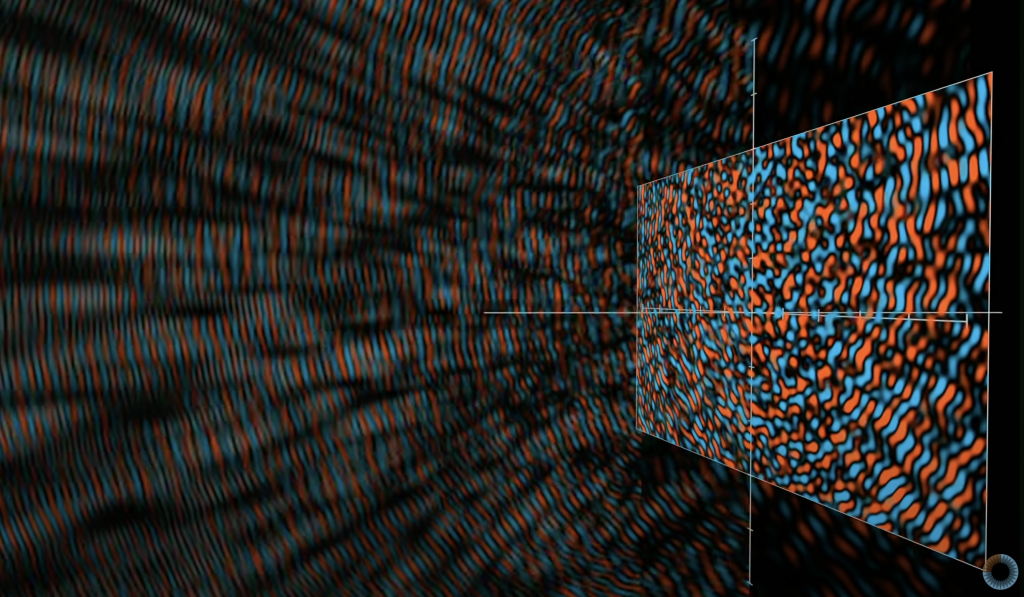
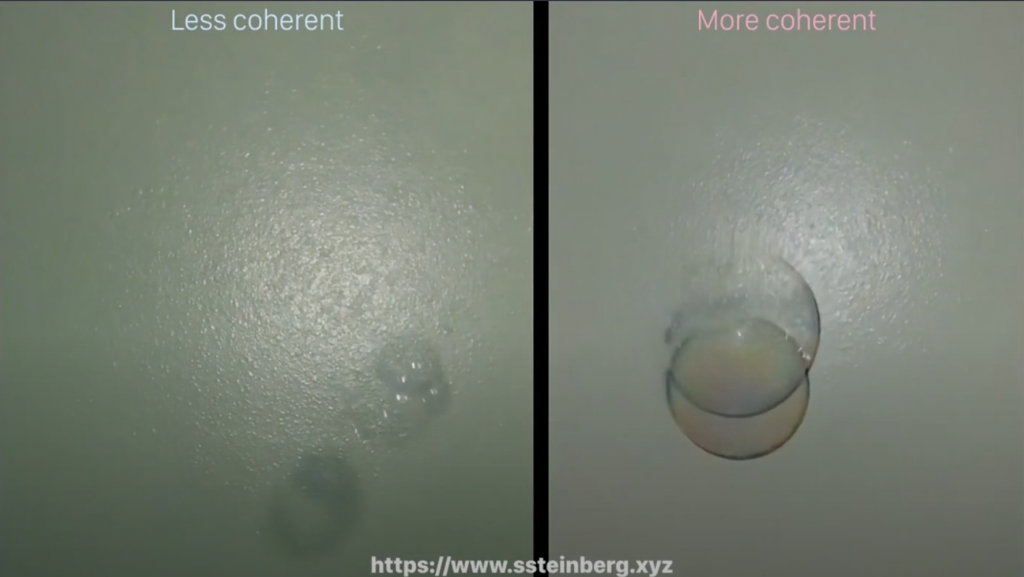
    Computer graphics based on wave optics is undoubtedly a huge challenge for graphics researchers. It not only requires computational processing of electromagnetic waves, but also involves some theories of quantum mechanics. It is not easy to bridge the gap between physics and graphics. In graphics based on wave optics, the propagation of light in a medium is no longer just a straight line, but will exhibit various characteristics such as spin, deflection and diffraction due to different wavelengths. From the optical rotation caused by soap bubbles, polarizers, oil film gloss or sugar media to how radio radiation propagates between urban buildings, all are inseparable from the theory of wave optics.

    There are also many experts on Zhihu who have shared very detailed basic teaching on wave optics rendering theory.

    However, the reading threshold is high and it is too far from practical application. Wave optics rendering involves too much mathematical and physical knowledge, and even if you read the paper of Professor Yan and his doctoral students line by line, it is difficult to make any progress.

    The holy grail of graphics is ray tracing, and global wave optics rendering is the holy grail of graphics holy grails.

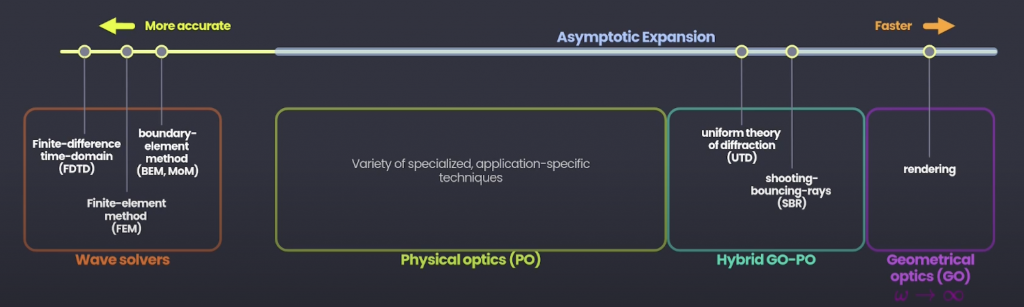
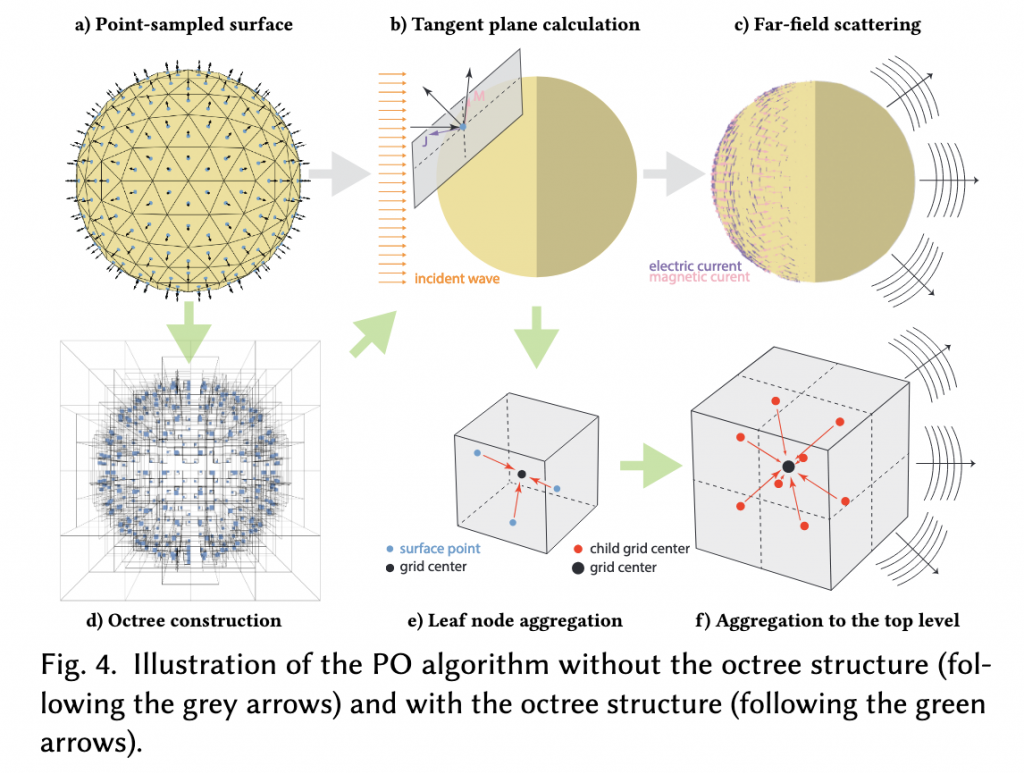
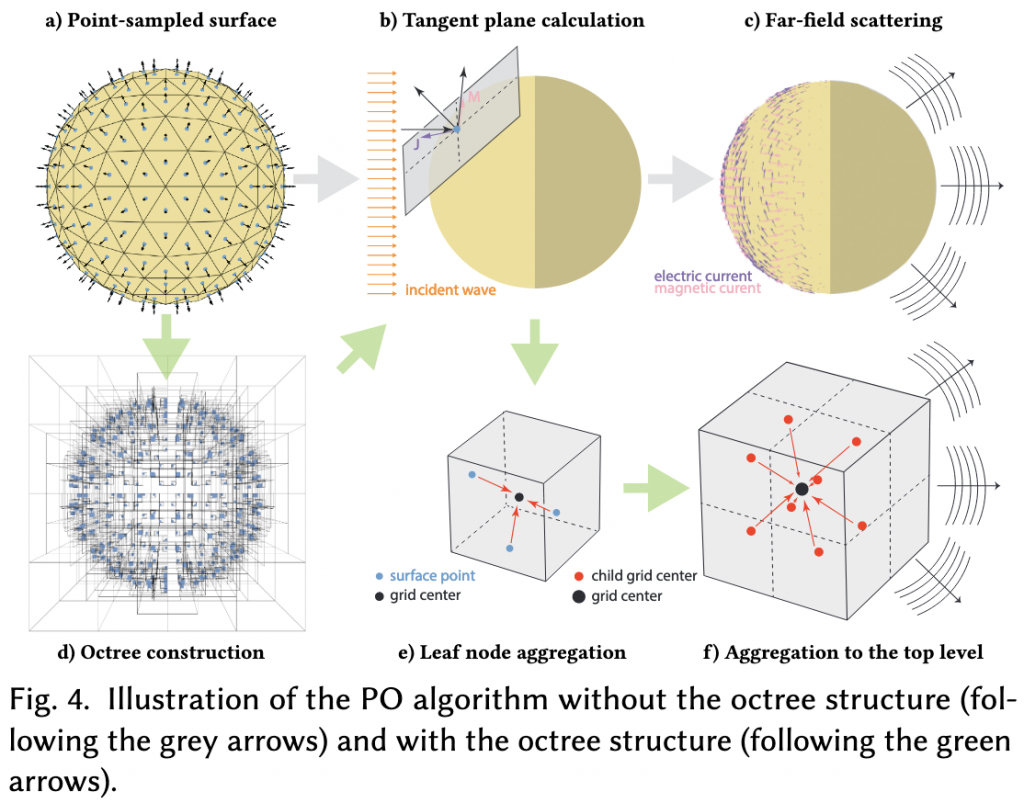
    At Sig21, Shlomi proposed combining path tracing with physical optics to achieve a realistic simulation of electromagnetic radiation propagation. There are many methods for calculating electromagnetic wave transmission, from high-precision but computationally intensive wave solvers to fast but inaccurate geometric optics methods. The following figure shows the current calculation methods for electromagnetic wave transmission. The left one is the most accurate, and the right one is the fastest.

    Wave Solvers focus on finding exact solutions to Maxwell's equations, but are not practical for large scenes, which are usually done with FDTD, BEM or FEM.

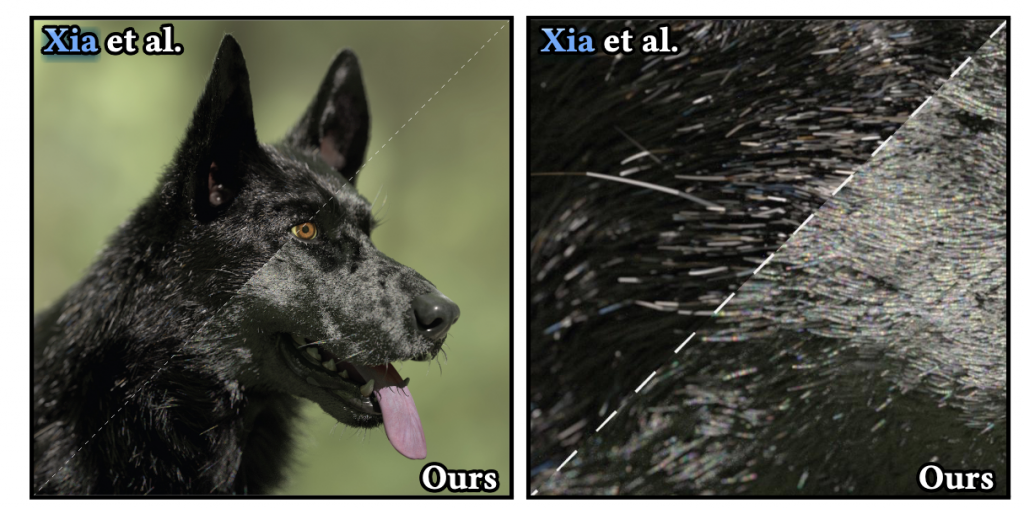
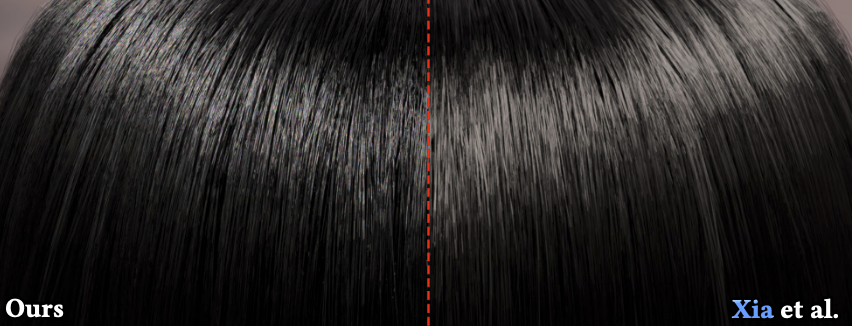
    PO is based on high-frequency approximation of electromagnetic wave calculations, but it is barely sufficient for the frequency of visible light. PS: [Xia 2023]'s black dog hair belongs to the Physical Optics method. The full-wave reference in this article should still belong to the Wave Solvers method, but it uses some ideas of PO (equivalent current, etc.) on the basis of BEM.

    In addition to PO, there is another method between Wave Solvers and Geometrical Optics, called Hybrid GO-PO. I personally think it should be called a hybrid method of geometric optics and physical optics. The Uniform Theory of Diffraction (UTD) incorporates the diffraction effect into geometric optics to calculate the transmission of electromagnetic waves under high-frequency conditions. In my opinion, UTD compensates for the deficiencies of the boundary conditions of geometric optical rays by calculating the diffraction coefficient, which means that the rays of geometric optics can also turn. This operation is very practical in the field of radar detection antenna design. In addition to UTD, Hybrid GO-PO also involves a technology called Shooting and Bouncing Rays (SBR). This technology simulates multiple reflections of rays on the surface of an object, which is also based on geometric optics.

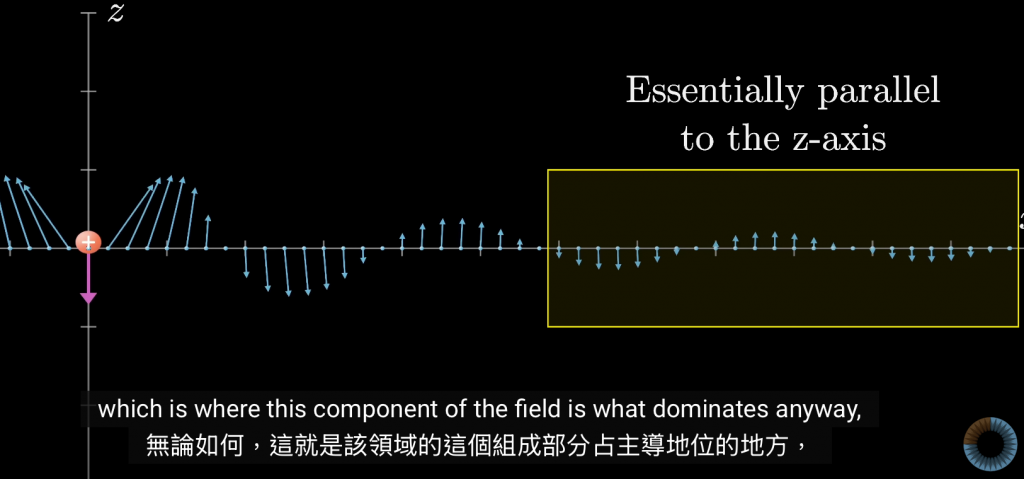
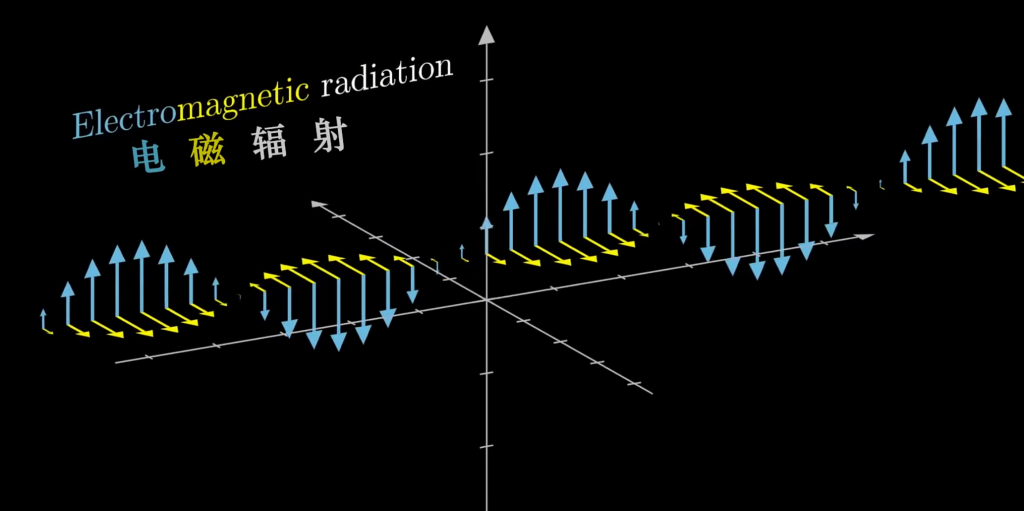
    I personally think that understanding light as a plane sine wave is somewhat limited. For example, the 3b1b optics series video considers the electric field of light as a plane sine wave.

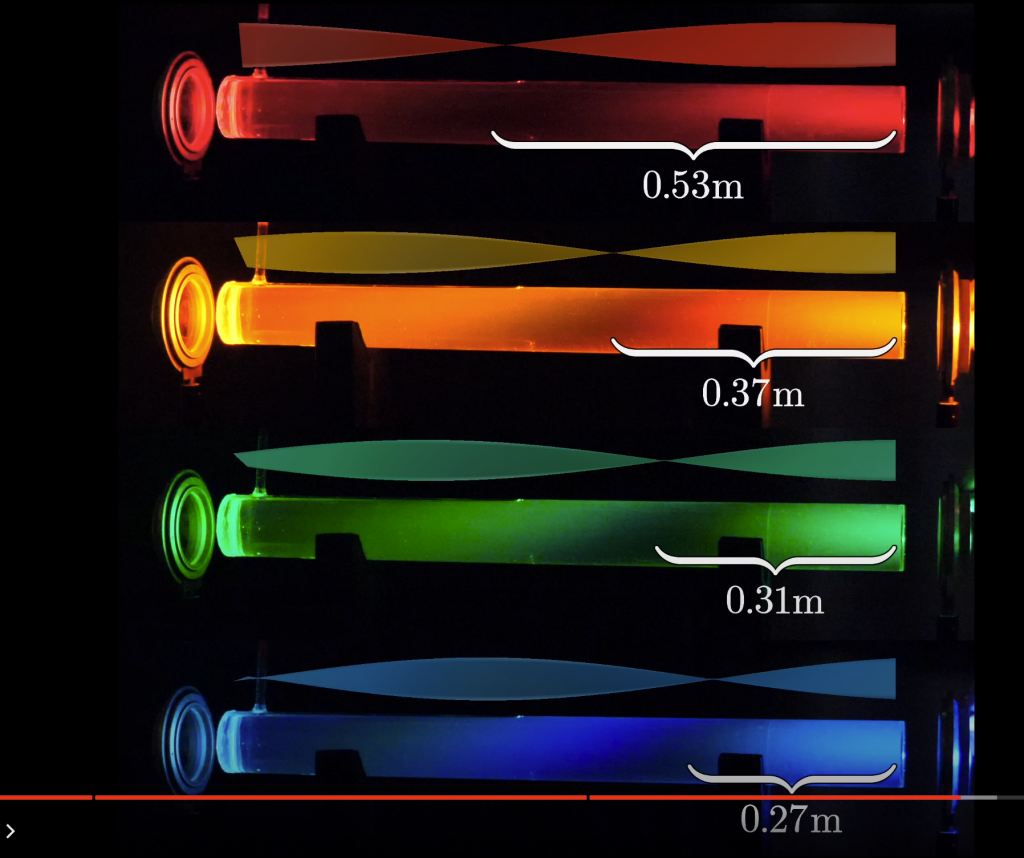
    Although it can explain most phenomena and is very suitable for introductory learning, for the study of wave optics rendering, simply describing the electric field of light as a plane sine wave cannot further explain, for example, the Gaussian beam mentioned in this paper.

    But I still strongly recommend readers who are not familiar with wave optics to watch this series of videos first.

    The video shows the special wave optical phenomenon that light "rotates" when passing through a right-handed chiral medium, and popularizes a series of interesting phenomena in wave optics and the principles behind them.

    Very thought-provoking.

    Finally, it even talks about how to use matter waves to construct holographic images.

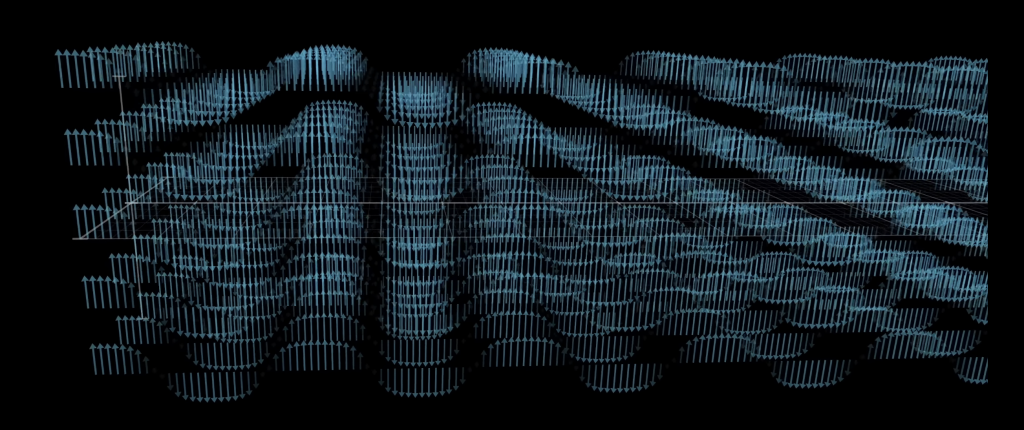
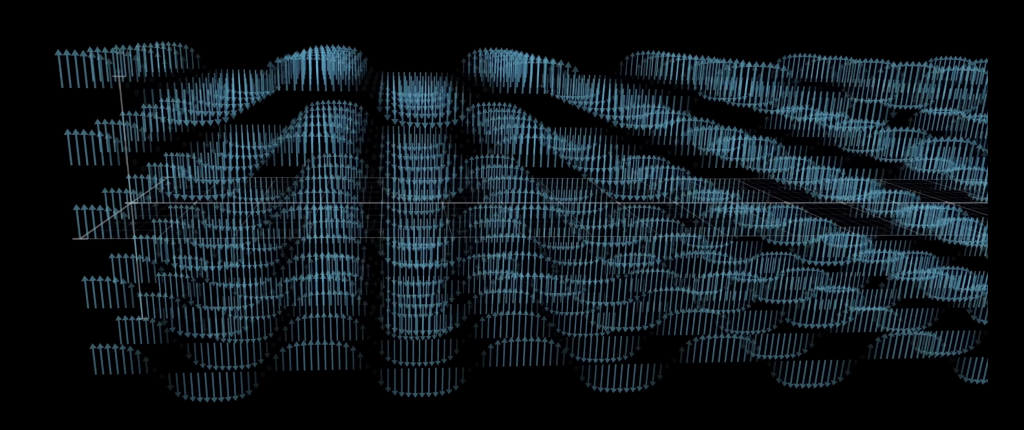
    In classical electromagnetic field theory, we usually usePlane WaveExpand the electromagnetic field, and the photons of each mode are spatiallyNonlocalWith infinite spatial extension,A photon is in a mode with a well-defined frequency and wave vector., so it "fills" the entire area of the plane wave in space. This is very common for electromagnetic field patterns in free space, but this plane wave is not suitable for describing localization.

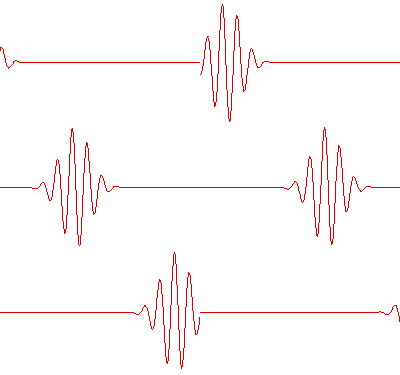
    Another way to expand isLocal wave packetThis way of understanding allows us to arrange the electromagnetic field in space, that is, to form a series of wave packets with a certain width.

    img

    Simply understanding light as a sine wave actually violates the uncertainty principle. If light is regarded as a sine wave, it means that the light is completely monochromatic, but monochromatic light is impossible in reality. The effect of optical signals is basically in the frequency domain, and Fourier transform is required to convert the spatial domain to the frequency domain. The bandwidth-time uncertainty principle states that the narrower the bandwidth, the longer the signal will be in time. Conversely, the wider the bandwidth, the shorter the time length of the signal.

    In classical electromagnetic theory, a wave packet can correspond to a region where energy is concentrated.

    But please note that photons cannot be simply understood as a wave packet, but as a probability wave.Probability wave functionDescribes the probability of a photon's existence. The more concentrated the wave packet, the more obvious the particle nature. This is the wave-particle duality explained by quantum electrodynamics. A photon is not necessarily in only one wave packet, it can also be described as a superposition of multiple wave packets. Because the photon state is essentially the excitation of the quantum field,Allows superposition of wave packets at different locations.

    That is to say,A photon can "span" multiple wave packets, that is, its wave function can exist in the form of multiple wave packets in space, rather than being confined to a specific location. When a wave packet mode has a photon, this wave packet can be regarded asLowest excited state; If there are multiple photons on the wave packet (higher-order excited states), higher energy will be reflected.

    An electromagnetic beam mentioned in this articleGaussian beamIt is a specific electromagnetic wave solution and can be regarded as a wave packet.Gaussian beamIt is a structure with stable amplitude and phase.Single wave packet, which shows a Gaussian distribution on the cross section. This is different from the plane wave solution we usually use in classical electromagnetic theory, because the wavefront of the Gaussian beam has a changing curvature and is not an infinitely extended plane.

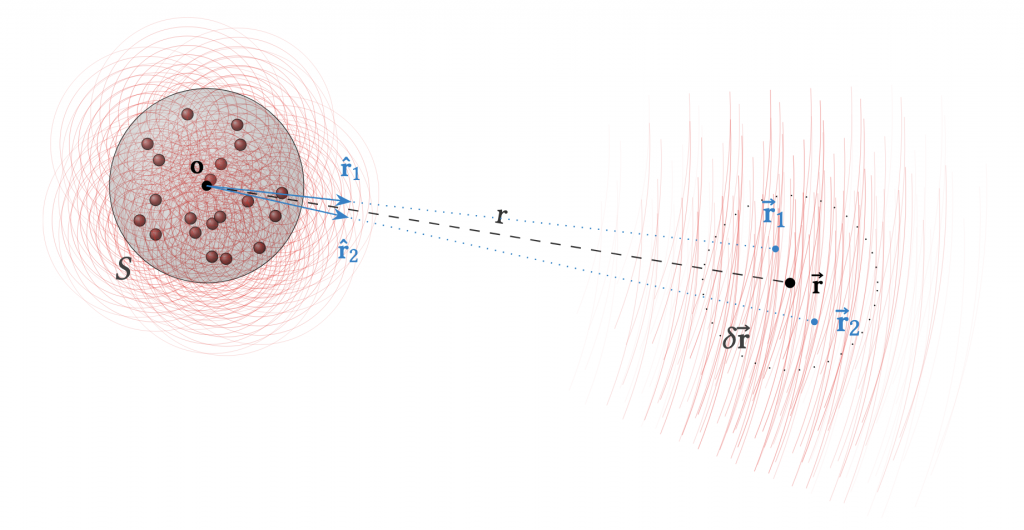
    Ensemble of wavesRefers to a collection of multiple waves that may have different frequencies, phases, or propagation directions. If we consider a system in which multiple independent wave packets (such as multiple pulsed laser beams) are superimposed on each other, these wave packets can be understood as aEnsemble of wavesIn other words, if multiple uncorrelated wave packets, especially those with random phases, are superimposed on each other, they can statistically constitute a wave ensemble.

    When we expand the electromagnetic field into a series of wave packets, we can regard each wave packet as a random event, and their arrival time and phase are random variables. For a collection of multiple wave packets, we can observe the characteristics of these wave packets at different times and locations. In a statistical sense, usingEnsemble meanTo analyze the energy distribution and wave behavior of light.


    $$
    \langle U(\vec{r}, t) \rangle = \lim_{T \to \infty} \frac{1}{2T} \int_{-T}^{T} U(\vec{r}, t) \, dt
    $$

    Since I am not a physicist, I do not approve of writing the differential before the integral formula (

    As mentioned above, light can be viewed as a collection of multiple wave packets. There may be phase and time differences between different wave packets, so it is necessary to introduceCross-correlation functionandInterference Functionto describe the coherence and relative phase between wave packets at two different locations, providing aSimilarity in time and spaceIf we sayEnsemble meanUsed to describe the average behavior of a signal in a statistical sense, thenCross-correlation functionIt describes the time averageThe correlation between different locations and different timesandVolatility Correlation.

    Specifically, the cross-correlation function describes the coherence of the waves at positions $\vec{r}_1$ and $\vec{r}_2$. If the two waves are coherent, then the Gamma value will be large:


    $$
    \Gamma(\vec{r}_1, \vec{r}_2, \tau) = \langle U(\vec{r}_1, t) U^*(\vec{r}_2, t + \tau) \rangle
    $$


    The cross spectral density (CSD) matrix $W(\vec{r}_1, \vec{r}_2, \omega)$ is the cross-correlation functionFourier Transform, expressed in the frequency domainThe correlation between two positions.

    Remember the autocorrelation function we discussed in Xia2023's article Black Dog Hair? The cross-correlation function requires two signals to describe, while the autocorrelation function only has one signal. From another perspective, the autocorrelation function (ACF) is a special case of the cross-correlation function. The autocorrelation function describesThe correlation between the signal and itself at different times or locations, and the cross-correlation function isCorrelation between two different signals or the same signal at different locationsThe cross-correlation function and the cross-spectral density are a pair of Fourier transform pairs, and the autocorrelation function and the power spectral density are a pair of Fourier transform pairs.

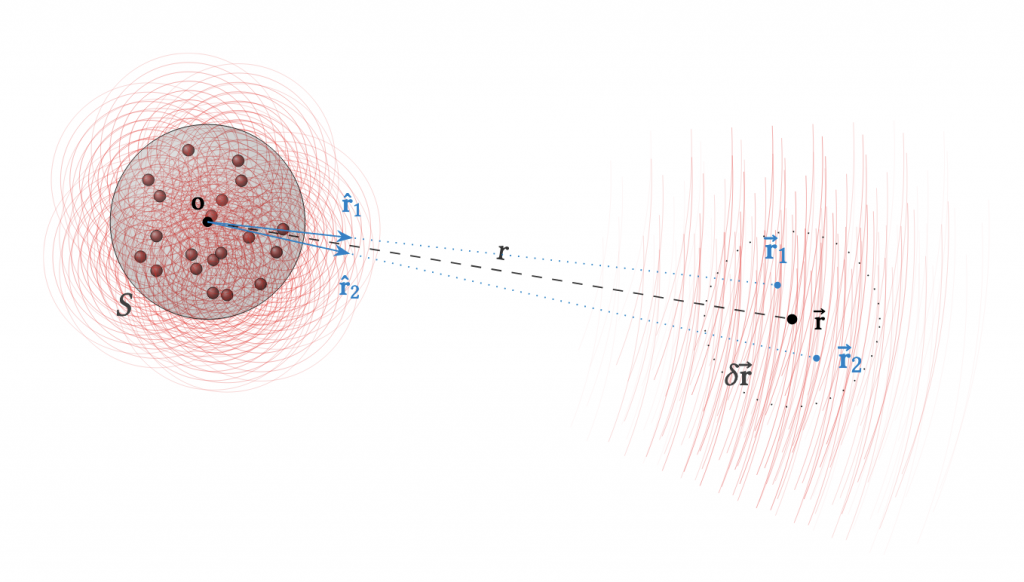
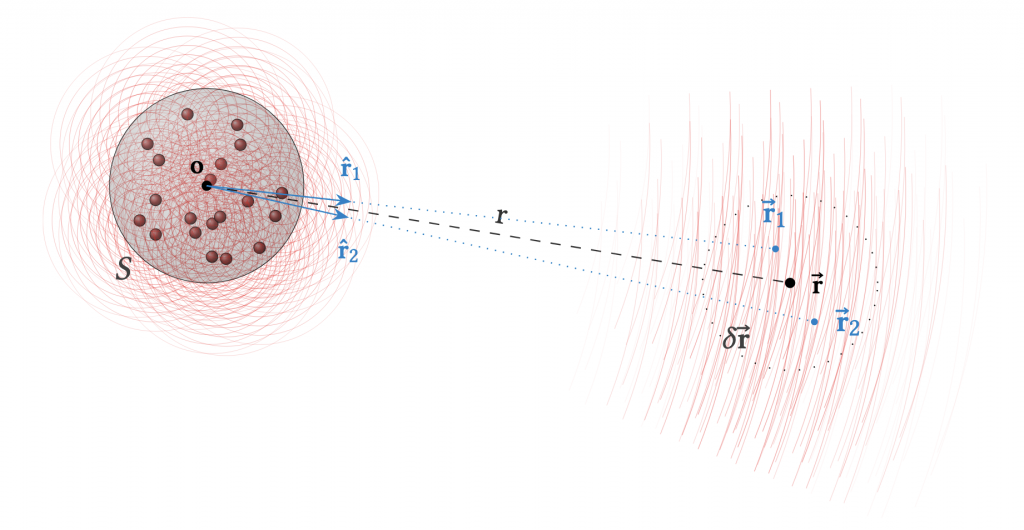
    The cross spectral density (CSD) and the mutual coherence function describe the coherence of the fluctuations between different locations.Radiance Cross-Spectral Density (RCSD)It is a generalization of CSD, describing the correlation between light radiation (i.e., energy density) at different positions and directions. It can be understood that RCSD provides a coherence description similar to CSD based on radiation measurement. In the formula, $L(\vec{r}_1, \vec{r}_2, \omega)$ represents the radiation intensity coherence between positions $\vec{r}_1$ and $\vec{r}_2$ at frequency $\omega$.

    Radiative cross-spectral density transfer equation (SDTE)With classicLight Transport Equation (LTE)Similar, but more suitable for wave optics. LTE describes the transmission of optical radiance from point to point, while SDTE uses the RCSD function to describe the propagation of optical radiation, which is equivalent to treating the transmission as coherent transmission between regions.

    The RCSD in SDTE expresses the propagation of radiation in the form of an integral between regions, which can be understood as replacing the traditional reflection and scattering with the RCSD matrix and diffraction operator. And note that SDTE is based onRCSD function, rather than the specific light intensity value, which is quite different from LTE.

    In further discussion of the useBoundary Element Method (BEM)andAdaptive Integral Method (AIM)Before we discuss the accelerated full-wave reference simulator, let's first briefly review the previous article. The previous article introduced the PO method and SDTE/RCSD theory. These methods are used for different scattering calculation needs, but their basic theories and scope of application are different. This article will discuss a method that provides high-precision surface scattering simulation by combining BEM and AIM.

    To sum up in the original author's words, Wave optics is a very new branch in physically based rendering. Although wave optics phenomena can be seen everywhere in life, their impact on the picture is not very big. There is actually a lot of room for improvement in this direction.

    Other related references:


    A Full-Wave Reference Simulator for Computing Surface Reflectance

    Paper Homepage:

    https://blaire9989.github.io/assets/1_BEMsim3D/project.html

    ACM Home Page:

    https://dl.acm.org/doi/10.1145/3592414

    ACM Citations:

    Yunchen Yu, Mengqi Xia, Bruce Walter, Eric Michielssen, and Steve Marschner. 2023. A Full-Wave Reference Simulator for Computing Surface Reflectance. ACM Trans. Graph. 42, 4, Article 109 (August 2023), 17 pages. https: //doi.org/10.1145/3592414

    Speech Report

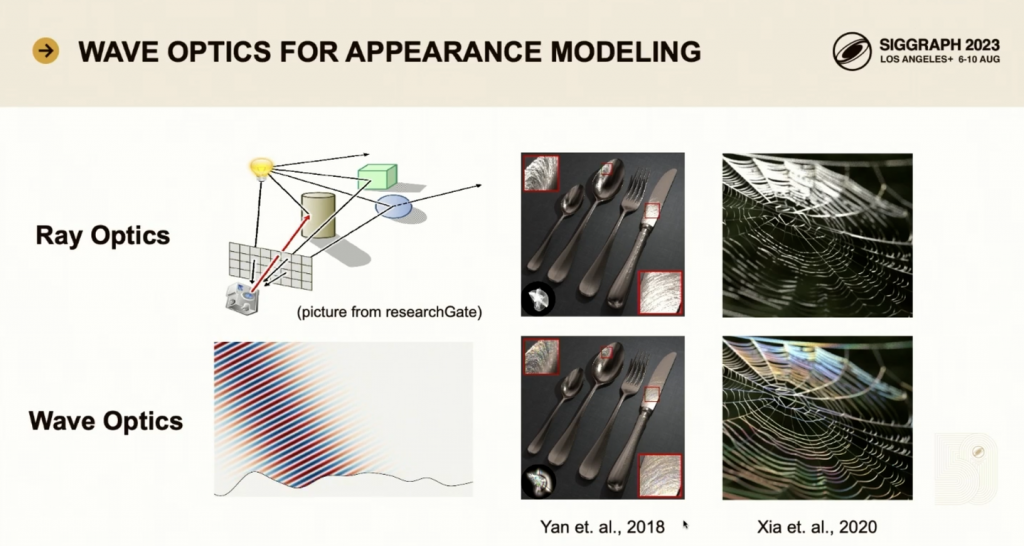
    Compared to the more commonly used ray tracing techniques, wavelight simulations are more time-consuming but also more accurate.

    For example, the microscopic scratches on the metal surface and the hair fiber structure cannot be rendered by traditional optical models, and the colorful color effects we observe in real life cannot be rendered.

    Wave optics-based rendering is a difficult problem because solving Maxwell's equations requires a lot of complex calculations. Existing wave-based appearance models usually adopt some approximation methods.

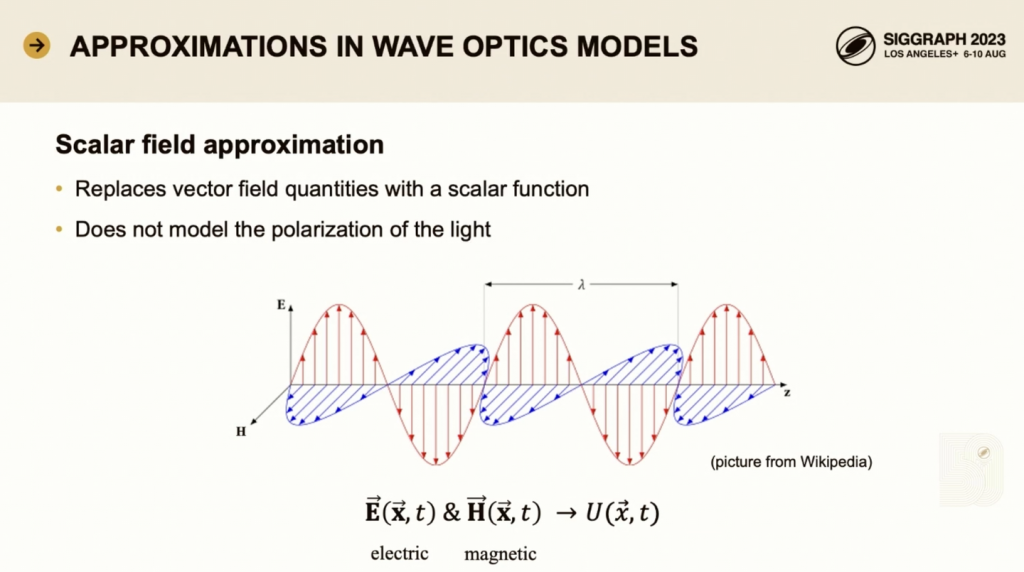
    One approximation is the scalar field approximation.

    In the wave scattering problem, the electric field and the magnetic field are different vector field quantities, and light with different polarizations consists of field quantities pointing in different directions.

    Some approximate models replace these two vector field quantities with a single scalar function, thus being able to calculate the intensity of the light energy but giving up modeling polarization.

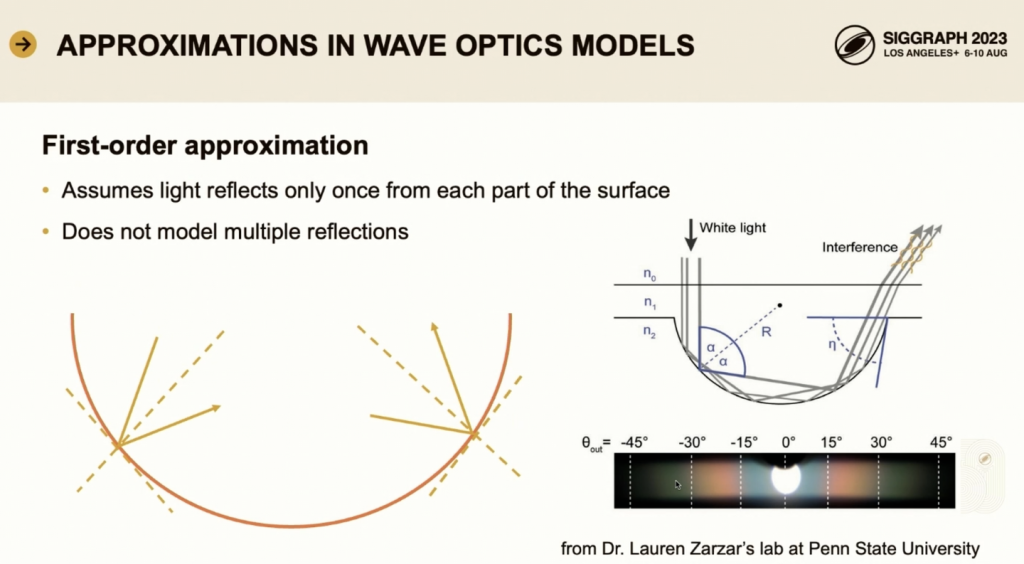
    Another approximation is the first-order approximation. This assumes that the light reflects only once from each part of the model structure, ignoring multiple reflections. However, there are many cases where these approximations are not valid.

    For example, Yu et al., in collaboration with Dr. Lawrence’s group at Penn State University, created surfaces with cylindrical cross-sections that cause multiple light reflections and produce structural colors, phenomena that cannot be well understood or predicted using approximate models.

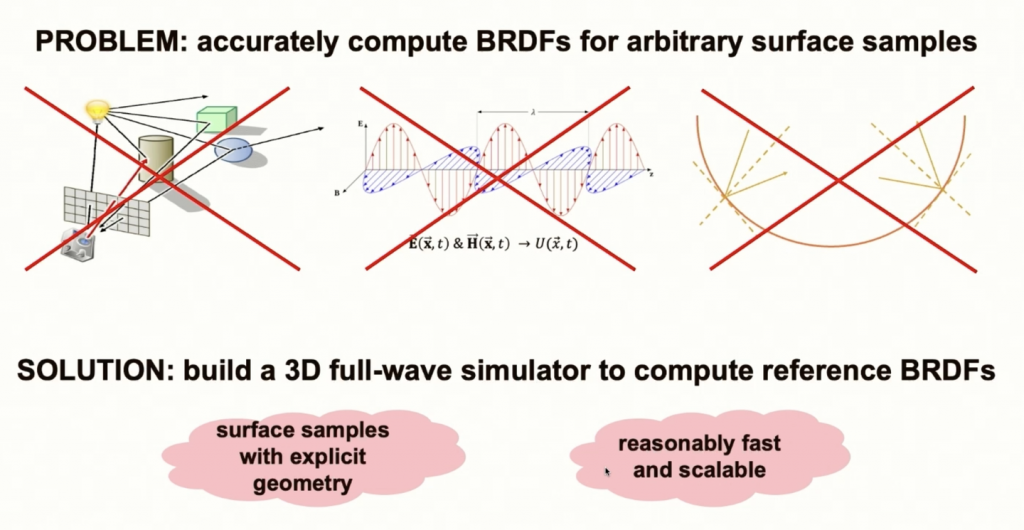
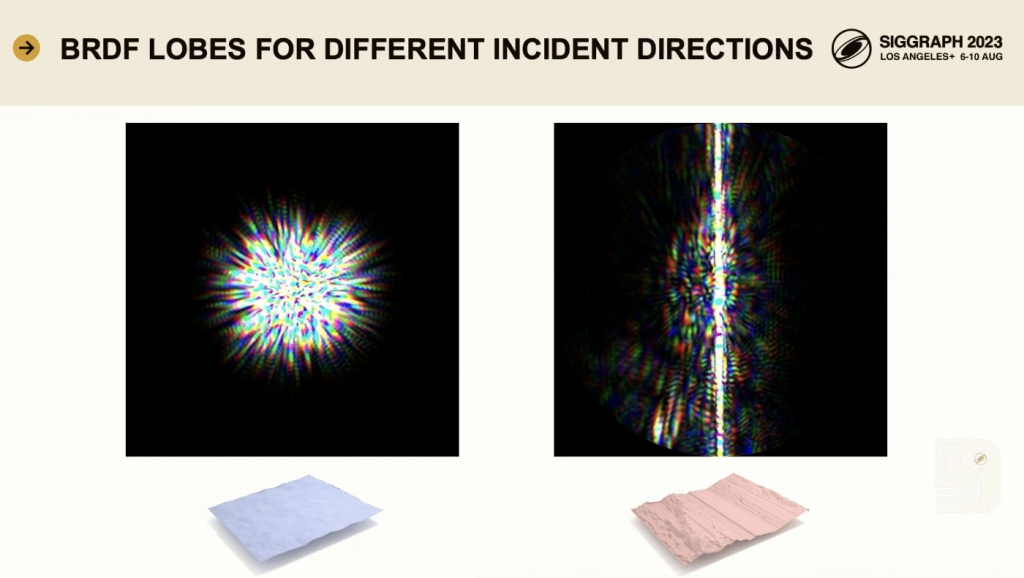
    The authors wanted to characterize surface scattering as accurately as possible by calculating the bidirectional reflectance distribution function (BRDF).

    Existing models all use various approximations, such as ray-based, scalar, or first-order approximation models. Without a reference quality BRDF, it is difficult to see what each reflection model is missing or what scenarios it is suitable for.

    The authors' solution is to build a 3D 4-way simulation to compute the BRDF of surfaces with well-defined microgeometry.

    Claims to compute a reference-quality BRDF for surface samples without using any approximations.

    In terms of speed, dddd.

    The authors next describe how their simulation works and how it relates to the BRDF.

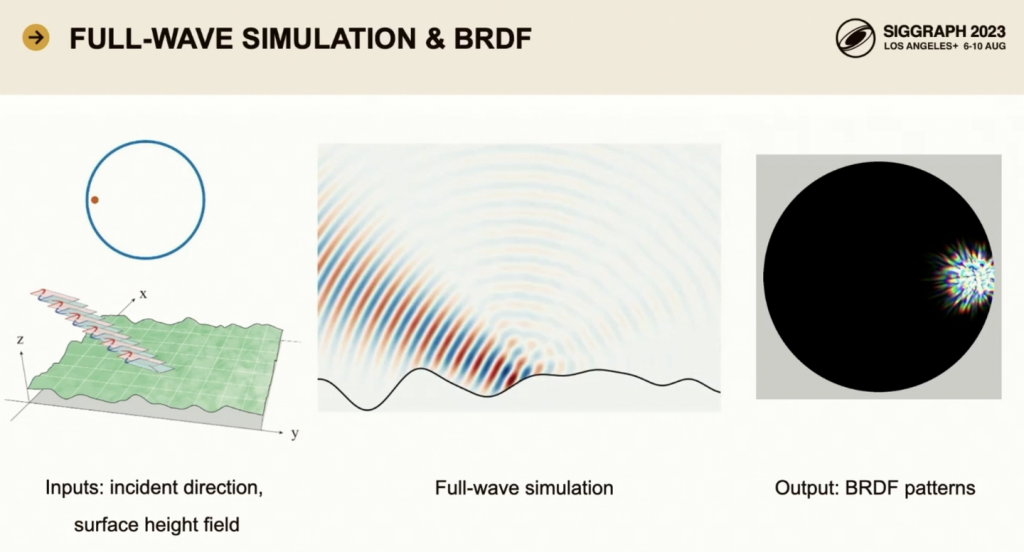
    First, in the left picture, we input a surface sample (defined as a height field) and an incident direction (expressed on the projected hemisphere). We define an incident field propagating toward the surface and calculate a scattered field from the surface.

    In the middle picture, the beam is the incident field, and the scattered field in the background is also shown in this picture.

    The output is the BRDF model for a given incident direction. Each point in the hemisphere represents an outgoing direction, and the color represents the color of the reflected light in that direction. The BRDF is expressed in RGB colors, which are converted from spectral data.

    For many surfaces with low roughness, the reflection pattern is symmetric around the specular direction and changes as the incident light direction moves.

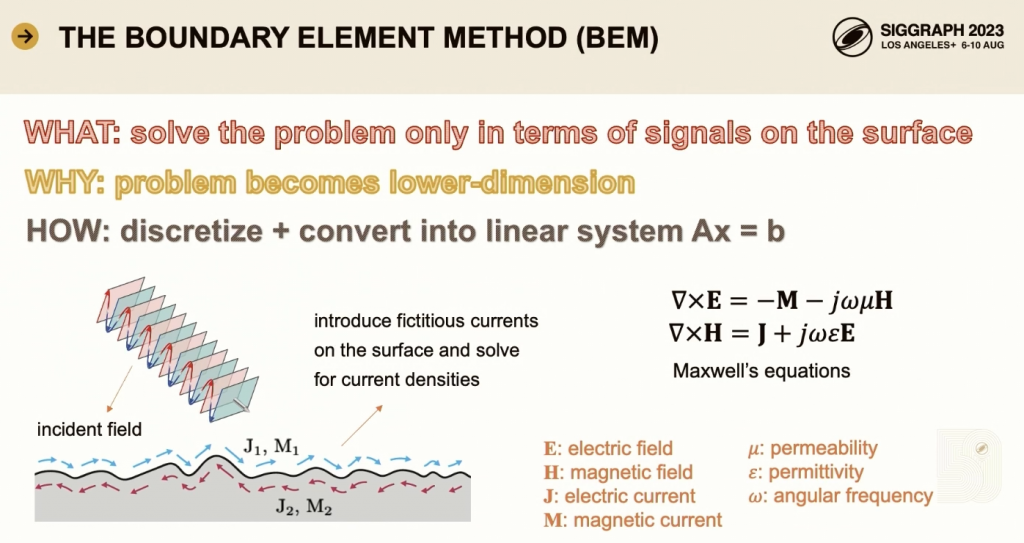
    The following is a discussion on how to use the boundary element method to solve the problem of signal scattering only on the surface, thereby reducing the dimensionality of the problem.

    The surface signal is the surface current solved from Maxwell's equations. After discretization, the problem is constructed as a linear system, and the surface current and scattered field are solved.

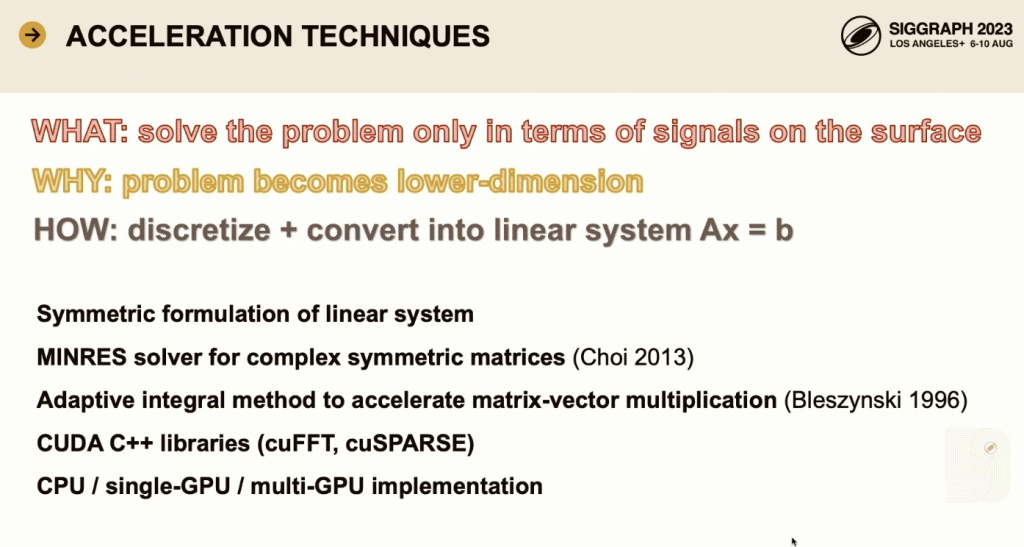
    To make the computation feasible, the authors symmetrize the linear system and use a minimum residual solver suitable for symmetric matrices.

    In addition, the matrix-vector multiplication is accelerated using the adaptive integration method, which is an acceleration method based on the fast Fourier transform and was originally used in radar calculations.

    Most of the code uses the Cuda C++ package for acceleration.

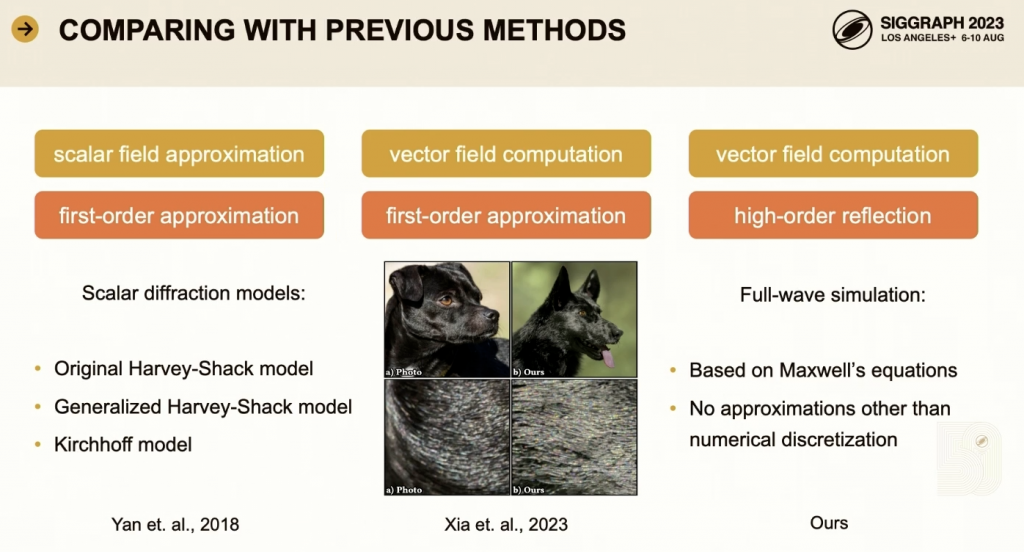
    Next, some results are shown, illustrating how the BRDF it computes compares to the BRDF derived from previous methods.

    [Yan 2018] use scalar field approximation BRDF models that only consider one refraction.

    [Xia 2023] This paper uses vector field quantities but only considers one refraction.

    The most accurate method is ours, which not only uses vector field quantities, but also takes into account reflections of all orders.

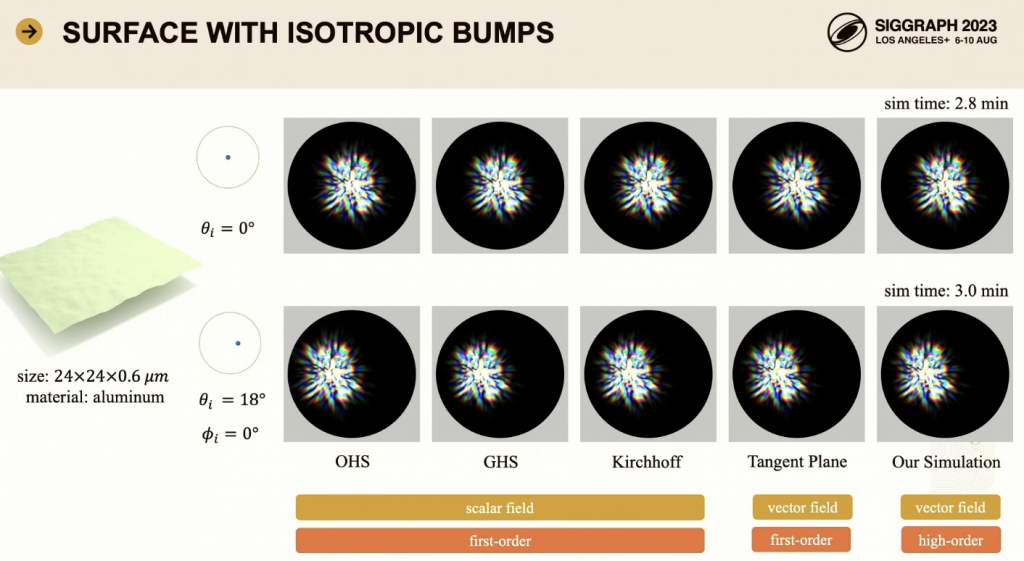
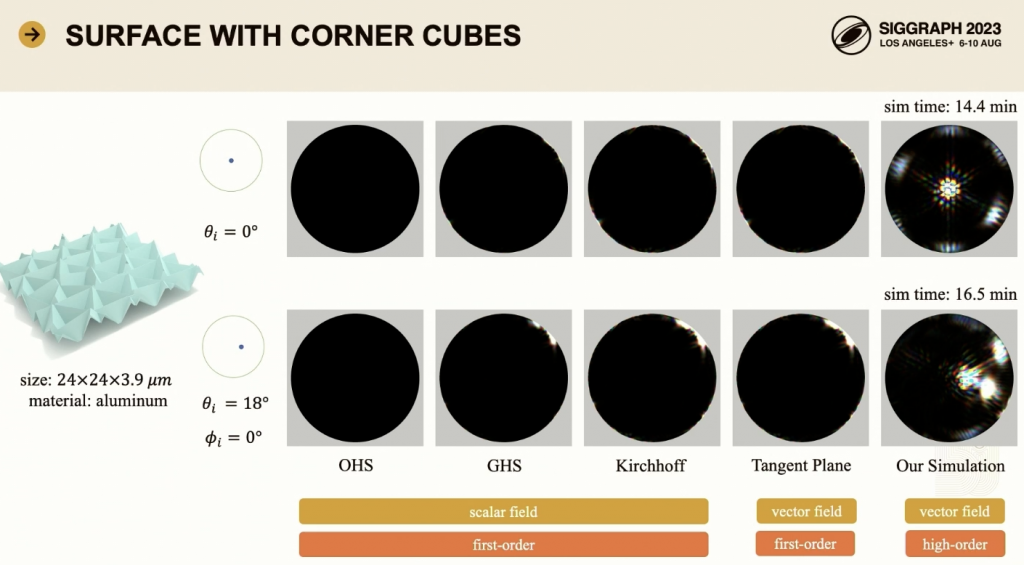
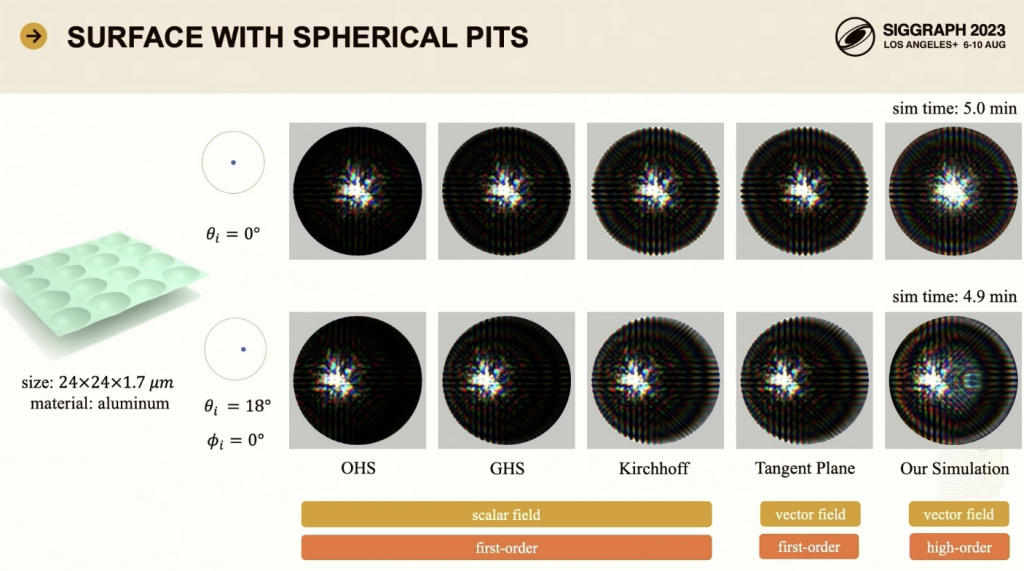
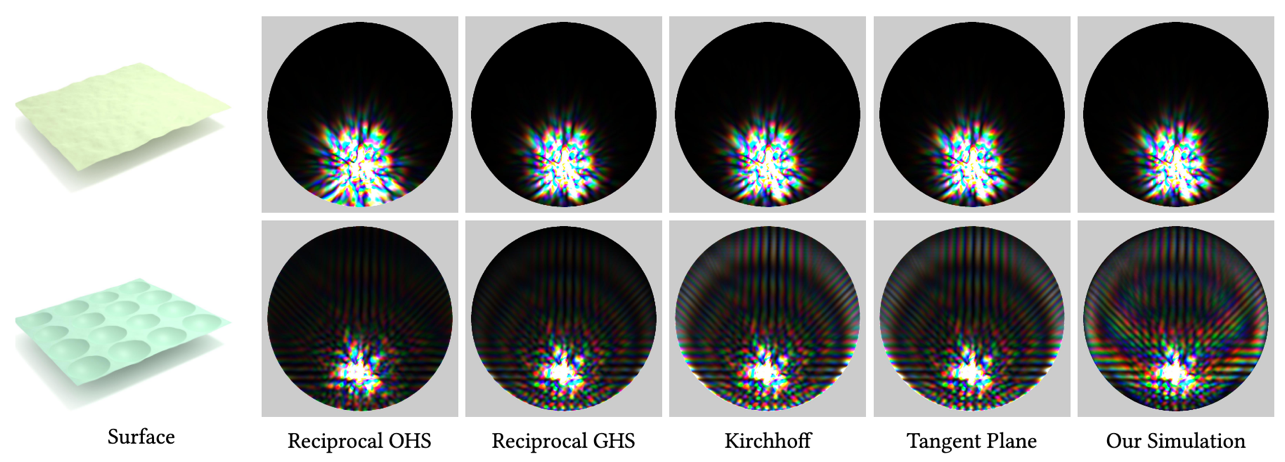
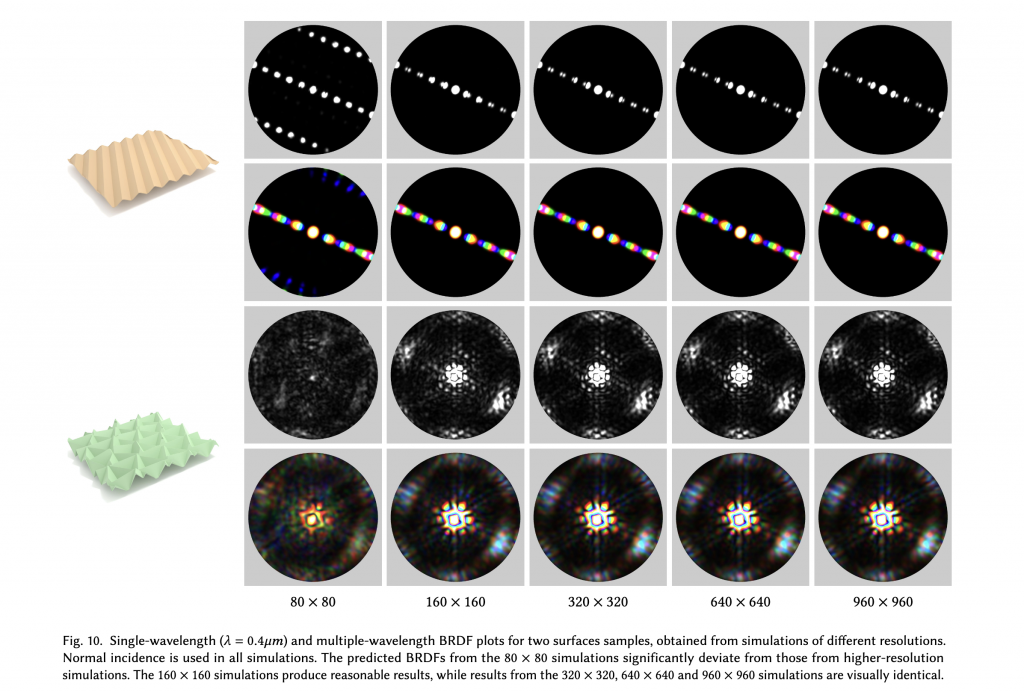
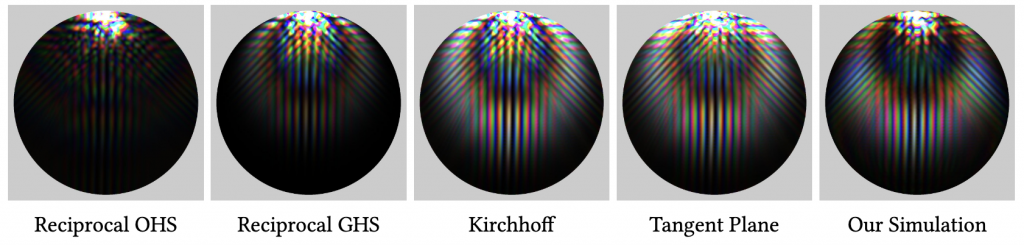
    In the above figure, each incident direction corresponds to five BRDFs, representing different calculation methods.

    A relatively smooth material covered with a bunch of isotropic bombs.

    The first row shows the normal instance, and the reflection pattern is pretty much centered.

    In the second row, the pattern shifts to the left because the incident light comes from a certain oblique direction.

    Since the surface is not too rough, the results of the five methods are very similar.

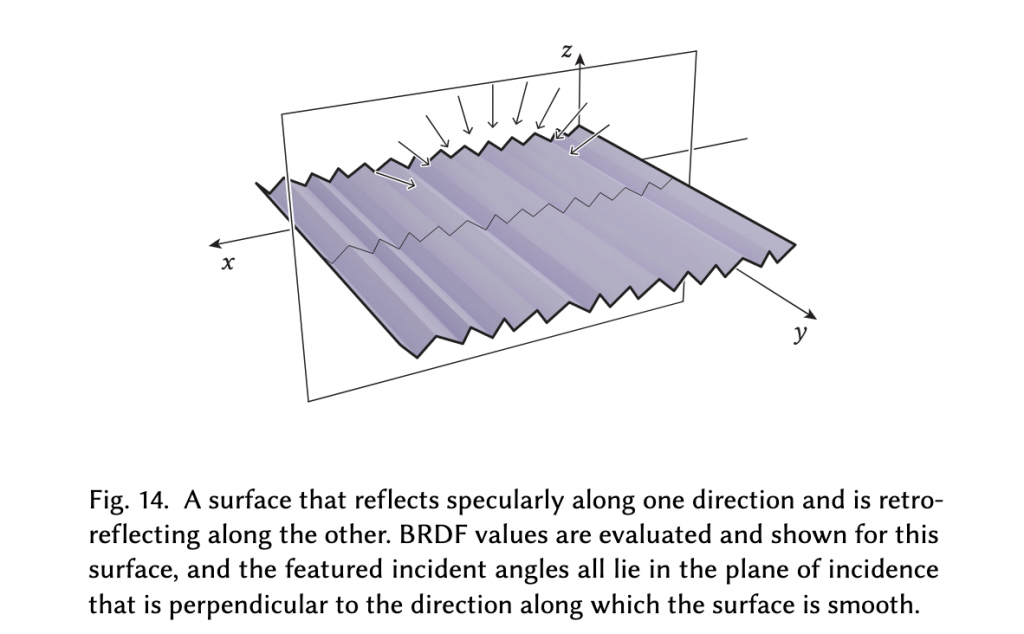
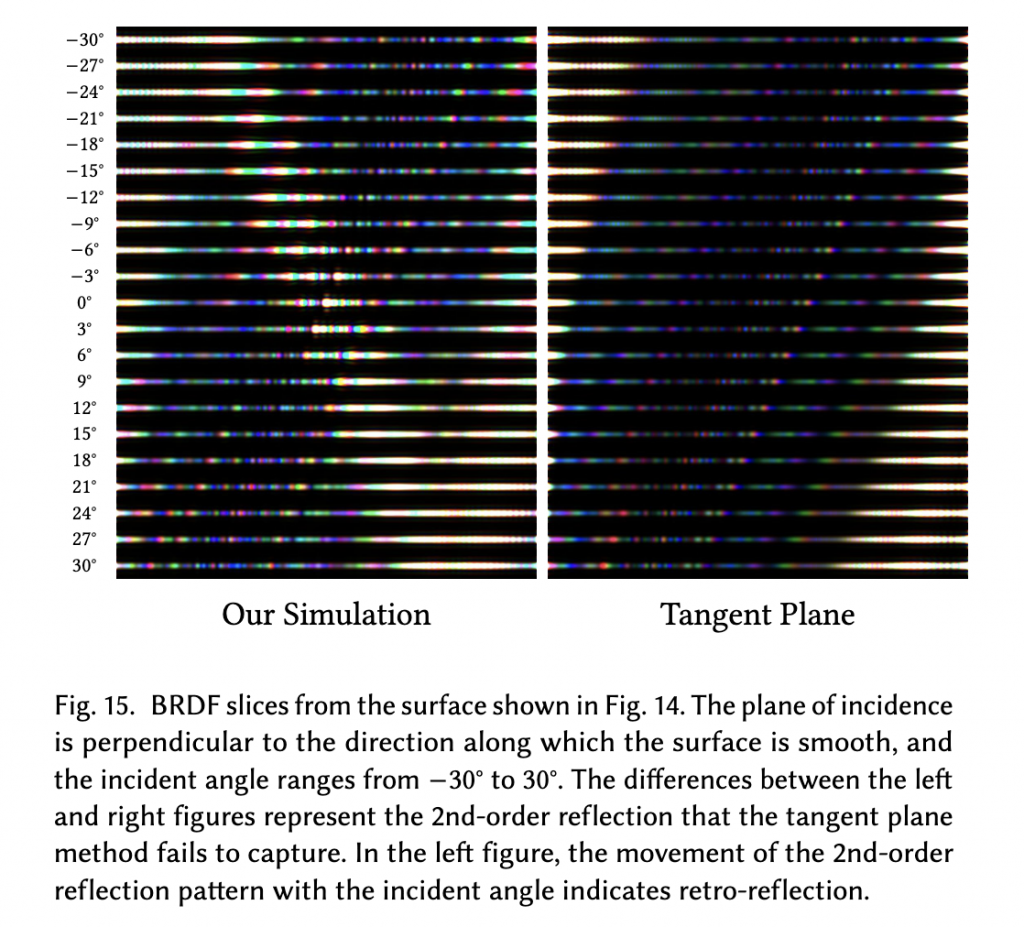
    Another material has some corners (corner cubes). The three faces of each corner cube will reflect the light multiple times, making the reflected light return in the direction of incidence. This is called retroreflection.

    Our simulator can also simulate this phenomenon. The four methods on the left all failed.

    The reason is that if only one reflection is considered, when the light hits one face of the corner cubes, it will be predicted to go down into the lower hemisphere.

    The final example is a surface covered with spherical pits.

    Multiple reflections occur due to the high slopes of the surface at the edges of the pits.

    Different methods show obvious differences.

    You can see the extra lobe predicting. (The part slightly to the right in the middle)

    In addition, it is brighter overall.

    These differences arise from interference between reflections of different orders.

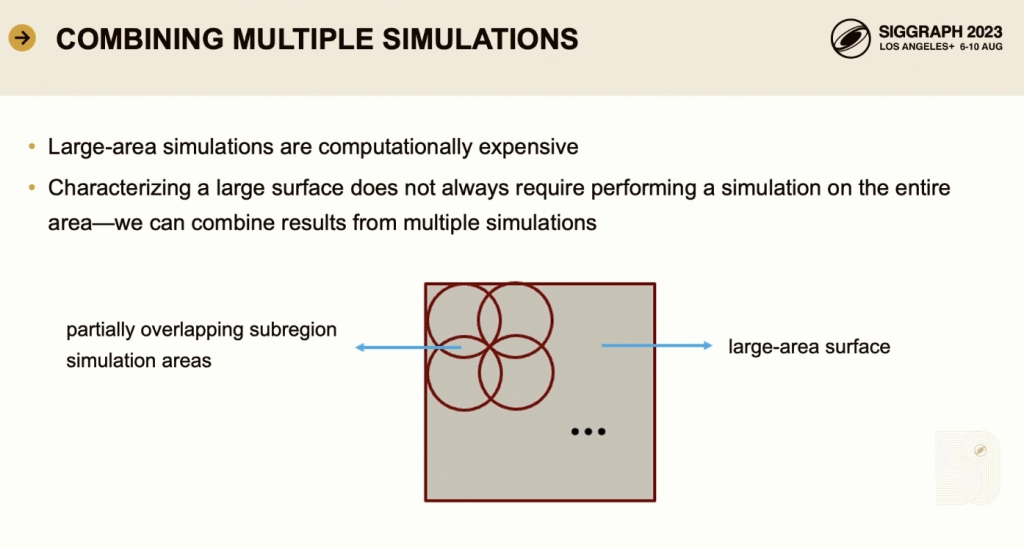
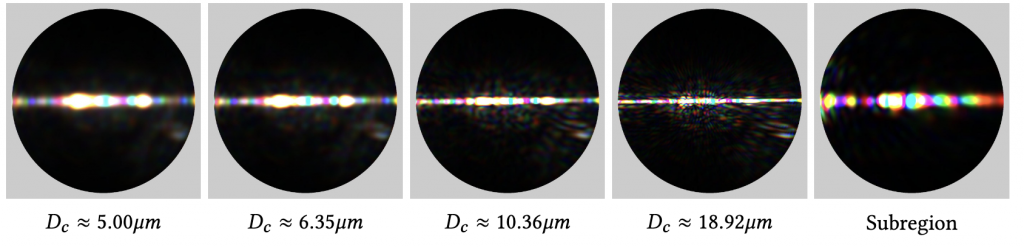
    Finally, a technique for efficiently computing the BRDF of a very large number of densely sampled directions is briefly introduced.

    If the surface to be simulated is large, this will be slow and require a lot of GPU memory.

    But the calculation is linear and can decompose a large surface into multiple smaller sub-areas.

    The incident field is projected onto each sub-area, the smaller sub-area simulation is performed first, and then the scattered fields are integrated to obtain the BRDF of the entire large-area surface.

    By applying different complex value scale factors to the scattered fields of different sub-areas, the BRDF of a large surface corresponding to different incident directions can be synthesized.

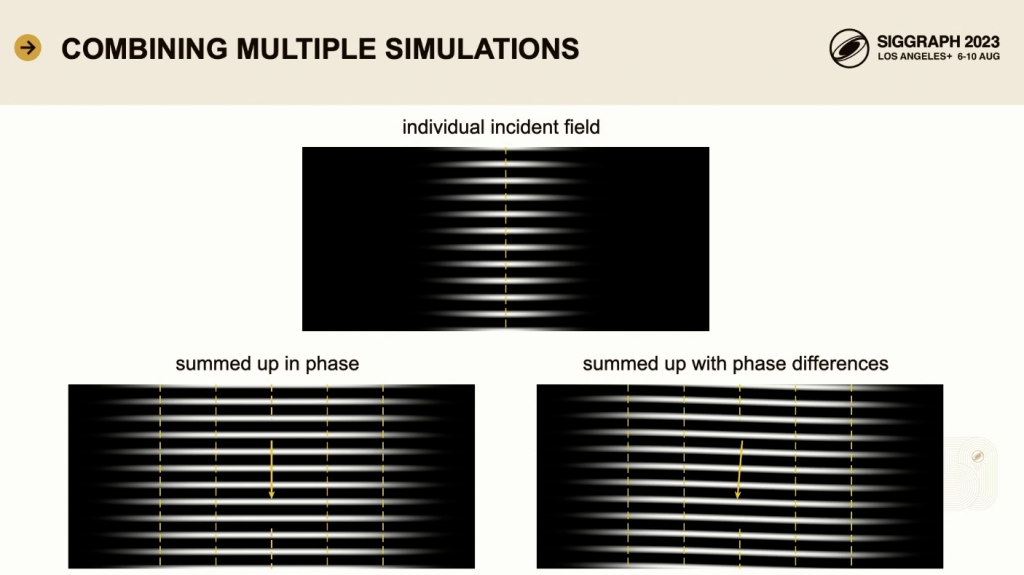
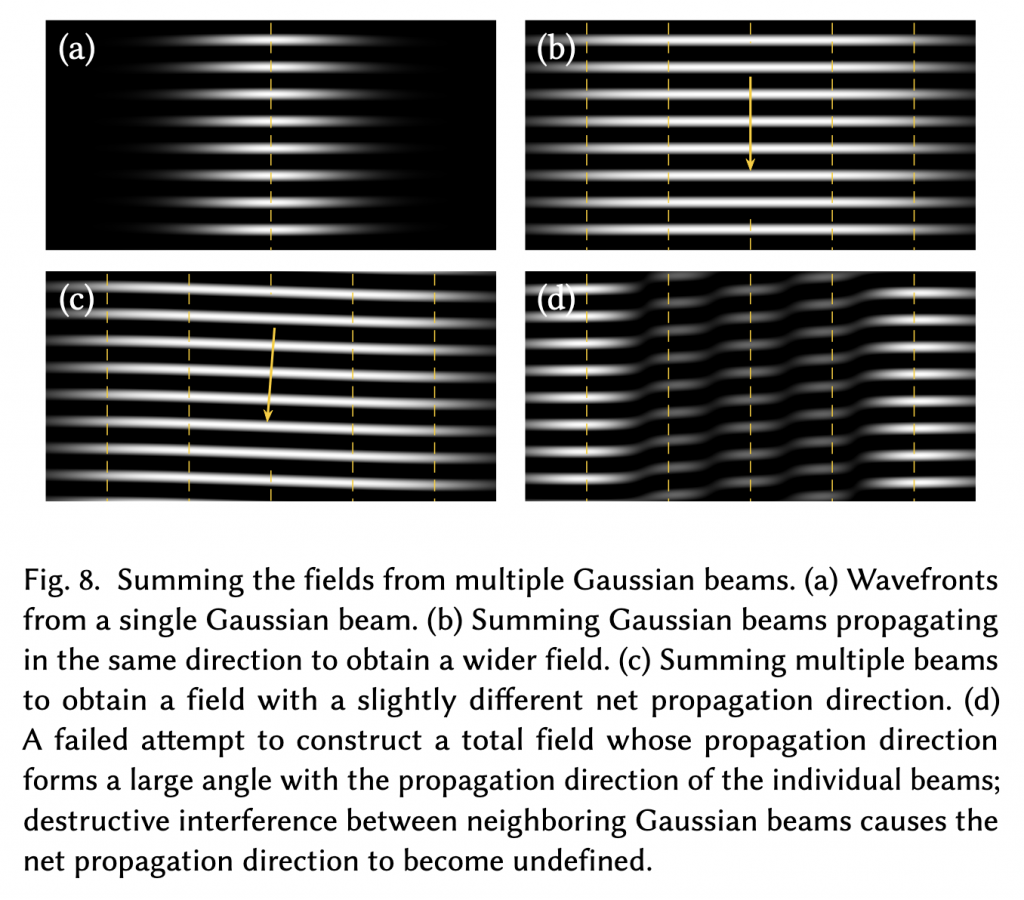
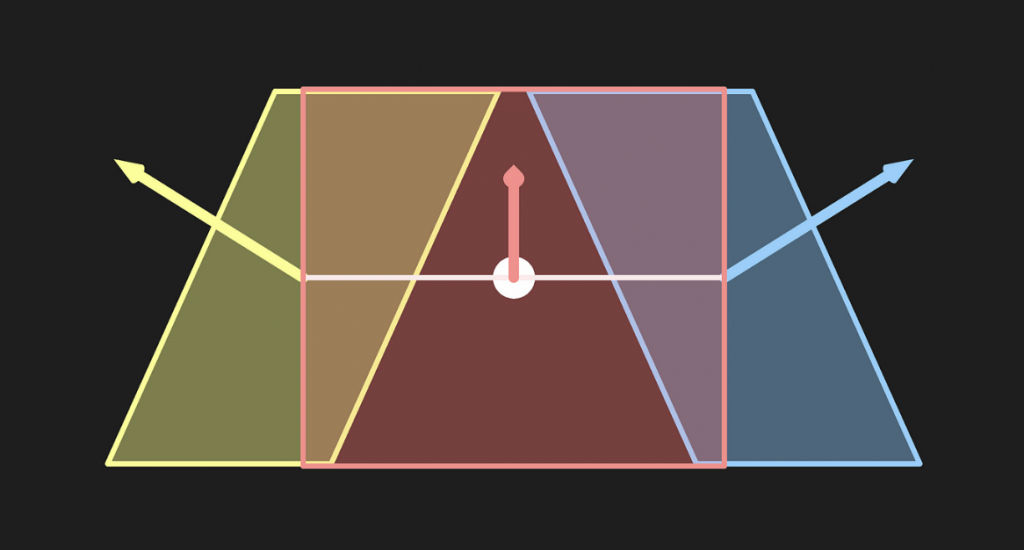
    This is because applying an appropriate phase shift to the local incident field in each sub-region produces a total incident field with a different net direction on the surface. In this figure, the incident field propagates vertically. If the same field with five foci at different spatial locations is superimposed, a spatially wider field is obtained, still propagating in the vertical direction. If these fields are linearly combined and an appropriate complex-valued scaling factor is applied to the field in each sub-region, the overall field can be made to propagate in a slightly tilted direction.

    Here we explain why different complex value scale factors can produce different incident directions.

    • This factor can adjust the amplitude and phase of the wave. For example, if two stones are thrown into the water at the same time, the waves on the water will be stronger. If one stone is thrown a little later, the ripples may cancel each other out (destructive interference). This factor controls the time of throwing the stones. By adjusting the phase to control the superposition of waves, the waves can be "guided" to propagate in different directions. Search for "Beamforming" in detail. It is widely used in radar, wireless communication, sonar and other fields.

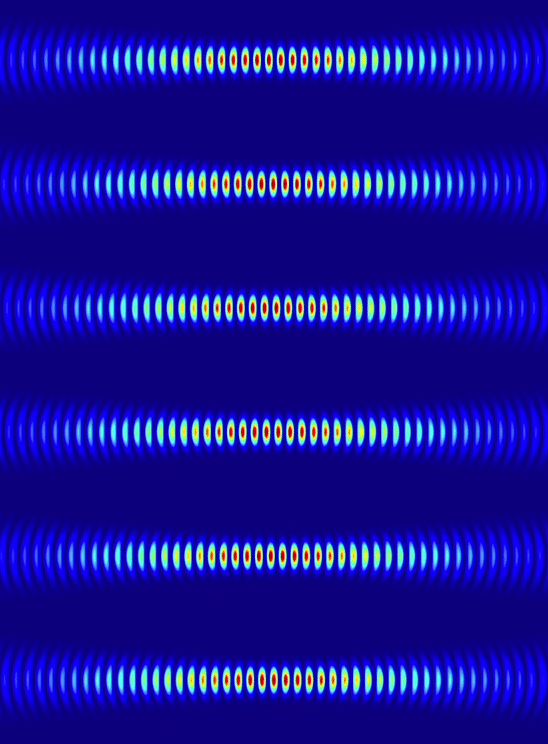
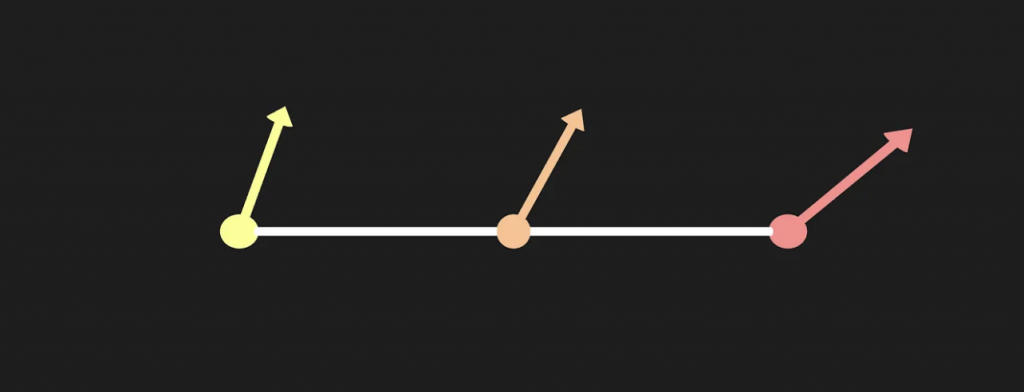
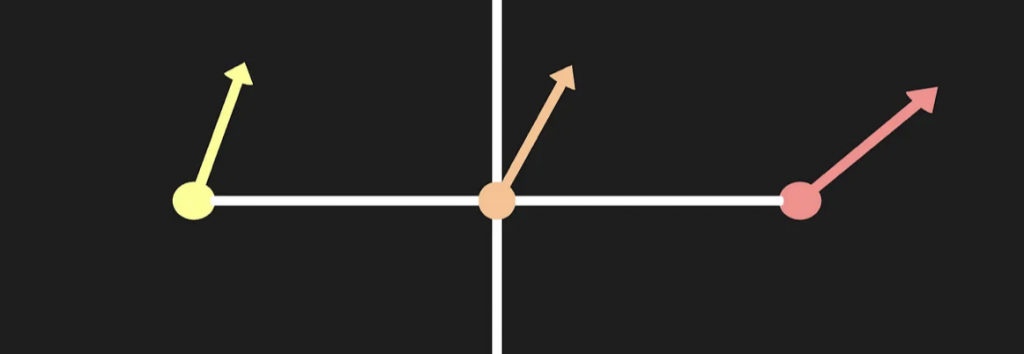
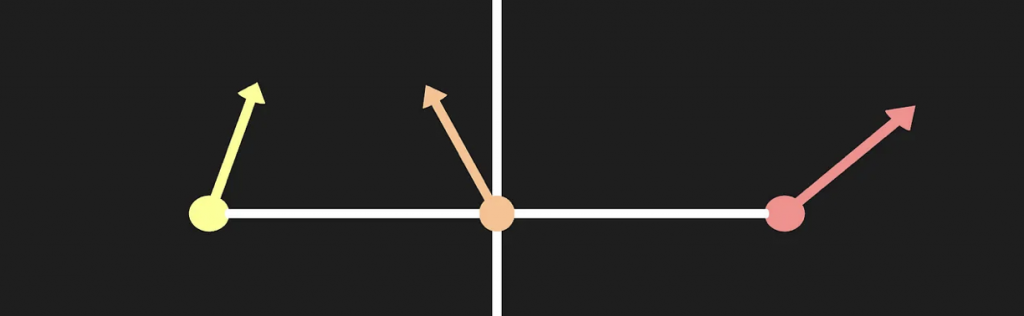
    These three pictures represent the wavefront of the light wave, i.e. the wave crest, which can be understood as the waveform cross section of the light during propagation.

    In the upper figure, the incident field distribution is concentrated in the center when the light is incident perpendicular to the surface. The light field is concentrated in the center and propagates in the vertical direction (i.e. the direction of the yellow line in the middle).

    At the bottom left, the effect of superposition of multiple identical incident fields, but with the same phase (i.e. no phase difference) when superimposed. The addition of multiple incident fields makes the entire field wider in space, but the propagation direction remains vertical.

    In the lower right corner, the superposition effect of multiple incident fields is shown, but a phase difference is added during the superposition, which is equivalent to "offsetting" the direction of the incident field, showing an inclined direction.

    In the demo, two videos show the movement of BRDF patterns. (I'm too lazy to make GIFs)

    Finally, the big guys took a photo with their hands making a heart shape.

    paper

    mineFirst articleHaving briefly introduced the content and results of this work, we will now move directly to the theoretical derivation (Section 3-5).

    3 FULL-WAVE SIMULATION

    The holistic approach starts with a surface model, described by a height field and its material properties (such as the complex refractive index), and specifies a target point.

    To compute the BRDF for a given incident direction, an incident field is defined that propagates from that specific direction to the target point.

    This incident field is used as input and processed through a surface scattering simulation to solve for the corresponding scattered electromagnetic field.

    In this section (FULL-WAVE SIMULATION), we will focus on the principles of BEM in application scenarios. The next section will explain how to efficiently implement the BEM algorithm, and the last section will explain how to combine multiple simulation results to synthesize a BRDF that is densely sampled in the incident and scattering directions.

    Let me start with a symbol table to scare you.

    3.1 Boundary Element Method: The Basics

    The boundary element method (BEM) mainly solves the scattering problem of a single frequency, that is, how electromagnetic waves (including electric and magnetic fields) of a specific frequency are reflected and scattered at the boundaries of different media. The boundary here divides the space into two uniform regions, and the material properties of the two regions (medium parameters at the incident site) are represented by ($\epsilon_1, \mu_1$) and ($\epsilon_2, \mu_2$). Among them, $\epsilon$ represents the dielectric constant (dielectric constant), and $\mu$ represents the magnetic permeability (magnetic permeability coefficient).

    In this approach, we deal with complex-valued fields that contain both amplitude and phase information (i.e., the propagation state of the wave). To simplify the formula, we assume that all waves are "time-harmonic" - that is, the waves change with a specific period over time. Throughout the text, the $e^{j\omega t}$ term is omitted to simplify the presentation.

    3.1.1 Maxwell's Equations and Surface Currents

    First, Maxwell's equations describe how electric fields (E) and magnetic fields (H) interact with each other, determining how light waves propagate and scatter between different materials. For simplicity, this is expressed in a "time-harmonic" form:

    $$ \begin{align} \nabla \times \mathbf{E} &= -\mathbf{M} – j \omega \mu \mathbf{H} \\ \nabla \times \mathbf{H} &= \mathbf{ J} + j \omega \epsilon \mathbf{E} \tag{1} \end{align} $$


    The left side of the equal sign describes the degree of "rotation" of the electric and magnetic fields in space. $M$ and $J$ areSurface current density(imaginary current), respectively representing the density of magnetic flow and current (electric and magnetic current densities). This formula can be understood as that when the electric field "rotates" near the boundary, changes in magnetic flow and magnetic field occur; the rotation of the magnetic field also causes changes in the electric field and current.

    The core idea of the boundary element method is:Introducing surface currents on boundaries, using these currents to indirectly describe the field distribution without having to calculate all points in each region. The three-dimensional problem is reduced to a two-dimensional problem on the boundary.

    3.1.2 Source-Field Relationships

    How does an imaginary electric current on the surface (the "source" of the electromagnetic waves) produce the scattered electromagnetic field (the "field")?

    As shown in Fig. 2., in the region $R_1$, the total field (incident field and scattered field) are represented as $E_1$ and $H_1$ respectively;

    $$ \begin{align} &\mathbf{E}_1 = \mathbf{E}_i + \mathbf{E}_s \\ &\mathbf{H}_1 = \mathbf{H}_i + \mathbf{H}_s \tag{2} \end{align} $$


    In the region $R_2$ , the total field is denoted by $E_2$ and $H_2$ . The upper scattered field is generated by the upper electromagnetic current; the lower scattered field is generated by the lower electromagnetic current.

    In a homogeneous medium, Maxwell's equations can be written in integral form to describe how electric and magnetic fields are generated.

    \begin{align} \mathbf{E}(\mathbf{r}) &= -j \omega \mu (\mathcal{L} \mathbf{J})(\mathbf{r}) – (\mathcal{K } \mathbf{M})(\mathbf{r}) \\ \mathbf{H}(\mathbf{r}) &= -j \omega \epsilon (\mathcal{L} \mathbf{M})(\mathbf{r}) + (\mathcal{K} \mathbf{J})(\mathbf{r}) \tag{3} \end{align }


    The left side of the equal sign represents the electromagnetic field strength at $r$, that is, it describes the "effect" of the field. $\mathcal{L}$ and $\mathcal{K}$ are integral operators that represent how the field is generated from the surface current and magnetization. These two operators are defined as:

    $$ \begin{aligned} & (\mathcal{L} \mathbf{X})(\mathbf{r})=\left[1+\frac{1}{k^2} \nabla \nabla \cdot\right ] \int_V G\left(\mathbf{r}, \mathbf{r}^{\prime}\right) \mathbf{X}\left(\mathbf{r}^{\prime}\right) d \mathbf{r}^{\prime} \\ & (\mathcal{K} \mathbf{X})(\mathbf {r})=\nabla \times \int_V G\left(\mathbf{r}, \mathbf{r}^{\prime}\right) \mathbf{X}\left(\mathbf{r}^{\prime}\right) d \mathbf{r}^{\prime} \end{aligned} \tag{4} $$


    $G(r, r{\prime})$ is the three-dimensional Green's function for the scalar Helmholtz equation, defined as:

    $$
    G(\mathbf{r}, \mathbf{r}^{\prime}) = \frac{e^{-jkr}}{4 \pi r} \quad \text{where } r = |\mathbf{r } – \mathbf{r}^{\prime}|
    \tag{5}
    $$


    This function converts the source field of the scattering surface into the distribution of the electromagnetic field in the scattering area.

    The formula (11) in this paper is actually the same as that in [Xia 2023], but this paper implicitly incorporates the Green's function in the operator and the integration domain is wider. In essence, both describe how to generate the scattered electric field $E(r)$ from the current density $\mathbf{J}$ and the magnetic flux density $\mathbf{M}$.

    When solving Maxwell's equations, the Green's function is used to integrate the influence of various sources (such as current and charge) on the electromagnetic field in space. Assuming that the electromagnetic field changes with time in the form of $e^{j\omega t}$ (single frequency), a form similar to the Helmholtz equation can be obtained: $(\nabla^2 + k^2) \mathbf{E} = -j \omega \mu \mathbf{J}$ , which is actually a "frequency domain" form of Maxwell's equations. The Green's function is introduced to establish a source-field relationship, that is, the current $\mathbf{J}$ and the charge $\rho$ are used as "sources" to calculate the distribution of the electromagnetic field $\mathbf{E}$ and $\mathbf{H}$. Then the Green’s function satisfies the following equation: $(\nabla^2 + k^2) G(\mathbf{r}, \mathbf{r}{\prime}) = -\delta(\mathbf{r} – \mathbf{r}{\prime})$ , $\delta$ is the Dirac delta function, which represents the standard waveform generated by a “point source” in space, and describes the wave field excited by a “point source” in space. Through the Green’s function, the influence of any current distribution $\mathbf{J}$ on the field point $\mathbf{r}$ in space can be expressed! Then, the “current” or “charge” at each source point is diffused to the entire space through the Green’s function, producing a cumulative effect on each field point. $\mathbf{E}(\mathbf{r}) = \int_V G(\mathbf{r}, \mathbf{r}{\prime}) \mathbf{J}(\mathbf{r}{\prime}) d \mathbf{r}{\prime}$ This formula is the electric field expressed as an integral superposition of source currents. Finally, combine the integral form of Maxwell's equations with the idea of Green's function. For example, the integral form of the electric field can be expressed as: $\mathbf{E}(\mathbf{r}) = -j \omega \mu \int_V G(\mathbf{r}, \mathbf{r}{\prime}) \mathbf{J}(\mathbf{r}{\prime}) d \mathbf{r}{\prime} – \nabla \times \int_V G(\mathbf{r}, \mathbf{r}{\prime}) \mathbf{M}(\mathbf{r}{\prime}) d \mathbf{r}{\prime}$ . Through convolution, we can obtain the cumulative influence of the tiny current distribution at each source point on the field point, which is the result of the propagation and superposition of the integral of the Green’s function in space. The Green function is used as a convolution kernel to propagate the current distribution at each point in space to the target field point through integration, realizing the cumulative impact of the current at each source point in space on the entire field.

    The electric field in the dielectric regions $R_1$ and $R_2$ is expressed as formula (6) and (7) respectively, which include two operators.

    In area $R_2$:

    $$ \begin{align} & \mathbf{E}_1(\mathbf{r}) = -j \omega \mu_1 (\mathcal{L}_1 \mathbf{J}_1)(\mathbf{r}) – ( \mathcal{K}_1 \mathbf{M}_1)(\mathbf{r}) \\ & \mathbf{H}_1(\mathbf{r}) = -j \omega \epsilon_1 (\mathcal{L}_1 \mathbf{M}_1)(\mathbf{r}) + (\mathcal{K}_1 \ mathbf{J}_1)(\mathbf{r}) \end{align} \tag{6} $$


    In area $R_2$:

    \begin{align} \mathbf{E}_2(\mathbf{r}) &= -j \omega \mu_2 (\mathcal{L}_2 \mathbf{J}_2)(\mathbf{r}) – (\ mathcal{K}_2 \mathbf{M}_2)(\mathbf{r}) \\ \mathbf{H}_2(\mathbf{r}) &= -j \omega \epsilon_2 (\mathcal{L}_2 \mathbf{M}_2)(\mathbf{r}) + (\mathcal{K}_2 \mathbf{J}_2)(\mathbf{r}) \tag{7} \end{align}


    This gives the manifestations of electric and magnetic fields in different dielectric regions.

    In summary, this section transforms the Maxwell equations into integral expressions by generating scattered electromagnetic fields through hypothetical surface currents. Green's function transforms current and charge distribution into integral superposition of electromagnetic fields, showing the specific implementation of the source-field relationship. Finally, the expressions of the electric and magnetic fields in the regions $R_1$ and $R_2$ are given, showing the influence of different medium parameters on the field.

    3.1.3 Boundary Conditions

    When electromagnetic waves propagate at the boundary of two different media, reflection and refraction will occur. At this time, the energy of the wave cannot disappear out of thin air, but transitions smoothly at the interface. If the electric field or magnetic field is discontinuous at the boundary, an unrealistic energy jump will occur (that is, the energy suddenly disappears or increases), which violates the law of conservation of energy.

    Specifically, you can search: "Interface conditions for electromagnetic fields".

    Therefore, certain boundary conditions must be met at the boundary of the medium to ensure the continuity of the electromagnetic field and the conservation of energy. Specifically, when an electromagnetic wave propagates at the interface of two different media, the tangential components of the electric and magnetic fields need to maintain continuity at the boundary:


    $$
    \begin{aligned}
    & \mathbf{n} \times (\mathbf{E}_1 – \mathbf{E}_2) = 0 \\
    & \mathbf{n} \times (\mathbf{H}_1 – \mathbf{H}_2) = 0
    \end{aligned}
    \tag{8}
    $$


    And the net electromagnetic current density on the boundary is zero, that is, the electromagnetic current densities on both sides of the boundary are opposite in direction and equal in magnitude.


    $$
    \begin{aligned}
    & \mathbf{J} = \mathbf{J}_1 = -\mathbf{J}_2 \\
    & \mathbf{M} = \mathbf{M}_1 = -\mathbf{M}_2
    \end{aligned}
    \tag{9}
    $$


    These two conditions must be met at the same time to avoid violating the laws of physical conservation.

    3.1.4 Integral Equations

    Combining the above formulas (6), (7), (8) and (9), we get the integral equations for the electric and magnetic fields, which are called the PMCHWT (Poggio-Miller-Chang-Harrington-Wu-Tsai) equations:

    $$
    \begin{aligned}
    & {\left[j \omega \mu_1\left(\mathcal{L}1 \mathbf{J}\right)(\mathbf{r})+j \omega \mu_2\left(\mathcal{L}_2 \ mathbf{J}\right)(\mathbf{r})+\left(\mathcal{K}_1 \mathbf{M}\right)(\mathbf{r})+\right.}\left.\left(\mathcal{K}_2 \mathbf{M}\right)(\mathbf{r})\right] {\tan } \\
    &=\left[\mathbf{E}i(\mathbf{r})\right]{\tan } \\
    & {\left[\left(\mathcal{K}1 \mathbf{J}\right)(\mathbf{r})+\left(\mathcal{K}_2 \mathbf{J}\right)(\mathbf {r})-j \omega \varepsilon_1\left(\mathcal{L}_1 \mathbf{M}\right)(\mathbf{r})-j \omega \varepsilon_2\left(\mathcal{L}_2 \mathbf{M}\right)(\mathbf{r})\right]{\ tan } } \\
    &=-\left[\mathbf{H}i(\mathbf{r})\right]{\tan }
    \end{aligned}
    \tag{10}
    $$


    These two equations also have names:

    • EFIE(Electric Field Integral Equation), electric field integral equation. $j \omega \mu_1 (\mathcal{L}_1 \mathbf{J})(\mathbf{r})$ and $j \omega \mu_2 (\mathcal{L}_2 \mathbf{J})(\mathbf{r})$ represent the contribution of current density $\mathbf{J}$ to the electric field in medium 1 and medium 2. $\mathcal{K}_1 \mathbf{M}$ and $\mathcal{K}_2 \mathbf{M}$ represent the contribution of magnetic current density $\mathbf{M}$ to the electric field in medium 1 and medium 2.
    • MFIE(Magnetic Field Integral Equation), magnetic field integral equation.

    In general, this is a boundary integral equation specifically used to solve electromagnetic scattering problems caused by dielectric objects. With this PMCHWT equation, the distribution of electromagnetic fields can be accurately calculated.

    3.1.5 Solving for Current Densities

    In this section, we need to use the PMCHWT equation above to calculate the distribution of "electric current" and "magnetic current" on the surface of the object. These distributions determine how the electromagnetic wave will be "reflected" or "refracted" when it hits the object.

    The surface current density $\mathbf{J}$ and magnetic flux density $\mathbf{M}$ are solved by discretizing the boundary element. A basis function $f_m(\mathbf{r})$ is defined for the discrete element, and the current density and magnetic flux density distribution are expressed by the basis function expansion method.


    $$
    \mathbf{J}(\mathbf{r}) = \sum_{m=1}^{N} I_{J_m} f_m(\mathbf{r}); \quad \mathbf{M}(\mathbf{r} ) = \sum_{n=1}^{N} I_{M_n} f_n(\mathbf{r})
    \tag{11}
    $$


    N is the total number of basis functions; $ I_{J_m}$ and $I_{M_n}$ are the unknown coefficients of the corresponding basis functions, representing the current and magnetic flux intensities on each unit.

    Through this basis function expansion, the continuous surface current density and magnetic current density are decomposed into a linear combination of a series of basis functions.

    In order to solve the unknown coefficients of the corresponding basis functions, the electric field integral equation (EFIE) and the magnetic field integral equation (MFIE) are transformed into a linear equation system. This is done using the Galerkin Method. The basic idea of this method is to apply the integral equation to each basis function and perform weighted averaging so that the integral equation holds true in the projection direction of each basis function. Simply put, this method involves discretization, finding the basis, and calculating the coefficients. A high-dimensional linear equation system can be simplified using linear algebra methods.

    In this way, the EFIE part of the original continuous form of the PMCHWT equation can be converted into a finite number of linear equations, and the problem can be transformed into solving the following matrix equation.


    $$
    \begin{bmatrix} A_{EJ} & A_{EM} \ A_{HJ} & A_{HM} \end{bmatrix} \begin{bmatrix} I_J \ I_M \end{bmatrix} = \begin{bmatrix} V_E \ V_H \end{bmatrix}
    \tag{12}
    $$


    in


    $$
    A_{\mathrm{EJ}}^{mn} =\int_S \mathbf{f}_m(\mathbf{r}) \cdot\left[j \omega \mu_1\left(\mathcal{L}_1 \mathbf{ f}_n\right)(\mathbf{r})+j \omega \mu_2\left(\mathcal{L}_2 \mathbf{f}_n\right)(\mathbf{r})\right] d \mathbf{r} \tag{13}
    $$

    $$
    A_{\mathrm{EM}}^{mn} =\int_S \mathbf{f}_m(\mathbf{r}) \cdot\left[\left(\mathcal{K}_1 \mathbf{f}_n\right )(\mathbf{r})+\left(\mathcal{K}_2 \mathbf{f}_n\right)(\mathbf{r})\right] d \mathbf{r} \tag{14}
    $$

    $$
    A_{\mathrm{HJ}}^{mn} =\int_S \mathbf{f}_m(\mathbf{r}) \cdot\left[\left(\mathcal{K}_1 \mathbf{f}_n\right )(\mathbf{r})+\left(\mathcal{K}_2 \mathbf{f}_n\right)(\mathbf{r})\right] d \mathbf{r} \tag{15}
    $$

    $$
    A_{\mathrm{HM}}^{mn} =-\int_S \mathbf{f}_m(\mathbf{r}) \cdot\left[j \omega \varepsilon_1\left(\mathcal{L}_1 \mathbf {f}_n\right)(\mathbf{r})+j \omega \varepsilon_2\left(\mathcal{L}_2 \mathbf{f}_n\right)(\mathbf{r})\right] d \mathbf{r} \tag{16}
    $$

    and


    $$
    V_{\mathrm{E}}^m =\int_S \mathbf{f}_m(\mathbf{r}) \cdot \mathbf{E}_i(\mathbf{r}) d \mathbf{r}\tag{ 17}
    $$

    $$
    V_{\mathrm{H}}^m =-\int_S \mathbf{f}_m(\mathbf{r}) \cdot \mathbf{H}_i(\mathbf{r}) d \mathbf{r}\tag {18}
    $$

    In formula (12), $I_J$ and $I_M$ need to be calculated.

    In a loose sense, formulas (13)-(16) respectively represent the contribution of each small block's current density to the electric field, the contribution of each small block's magnetic flux density to the electric field, the contribution of each small block's current density to the magnetic field, and the contribution of each small block's magnetic flux density to the magnetic field. Formulas (17)(18) respectively represent the "driving force" of the external incident electric field on the small block's current and the "driving force" of the external incident magnetic field on the small block's magnetic flux. Emphasize the elements in the matrix, such as $A_{EJ}^{mn}$, which is actually a double integral. Since the integration of the source point $\mathbf{r}{\prime}$ has been completed in $\mathcal{L}_1$ and $\mathcal{L}_2$, the original paper looks like a single integral.

    Although it is not written in the original paper, it is recommended that smart readers derive it by themselves. Try to expand formula (13) according to formula (4) mentioned above. I have tried to derive it here. Please correct me if there are any mistakes. First, substitute the two operators and pay attention to the position of the gradient operator here:


    $$
    \begin{aligned}
    A_{\mathrm{EJ}}^{mn} &= j \omega \mu_1 \int_S \mathbf{f}_m(\mathbf{r}) \cdot \left\{ \int_V G_1(\mathbf{r}, \mathbf{r}{\prime}) \mathbf{f}_n(\mathbf{r}{\prime}) d\mathbf{r}{\prime} + \frac{1}{k_1^2} \nabla \left[ \nabla \cdot \int_V G_1(\mathbf{r}, \mathbf{r}{\prime}) \mathbf{f}_n(\mathbf{r}{\prime}) d\mathbf{r}{\prime} \right] \right\} d\mathbf{r} \\
    &\quad + j \omega \mu_2 \int_S \mathbf{f}_m(\mathbf{r}) \cdot \left\{ \int_V G_2(\mathbf{r}, \mathbf{r}{\prime}) \mathbf{f}_n(\mathbf{r}{\prime}) d\mathbf{r}{\prime} + \frac{1}{k_2^2} \nabla \left[ \nabla \cdot \int_V G_2(\mathbf{r}, \mathbf{r}{\prime}) \mathbf{f}_n(\mathbf{r }{\prime}) d\mathbf{r}{\prime} \right] \right\} d\mathbf{r}
    \end{aligned}
    $$

    Consider first one of the gradient terms:

    $$
    \int_S \mathbf{f}_m(\mathbf{r}) \cdot \nabla \left[ \nabla \cdot \int_V G(\mathbf{r}, \mathbf{r}{\prime}) \mathbf{f }_n(\mathbf{r}{\prime}) d\mathbf{r}{\prime} \right] d\mathbf{r}
    $$

    Expand using vector distribution integral:

    $$
    \int_S \mathbf{f}m \cdot \nabla B \, dr = -\int_S B (\nabla \cdot \mathbf{f}_m) \, dr + \int{\partial S} B (\mathbf{A } \cdot \mathbf{n}) \, dr
    $$

    Among them, the divergence term $B$:

    $$
    B = \nabla \cdot \int_V G(\mathbf{r}, \mathbf{r}{\prime}) \mathbf{f}_n(\mathbf{r}{\prime}) d\mathbf{r}{ \prime}
    $$

    But sorry, this is physics. Under the boundary conditions, the boundary terms are directly simplified to zero, and we get:

    $$
    \int_S \mathbf{f}_m \cdot \nabla B \, dS = -\int_S B (\nabla \cdot \mathbf{f}_m) \, dS
    $$

    For the divergence term $B$ , the divergence can be directly expanded:

    $$
    B = \nabla \cdot \int_V G(\mathbf{r}, \mathbf{r}{\prime}) \mathbf{f}_n(\mathbf{r}{\prime}) d\mathbf{r}{ \prime} = \int_V (\nabla \cdot G(\mathbf{r}, \mathbf{r}{\prime}) \mathbf{f}_n(\mathbf{r}{\prime})) d\mathbf{r}{\prime}
    $$

    One is a scalar function and the other is a matrix function, so according to the product rule of divergence:

    $$
    \nabla \cdot (G \mathbf{f}_n) = (\nabla G) \cdot \mathbf{f}_n + G (\nabla \cdot \mathbf{f}_n)
    $$

    But sorry, this is physics. Since the basis functions satisfy the divergence-free condition, this is a straightforward simplification:

    $$
    \nabla \cdot (G \mathbf{f}_n) = (\nabla G) \cdot \mathbf{f}_n
    $$

    At the same time, we note the symmetry of the Green's function $\nabla G(\mathbf{r}, \mathbf{r}{\prime}) = -\nabla{\prime} G(\mathbf{r}, \mathbf{r}{\prime})$, so:

    $$
    B = \nabla \cdot \int_V G(\mathbf{r}, \mathbf{r}{\prime}) \mathbf{f}_n(\mathbf{r}{\prime}) d\mathbf{r}{ \prime} = -\int_V \nabla{\prime} G(\mathbf{r}, \mathbf{r}{\prime}) \cdot \mathbf{f}_n(\mathbf{r}{\prime}) d\mathbf{r}{\prime}
    $$

    Perform the distribution integral on this term as well:

    $$
    \int_V \nabla{\prime} G(\mathbf{r}, \mathbf{r}{\prime}) \cdot \mathbf{f}_n(\mathbf{r}{\prime}) d\mathbf{r }{\prime} = \int_V \nabla{\prime} \cdot (G \mathbf{f}_n) d\mathbf{r}{\prime} – \int_V G (\nabla{\prime} \cdot \mathbf{f}_n) d\mathbf{r}{\prime}
    $$

    But sorry, this is physics. The boundary terms are simplified again:

    $$
    \int_V \nabla{\prime} G(\mathbf{r}, \mathbf{r}{\prime}) \cdot \mathbf{f}_n(\mathbf{r}{\prime}) d\mathbf{r }{\prime} = -\int_V G(\mathbf{r}, \mathbf{r}{\prime}) (\nabla{\prime} \cdot \mathbf{f}_n(\mathbf{r}{\prime})) d\mathbf{r}{\prime}
    $$

    Finally, we get:

    $$
    B = \nabla \cdot \int_V G(\mathbf{r}, \mathbf{r}{\prime}) \mathbf{f}_n(\mathbf{r}{\prime}) d\mathbf{r}{ \prime} = \int_V G(\mathbf{r}, \mathbf{r}{\prime}) (\nabla{\prime} \cdot \mathbf{f}_n(\mathbf{r}{\prime})) d\mathbf{r}{\prime}
    $$

    The relationship between wave number $k_i$ and medium parameters:

    $$
    k_i^2 = \omega^2 \mu_i \varepsilon_i \quad \Rightarrow \quad \frac{1}{k_i^2} = \frac{1}{\omega^2 \mu_i \varepsilon_i}
    $$

    The same goes for the other gradient term, and finally we get the final expression $A_{\mathrm{EJ}}^{mn}$ :

    $$
    \begin{aligned} A_{\mathrm{EJ}}^{mn} &= j \omega \mu_1 \int_S \int_{V_1} \mathbf{f}m(\mathbf{r}) \cdot \mathbf{f }n(\mathbf{r}{\prime}) G_1(\mathbf{r}, \mathbf{r}{\prime}) d\mathbf{r}{\prime} d\mathbf{r} \\ &\quad – \frac{j}{\omega \varepsilon_1} \int_S \int{V_1} (\nabla \cdot \mathbf{f}m(\mathbf{r})) G_1(\mathbf{r}, \mathbf{r}{\prime}) (\nabla{\prime} \cdot \mathbf{f}n(\mathbf{r}{\prime})) d\mathbf{r}{\prime} d\mathbf{r} \\ &\quad + j \omega \mu_2 \int_S \ int{V_2} \mathbf{f}m(\mathbf{r}) \cdot \mathbf{f}n(\mathbf{r}{\prime}) G_2(\mathbf{r}, \mathbf{r}{\prime}) d\mathbf{r}{\prime} d\mathbf{r } \\ &\quad – \frac{j}{\omega \varepsilon_2} \int_S \int{V_2} (\nabla \cdot \mathbf{f}_m(\mathbf{r})) G_2(\mathbf{r}, \mathbf{r}{\prime}) (\nabla{\prime} \cdot \mathbf{f}_n(\mathbf{r}{\prime})) d\mathbf{r }{\prime} d\mathbf{r} \end{aligned}
    $$

    The same operation is used to obtain the remaining matrix elements. Here we directly copy the content of the additional materials of the paper:

    $$
    \begin{aligned} A_{\mathrm{EM}}^{mn}= & A_{\mathrm{HJ}}^{mn}=\int_{\mathbf{f}_m} \int_{\mathbf{f} _n} \mathbf{f}_m(\mathbf{r}) \cdot\left[\nabla G_1\left(\mathbf{r}, \mathbf{r}^{\prime}\right) \times \mathbf{f}_n\left(\mathbf{r}^{\prime}\right)\right] d \mathbf{r}^{\prime} d \mathbf{r} \\ & +\int_{\mathbf{f}_m} \int_{\mathbf{f}_n} \mathbf{f}_m(\mathbf{r}) \cdot\left[\nabla G_2\left(\mathbf{r}, \mathbf{r}^{\prime}\right) \times \mathbf{f} _n\left(\mathbf{r}^{\prime}\right)\right] d \mathbf{r}^{\prime} d \mathbf{r} \\ A_{\mathrm{HM}}^{mn} & =-j \omega \varepsilon_1 \int_{\mathbf{f}_m} \int_{\mathbf{f}_n} \mathbf{ f}_m(\mathbf{r}) \cdot \mathbf{f}_n\left(\mathbf{r}^{\prime}\right) G_1\left(\mathbf{r}, \mathbf{r}^{\prime}\right) d \mathbf{r}^{\prime} d \mathbf{r} \\ & +\frac{j}{ \omega \mu_1} \int_{\mathbf{f}_m} \int_{\mathbf{f}_n} \nabla \cdot \mathbf{f}_m(\mathbf{r}) G_1\left(\mathbf{r}, \mathbf{r}^{\prime}\right) \nabla^{\prime} \cdot \mathbf{f} _n\left(\mathbf{r}^{\prime}\right) d \mathbf{r}^{\prime} d \mathbf{r} \\ & -j \omega \varepsilon_2 \int_{\mathbf{f}_m} \int_{\mathbf{f}_n} \mathbf{f}_m(\mathbf{r}) \cdot \mathbf{f}_n\left(\mathbf{r }^{\prime}\right) G_2\left(\mathbf{r}, \mathbf{r}^{\prime}\right) d \mathbf{r}^{\prime} d \mathbf{r} \\ & +\frac{j}{\omega \mu_2} \int_{\mathbf {f}_m} \int_{\mathbf{f}_n} \nabla \cdot \mathbf{f}_m(\mathbf{r}) G_2\left(\mathbf{r}, \mathbf{r}^{\prime}\right) \nabla^{\prime} \cdot \mathbf{f}_n\left(\mathbf{r}^{\prime}\right) d \mathbf{r} ^{\prime} d \mathbf{r}\end{aligned}
    $$

    After getting each element of the matrix, we introduce shift-invariant functions to help us get the Green's function and its gradient in different coordinate systems.

    $$
    \begin{aligned}
    & g_{1, i}\left(\mathbf{r}-\mathbf{r}^{\prime}\right)=G_i\left(\mathbf{r}, \mathbf{r}^{\prime} \right)=\frac{e^{-j k_i r}}{4 \pi r} \\
    & g_{2, i}\left(\mathbf{r}-\mathbf{r}^{\prime}\right)=\hat{\mathbf{x}} \cdot \nabla G_i\left(\mathbf{ r}, \mathbf{r}^{\prime}\right)=-\left(xx^{\prime}\right)\left(\frac{1+j k_i r}{4 \pi r^3}\right) e^{-j k_i r} \\
    & g_{3, i}\left(\mathbf{r}-\mathbf{r}^{\prime}\right)=\hat{\mathbf{y}} \cdot \nabla G_i\left(\mathbf{ r}, \mathbf{r}^{\prime}\right)=-\left(yy^{\prime}\right)\left(\frac{1+j k_i r}{4 \pi r^3}\right) e^{-j k_i r} \\
    & g_{4, i}\left(\mathbf{r}-\mathbf{r}^{\prime}\right)=\hat{\mathbf{z}} \cdot \nabla G_i\left(\mathbf{ r}, \mathbf{r}^{\prime}\right)=-\left(zz^{\prime}\right)\left(\frac{1+j k_i r}{4 \pi r^3}\right) e^{-j k_i r} \quad \text { where } r=\left|\mathbf{r}-\mathbf{r}^{\prime}\ right|
    \end{aligned}
    $$

    Then the matrix elements are expanded into a combination of different components of the basis functions, which act on the translation invariant functions. All elements of the final matrix have the following form. This form can speed up the construction and solution of the boundary element matrix.

    $$
    \int_{\mathbf{f}m} \int{\mathbf{f}_n} \psi_m(\mathbf{r}) g\left(\mathbf{r}-\mathbf{r}^{\prime}\ right) \xi_n\left(\mathbf{r}^{\prime}\right) d \mathbf{r}^{\prime} d \mathbf{r}
    $$

    Finally, we get:


    Here, $x, y, z, x^{\prime}, y^{\prime}, z^{\prime}$ are the Cartesian components of $\mathbf{r}, \mathbf{r}^{\prime }$. Now we have for $i=1,2$:

    $$ \begin{aligned} A_{\mathrm{EJ}, i}^{mn} &= j \omega \mu_i \int_{\mathbf{f}_m} \int_{\mathbf{f}_n} \mathbf{ f}_{mx}(\mathbf{r}) \, g_{1, i}\left(\mathbf{r}-\mathbf{r}^{\prime}\right) \, \mathbf{f}_{nx}\left(\mathbf{r}^{\prime}\right ) \, d \mathbf{r}^{\prime} \, d \mathbf{r} \\ & \quad + j \omega \mu_i \int_{\mathbf{f}_m} \int_{\mathbf{f}_n} \mathbf{f}_{my}(\mathbf{r}) \, g_{1, i}\left(\mathbf{r}-\mathbf{r}^{\prime}\right) \, \mathbf {f}_{ny}\left(\mathbf{r}^{\prime}\right) \, d \mathbf{r}^{\prime} \, d \mathbf{r} \\ & \quad + j \omega \mu_i \int_{\mathbf{f}_m} \int_{\mathbf{f}_n} \mathbf{f}_{mz}(\mathbf{r }) \, g_{1, i}\left(\mathbf{r}-\mathbf{r}^{\prime}\right) \, \mathbf{f}_{nz}\left(\mathbf{r}^{\prime}\right) \, d \mathbf{r}^{\prime} \, d \mathbf{r} \\ & \ quad – \frac{j}{\omega \varepsilon_i} \int_{\mathbf{f}_m} \int_{\mathbf{f}_n} \nabla \cdot \mathbf{f}_m(\mathbf{r}) \, g_{1, i}\left(\mathbf{r}-\mathbf{r}^{\prime}\right) \, \ nabla^{\prime} \cdot \mathbf{f}_n\left(\mathbf{r}^{\prime}\right) \, d \mathbf{r}^{\prime} \, d \mathbf{r} \end{aligned} \tag{S.18} $$

    where $\mathbf{f}{mx}, \mathbf{f}{my}, \mathbf{f}_{mz}$ are the $x, y, z$ components of the vector basis function $\mathbf{f}_m$ . Similarly, we have:

    $$ \begin{aligned} & A_{\mathrm{EM}, i}^{mn}=A_{\mathrm{HJ}, i}^{mn}=\int_{\mathbf{f}m} \int{ \mathbf{f}n} \mathbf{f}{mz}(\mathbf{r}) g_{2, i}\left(\mathbf{r}-\mathbf{r}^{\prime}\right) \mathbf{f}{ny}\left(\mathbf{r}^{\prime}\right) d \ mathbf{r}^{\prime} d \mathbf{r} \\ & -\int{\mathbf{f}m} \int{\mathbf{f}n} \mathbf{f}{my}(\mathbf{r}) g_{2, i}\left(\mathbf{r}-\mathbf{r}^{\prime}\right) \mathbf{f}{nz }\left(\mathbf{r}^{\prime}\right) d \mathbf{r}^{\prime} d \mathbf{r} \\ & +\int{\mathbf{f}m} \int{\mathbf{f}n} \mathbf{f}{mx}(\mathbf{r}) g_{3, i}\left(\mathbf{r} -\mathbf{r}^{\prime}\right) \mathbf{f}{nz}\left(\mathbf{r}^{\prime}\right) d \mathbf{r}^{\prime} d \mathbf{r} \\ & -\int{\mathbf{f}m} \int{\mathbf{f}n} \mathbf{f}{mz}(\ mathbf{r}) g_{3, i}\left(\mathbf{r}-\mathbf{r}^{\prime}\right) \mathbf{f}{nx}\left(\mathbf{r}^{\prime}\right) d \mathbf{r}^{\prime} d \mathbf{r} \\ & +\int{\mathbf {f}m} \int{\mathbf{f}n} \mathbf{f}{my}(\mathbf{r}) g_{4, i}\left(\mathbf{r}-\mathbf{r}^{\prime}\right) \mathbf{f}{nx}\left(\mathbf{r}^{\prime}\right) d \ mathbf{r}^{\prime} d \mathbf{r} \\ & -\int{\mathbf{f}m} \int{\mathbf{f}n} \mathbf{f}{mx}(\mathbf{r}) g_{4, i}\left(\mathbf{r}-\mathbf{r}^{\prime} \right) \mathbf{f}_{ny}\left(\mathbf{r}^{\prime}\right) d \mathbf{r}^{\prime} d \mathbf{r} \end{aligned} \tag{S.19} $$

    Lastly, we also have:

    $$ \begin{aligned} A_{\mathrm{HM}, i}^{mn} & =-j \omega \varepsilon_i \int_{\mathbf{f}m} \int{\mathbf{f}n} \mathbf {f}{mx}(\mathbf{r}) g_{1, i}\left(\mathbf{r}-\mathbf{r}^{\prime}\right) \mathbf{f}{nx}\left(\mathbf{r}^{\prime}\right) d \ mathbf{r}^{\prime} d \mathbf{r} \\ & -j \omega \varepsilon_i \int{\mathbf{f}m} \int{\mathbf{f}n} \mathbf{f}{my}(\mathbf{r}) g_{1, i}\left(\mathbf{r}-\mathbf{r}^{\prime}\right) \mathbf{f}{ny }\left(\mathbf{r}^{\prime}\right) d \mathbf{r}^{\prime} d \mathbf{r} \\ & -j \omega \varepsilon_i \int{\mathbf{f}m} \int{\mathbf{f}n} \mathbf{f}{mz}(\mathbf{r}) g_{1, i}\left( \mathbf{r}-\mathbf{r}^{\prime}\right) \mathbf{f}{nz}\left(\mathbf{r}^{\prime}\right) d \mathbf{r}^{\prime} d \mathbf{r} \\ & +\frac{j}{\omega \mu_i} \int{\mathbf{f}m} \int{\mathbf{f}n } \nabla \cdot \mathbf{f}_m(\mathbf{r}) g{1, i}\left(\mathbf{r}-\mathbf{r}^{\prime}\right) \nabla^{\prime} \cdot \mathbf{f}_n\left(\mathbf{r}^{\ prime}\right) d \mathbf{r}^{\prime} d \mathbf{r} \end{aligned} \tag{S.20} $$


    This part of the code is inMVProd ClassIt doesn’t matter if you don’t understand it, because I just copied and scribbled it randomly, which is beyond the scope of graphics research.

    In addition, the author also discussed the symmetry of EFIE and MFIE. It is this symmetry that makes the computational efficiency and space utilization lower. Note:


    $$
    A_{EJ} = A_{EJ}^T, \quad A_{HM} = A_{HM}^T \tag{19}
    $$

    $$
    A_{EM} = A_{EM}^T, \quad A_{HJ} = A_{HJ}^T, \quad A_{EM} = A_{HJ}\tag{20}
    $$

    Since the matrix is symmetric, we do not need to calculate all the matrix elements, nor do we need to store all the matrix elements.

    After solving for the surface current density, equation (6) can be used to calculate the scattered field propagating outward from the scattering surface.

    3.2 Rough Surface Scattering: The Specifics

    When simulating the interaction between electromagnetic waves and rough surfaces, the irregular geometric structure of the surface will have a significant impact on the scattering characteristics. The authors discretized the rough surface and divided the continuous surface into multiple units, each of which can be numerically calculated using the PMCHWT equation.

    3.2.1 Rough Surface Samples

    Represent the rough surface as a two-dimensionalHeight field, and then the height field is discretized and divided into multiple rectangular units.

    Only a surface sample of size $$L_x \times L_y$$ is considered for each simulation, and a step size $d$ is chosen to define the discretization grid.


    $$
    x_s = s \cdot d, \quad s = 0, 1, \ldots, N_x
    \
    y_t = t \cdot d, \quad t = 0, 1, \ldots, N_y
    \tag{21}
    $$


    Among them, $ N_x = L_x / d$ and $N_y = L_y / d$, respectively, represent the number of cells divided in the $x$ and $y$ directions. At each discrete point $(x_s, y_t)$ there is a height field $h(x_s, y_t)$ function.

    The authors concluded that the height variations of rough surfaces are very small, typically only a few micrometers, which is comparable to the wavelength of visible electromagnetic waves.

    3.2.2 Basis Elements and Functions

    Each primitive has four corners, each corner has a different height, and each corner contributes differently to the current and magnetic flux. Therefore, four basis functions are defined on each small square to approximate the situation on each small square.

    In most simulations, the step size $d$ is chosen to be around $\lambda / 16$ of the wavelength to ensure accuracy.

    Each primitive is parameterized by two parameters u and v, both in the range [-1, 1].

    The shape of the primitive is represented by a bilinear function $\mathbf{r}(u, v)$, where $(s, t)$ represents the index of the current primitive, and the primitive is determined by the coordinates of the four vertices:

    $$ \begin{aligned} \mathbf{r}(u, v) = &\frac{(1 – u)(1 – v)}{4} \mathbf{p}_{s-1, t-1} + \\ &\frac{(1 – u)(1 + v)}{4} \mathbf{p}_{s-1, t} + \\ &\frac{(1 + u)(1 – v)}{4} \mathbf{p}_{s, t-1} + \\ &\frac{(1 + u)(1 + v)}{4} \mathbf{p} _{s, t} \end{aligned} \tag{22} $$

    where $\mathbf{p}{s, t} = (x_s, y_t, z{s, t})$ are the coordinates of the four vertices of the primitive.

    Four basis functions $f_1(u, v), f_2(u, v), f_3(u, v), f_4(u, v)$ are defined on each rectangular primitive, and their forms are:


    $$
    \begin{aligned}
    & f_1(u, v) = \frac{(1 – u)}{J(u, v)} \frac{\partial \mathbf{r}(u, v)}{\partial u}, \quad f_2 (u, v) = \frac{(1 + u)}{J(u, v)} \frac{\partial \mathbf{r}(u, v)}{\partial u} \\
    & f_3(u, v) = \frac{(1 – v)}{J(u, v)} \frac{\partial \mathbf{r}(u, v)}{\partial v}, \quad f_4 (u, v) = \frac{(1 + v)}{J(u, v)} \frac{\partial \mathbf{r}(u, v)}{\partial v}
    \end{aligned}
    \tag{23}
    $$


    Here the Jacobian $J(u, v)$ is represented as follows:


    $$
    J(u, v) = \left| \frac{\partial \mathbf{r}(u, v)}{\partial u} \times \frac{\partial \mathbf{r}(u, v)}{ \partial v} \right|
    \tag{24}
    $$


    The introduction of Jacobian is used to transform the coordinate system and ensure that the basis functions have appropriate proportional relationships in different $u, v$ directions.

    3.2.3 Gaussian Beam Incidence

    Since I don't know much about optics, the following is my personal understanding. A Gaussian beam is a phenomenon in which the middle part of the traveling wave field appears to be concave inward when the laser is emitted. In other words, a Gaussian beam describes the energy distribution of light on the cross section. The focus of plane waves and spherical waves is to describe the direction of energy propagation. During the propagation process, the wavefront shape of a Gaussian beam is approximately a spherical wave.

    Gouy phase is a phase delay effect in Gaussian beam propagation. The phase of the beam will increase after passing through the focus. On the other hand, Gaussian beams satisfy a solution of Maxwell's equations under paraxial conditions and can be approximated as non-uniform spherical waves. I feel that there is no need to study it too deeply at present.

    Information about Gaussian beams:

    Back to the original paper, the advantage of Gaussian beam is that the size of the incident field can be controlled, and thus the surface induced current density of an area slightly larger than the irradiated area can be controlled to be a non-zero value.

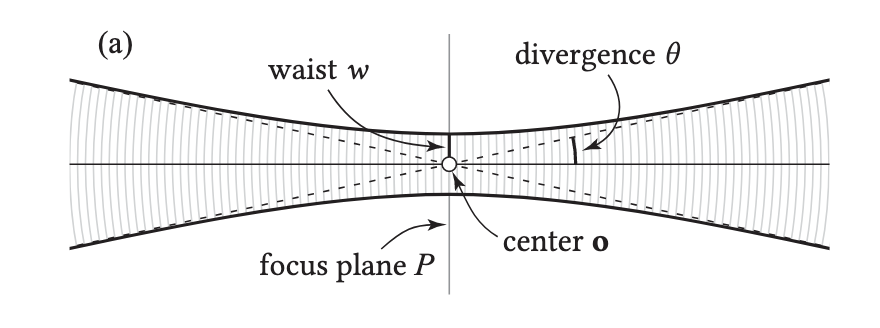
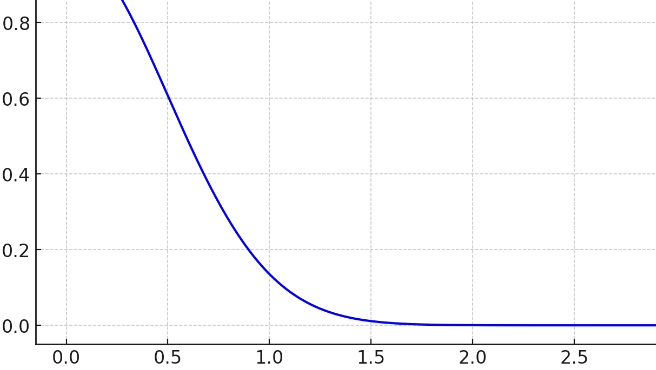
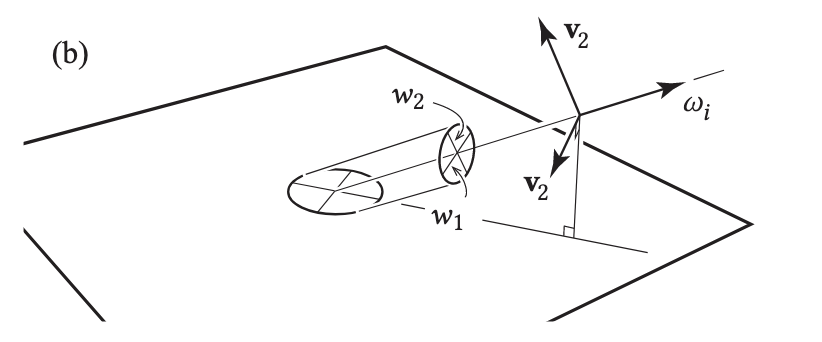
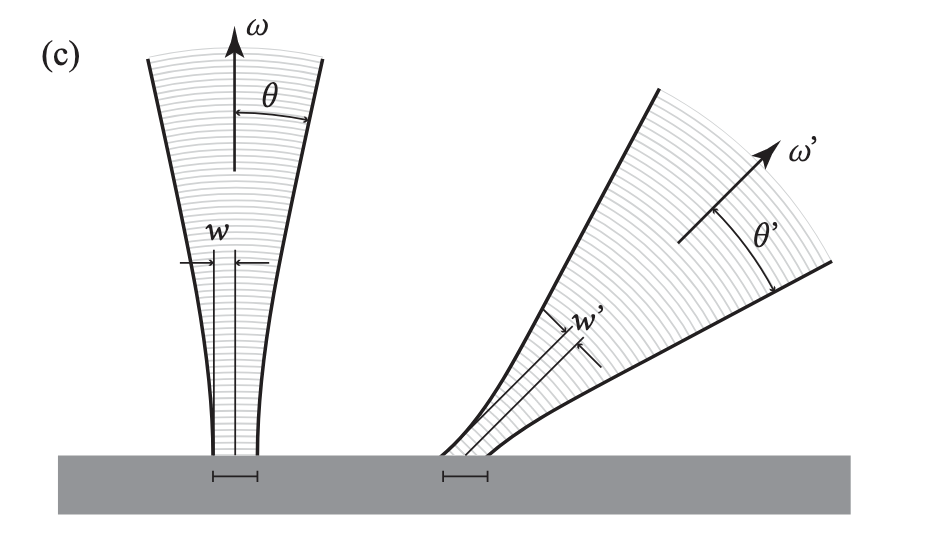
    A Gaussian beam is an electromagnetic wave whose amplitude is distributed in a two-dimensional Gaussian pattern in a plane perpendicular to the propagation direction [Paschotta 2008]. Its energy is mainly concentrated near the center of the beam. Looking at the figure (a) above, a Gaussian beam can be described by the focal plane $P$ , the center point $o$ , and the beam waist $w$ . The field intensity decays with position as $e^{-r^2 / w^2}$ . When the distance from the center exceeds $2.5w$ , the field intensity decays to a very small value and can be considered to be almost zero.

    However, Gaussian beams also have a certain degree of divergence. The divergence angle $\theta$ is approximately proportional to the wavelength $\lambda$ and inversely proportional to the beam waist diameter $w$. Formula:


    $$
    \theta = \frac{\lambda}{\pi \eta w} \tag{25}
    $$


    When the beam is incident on the surface obliquely, the Gaussian beam has an elliptical cross section in the focal plane, as shown in the figure below. There are different beam waist sizes in two perpendicular directions: one parallel to the plane of the incident direction and the surface normal, and the other perpendicular to it.

    In order to ensure that the irradiation area of the Gaussian beam in different directions on the surface is the same, two beam waist widths in the lateral direction are introduced here:


    $$
    w_1 = w, \quad w_2 = w \cos \theta_i\tag{26}
    $$


    The illuminated area on the surface remains consistent even at different angles of incidence. This is very important for deriving the BRDF.

    4. IMPLEMENTATION AND ACCELERATION

    However, if we use the above method to calculate, there will be no result. Therefore, some acceleration methods are needed.

    4.1 The Adaptive Integral Method

    If we want to directly calculate the system of equations of formula (12) above, the amount of calculation is unacceptable.

    $$ \begin{bmatrix} A_{EJ} & A_{EM} \ A_{HJ} & A_{HM} \end{bmatrix} \begin{bmatrix} I_J \ I_M \end{bmatrix} = \begin{bmatrix} V_E \V_H \end{bmatrix} \tag{12} $$


    According to the original idea, $N$ basis functions are used to represent the current magnetic flux density, and the size of the matrix is $2N \times 2N$ . If the matrix is solved directly (LU decomposition, Cholesky decomposition, etc.), the total complexity may be $\mathcal{O}(N^3)$ . Even if the conjugate gradient method is used, the total complexity is still $\mathcal{O}(N^2)$ . In some small-scale simulations, the size of the basis function is about $960*960$ , and the storage requirement is about 29.4GB. Using the Adaptive Integral Method, AIM, the total storage requirement is about 76.8 MB based on 8 bytes. What is so magical about this method? Let me show you together!

    4.1.1 Approximating Matrix Elements

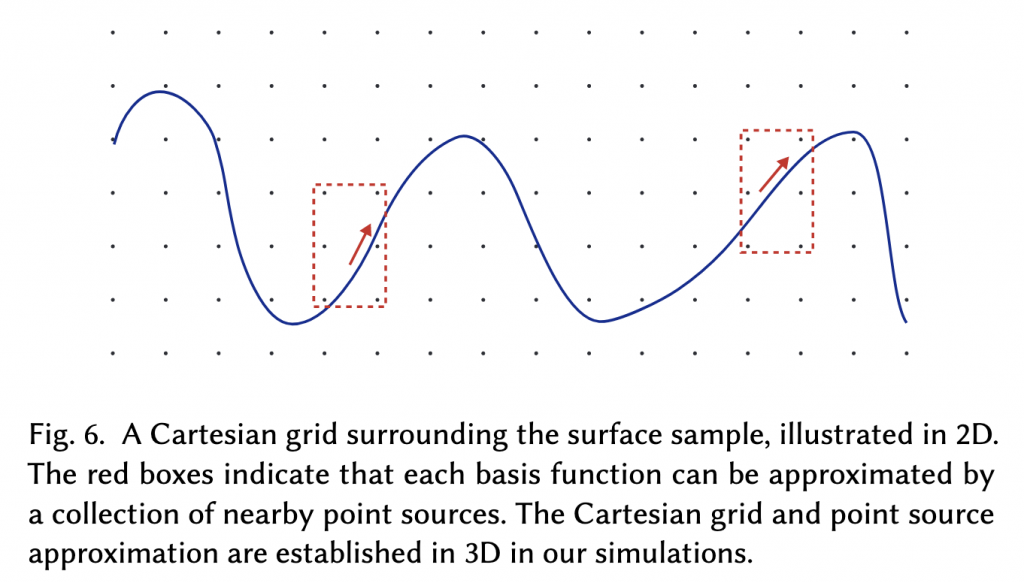
    AIM was first proposed by Bleszynski et al. [1996]. The core idea of AIM is to approximate the effect of each basis function as the effect of a set of point sources, avoiding the direct calculation of the exact interaction between each pair of basis functions, and at the same time spread the influence of each basis function through FFT to improve the calculation efficiency.

    The calculation method of matrix elements in AIM is to approximate the calculation by linear combination of some items of matrix elements. This is why the readers are asked to further deduce after the above formulas (13)-(16) to derive the final result so that it conforms to the form of AIM.

    $$
    \int_{f_m} \int_{f_n} \psi_m(r) g(r – r{\prime}) \xi_n(r{\prime}) \, dr{\prime} \, dr
    \tag{27}
    $$


    AIM first creates a global 3D Cartesian grid in the space containing the electromagnetic fields and field sources, as shown in Figure (6) below.

    In order to further simplify formula (27), the AIM algorithm approximates the original basis function as a point source on a set of grid points in this three-dimensional Cartesian coordinate system. In other words, it is a continuous-to-discrete transformation, which is convenient for subsequent FFT.

    $$ \psi_m(r) \approx \tilde{\psi}m(r) := \sum{p \in S_m} \Lambda_{mp} \delta^3(r – p) \\ \xi_n(r{\ prime}) \approx \tilde{\xi}n(r{\prime}) := \sum{q \in S_n} \Lambda{\prime}_{nq} \delta^3(r{\prime} – q) \tag{28} $$

    Substituting formula (27) into formula (28), in other words, the double integral form is converted into a double summation form.

    $$
    \sum{p \in S_m} \sum_{q \in S_n} \Lambda_{mp} g(p – q) \Lambda{\prime}_{nq}
    \tag{29}
    $$


    Method detailed reference:

    Kai Yang and Ali E Yilmaz. 2011. Comparison of precorrected FFT/adaptive integral method matching schemes. Microwave and Optical Technology Letters 53, 6 (2011), 1368–1372.

    4.1.2 Base and Correction Matrices

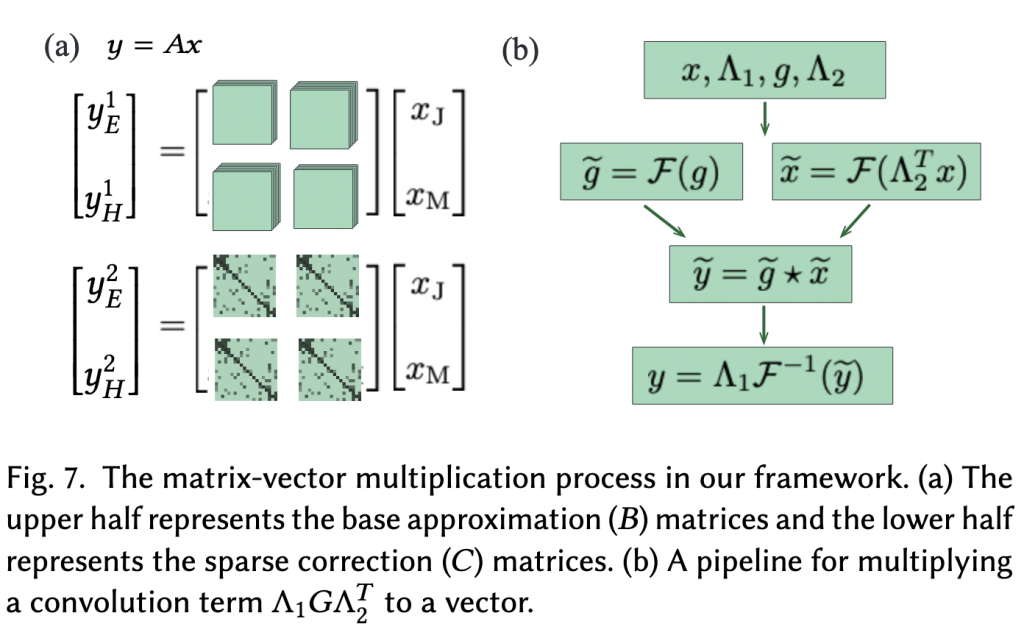
    Based on formula (29), a set of base approximation matrices $B_{EJ}, B_{EM}, B_{HJ}, B_{HM}$ are defined as approximations to specifically handle basis function pairs with a long distance. These matrices simplify the calculation by introducing $\Lambda$ matrices and convolution operations. At the same time, for basis function pairs with a short distance ($d_{near}$), correction matrices are introduced to reduce the error. $C_{EJ}, C_{EM}, C_{HJ}, C_{HM}$ is a sparse matrix defined as follows:

    $$ C_{\mathrm{X}}^{mn}=\left\{\begin{array}{ll} A_{\mathrm{X}}^{mn}-B_{\mathrm{X}}^{mn } & d_{mn} \leq d_{\text {near }} \\ 0 & \text { otherwise } \end{array} \quad \mathrm{X} \in\{\mathrm{EJ}, \mathrm{EM}, \mathrm{HJ}, \mathrm{HM}\}\right. \tag{30} $$

    $A_X^{mn}$ is the exact value of the original matrix, while $B_X^{mn}$ is the approximation of the fundamental matrix. By subtracting the approximation of the fundamental matrix, a more accurate correction term is obtained to compensate for the error of the close basis function pairs.

    In summary, the final approximate form of each matrix in the AIM method can be written as follows:

    $$ \begin{aligned} A_{\mathrm{EJ}} \approx B_{\mathrm{EJ}}+C_{\mathrm{EJ}} ; & A_{\mathrm{EM}} \approx B_{\mathrm{ EM}}+C_{\mathrm{EM}} ; \\ A_{\mathrm{HJ}} \approx B_{\mathrm{HJ}}+C_{\mathrm{HJ}} ; & A_{\mathrm{HM}} \approx B_{\mathrm{HM}}+C_{\mathrm{HM}} \end{aligned } $$


    In other words, the original matrix can be approximated by a combination of the fundamental matrix and the correction matrix.

    4.1.3 Fast Matrix-Vector Multiplication

    Fast Matrix-Vector Multiplication is the core of AIM.

    Since the modified matrix $C$ obtained above is a sparse matrix, $C$ has non-zero values only on close-range basis functions, so the multiplication operation of the matrix $C$ is very fast.

    Using the convolution property of the basic approximation matrix $B$, the product of the matrix $B$ and the vector is calculated. The calculation process is divided into three steps:


    $$
    y_1 = \Lambda_2^T x, \quad y_2 = G y_1, \quad y_3 = \Lambda_1 y_2
    \tag{32}
    $$


    The first step is to project the vector onto a sparse matrix grid.

    The second step is also the core step, which is to propagate the data of the grid points to the entire network, that is, to calculate the influence of each point on other points. The closer the two points are, the larger the propagation function in the matrix $G$ will be. FFT is used to speed up the process.


    $$
    y_2 = \mathcal{F}^{-1} { \mathcal{F}(g) \mathcal{F}(y_1) }
    \tag{33}
    $$


    The third step maps the result back to the original basis function space.

    4.2 GPU-Accelerated Iterative Solving

    The computational focus of the AIM method is shifted to fast Fourier transform (FFT) and sparse matrix operations on the GPU. In summary, the large matrix is currently divided into the basic matrix $B$ and the correction matrix $C$ to handle the long-distance and short-distance basis function pairs respectively.

    • cuFFT: Converts the underlying matrix multiplication operation to a convolution calculation in the frequency domain
    • cuSPARSE: Accelerate the correction matrix C for sparse matrix calculations

    And optimize the calculation strategy:

    • For small-scale simulation tasks, only one GPU is needed.
    • For large-scale simulation tasks, distribute the tasks to 4 GPUs
    4.2.1 Small-Scale Simulations

    For small-scale simulation tasks (e.g. $12 \mu m \times 12 \mu m$), the Fourier transform of the propagation function (i.e. the Fourier transform of the matrix $G$) must be calculated and stored in advance. In small-scale tasks, the sparse correction matrix C occupies less than 5GB of video memory and can be handled by a single GPU.

    4.2.2 Large-Scale Simulations

    For large-scale simulation tasks (e.g. $24 \mu m \times 24 \mu m$), since the video memory of a single GPU is not enough to store all the data, the author distributes the computational tasks to 4 GPUs. In this scale simulation, the number of basis functions will reach 960 × 960, and storing all non-zero elements of the correction matrix (including row and column indices and complex floating-point values) requires about 20GB of video memory. The strategy is still the same as the small scale, and each GPU is allocated about 5GB of memory to store the correction matrix $C$.

    The MINRES solver is executed on the host CPU, while the matrix-vector product $y = Ax$ is computed on the GPU. But don’t worry about the transfer time, the vector is only about 30MB.

    4.3 FFT-Accelerated Scattered Field Evaluation

    The FFT is used to accelerate the calculation of the scattered field. The field scattered from the surface is evaluated in the far field region to finally find the surface BRDF.

    After solving the BEM, the current density $\mathbf{J}$ and the magnetic flux density $\mathbf{M}$ on the surface are obtained. These density distributions define the electromagnetic sources on the surface and can be used to calculate the scattered field in the far field region. The formula is very simple, and it will weaken with distance and have a certain phase change:


    $$
    \mathbf{E_s}(r) \approx \mathbf{E}(\hat{r}) \frac{e^{-jkr}}{r}; \quad \mathbf{H_s}(r) \approx \mathbf {H}(\hat{r}) \frac{e^{-jkr}}{r}
    \tag{36}
    $$


    The right side of the formula $\mathbf{E}(\hat{r})$ and $\mathbf{H}(\hat{r})$ are the amplitudes of the specific directions $\hat{r}$ in the far field. In different directions, the intensity of the scattered field may be different.


    $$
    \begin{aligned}
    F_1(\hat{\mathbf{r}})=\int_V J_x\left(\mathbf{r}^{\prime}\right) e^{jk \mathbf{r}^{\prime} \cdot \hat {\mathbf{r}}} d \mathbf{r}^{\prime} ; & F_2(\hat{\mathbf{r}})=\int_V J_y\left(\mathbf{r}^{\prime}\right) e^{jk \mathbf{r}^{\prime} \cdot \hat {\mathbf{r}}} d \mathbf{r}^{\prime} \\
    F_3(\hat{\mathbf{r}})=\int_V J_z\left(\mathbf{r}^{\prime}\right) e^{jk \mathbf{r}^{\prime} \cdot \hat {\mathbf{r}}} d \mathbf{r}^{\prime} ; & F_4(\hat{\mathbf{r}})=\int_V M_x\left(\mathbf{r}^{\prime}\right) e^{jk \mathbf{r}^{\prime} \cdot \hat {\mathbf{r}}} d \mathbf{r}^{\prime} \\
    F_5(\hat{\mathbf{r}})=\int_V M_y\left(\mathbf{r}^{\prime}\right) e^{jk \mathbf{r}^{\prime} \cdot \hat {\mathbf{r}}} d \mathbf{r}^{\prime} ; & F_6(\hat{\mathbf{r}})=\int_V M_z\left(\mathbf{r}^{\prime}\right) e^{jk \mathbf{r}^{\prime} \cdot \hat {\mathbf{r}}} d \mathbf{r}^{\prime}
    \end{aligned}
    \tag{37}
    $$


    To avoid solving these integrals directly, the author uses the point source approximation ($\Lambda$ matrix) of $\mathbf{J}$ and $\mathbf{M}$ previously (4.1.2) to discretize each integral term $F_i(\hat{r})$ and rewrite it in Fourier transform form, as shown in formula (38):


    $$
    F_i(\hat{r}) = \sum_{p \in S} h_i(p) e^{jp \cdot k \hat{r}}
    \tag{38}
    $$


    Convert the continuous field strength calculation into a discrete sum so that it can be quickly calculated using FFT. And from the above formula, it can be observed that $F_i(\hat{r})$ is actually the Fourier component of $h_i(p)$ at the spatial frequency $-k\hat{r}$.

    The required spatial frequencies are not on the FFT grid but can be interpolated; we add zero padding prior to the FFT step, to ensure enough resolution in the frequency domain for the trilinear interpolation to be sufficiently accurate.

    5 HIGH RESOLUTION BRDF GENERATION

    After a lot of work, I finally got back to the familiar BRDF calculation. The key here is to use the linear superposition of small-scale simulations to reconstruct the far-field scattering of the large-scale incident field, rather than trying to do it all at once. A grid of $N^2$ small-scale Gaussian beams is linearly combined to approximate the large-scale incident field.

    This is done using a technique called beam steering, which significantly reduces computational costs by not having to simulate each direction.

    5.1 Basic and Derived Incident Directions

    First, $N^2$ Gaussian beams propagating in a certain direction $\mathbf{u}$ form a grid of $N \times N$ points in the receiving plane. These beams are combined to generate a large total field.

    Then, a complex scaling factor is introduced into each Gaussian beam to adjust the phase of each beam and thus adjust the propagation direction of the combined field. These directions are called desired directions.


    $$
    a_{st} = e^{jk \mathbf{p}{st} \cdot \omega_i} \tag{39}
    $$

    When the angle between the target incident direction $-\omega_i$ and the basic direction $\mathbf{u}$ is close to the divergence of the small beams, aliasing artifacts begin to appear. An example is shown in Fig. 8 (d).

    In our framework, we decide on a primary waist w and choose a collection of basic incident directions. In general, a smaller waist width means a larger divergence angle, so that more incident directions can be derived from each basic direction, thereby reducing the number of basic directions required. A larger waist width will reduce the divergence angle of each Gaussian beam, making the total field divergence after combination smaller, thus producing a more accurate incident direction.

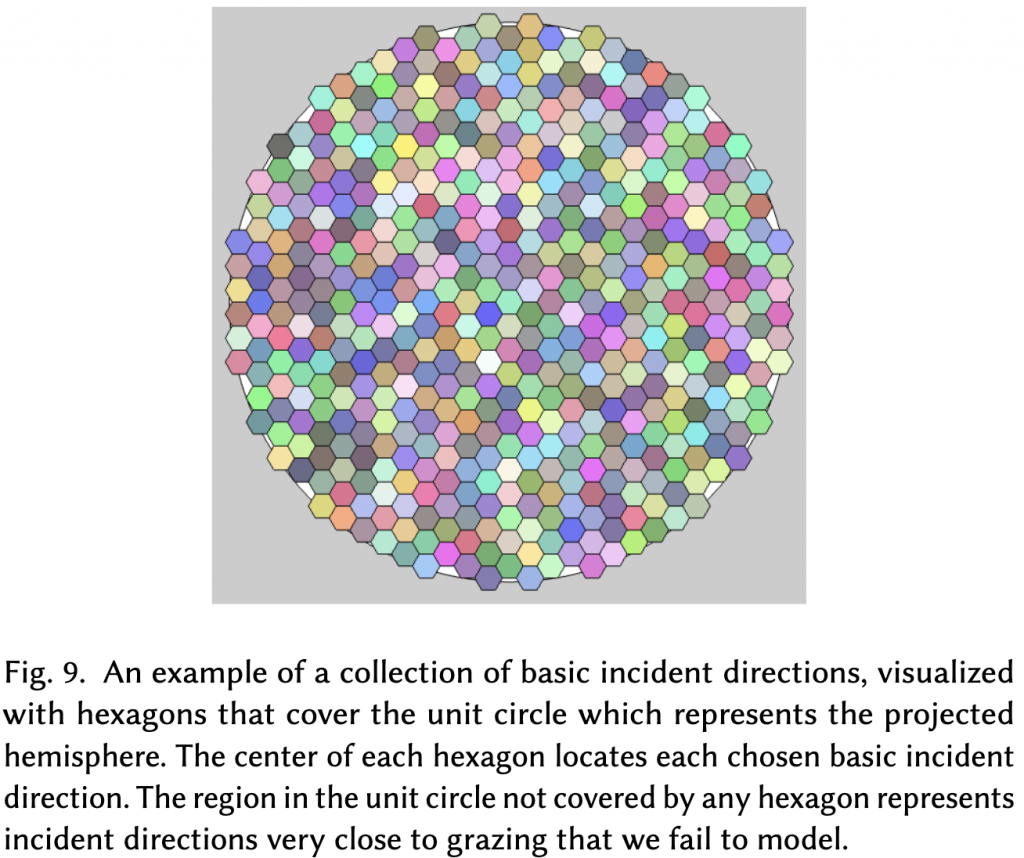
    The center of each hexagon corresponds to a basic direction of incidence. All the directions of incidence in the entire hemisphere are divided into several territories, and each territory belongs to a basic direction of incidence. In the hemispherical projection, this proportional relationship and the cosine factor cancel each other out, so you can useHexagons of equal sizeTo express.

    For each cardinal direction, several derived directions that deviate from the cardinal direction can be generated through "beam steering".

    When the incident angle of light is very small (for example, close to the surface normal direction), the range of derived directions near the basic incident direction is very small, because the light at a small angle is more concentrated and will not diffuse greatly. Conversely, the range of derived directions will be larger. In summary, the larger the incident angle (the closer the angle is to the horizontal), the larger the coverage of the derived directions. The author of the formula also mentioned: $1/\cos \theta_i$.

    5.2 Individual Simulations and Synthesized Results

    In order to calculate the BRDF, we need to know the scattering of this large area of incident light. However, directly simulating such a large area of light will require a high computational cost. Therefore, we:

    The large-scale incident field is simulated using a superposition of small-scale simulations.

    Think of it as using many small flashlights (Gaussian beams) to cover an area, rather than one giant searchlight.

    First, determine the size of the flashlights (the size of the beam, i.e. the waist width $w$) and evenly distribute them on the surface. Written as a formula, this arrangement of flashlights is the grid point ${x_s}, {y_t}$, representing the center position of each Gaussian beam. The grid spacing is generally the same as the waist width to ensure uniform coverage of the light and keep the divergence angle low.

    Let each Gaussian beam produce the same electromagnetic field in its central region, just repeating the effect at different locations.

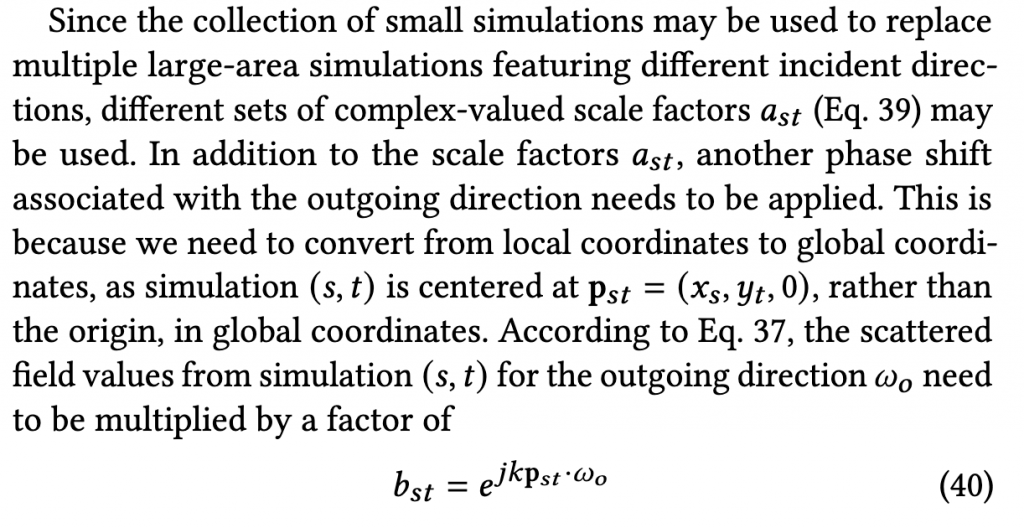
    Next, to get the total scattered field of a large beam, we needPhase FactorTo perform “adjustment” and “superposition”, please refer to formula (39) for details.

    Finally, Combining with Eq. 39, the scattered fields in the far field region corresponding to the pair of directions $(w_i,w_o)$ are given by:

    $$ \begin{aligned} \mathbf{E}\left(\omega_i, \omega_o\right) & =\sum_{s=1}^n \sum_{t=1}^ne^{jk \mathbf{p} {st} \cdot\left(\omega_i+\omega_o\right)} \mathbf{E}{st}\left(\omega_o\right) \\ \mathbf{H}\left(\omega_i, \omega_o\right) & =\sum_{s=1}^n \sum_{t= 1}^ne^{jk \mathbf{p}{st} \cdot\left(\omega_i+\omega_o\right)} \mathbf{H}{st}\left(\omega_o\right) \end{aligned} \tag{41} $$

    where $\mathbf{E}, \mathbf{H}$ refer to the far field quantities only associated with directions (without the $e^{-jkr} / r$ term).

    Finally, we can compute the surface BRDF value as

    $$
    f_r\left(\omega_i, \omega_o\right)=\frac{\frac{1}{2}\left|\mathbf{E}\left(\omega_i, \omega_o\right) \times \mathbf{H} \left(\omega_i, \omega_o\right)^*\right|}{\Phi_i \cos \theta_r}
    \tag{42}
    $$

    where the incident power $\Phi_i$ is computed by integrating the incident irradiance over the surface:

    $$
    \Phi_i=\frac{1}{2} \int_S\left|\left[\mathbf{E}_i\left(\mathbf{r}^{\prime}\right) \times \mathbf{H}_i\ left(\mathbf{r}^{\prime}\right)^*\right] \cdot \mathbf{n}\right| d \mathbf{r}^{\prime}
    \tag{43}
    $$

    where $\mathbf{n}$ is the surface normal at the macro scale ( $+\mathbf{z}$ ). Note that Eq. 42 and Eq. 43 can also be applied in single simulations, where $\Phi_i$ is computed from a single Gaussian beam.

  • 波动光学毛发渲染:相关论文汇总整理(一)-学习笔记-3

    Wave Optics Hair Rendering: A Summary of Related Papers (I) - Study Notes-3

    Disclaimer: This is a pure garbage article, which is a supplement to the previous two articles. I just sorted it out for my own review. All titles can be redirected to the paper homepage. Special terms are given in Chinese and English as much as possible. If there are any mistakes, please point them out. Thank you very much.

    original:https://zhuanlan.zhihu.com/p/830617613

    Table of contents

    1. [Xia 2023] A Practical Wave Optics Reflection Model for Hair and Fur
    2. [Xia 2023] Iridescent Water Droplets Beyond Mie Scattering
    3. [Aakash 2023] Accelerating Hair Rendering by Learning High-Order Scattered Radiance
    4. [Kneiphof and Klein 2024] Real-Time Rendering of Glints in the Presence of Area Lights
    5. [Huang 2024] Real-time Level-of-detail Strand-based Hair Rendering
    6. [Xing 2024] A Tiny Example-Based Procedural Model for Real-Time Glinty Appearance Rendering
    7. [Zhu 2022] Practical Level-of-Detail Aggregation of Fur Appearance
    8. [Clausen 2024] Importance of multi-modal data for predictive rendering
    9. [Shlomi 2024] A Free-Space Diffraction BSDF
    10. [Kaminaka 2024] Efficient and Accurate Physically Based Rendering of Periodic Multilayer Structures with Iridescence
    11. [Yu 2023] A Full-Wave Reference Simulator for Computing Surface Reflectance
    12. [Shlomi 2022] Towards Practical Physical-Optics Rendering
    13. [Huang 2022] A Microfacet-based Hair Scattering Model
    14. [Shlomi 2021] A Generic Framework for Physical Light Transport
    15. [Shlomi 2024] A Generalized Ray Formulation For Wave-Optics Rendering
    16. [Shlomi 2021] Physical Light-Matter Interaction in Hermite-Gauss Space
    17. [GUILLÉN 2020] A general framework for pearlescent materials
    18. [Werner 2017] Scratch iridescence: Wave-optical rendering of diffractive surface structure
    19. [Fourneau 2024] Interactive Exploration of Vivid Material Iridescence using Bragg Mirrors
    20. [Chen 2020] Rendering Near-Field Speckle Statistics in Scattering Media
    21. [Kajiya and Kay 1989] Kajiya-Kay Model
    22. [Marschner 2003] Light Scattering from Human Hair Fibers
    23. [Benamira 2021] A Combined Scattering and Diffraction Model for Elliptical Hair Rendering
    24. [Zinke 2008] Dual Scattering Approximation for Fast Multiple Scattering in Hair

    [Xia 2023] A Practical Wave Optics Reflection Model for Hair and Fur

    Wave optics, hair rendering, surface electromagnetics, far-field scattering

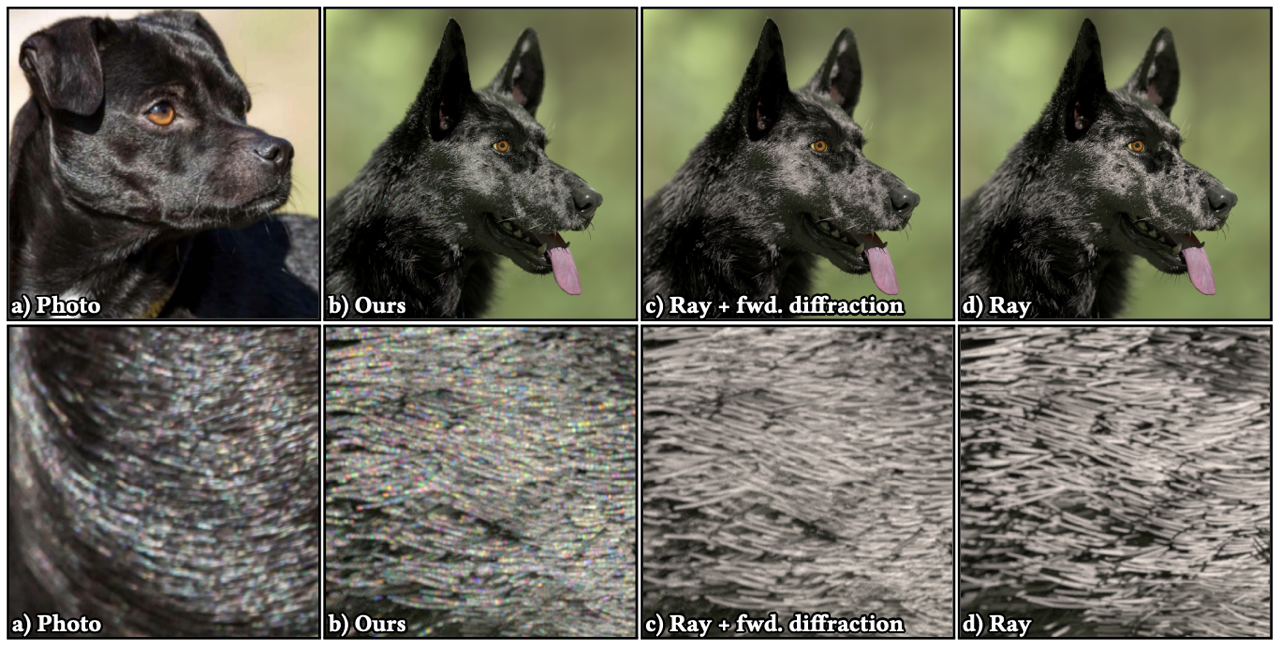
    Wave optics is used to render hair. The surface electromagnetic field is calculated to obtain the scattered field, and then noise is added to simulate the Glints effect.

    I found that the authors of this series are all very good-looking. (crossed out)

    img

    1. Background

    Hair rendering has been mainly based on ray tracing technology, which cannot handle wave optics effects, such as strong forward scattering and subtle color changes on the hair surface. Previous research [Xia et al. 2020] demonstrated that diffraction effects play a key role in the color and scattering direction of fibers. However, this study did not consider surface roughness and the microstructure of the fiber epidermis (such as tilted keratin scales).

    2. Motivation

    In order to make up for the lack of treatment of diffraction and forward scattering (such as Glints phenomenon) in the existing light optics model.

    Although full-wave simulations can produce very detailed scattering data, the computational effort is still too high and must be accelerated or simplified in some way to achieve hair or fur rendering in large-scale scenes.

    We wanted to develop a model that could efficiently handle various fiber geometry variations.

    3. Methods

    Hair modeling is based on scanning electron microscope (SEM) images of hair.

    Use "WAVE SIMULATION WITH 3D FIBER MICROGEOMETRY" to calculate the reflection and diffraction of rough fiber surfaces. That is, PO.

    Speckle theory is introduced to analyze the statistical characteristics of the scattering pattern, and noise is used to accelerate it.

    [Xia 2023] Iridescent Water Droplets Beyond Mie Scattering

    Wave optics, iridescence effect, Quetelet scattering model of water droplets on water surface

    Combining Mie scattering, Quetelet scattering (light interference) and dynamic changes of water droplets, the rainbow-like color effect of water droplets on the water surface and in the steam is realistically rendered, surpassing the traditional single Mie scattering model.

    img

    1. Background

    Iridescence is common in nature, especially in water droplets, fog and steam. It can generally be explained by Mie scattering. Mie scattering describes the scattering effect that occurs when light encounters spherical particles of the same wavelength. It is one of the important theories currently used to simulate natural phenomena such as water droplets, clouds, rain and fog.

    However, while Mie scattering can explain the optical properties of isolated water droplets, it cannot fully explain phenomena such as the iridescence of water droplets on the surface of water and the complex rainbow patterns in vapor. Phenomena depend not only on how individual particles scatter light, but also on surface reflections, interference effects, and dynamic changes in particle size.

    2. Motivation

    Mie scattering can only deal with isolated light scattering phenomena and cannot explain more complex optical interference effects.

    Accurately simulating these natural phenomena can greatly improve the realism and look and feel of image rendering.

    Existing computer optical models and rendering methods are mostly limited to Mie scattering and cannot explain the interaction of light in a multi-particle environment, such as light interference and reflection between water droplets or between water droplets and surfaces.

    3. Methods

    The "Quetelet scattering model on water" is used to explain the rainbow effect produced by water droplets floating on the water surface. By building an empirical model, thermal imaging technology is used to relate temperature to the size and height of water droplets. Quetelet scattering phase function and BRDF (bidirectional reflectance distribution function) are used to render particle groups and water surfaces.

    A water droplet growth and evaporation model was developed to simulate the dynamic changes of water droplets in steam. Combined with Mie scattering, water droplets of non-uniform size were used to simulate the rainbow color changes in steam. In order to improve rendering efficiency, an acceleration algorithm based on motion blur was used, which increased the calculation speed by 10 times compared with traditional methods.

    [Aakash 2023] Accelerating Hair Rendering by Learning High-Order Scattered Radiance

    Hair rendering, MLP, accelerated hair scattering

    The method of learning hair higher-order scattered radiance online combined with a small multilayer perceptron (MLP) significantly accelerates hair rendering in a path tracing framework, reducing computation time and introducing only a small amount of bias.

    img

    1. Background

    The multiple scattering of hair is very complex, especially in the path tracing process, because it is necessary to simulate the multiple scattering of light between hairs, which makes it difficult to converge.

    2. Motivation

    Develop a method to improve computational efficiency while maintaining high-quality simulation of multiple scattering effects.

    In the existing technology, some methods make simplifying assumptions about the scene or lighting. This paper hopes to propose a general method that does not make any assumptions about the scene.

    3. Methods

    A small multilayer perceptron (MLP) is used to learn higher-order scattered radiance online. This MLP network learns the scattering properties of hair in real time during the rendering process, without relying on pre-computed tables or simulations.

    The MLP is integrated into the path tracing framework to infer and compute higher-order diffuse radiation contributions.

    The renderer's bias and speedup can be adjusted in real time to find the optimal balance between computational efficiency and rendering quality.

    [Kneiphof and Klein 2024] Real-Time Rendering of Glints in the Presence of Area Lights

    Accelerated area light source Glints, microsurface models, real-time rendering

    Rendering glints under area lights is done in real time by combining Linearly Transformed Cosines (LTC) with a microsurface count model based on the binomial distribution.

    img

    1. Background

    Many real-world materials (such as metals, gemstones, etc.) have a glittering appearance, which is caused by the reflection of micro-surfaces. However, glitter is a discrete phenomenon, and the computational complexity of wave optics simulation is too large.

    Previous studies have mostly focused on using infinitesimal point light sources to render flash effects, which is a reasonable simplification for distant light sources like the sun, but in reality most light sources are essentially area light sources. Existing technologies have not been able to effectively handle flash rendering under area light sources.

    2. Motivation

    Glint rendering under area lights. Area lights (such as the light shining into a room through a window) are a common type of light, and how to efficiently render glint effects under such lights is an unsolved problem. We hope to develop a method that can accurately render glint effects under area lights while meeting the needs of real-time rendering.

    It is hoped that it can be easily integrated into existing real-time rendering frameworks without introducing significant additional overhead to existing area light shading methods.

    3. Methods

    Glint reflection probability estimation computes the probability that a microfacet is correctly oriented to reflect light from a light source to an observer, using Linearly Transformed Cosines (LTC) for large sources and a locally constant approximation for small sources.

    The number of reflective microsurfaces is counted using a binomial distribution-based counting model.

    Integration with existing frameworks.

    [Huang 2024] Real-time Level-of-detail Strand-based Hair Rendering

    Hair rendering, LoD, based on hair strands, BCSDF

    An innovative real-time strand-based hair rendering framework is proposed, which ensures the consistent appearance of hair at different view distances and achieves significant rendering acceleration through seamless level-of-detail (LoD) transition.

    img

    1. Background

    Strand-based hair rendering is becoming increasingly popular in film, television and game production for its realistic appearance, but it is computationally very expensive, especially at long viewing distances.

    The current LoD method is prone to noticeable discontinuities in the transition from hair strands to cards, resulting in inconsistent appearance.

    2. Motivation

    Solve discontinuity in dynamics and appearance. Existing solutions for converting hair strands to hair cards have significant differences in appearance and animation performance. The goal of this paper is to achieve seamless LoD transition from far to near, eliminating appearance changes during transition while maintaining computational efficiency.

    3. Methods

    Encapsulates multiple hair strands within an elliptical volume using an elliptical thick hair model. The shape and overall structure of the hair cluster is maintained at different LoDs, providing a consistent look as the view distance changes.

    The elliptical bidirectional curve scattering distribution function (BCSDF) simulates single and multiple scattering phenomena within hair clusters and is suitable for hair distribution scenarios ranging from sparse to dense and from static to dynamic.

    Dynamic LoD adjustment and hair width calculation.

    [Xing 2024] A Tiny Example-Based Procedural Model for Real-Time Glinty Appearance Rendering

    Glints, material self-similarity

    A model based on tiny example microstructures that renders glinty effects in real time, significantly reducing memory usage and computational overhead while maintaining the realism of high-frequency reflection details.

    img

    1. Background

    The shimmering details produced by complex microstructures can significantly improve the realism of renderings, especially on materials such as metals and gemstones. These details usually require high-resolution normal maps to define each micro-geometry, but such methods have high memory requirements and are not suitable for real-time rendering applications.

    2. Motivation

    Reduce memory and computational overhead.

    Leveraging material self-similarity: Many materials have independent structural features and self-similarity, and small samples are used to implicitly represent complex microstructures, thereby reducing memory requirements.

    3. Methods

    A tiny example-based procedural model based on the microstructure of a small sample can generate complex sparkle details by reusing a small number of samples based on the self-similarity of the material.

    Precomputed Normal Distribution Functions (NDFs) Precompute and store small samples of normal distribution functions (NDFs) using 4D Gaussians. Stored in multi-scale NDF maps and called by simple texture sampling at rendering time.

    A tiny example-based NDF evaluation method combines texture sampling with a small example NDF evaluation method to quickly generate the shiny appearance of complex surfaces.

    [Zhu 2022] Practical Level-of-Detail Aggregation of Fur Appearance

    Hair rendering, simplified hair count, neural networks

    A practical hair appearance aggregation model that significantly accelerates hair rendering while maintaining realistic visual effects by reducing the number of geometric hairs and combining multiple scattering of light, using neural networks to achieve real-time dynamic simplification.

    img

    1. Background

    If there are too many hairs, the light scattering and reflection of each hair will greatly increase the calculation amount, especially when simulating multiple light scattering.

    Most existing simplification methods improve rendering efficiency by reducing the number of hairs, but this method has great limitations. This method can cause the hair to look too rough or dry, and the reflection and scattering effects of light are not realistic.

    2. Motivation

    Reducing geometric complexity.

    Improving rendering efficiency.

    3. Methods

    An aggregated fur appearance model is proposed, which uses a thick cylinder to represent the optical behavior of a group of hair clusters. By analyzing the optical properties of individual hairs (such as the incident angle of light), the model can accurately reflect the aggregated appearance of hair clusters.

    A lightweight neural network is used to map the optical properties of individual hairs to parameters in the aggregate model.

    A dynamic level-of-detail scheme based on view distance and number of light bounces is proposed to dynamically simplify the geometric structure of hair.

    [Clausen 2024] Importance of multi-modal data for predictive rendering

    Predictive rendering, spectral rendering, microsurface geometry

    Multi-modal data is important for predictive rendering, especially in accurately modeling material reflection behavior. By combining spectral, spatial information and micro-geometric details, the realism and computational efficiency of reflection models can be improved.

    img

    1. Background

    The need for predictive rendering aims to accurately simulate the appearance of materials.

    Most current databases on material reflection behavior are limited to a single dimension, usually covering only the spectral domain or the spatial domain, and lack descriptions of microgeometry details.

    2. Motivation

    In order to address data limitations, multimodal data can not only better simulate the reflection of materials under different lighting conditions, but also reveal the influence of the microscopic geometry of the material surface on light scattering.

    Multimodal reflectance data can help develop more realistic and efficient reflectance models.

    3. Methods

    Building a multi-modal reflection database, including spectral data, spatial distribution data and microgeometry details of the material.

    Simulating microgeometry of the microgeometry of a material surface.

    Integrating spectral and spatial domains.

    [Shlomi 2024] A Free-Space Diffraction BSDF

    Wave optics, electromagnetic computing, free space diffraction, importance sampling, PT integration,

    A bidirectional scattering distribution function (BSDF) based on free-space diffraction can efficiently simulate the diffraction phenomenon of light around the edges of objects in complex scenes through ray tracing without the need for geometric preprocessing, and is particularly suitable for path tracing technology.

    img

    1. Background

    Free-space diffraction is an optical phenomenon in which light is diffracted when it encounters an edge or corner of an object, bending some of its energy into the shadowed area. This phenomenon is important for modeling the propagation of light waves, especially at long wavelengths, such as radar, WiFi, and cellular signals.

    The limitations of traditional methods such as the Geometric Theory of Diffraction (GTD) and the Unified Theory of Diffraction (UTD) are the extremely high computational complexity caused by the need to deal with light rays that interfere with each other, especially in complex geometric scenes. Existing methods rely on scene simplification and specific geometric structures and cannot effectively handle complex three-dimensional scenes.

    2. Motivation

    Addressing diffraction rendering in complex scenes. Existing diffraction simulation methods are difficult to scale and make compatible with path tracing techniques.

    Existing diffraction methods often rely on complex nonlinear interference calculations, while path tracing uses linear rendering equations. This paper hopes to design a free-space diffraction BSDF that works efficiently within the path tracing framework without requiring major modifications to the path tracer.

    3. Methods

    The Fraunhofer diffraction edge model is based on Fraunhofer diffraction. Near the intersection of light and geometric objects, the relevant edges are identified and the diffraction effects are calculated. When the light hits the object, the BSDF of free space diffraction is constructed through geometric analysis to quantify how the light propagates around the geometric object and how much energy is diffracted.

    The importance sampling strategy evaluates the geometric edges around the points where the ray interacts with the object and samples and traces the diffracted rays.

    Seamless integration in path tracing

    [Kaminaka 2024] Efficient and Accurate Physically Based Rendering of Periodic Multilayer Structures with Iridescence

    Multi-layer oil film rendering, iridescence effect, wave optics

    A multi-layer interference rendering method. It can express the iridescence effect of periodic multi-layer structures. By introducing the Huxley method from biology, it can achieve efficient calculation independent of the number of layers.

    img

    1. Background

    Thin-film interference is an optical phenomenon caused by the wave properties of light waves, which produces iridescence when the viewing angle or illumination angle changes. It usually appears in single-layer or multi-layer structures in nature, such as butterfly wings, beetle shells and dielectric mirrors.

    The limitations of existing methods such as recursive calculation method and transfer matrix method (TMM) are that the computational complexity increases significantly with the number of layers. Simplified methods ignore multiple reflections in thin films.

    2. Motivation

    Improving efficiency for multilayer structures.

    Applied to physical rendering of complex materials.

    3. Methods

    A multilayer interference model based on Huxley's approach is proposed. It can efficiently calculate the reflection and transmission coefficients in periodic multilayer structures and supports multiple materials and absorption effects.

    Based on BRDF implementation. Implemented as a BRDF (Bidirectional Reflectance Distribution Function), it can be integrated into traditional rendering systems such as PBRT-v3.

    [Yu 2023] A Full-Wave Reference Simulator for Computing Surface Reflectance

    Wave optics, full-wave simulation

    Full-wave simulator based on the boundary element method (BEM) that can calculate light scattering on rough surfaces with high accuracy. It is used to evaluate and improve approximate reflection models in computer graphics, especially when multiple scattering, interference and diffraction effects are significant.

    img

    1. Background

    Surface reflection models are usually based on geometric optics, which assumes that light propagates in the form of rays. For scenes where surface features are comparable to the wavelength of light, geometric optics models cannot accurately capture wave effects such as diffraction and interference.

    Based on wave optics approximations, such as Beckmann-Kirchhoff theory and Harvey-Shack model, they still produce errors under multiple scattering and complex geometric structures.

    2. Motivation

    Since existing reflection models have different accuracy in different situations, there is a lack of reliable benchmarks to verify their accuracy. The goal of this paper is to develop a simulator based on full-wave theory to minimize approximations and achieve high-precision surface reflection calculations through numerical discretization, thereby providing a reference tool that can be used to evaluate the accuracy of various reflection models.

    Addressing multiple scattering and wave effects.

    3. Methods

    Boundary Element Method (BEM), accelerated by Adaptive Integral Method (AIM).

    The simulator's full-wave simulation completely solves Maxwell's equations and can accurately simulate wave phenomena such as light propagation, interference, and scattering.

    And it can efficiently calculate BRDF (efficient BRDF computation).

    [Shlomi 2022] Towards Practical Physical-Optics Rendering

    Wave optics, PLT

    We propose an efficient Physical Light Transport (PLT) framework that exploits the principles of partially coherent light and wave optics to achieve accurate rendering of interference, diffraction, and polarization effects in complex scenes through an improved rendering algorithm, bringing its performance close to that of classic “physically based” rendering methods.

    img

    1. Background

    Most existing rendering methods ignore the wave characteristics of light, especially in complex scenes, which makes it impossible to render physical phenomena such as interference and diffraction of light, which are particularly important on certain materials (such as iridescent coatings, optical discs, etc.). To solve this problem, a rendering framework based on Maxwell's electromagnetic theory is proposed.

    Although PLT provides a theoretical full-wave model that can simulate the coherence, interference and diffraction of light, existing methods are very computationally difficult.

    2. Motivation

    Simplifying the physical light transport model.

    Introducing new coherence-aware materials and developing material models that can perceive light coherence will improve the usability of PLT in practical scenarios.

    3. Methods

    Restricting the coherence shape of light, through thermodynamic derivation, proves that this approximation is reasonable under most natural light sources.

    An extended Stokes-Mueller calculus is used to combine the radiation, polarization and coherence properties of light as new rendering primitives. The generalized Stokes parameters can fully quantify all properties of light and accurately simulate complex optical phenomena caused by these properties, such as interference and diffraction.

    Wave BSDF and importance sampling.

    New coherence-aware material models take full advantage of the coherence properties of light to expand the scope of application of PLT.

    [Huang 2022] A Microfacet-based Hair Scattering Model

    Hair rendering, scattering lobes, BCSDF

    The first hair scattering model based on microsurface theory is proposed to accurately describe the scattering behavior of hair, including non-separable scattering lobe structure, elliptical cross section, efficient importance sampling and forward scattering spot (glint-like) effect.

    img

    1. Background

    Complexity of hair rendering. Most existing hair scattering models simplify the mathematical calculations through separable scattering lobes, which are fast but not ground truth.

    Most hair scattering models are based on geometric simplification, treating hair as smooth cylinders, which leads to deviations in scattering behavior.

    2. Motivation

    Introducing a physically-plausible microfacet model more accurately describes the scattering behavior of hair: the surface microscopic roughness, the tilted scale structure, and the non-separable scattering lobe shapes.

    Improving sampling efficiency and physical accuracy.

    3. Methods

    The hair modeling is combined with microfacet theory, and GGX or Beckmann normal distribution is applied to describe the microscopic roughness of the surface. And it is non-separable lobes.

    The bidirectional curve scattering distribution function (BCSDF) describes the complex interaction of light on the hair surface.

    Support for elliptical cross-sections and efficient sampling. Support for elliptical cross-sections for hair.

    [Shlomi 2021] A Generic Framework for Physical Light Transport

    Wave optics, PLT

    The first global light transport framework based on Maxwell's electromagnetic theory that can handle partially coherent light is proposed, which accurately simulates the interference and diffraction effects of light and extends the traditional radiometric-based light transport theory to the field of wave optics.

    img

    1. Background

    Existing light transport models are usually based on geometric optics and radiometry, which ignore the wave characteristics of light and cannot simulate phenomena such as interference and diffraction. They cannot accurately reproduce wave optical effects such as rainbow effect, grating, thin film interference, light polarization, etc., which is the limitation of classical radiometric light transport models.

    Current models can only handle local treatment of wave effects, but cannot account for the transmission and coherence of light in global scenes.

    2. Motivation

    Achieving global wave-optics consistency in light transport, that is, combining Maxwell's electromagnetic theory.

    Combining wave optics with classical geometric optics (integrating wave optics with classical geometric optics) can deal with the wave effect of light and be consistent with classical geometric optics in the short wavelength limit.

    3. Methods

    Modeling partially-coherent light is divided into two parts: two-point coherence description and light source model. Different from traditional radiance, this paper introduces a "cross-spectral density function" based on the partial coherence of light, which can capture the interference characteristics of light. The physical model of natural light sources is based on the principle of spontaneous radiation in quantum mechanics.

    Generalizing the light transport equation. The spectral-density transport equation is used to calculate the interference and diffraction effects of light during propagation. This paper also proves that the framework can be simplified to classical geometric optics in the short wavelength limit, so it can be seamlessly integrated with existing light transport methods.

    Diffraction and propagation model.

    [Shlomi 2024] A Generalized Ray Formulation For Wave-Optics Rendering

    Wave optics, wave sampling theory, bidirectional path tracing

    A generalized ray formal model is proposed for wave optics rendering. By solving the sampling problem, weak locality, linearity and completeness are simultaneously established in wave optics. Bidirectional wave optics path tracing and efficient rendering are achieved in complex scenes.

    img

    1. Background

    The classical model of light transport is based on ray optics, which assumes that light propagates as a point query in a linear manner. However, ray optics cannot capture the wave nature of light and ignores interference and diffraction phenomena, such as the iridescence effect, thin film interference, and diffraction of long-wave radiation.

    Although wave optics can accurately describe the interference and diffraction effects of light, traditional sampling and path tracing techniques are difficult to apply due to its nonlinear behavior.

    2. Motivation

    Solving the sampling problem in wave optics. In order to apply wave optics in bidirectional optical transmission, it is necessary to solve the sampling problem under weak locality.

    Develop a novel formalism of wave optics that enables efficient applications in inverse path tracing and bidirectional light transport while maintaining linearity and completeness.

    Improving wave-optics rendering efficiency, making the convergence speed of wave-optics rendering close to that of classical ray optics rendering systems.

    3. Methods

    Introduction of the generalized ray. Perform weak local linear queries. Generalized rays are no longer limited to point queries at a single location, but occupy a small spatial region. They can capture the interference and diffraction effects of light.

    Weak locality and linearization. In wave optics, perfect locality and linearization cannot be achieved simultaneously. Therefore, perfect locality is abandoned. Weak locality is adopted to ensure that generalized rays can be linearly superposed.

    Backward wave-optical light transport model.

    Application in bidirectional path tracing.

    [Shlomi 2021] Physical Light-Matter Interaction in Hermite-Gauss Space

    Wave optics, PLT

    A new framework for light-matter interaction is proposed, which unifies the formulas for scattering and diffraction by decomposing partially coherent light into the Hermite-Gauss space and modeling matter as a locally stationary random process, and enables efficient calculation and description of complex optical phenomena.

    img

    1. Background

    The light observed in daily life is usually composed of many independent electromagnetic waves. Due to the complexity of partially-coherent light, the coherent properties of partially coherent light, such as reflection on microscopic geometric surfaces, the appearance of coating materials, grating effects, etc., cannot be explained by classical radiosity theory.

    The limitations of existing tools only allow for rendering of specific materials and are difficult to generalize.

    2. Motivation

    Building a general-purpose light-matter interaction framework to efficiently process partially coherent light and simplify the complexity of existing computational tools.

    Decomposing light coherence properties, the Hermite-Gauss space is introduced in the hope of decomposing and representing the coherence of light in a computationally feasible way, which is widely applicable to various optical phenomena.

    3. Methods

    Light transport in Hermite-Gauss space.

    Locally-stationary matter model.

    Analysis of light-matter interaction.

    Unifying light-matter interaction formulae.

    [GUILLÉN 2020] A general framework for pearlescent materials

    Wave optics, interference pigment optics, inverse rendering

    Simulate the optical properties of pearlescent materials, and provide a theoretical basis for the design and reverse rendering of pearlescent materials.

    img

    1. Background

    Wide Applications of Pearlescent Materials. These materials have unique gloss and color-changing effects and are widely used in packaging, ceramics, printing, cosmetics and other fields.

    The complex optical processes of pearlescence are derived from multiple scattering and wave optical interference between pigment flakes. Existing models are difficult to fully describe these complex optical behaviors.

    2. Motivation

    Building a More Comprehensive Model for Pearlescent Materials. Existing pearlescent material models do not adequately account for the complex structure of pigments and the effects of the manufacturing process. The goal is to expand the range of pearlescent appearances that can be represented by introducing new optical simulation models.

    A generic pearlescent material model can also be used in reverse rendering.

    3. Methods

    An optical model based on interference pigments is proposed, which takes into account the multilayer structure of pigment flakes, the directional correlation of particles, thickness variation and other characteristics.

    Systematic Study of Parameter Space, exploring the effects of orientation, thickness, and arrangement of pigment flakes on the material’s appearance.

    Inverse Rendering helps interpret light scattering phenomena in the real world.

    [Werner 2017] Scratch iridescence: Wave-optical rendering of diffractive surface structure

    Wave optics, non-paraxial scalar diffraction theory, iridescence effect, microscopic scratches

    A wave optics model based on non-paraxial scalar diffraction theory is used to simulate the iridescence effect on microscopic scratched surfaces, from local spots to smooth reflections at long distances.

    img

    1. Background

    Optical Effects of Scratches: Under directional lighting (such as sunlight or halogen lamps), these scratched surfaces will show complex iridescent patterns, which are caused by the diffraction of incident light by the scratch structure. This cannot be reproduced in the geometric optics model.

    Although existing analytical models are able to reproduce the iridescence effect of some microstructures (such as optical discs), simulation of the optical behavior of locally resolved scratches remains a challenge.

    2. Motivation

    Provide a Wave-Optical Scratch Rendering Framework, which can accurately simulate the optical effects caused by scratches, including light spots, iridescence and other visual phenomena.

    3. Methods

    Wave-Optical Model Based on Non-Paraxial Scalar Diffraction Theory: The method in this paper can accurately simulate the diffraction behavior of light on micro-scale surface features at large angles of incidence and reflection.

    Vector Graphics Representation of Scratch Surfaces.

    Multi-Scale BRDF Model.

    Integration and Optimization in Physically-Based Rendering Systems.

    [Fourneau 2024] Interactive Exploration of Vivid Material Iridescence using Bragg Mirrors

    Wave optics, iridescence effect, Bragg mirror, spectral approximation

    Describes the material iridescence effect of 1D photonic crystals (i.e. Bragg mirrors). Simplifies to a single bounce BRDF for fast computation under certain conditions.

    img

    1. Background

    Iridescence in nature is manifested in organisms, plants or gemstones. It is caused by specific microscopic geometric structures whose size is comparable to the wavelength of visible light. The most prominent example is photonic crystals, which produce structural colors by repeating in one-, two- or three-dimensional structures.

    1D photonic crystals, or optical properties of Bragg mirrors. Most existing works use the classic transfer matrix method to calculate the optical effects of multilayer films, but as the number of films increases, the computational complexity increases significantly.

    2. Motivation

    Simplifying the computation of Bragg mirror reflectance, introducing a more concise, closed-form reflection formula and exploring fast approximation methods in RGB spectral rendering.

    Investigating the effects of rough Bragg layers to explore the influence of surface roughness on optical performance.

    3. Methods

    Introduce the closed-form reflectance formula. Based on Yeh's formula (Yeh88 Formula), do RGB spectral approximation (RGB Spectral Approximation).

    Analyze the effect of roughness on optical transmission.

    The appearance of a rough Bragg layer is efficiently rendered using the Single-reflection BRDF Model.

    [Chen 2020] Rendering Near-Field Speckle Statistics in Scattering Media

    MC path integral, importance sampling, memory effect, speckle, biological tissue imaging

    Simulating speckle statistics under near-field imaging conditions in scattering media accelerates speckle rendering in biological tissue imaging applications and provides support for speckle-based imaging techniques.

    img

    1. Background

    When performing deep imaging in biological tissues, imaging becomes very difficult due to multiple scattering of light inside the tissue. When irradiated with coherent light (such as laser), high-frequency speckle patterns are generated inside the tissue. The statistical properties of speckle patterns, especially the memory effect, provide the basis for tissue imaging techniques (such as fluorescence imaging and adaptive optical focusing).

    The limitations of existing models are that they mainly focus on far-field imaging, while near-field conditions are ignored.

    2. Motivation

    Developing a Physically Accurate and Efficient Model for Near-Field Speckle Rendering.

    Improving Computational Efficiency of Speckle Simulations. The wave equation solver is too computationally intensive.

    3. Methods

    Monte Carlo Path Integral Rendering Framework.

    Aperture and Phase Function Approximations.

    Importance Sampling.

    [Kajiya and Kay 1989] Kajiya-Kay Model

    The originator of hair, no need to say more

    The hair is simplified as a thin and long cylinder, and the light reflection behavior of the hair surface is simulated by extending the Phong model.

    img

    1. Background

    Based on the concept of Phong lighting model, it is extended into an empirical model suitable for hair rendering.

    2. Motivation

    Hair has very unique optical properties, such as specular reflection, subsurface scattering, etc., and the emergence of these phenomena is closely related to the geometric shape and surface structure of hair.

    3. Methods

    The Kajiya-Kay model is based on the idea of the Phong model and is an extension of the Phong model.

    Cylindrical Hair Representation.

    [Marschner 2003] Light Scattering from Human Hair Fibers

    The originator of hair, no need to say more +1

    It is able to capture key visual effects that existing Kajiya-Kay models cannot describe, such as multiple highlights and scattering variations associated with fiber axis rotation.

    img

    1. Background

    Limitations of the Kajiya-Kay Model assumes that hair is only an opaque cylinder, ignoring key phenomena such as internal reflection and transmission.

    2. Motivation

    Hair is a dielectric material, and especially light-colored hair (such as blonde, brown, and red) has significant translucency. Therefore, there is a need for a More Accurate Hair Scattering Model.

    3. Methods

    The 3D full hemispherical light scattering of a single hair was measured.

    The Transparent Elliptical Cylinder Model is proposed.

    Simplified Shading Model.

    [Benamira 2021] A Combined Scattering and Diffraction Model for Elliptical Hair Rendering

    Wave optics, hair rendering, elliptical hair, diffraction scattering lobe function, no pre-calculation

    A new combined scattering and diffraction model that simulates light scattering and diffraction phenomena for hair with an elliptical cross-section without pre-calculation.

    img

    1. Background

    Still with wave optics as the background, when light interacts with objects whose size is close to the wavelength of light, interference and diffraction effects become significant.

    Rendering hair requires considering its geometric properties as well as the wave effects of light. While ray tracing can simulate most scattering phenomena, it falls short when it comes to diffraction in hair.

    2. Motivation

    Addressing Diffraction and Elliptical Cross-sections. A model combining the wave and ray properties of light is proposed to handle the light diffraction phenomenon of hair without pre-calculation. Supports hair fibers with arbitrary elliptical cross-sections.

    3. Methods

    The ray part (Ray Interaction with Elliptical Fibers) introduces a complete light transport model, continues the traditional ray model, and handles most scattering effects.

    The Wave Diffraction by Elliptical Fibers section introduces a new diffraction scattering lobe function that captures the strong forward scattering effect that occurs when light interacts with hair.

    Precomputation-free Approach.

    Integration with Modern Ray Tracers.

    [Zinke 2008] Dual Scattering Approximation for Fast Multiple Scattering in Hair

    Hair rendering, multiple scattering

    The "dual scattering" model is widely used in real-time rendering, and there is no need to explain this classic model.

    img

    1. Background

    In light-colored dense hair, multiple scattering is a key factor in determining the overall hair color.

    Existing methods based on path tracing or photon mapping are too slow to render and often ignore the circular cross-section of hair fibers.

    2. Motivation

    Need for a Physically Accurate and Efficient Multiple Scattering Model.

    3. Methods

    Dual Scattering Model, global multiscattering and local multiscattering. The global multiscattering part aims to calculate the light that passes through the hair volume and reaches the neighborhood of the target point, while the local multiscattering considers the scattering events within this neighborhood.

  • 毛发渲染研究:波动光学的毛发渲染-学习笔记-2

    Hair Rendering Research: Wave Optics Hair Rendering - Study Notes - 2

    Disclaimer: This article is mainly about my personal notes on this black dog hair paper in SIG23. There should be no threshold for reading, because I myself have not entered the graphics field. There are formulas, but not many. The formula tags are the same as the original paper. All the content is just my tinkering. If there are any misunderstandings in the formulas, please correct me. Thank you very much!

    original:https://zhuanlan.zhihu.com/p/809636731

    Keywords: Introduction to graphics, offline rendering, wave optics-based rendering, hair rendering

    Mengqi Xia, Bruce Walter, Christophe Hery, Olivier Maury, Eric Michielssen, and Steve Marschner, “A Practical Wave Optics Reflection Model for Hair and Fur,” ACM Transactions on Graphics (TOG), vol. 42, no. 4, article 39, pp. 1-15, Jul. 2023.

    1. Related Work

    • Ray-based fiber model In the study of human hair, the model of Marschner [2003] is widely used in the industry. It analyzes the light paths in dielectric cylinders and cones and separates the scattering into R, TT and TRT. Zinke [2009] added a diffuse reflection component. Sadeghi [2010] proposed an artist-controlled parameterization method. d'Eon [2014] and Huang [2022] proposed a non-separable characterization method, that is, there is a coupling effect between the azimuthal and longitudinal angles, which cannot be simply separated. Chiang [2016] further optimized the model to make it suitable for production-level rendering. In addition to human hair, Khungurn and Marschner [2017] explored the modeling of elliptical hair. Yan [2015, 2017] studied animal hair with an internal medulla. Aliaga [2017] generalized the model to textile fibers with more complex cross-sections.
    • Fiber Model Based on Wave Optics Linder [2014] resolved cylindrical fibers with perfectly circular cross-sections and investigated the scattering behavior. Xia [2020] demonstrated several important differences compared to the geometric optics model by performing two-dimensional wave simulations on cylinders with arbitrary cross-sections. However, this model is a regular circle and does not have microscopic geometric structures such as hair scales. Benamira and Pattanaik [2021] proposed a faster hybrid model that uses wave optics only for forward scattering and relies on geometric optics for the rest.
    • Plane model simulation based on physical optics Physical optics planar models use physical optics approximations to simulate the scattering behavior of light on nearly planar, rough surfaces that can be represented as height fields, including Gaussian random, periodic, precomputed, and scratched surfaces. They combine Kirchhoff scalar diffraction theory with path tracing methods to handle scattering and reflection, and calculate the diffraction of light on different rough surfaces through various models such as Beckmann-Kirchhoff and Harvey-Shack. Although these models are effective on planar surfaces, the closed nature of fiber geometry and complex light interactions require more complex treatments.
    • Computational Electromagnetics,Spickle Effect and Stylized noise This has been mentioned in the previous article, so I will skip it here.

    https://zhuanlan.zhihu.com/p/776529221

    2. Background Research

    Overview

    Hair modeling is based on scanning electron microscope (SEM) images of hair, which can accurately restore the microstructure of hair, such as hair scales and roughness.

    Next, use "WAVE SIMULATION WITH 3D FIBER MICROGEOMETRY" to calculate the reflection and diffraction of the rough fiber surface.

    On this basis, speckle theory is introduced to analyze the statistical characteristics of scattering patterns, and noise is used to describe these speckles, which greatly optimizes the model.

    Then, by comparing with the actual measured data, reasonable fiber parameters (such as size, skin angle and surface roughness) are derived and finally integrated into the rendering system.

    3. OVERVIEW

    3.1 Fiber scattering models

    I translate this into fiber scattering model. This describes the interaction between single fibers. The key here isBCSDF (Bidirectional Curvilinear Scattering Distribution Function)Unlike the bidirectional scattering distribution function (BSDF) commonly used in surface reflection and refraction, the BCSDF is designed specifically for curved fibers. The following formula states that when a given wavelength of light is irradiated on a fiber, it will be reflected or transmitted from another direction after entering from one direction.
    $$
    L_r(\omega_r, \lambda) = \int L_i(\omega_i, \lambda) S(\omega_i, \omega_r, \lambda) \cos \theta_i d\omega_i \tag{1}
    $$
    The left side of the formula represents the given wavelength $\lambda$,EmissionThe radiant brightness in the direction $\omega_r$. $ L_i(\omega_i, \lambda)$ isIncidentThe radiance in the direction $\omega_i$. $S(\omega_i, \omega_r, \lambda)$ is the bidirectional curvilinear scattering distribution function, which describes how the light is "scattered" by the fiber. $\cos \theta_i$ is to take into account the effect of the angle of incidence. If the light hits the fiber at a very flat angle, its effect will be smaller than when it hits it vertically.

    Writing the above formula in spherical coordinates, and treating each different interaction of light with the hair fiber as a different mode, and then summing up the different scattering terms:
    $$
    S(\theta_i, \theta_r, \phi_i, \phi_r, \lambda) = \sum_{p=0}^{\infty} S_p(\theta_i, \theta_r, \phi_i, \phi_r, \lambda)
    \tag{2}
    $$
    The first scattering term $S_0$ describes the surface reflection, which is often referred to as the direct reflection term $R$ in the past. This term generally represents the statistical average of the reflection from the smooth fiber or the rough fiber surface. This term can be calculated more accurately here in the paper.

    Recall that previous rendering methods (e.g. Marschner [2003]) typically decompose each scattering pattern $S_p$ into two separate functions: the longitudinal function $M_p$ and the anazimuthal function $N_p$ . This approach has been criticized as being inaccurate and should be avoided using the following separable approximation.
    $$
    S_p(\theta_i, \theta_r, \phi_i, \phi_r, \lambda) = M_p(\theta_i, \theta_r)N_p(\theta_i, \phi_i, \phi_r, \lambda)
    \tag{3}
    $$
    Therefore, XIA[2023] samples the scattering parameters of multiple rough fibers and takes the average, denoted as $S_0,avg$ . $f(\theta_h, \phi_h, \lambda)$ is the noise component, represented by two half-range vector angles and wavelength, which is used to correct the deviation of the current specific fiber instance from the mean.
    $$
    S_{0,\text{sim}}(\theta_i, \theta_r, \phi_i, \phi_r, \lambda) \approx S_{0,\text{avg}}(\theta_i, \theta_r, \phi_i, \phi_r , \lambda) f(\theta_h, \phi_h, \lambda)
    \tag{4}
    $$
    Currently, the complete fiber scattering model is as follows. The first term represents the scattering mode of reflection from the fiber surface, combined with 3D wave simulation. The subsequent summation terms are the sum of other higher-order scattering modes.
    $$
    S_{\text{prac}}(\theta_i, \theta_r, \phi_i, \phi_r, \lambda) = S_{0,\text{prac}}(\theta_i, \theta_r, \phi_i, \phi_r, \lambda ) + \sum_{p=1}^{\infty} S_p(\theta_i, \theta_r, \phi_i, \phi_r, \lambda)
    \tag{5}
    $$
    In practice, the final scattering formula is much simpler to accommodate surfaces with more complex geometry.

    3.2 Speckle theory

    Speckle theory describes the random light intensity distribution phenomenon produced when light interacts with a rough surface. The $A$ in Goodman's [2007] formula represents the superposition of all phase vectors, i.e. the resulting phase vector (Phasor):
    $$
    \mathbf{A} = \frac{1}{\sqrt{N}} \sum_{n=1}^{N} a_n = \frac{1}{\sqrt{N}} \sum_{n=1} ^{N} a_n e^{i\phi_n}
    $$
    The above formula is a comprehensive expression of the speckle intensity, in other words, it is used to express the intensity of scattered light. The reason for this phenomenon is that light reflects, refracts and interferes with each other between many tiny surfaces. The phase difference in the propagation of light leads to uneven light and dark patterns. Through this formula, it is possible to statistically calculate how light interferes with each other on the fiber surface to obtain the speckle pattern.

    4. WAVE SIMULATION WITH 3D FIBER MICROGEOMETRY

    In wave optics simulations, light is considered an electromagnetic wave. It consists of magnetic and electric fields that are perpendicular to each other. The interaction of light with hair (such as scattering) can be transformed into an analysis of how the electromagnetic field is affected by the object.

    4.1 Wave optics

    First of all, it is important to understand that when the electromagnetic field changes with a time period, it is called a time-harmonic field. In a time-harmonic field, the electric and magnetic fields can be represented by complex numbers as phase vectors (phasors). The clever thing is that the electric and magnetic fields are perpendicular to each other.
    $$
    E_{\text{inst}} = \Re(E e^{j\omega t}), \quad H_{\text{inst}} = \Re(H e^{j\omega t})
    \tag{6}
    $$
    They are the electric field and magnetic field, respectively, but the real part is taken separately. The complex part contains the amplitude and phase information of the field.

    The following two sets of equations areMaxwell's equationsIn the time-harmonic field form:
    $$
    \nabla \times \mathbf{E} = -\mathbf{M} – j\omega \mu \mathbf{H}
    \
    \nabla \times \mathbf{H} = \mathbf{J} + j\omega \varepsilon \mathbf{E}
    \tag{7}
    $$
    Among them, $\varepsilon$ is the dielectric constant (affects the electric field), and $\mu$ is the magnetic permeability (affects the magnetic field). These two terms describe how the material affects the propagation of electromagnetic fields.

    When an object (such as a fiber) is illuminated by an incident wave, the incident electric and magnetic fields are represented by $\mathbf{E}_i$ and $\mathbf{H}_i$, respectively. But the presence of the object changes these fields, so that what we observe isTotal Field.
    $$
    \mathbf{E}_1 = \mathbf{E}_i + \mathbf{E}_s, \quad \mathbf{H}_1 = \mathbf{H}_i + \mathbf{H}_s
    \tag{8}
    $$
    In short, total field = incident field + scattered field.

    The light energy propagates outward along with the scattered fields $\mathbf{E}_s$ and $\mathbf{H}_s$, so calculating the scattering function of the fiber is the key. How to calculate it?

    Full-wave simulation is the most accurate. Full-wave simulation requires discretizing the object into a grid and requires high resolution (generally, at least 10 grid cells per wavelength), which requires processingMillions of grid cells. It was also mentioned in the previous article.

    That is to say, even simulating a short fiber segment that is only tens of microns long requires processing millions of grid cells.

    Therefore, using Physical Optics Approximation (PO)In PO, the electric current and magnetic current on the surface of the object (respectively denoted as $J$ and $M$) can be regarded as the secondary source of the scattered field. The electromagnetic current generates secondary radiation, forming scattered waves. PO assumes that only a single reflection occurs on the surface of the object, ignoring multiple reflections and complex diffraction effects. After obtaining the electric current and magnetic current on the surface, the scattered waves generated by them are calculated. The properties of these far-field waves are derived from the surface electric current and magnetic current.

    Just one PO is not enough, an octree algorithm must be incorporated to accelerate far-field calculations.

    4.2 Physical Optics Approximation

    Specifically, PO makes two simplifying assumptions: single scattering and local plane assumption. This method is also general enough.

    As shown in the figure above, multiple points are sampled on the surface of an object, which is approximated as a plane. The current and magnetic field on the tangent plane are calculated to generate a scattering field. Through this scattering field, the far-field scattered waves generated by these currents and magnetic currents are calculated. At the same time, the Octree structure is used to divide it into smaller voxels. The calculation results of each leaf node are aggregated to the parent node to obtain the total radiation contribution.

    Surface current calculation.

    The calculation of surface current and magnetic current is a critical step in PO simulation. For each sampling point, its normal vector $n(r{\prime})$ and area information are stored. Next, the interaction between the incident wave and the surface current is calculated for each small plane.

    According to the direction of the incident wave $e_i$ and the surface normal $n(r{\prime})$, the incident electric field is decomposed into parallel polarization and perpendicular polarization components. The reason for the decomposition is that parallel polarization and perpendicular polarization are completely different expressions in the Fresnel equation.

    Parallel polarization component: The electric field of light is parallel to the reflection plane of the incident light.
    Vertically polarized component: The electric field of light is perpendicular to the reflection plane of the incident light.

    Therefore, the incident field $E_i$ is decomposed into a parallel polarization component $E_i^p$ and a perpendicular polarization component $E_i^s$, which looks like this: $E_i = E_i^p + E_i^s$.

    The reflected field $E_r$ is expressed as the sum of parallel and perpendicular polarization components, and the coefficients next to the incident field represent the reflection from the Fresnel equations:
    $$
    E_r = E_r^p + E_r^s = F^p E_i^p + F^s E_i^s
    \tag{9-1}
    $$
    Then, the total electric field $E_1$ is the sum of the incident and reflected fields:
    $$
    E_1 = E_i + E_r
    \tag{9-2}
    $$
    According to high school physics, we know that electricity can generate magnetism, and magnetism can also generate electricity. Therefore, we have the following expression:
    $$
    M = -n \times E_1,
    J = n \times H_1
    \tag{10}
    $$
    Therefore, the induced current and magnetic flux on the surface can be calculated based on the incident field and the reflected field. After obtaining the current and magnetic flux, the scattered wave in the far field is calculated.

    In theory, the incident field can be anything. But here the author uses Gaussian-windowed plane waves. The amplitude of this wave follows a normal distribution and is easy to calculate.

    To summarize, here we decompose the incident light into two components, and use the Fresnel equation to calculate the reflected field. Then we add the reflected field to the incident field to get the total field. Through the relationship between the electric/magnetic field and the electric/magnetic current, we calculate the induced electric/magnetic current on the surface. In this way, we can simulate the scattering of the fiber.

    That is to say,Calculation of electric and magnetic currents on the fiber surfaceThe scattering behavior of light can indeed be obtained.

    Far-field radiation in 3D

    In the previous section, we used the surface currents to obtain the surface currents and magnetic fluxes. This section uses this information to calculate the far-field scattering.

    based onHuygens's PrincipleConvert the original scattering problem into a radiation problem.

    Huygens' principle states that the electricity at each wavefront can be considered a new secondary wave source. It feels like one thing leads to another.

    The electric current $J$ and magnetic current $M$ on the surface of the hair fiber are regarded as secondary sources of light, which are then reradiated to obtain the scattered field.

    This is a bit difficult, as it involves the Method of Moments (MoM) in electromagnetism. Readers can study Gibson's [2021] book in depth. If you learn it, you must teach me well. But it doesn't matter. I found a picture from Professor Yan's 2021 paper, and I guarantee you can understand it.

    The red ball in the figure representsSecondary radiation source, each radiates outward, similar to the secondary radiation waves generated by surface currents and magnetic currents.
    Secondary radiation sourceEmit waves of equal intensity in all directionsThis is consistent with the idea that each surface point in the scattering formula in this paper contributes to scattering in all directions.
    The figure shows a small area ( $\delta \mathbf{r}$ ) far from the light source (the distance is $r$ ).Far field areaIn , the behavior of the analytical wave at different locations $\mathbf{r}_1$ and $\mathbf{r}_2$ is observed along the two directions $\hat{r}_1$ and $\hat{r}_2$ respectively. This is very similar to the behavior of the scattered electric field in the far field in the scattering formula.
    The light wave on the right side of the figure willFar field superpositionComplex interference fringes are formed, which is similar to the integral term in the scattering formula, superimposing the electromagnetic waves of the secondary radiation source at a distance.

    The formula is:
    $$
    E_s(\mathbf{r}) = j \omega \mu_0 \frac{e^{-jk_0 R}}{4\pi R} \hat{r} \times \int_\Gamma \left[ \hat{r} \times \mathbf{J}(r{\prime}) + \frac{1}{Z_0} \mathbf{M}(r{\prime}) \right] e^{jk_0 r{\prime} \cdot \hat{r}} d\mathbf{r{\prime}}
    \tag{11}
    $$
    Combined with the figure, the formula describes the performance of the scattered electric field $E_s(\mathbf{r})$ at a certain point $\mathbf{r}$ far away (far field), and decays with the distance in a relationship of $1/R$. This formula is a two-dimensional complex plane, that is, the solution of Maxwell's equations is regarded asTime-harmonic electromagnetic wavesin the form of.

    Looking at the structure of the above formula, it is very similar in form to $\mathbf{E}(\mathbf{r}, t) = \mathbf{E}_0 e^{j(\omega t – k \cdot \mathbf{r})}$, which is called the common time-harmonic solution of the electric field.

    $ j \omega \mu_0$ This imaginary term describesEffect of Magnetic Field on Electric Field, which is related to the frequency of the electromagnetic field$\omega$ and the magnetic permeability$\mu_0$ in the vacuum. The higher the frequency of the light wave, the stronger the electric field.$e^{-jk_0 R}$ is the phase factor, which represents the phase change of the light wave during propagation. The wave number$k_0 = \frac{2\pi}{\lambda}$, $\lambda$ is the wavelength of the electromagnetic wave. It means that when the wave propagates to a distance R, the phase of the electric field will change.$\hat{r}$ is the unit vector pointing from the scattering object to the observation point, indicating the direction of wave propagation. The cross product$\times$ operator indicates that the direction of the electric field is calculated. Make sure that the calculated electric field is consistent with the direction of wave propagation.

    The integral term $ \int_\Gamma \left[ \hat{r} \times \mathbf{J}(r{\prime}) + \frac{1}{Z_0} \mathbf{M}(r{\prime}) \right] e^{jk_0 r{\prime} \cdot \hat{r}} d\mathbf{r{\prime}} $ is the core of the formula. By integrating $\Gamma$ on the surface of the object, we can get the contribution of each point on the hair surface to the scattered electric field. The surface current and surface magnetic current at each point are summed, and then multiplied by the phase factor. Furthermore, $\mathbf{J}(r{\prime})$ is the surface current density, $\hat{r} \times$ ensures that the scattered electric field generated by the current is orthogonal to the wave propagation direction$\hat{r}$. $Z_0$ is the free space impedance, and the specific value$Z_0 = \sqrt{\frac{\mu_0}{\varepsilon_0}} \approx 377 \, \Omega$. I personally understand that this constant is the proportional relationship between the electric field and the magnetic field in a vacuum. The electric field and the magnetic field have different impedances, so they need to be scaled to be linearly added, that is, the magnetic current is normalized to a form similar to the current. The exponential term is also a phase factor, so I won't explain it in detail.

    Careful readers may find out why the surface current density $\mathbf{J}(r{\prime})$ has a cross product $\hat{r} \times \mathbf{J}(r{\prime})$ , while the surface magnetic current density $\mathbf{M}(r{\prime})$ does not.

    According to Maxwell's equations, the electric field and magnetic field are orthogonal to each other. The current $\mathbf{J}$ will generate a magnetic field, and the changing magnetic field will in turn generate an electric field.Electric and magnetic fields are coupled. However, let us revisit the following two parts of Maxwell's equations.
    $$
    \nabla \times \mathbf{E} = -\frac{\partial \mathbf{B}}{\partial t}
    \
    \nabla \times \mathbf{B} = \mu_0 \mathbf{J} + \mu_0 \varepsilon_0 \frac{\partial \mathbf{E}}{\partial t}
    $$
    The generation of magnetic field is achieved directly by displacing electric field, and the direction is orthogonal to the electric field. The generation of electric field is the rate of change of magnetic field, and the directionality needs to be adjusted.

    To understand it from another perspective, the left side of the integral term describesThe strength of the electromagnetic field decreases with distance, phase variation and directivity are also taken into account. The integral term describesElectromagnetic current and phase contribution at each surface point.

    In summary, formula (11) is an accurate expression that describes how the electromagnetic field on the surface of an object is scattered at a distance of $r$. With the formula for the electric field, the magnetic field is easy to calculate.

    When the scattering distance $R$ is large enough, the simplified expression of the far field is as follows, and the near-field effect can be directly ignored. In other words, in the far field, the propagation characteristics have become stable, so the integral term can be simplified to a term related to the scattering direction $\hat{r}$, that is, $E_s^{\text{far}}(\hat{r})$.
    $$
    E_s(r) = \frac{e^{-jk_0 R}}{R} E_s^{\text{far}}(\hat{r}), \quad H_s(r) = \frac{e^{- jk_0 R}}{R} H_s^{\text{far}}(\hat{r})
    \tag{12}
    $$
    In addition, if the contribution of each point is calculated directly, the time complexity is $O(MN)$, that is, the number of discrete points is $M$ $*$ and the number of scattering directions is $N$. Here, the octree is introduced to reduce the number of discrete points on the calculation surface through space partitioning, and the time complexity is reduced to $O(M+log(M)N)$. The specific implementation method is in 4.3.

    4.3 Multilevel fast Physical Optics

    Accelerate far-field scattering calculations using Multilevel Fast Physical Optics (MFPO).

    The multi-layer fast multipole algorithm (MLFMA) proposed by Chew [2001] is used to accelerate the solution of electromagnetic field scattering problems. This algorithm first constructs an octree structure for the surface of hair, for example, where each leaf node represents a sampling point. After the Octree is constructed, the surface current and magnetic current of each leaf node are calculated. Then, starting from the leaf node, the data are accumulated layer by layer. The original $O(MN)$ is reduced to $O(M + \log(M)N)$.

    The author then introduces the three key parts of the octree acceleration algorithm. The first is the far-field scattering kernel.
    $$
    e^{jk_0 r{\prime} \cdot \hat{r}} = e^{jk_0 (r{\prime} – c_L) \cdot \hat{r}} \prod_{i=1}^{L} e^{jk_0 (c_i – c_{i-1}) \cdot \hat{r}}
    \tag{13}
    $$
    The ultimate goal is to calculate the scattering contribution of the electromagnetic wave at each point on the surface of the object to a far-field observation area (distance $R$, direction $\hat{r}$). Specifically, the scattered electric field $E_s(r)$ and magnetic field $H_s(r)$ are calculated, that is, the contribution of the electromagnetic wave emitted from each point $r{\prime}$ on the hair surface in the far field. The left side of the formula is the phase change from a surface point $r{\prime}$ to the far-field observation direction $\hat{r}$. The final time complexity is $O(MN)$. The author divides the surface into different regions, each of which specifies a reference center point. The $c_0, c_1, …, c_L$ in the formula are the node centers of different levels in the octree.

    This alone cannot reduce the amount of calculation. Therefore, it is necessary to merge the contributions of surface points that are closer to each other through the high-level nodes of the octree because their phase changes are very small.

    Let's use Professor Yan's picture to explain. For a certain area $\delta \mathbf{r} $ in the far field, the contribution of all sampling points to the reference point $\mathbf{r}$ will be accurately calculated first. However, other points in the area are approximated using the parent node of the octree. In other words, the nearby $\mathbf{r}_1$ and $\mathbf{r}_2$ no longer need to consider so many sampling points, but directly use the total contribution obtained by the octree.

    The author defines a direction set, and each parent node of the octree stores the cumulative contribution data about different direction sets. Therefore, the parent node contains not only spatial information, but also cumulative information in multiple scattering directions. Finally, a complete 360-degree scattering field distribution is obtained at the root node.

    Next, starting from the second level of the tree, merge upwards in sequence. The specific method of upsampling is to perform forward FFT on the scattering contribution of the child node in the direction, then expand the frequency domain data with zero-padding, and finally convert it to the spatial domain through inverse FFT. Ultimately, the parent node can obtain more accurate scattering information in different directions.

    • Performance

    Octrees have a good acceleration effect. Triple trees have the best effect. The more complex the fiber, the better the optimization effect.

    • Fiber microgeometry and scattering patterns

    The cross section of a hair fiber is generally not a perfect circle, but an ellipse. The geometric parameters of the fiber are defined by the major radius $r_1$ and the minor radius $r_2$ of the ellipse. In order to simulate the microscopic roughness of the fiber surface, the author superimposed aGaussian random height field, simulating the real fiber surface. Furthermore,Cuticle tilt, the simulated flakes are arranged obliquely on the fiber surface.

    By comparing with traditional light-based hair models, wave optics simulations found that in addition to the significant forward-scattering phenomenon predicted by XIA[2020], complex wavelength-dependent granular patterns were observed, which generated rich color effects when converted to RGB colors.

    The study pointed out some regularities observed from the simulations:

    • Regardless of their actual position, fibers with the same geometric parameters (such as radius, roughness, cuticle tilt, etc.) will generateSimilar grain patterns.
    • If the fibers have different geometrical parameters, they will generateParticle patterns with different statistical properties, that is, the scattering patterns are obviously different.
    • The position of the scattered spots depends on the incident angle of the light, and the direction of the deviation followshalf vectordirection.
    • The size of the speckle pattern increases with the wavelength of the light, which is consistent with the results of Goodman [2007].

    5. A PRACTICAL FIBER SCATTERING MODEL

    A PRACTICAL FIBER SCATTERING MODELDesigned to account for microscopic geometric variations and complex scattering behavior of fibers.

    Previous studies generally used Lut to store the scattering distribution function. This method consumes a lot of space and requires simultaneous recording of the longitudinal and azimuthal scattering distributions.

    Now, the authors propose aWavelet-based noise representationThe compact fiber scattering model can represent more geometric complexity and achieve better scattering effect.

    In short, the authors want to compact the statistical speckle phenomenon so that it can beMean,variance,Autocorrelation function(ACF) and other statistics. Therefore, the author usedSpeckle TheoryTo describe the patterns produced by the random interference of light.

    5.1 Speckle statistics

    Here the author mentionedFully Developed SpeckleThis concept. The following is my personal understanding. When light hits a rough surface (such as a fiber/hair surface), each small area on the surface will scatter the light. Due to the tiny irregularities of the surface, the scattered light will interfere with each other, producing a complex light intensity distribution. This distribution is manifested as a series ofBright spots and dark spots, which we callSpeckleThe tiny features of the surface (such as roughness) become sufficiently irregular across the illuminated area (relative to the wavelength of the light) that the phase and intensity of the scattered light at each point is random, which is calledFully developed speckle.

    At this time, the fully developed speckle can be described by the complex Gaussian distribution of Goodman [2007]. That is, the real part $\mathcal{R}$ and the imaginary part $\mathcal{I}$ of the electromagnetic field obey the complex Gaussian distribution in space.
    $$
    p_{\mathcal{R},\mathcal{I}}(\mathcal{R}, \mathcal{I}) = \frac{1}{2 \pi \sigma^2} \exp\left( – \frac {\mathcal{R}^2 + \mathcal{I}^2}{2\sigma^2} \right)
    \tag{14}
    $$
    The real and imaginary parts of the field are independent and normally distributed, with zero mean and the same variance.

    The electromagnetic field intensity $I$ and the probability density function of the intensity distribution obeying the exponential distribution:
    $$
    I = \mathcal{R}^2 + \mathcal{I}^2 \ p_I(I) = \frac{1}{2\sigma^2} \exp\left( -\frac{I}{2\sigma ^2} \right)
    \tag{15}
    $$
    There is nothing much to say about these formulas. In short, the speckle field is very random!

    The author makes the light intensity follow an exponential distribution to ensure the statistical characteristics in a single direction. Secondly, by studying the statistical relationship of the light intensity between two points, the ensemble average of the two points is measured. Here, the autocorrelation function (ACF) is used.
    $$
    C(I_{p_1}, I_{p_2}) = \frac{\overline{(I_{p_1} – \overline{I_{p_1}})(I_{p_2} – \overline{I_{p_2}})} }{\sigma(I_{p_1}) \sigma(I_{p_2})}
    \tag{16}
    $$
    The value of the autocorrelation function is between -1 and 1.When the value is close to 1, indicating that the scattering behaviors of the two light intensities are very similar. This is the key to efficiently reproducing the particle structure in the fiber scattering field.

    5.2 Wavelet noise representation of the speckles

    The author introduces wavelet noise to represent the noise component of speckle $f(\theta_h, \phi_h, \lambda)$. The specific formula is as follows:
    $$
    f(\mathbf{x}) = \sum_{b=0}^{n-1} w_b(\mathbf{x}) I\left(2^b g_{\lambda}(\mathbf{x})\ right)
    \tag{17}
    $$
    The core idea of the formula is to decompose the light intensity of the speckle into noises of different frequency levels and perform weighted combination.

    By adjusting the weights of different frequency bands, the generated autocorrelation function $ C_f(\mathbf{x}_1, \mathbf{x}_2)$ is close to the final noise with the target autocorrelation function.

    According to the Wiener-Khinchin theorem, the autocorrelation function can be expressed byFourier TransformTo calculate. The specific formula is as follows:

    $$
    C_f(\mathbf{x}_1, \mathbf{x}2) = \mathcal{F} \left( \mathcal{F}^{-1} \left( \sum{b=0}^{n-1 } w_b I_b \right)^2 \right)
    \tag{18}
    $$
    This means that we can obtain the autocorrelation function by calculating the Fourier transform of the wavelet noise. The autocorrelation function and the power spectral density function are a pair of Fourier transforms, which is amazing.

    Here the original paper gives a proof of approximating the ACF by weighted summation of frequency bands.

    Traffic saving: By weighting each frequency band of the noise, the autocorrelation function of the entire noise can be approximated without dealing with the interactions between different frequency bands.

    The non-negative weights $v_b$ are found by the least squares method so that the weighted sum of the autocorrelation functions $C_b(\mathbf{x}1, \mathbf{x}_2)$ of each frequency band can approach the target autocorrelation function $C_t(\mathbf{x}_1, \mathbf{x}_2)$ .

    $$ C_t(\mathbf{x}_1, \mathbf{x}2) \approx \sum{b=0}^{n-1} v_b C_b(\mathbf{x}_1, \mathbf{x}_2) \tag{19} $$ After calculating the weights, we need to ensure energy conservation. That is, we adjust the expected value of the noise function $f(\mathbf{x})$ to $\mathbb{E}[f(\mathbf{x})] = 1$ . $$ \begin{aligned} & \mathrm{E}\left[S{\text {avg }}\left(\theta_i, \theta_r, \phi_r, \phi_r, \lambda\right) f\left(\theta_h, \phi_h, \lambda\right)\right] \\\
    & =S_{\text {avg }}\left(\theta_i, \theta_r, \phi_r, \phi_r, \lambda\right) \mathrm{E}[f(\mathbf{x})] \
    & \approx S_{\text {avg }}\left(\theta_i, \theta_r, \phi_r, \phi_r, \lambda\right)
    \end{aligned}
    \tag{20}
    $$


    Although the effect is good, it has limitations. For example, at grazing incidence angles (when the light is almost parallel to the surface), the fitting accuracy decreases, resulting in a decrease in scattering accuracy. Degeneration in the Forward Direction problem, when the light is in the forward direction (the light direction is consistent with the surface normal), the half-vector direction will degenerate.

    6. Validation

    6.1 Wave simulation validation

    The scattered intensity in the xy plane was calculated and calculated through 3600 azimuth angles $\phi_r$, and finally these angles were averaged into 360 directions.

    First, let's compare it to Mie scattering. It is not as good as Mie scattering at grazing angles. The PO approximation is more accurate when the radius of the object is large relative to the wavelength. It is inaccurate when the curvature of the object is small.

    Then compare BEM. To simulate the wave scattering of a small ellipsoid, BEM took three hours, while PO took two seconds.

    Finally, let’s compare 2D BEM. 1D Gaussian height fields are wrapped around circular and elliptical cross sections. PO wins hands down.

    6.2 Measurement

    A HeNe laser with a wavelength of 633 nm was used, and the beam spot size was 0.7mm (along the length of the hair) × 3mm (perpendicular to the hair direction)The laser is shone through a tiny hole onto a small area of the human hair sample.

    In short, the effect is good!

    6.3 Noise representation validation

    In one word, good!

    7. Rendering

    Integrated into PBRT-v3. The original ray-based model is denoted as $S_{\text{ray}}$ , while the diffraction model is denoted as $S_{\text{diffract}}$ .

    For diffraction, it is approximated here as single-slit diffraction, where the width of the slit is equal to the diameter of the cylinder (fiber).
    $$
    f_{\text{diffract}}(\theta_i, \phi_d, a) = a \cos \theta_i \cdot \text{sinc}^2(a \cos \theta_i \sin \phi_d)
    \tag{22}
    $$
    This diffraction model is used to combine with the longitudinal function to obtain a completeBidirectional scattering distribution function (BCSDF)Precompute the diffraction factors in the form of a table of size $50 \times 50 \times 200$ and use a table of the same size for importance sampling.

    The extinction cross section can be simply understood as the "effective area" over which light interacts with an object. The extinction cross section of a fiber will be larger than its actual geometric cross section. The extinction cross section will be close to twice the geometric cross section. Light is both reflected and diffracted in a fiber, so we need to divide the total energy between these two phenomena. As a rule of thumb, half of the energy can be used for diffraction and the other half for reflection.
    $$
    S_{\text{diffract}}(\theta_i, \phi_i, \theta_r, \phi_r, \lambda) = \frac{1}{2} \left[S_{\text{ray}}(\theta_i, \phi_i , \theta_r, \phi_r, \lambda) + f_{\text{diffract}}(\theta_i, \phi_d, D/\lambda)\right]
    \tag{23}
    $$
    Through importance sampling, reflection and diffraction of light are fairly considered.

    Next, the final rendering formula describing the light scattering phenomenon is in a nice form:
    $$
    S_{0,\text{prac}}(\theta_i, \phi_i, \theta_r, \phi_r, \lambda) = S_{0,\text{avg}}(\theta_i, \phi_i, \theta_r, \phi_r, \lambda) f(\theta_h, \phi_h, \lambda)\ \\
    = \frac{1}{2} \left[ S_{\text{ray}}(\theta_i, \phi_i, \theta_r, \phi_r, \lambda) + f_{\text{diffract}}(\theta_i, \ phi_d, D/\lambda) \right] f(\theta_h, \phi_h, \lambda)\
    \tag{24}
    $$
    Reflection + Diffraction + NoiseThe noise function $f(\theta_h, \phi_h, \lambda)$ is at the end, so that the scattered light is no longer concentrated in a few directions.

    Focus on this part:
    $$
    S_{0,\text{prac}}(\theta_i, \phi_i, \theta_r, \phi_r, \lambda) = S_{0,\text{avg}}(\theta_i, \phi_i, \theta_r, \phi_r, \lambda) f(\theta_h, \phi_h, \lambda)
    $$
    $S_{0,\text{avg}}$ represents the average reflection/refraction and diffraction behavior of the hair surface, which is calculated by preprocessing (BSDF table).

    Next, let’s talk about how to extract BCSDF from PO.

    The scattered electric and magnetic fields ($E_s^{\text{far}}$ and $H_s^{\text{far}}$) are obtained through Maxwell's equations.

    Then the Poynting vector is used to calculate the energy flow, which is equivalent to calculating the intensity of light.


    $$
    \langle S \rangle = \frac{1}{2} \text{Re}(E \times H^) \tag{25}
    $$

    In order to use the simulation results for rendering, the scattered intensity is related to the incident power. The scattered intensity is calculated by the formula, where $R^2$ is the far field spherical area:

    $$
    I_s(\theta_i, \phi_i, \theta_r, \phi_r, \lambda) = \langle S(\mathbf{r}) \rangle \cdot \hat{n} R^2 \tag{26}
    $$

    The scattered power $P_s$ and the absorbed power $P_a$ are calculated by integrating the intensities of the scattered light and the absorbed light, respectively.

    $$
    P_s = \int_{\Omega} I_s(\theta_i, \phi_i, \theta_r, \phi_r, \lambda) \, d\omega \tag{27}
    $$

    The absorbed power $P_a$ is calculated by integrating the Poynting vector over the surface.

    $$
    \begin{aligned}
    P_a & =\int_{\Gamma} \frac{1}{2} \operatorname{Re}\left(\mathbf{E}1 \times \mathbf{H}_1^{}\right) \cdot \hat{ \mathbf{n}}_1(A) d A \ & = \\
    \int{\Gamma} \frac{1}{2} \operatorname{Re}\left(\mathbf{J}^{} \times \mathbf{M}\right) \cdot \hat{\mathbf{n} }_1(s) ds
    \end{aligned}
    \tag{28}
    $$


    Finally, BCSDF was created.

    $$
    S(\theta_i, \phi_i, \theta_r, \phi_r, \lambda) = \frac{I_s(\theta_i, \phi_i, \theta_r, \phi_r, \lambda)}{|P_a – P_s|}
    \tag{30}
    $$

    Finally, a 5D table was used.

    The 1D dimension describes the wavelength.
    2D describes the direction of incident light.
    2D describes the direction of the outgoing light.

    The storage requirements can be reduced through the memory effect of scattering.

    When rendering, for each incident light direction, query the adjacent table data and apply the corresponding angle offset (angle offset in memory effect).

    The final table size used is $25 \times 32 \times 72 \times 180 \times 360$ , which is very large, requiring about 15GB of memory.

    8. Result

    Compared with XIA[2020], the new model is more vivid. The colorful glints are better. It reflects the glints produced by multiple wavelengths on the hair.

    9. DISCUSSION AND CONCLUSION

    The first practically applicable 3D wave optics fiber scattering model.

    Capable of generating speckle patterns commonly seen in optical scattering.

    Although the 3D simulation is highly accurate, its memory usage and computational cost are very large. A noise utility model is proposed to reduce the computational cost by capturing the statistical properties of the fiber scattering spot (such as the autocorrelation function).

    Currently, this model is mainly used to simulate the first-order reflection mode. In the future, it can be extended to higher-order scattering modes.

    Further development of new techniques may be needed to predict or measure the statistical properties of higher-order modes.

  • 毛发渲染研究:从基于光线到波动光学-学习笔记-1

    Hair Rendering Research: From Light-Based to Wave Optics - Study Notes - 1

    original:https://zhuanlan.zhihu.com/p/776529221


    The historical evolution of hair rendering research

    In 1989, Kajiya and Kay extended the Phong model to hair drawing and proposed an empirical model for hair drawing, the Kajiya-Kay model. This model simplifies hair into a series of elongated cylinders and assumes that light is simply reflected on the surface of hair. Specular reflection: highlights. Diffuse reflection: simulates the scattering of light inside the hair and the overall brightness of the hair.

    In 2003, Marschner et al. published the paper "Light Scattering from Human Hair Fibers", proposing a physics-based hair reflection model, known as the Marschner model.

    Traditional hair rendering models, such as the Marschner model and the Kajiya-Kay model, usually simplify hair into a single-layer cylinder, ignoring the influence of the medulla. In their 2015 paper "Physically-Accurate Fur Reflectance: Modeling, Measurement and Rendering", Yan et al. proposed a more accurate and efficient hair rendering model to address this problem, modeling each hair as two concentric cylinders. The modeling combines the complete hair bidirectional scattering distribution function (BSDF) to accurately describe the multipath propagation and scattering behavior of light in hair. In addition, to ensure physical authenticity, a large amount of physical measurement work was carried out, including nine different hair samples, and finally some reflection parameters of the database were opened for artists to adjust. In order to improve rendering efficiency, Yan [2015] combined the consideration of near-field scattering (R, TT, TRT) of [Zinke and Weber 2007], pre-calculated common scattering paths, stored in Lut, and realized efficient light scattering calculation of single hair fibers. For rendering pipeline optimization, Yan [2015] mainly focused on the dual-cylinder model.

    From Marschner[2003] to the extended models of d'Eon[2011] and Chiang[2016], although the continuous increase of hair parameters (such as azimuthal roughness numerical integration of d'Eon[2011] and near-field azimuthal scattering of Chiang[2016]) has increased rendering accuracy, its complex scattering path and large amount of pre-calculation limit its practicality and real-time performance. The double-cylinder hair reflection model proposed by Yan[2015] also has the problems of high computational cost and low practicality. Therefore, Yan[2017] proposed a simplified version, which achieves fast integration through analytical methods and greatly reduces the number of Lobes.

    The figure above clearly shows that Marschner [2003] used a longitudinal-azimuthal decomposition representation to simplify the complex three-dimensional light scattering process into two relatively independent dimensions. The longitudinal scattering function describes the propagation and scattering of light along the axis of the hair fiber. The azimuthal scattering function describes the scattering of light in the cross section of the hair fiber (the plane perpendicular to the fiber axis). This model considers T, TT and TRT. The energy conservation problem was corrected in d'Eon [2011]. Yan [2015]'s double cylinder model (hair cuticle and hair medulla) complicated the light interaction and considered R, TrT, TtT and TrRrT. Yan [2017] introduced a unified refractive index (IORs) to simplify the light path propagation and no longer distinguish the refractive indices of different materials, namely R, TT, TRT, TT^s and TRT^s (^s represents the simplified path). Yan[2017] pointed out that unifying IORs does not actually significantly affect the rendering results, and it can still maintain a high degree of realism becauseThe refractive index of the hair cortex and medulla is very close..

    In order to solve the problem of high computational complexity in previous hair rendering, Yan[2017] proposedDivision of near field and far field, and introducedLayered Rendering Strategy. The near field is mainly the fine scattering and reflection of light on a single hair. This area requires a high-precision physical model to render hair, such as wave optical phenomena such as interference and diffraction. The far field describes the overall scattering effect of light under the collective action of a large number of hair fibers. In this area, the microscopic structure of a single hair can be averaged, which is more suitable for calculation using statistical/approximate methods to optimize and improve rendering efficiency.Classification criteria: Based on the distance between the light and the hair fiber and the size of the hair fiberThat is, set aThresholdWhen the distance between the light and the hair is less than the threshold, it is classified as near field; otherwise, it is classified as far field.Layered rendering processFirst, ray tracing is used to determine whether it is near field or far field. In the near field, the Mie scattering theory and Fresnel equation are used to calculate reflection and transmission in combination with the pre-calculated scattering table. In the far field, the statistical scattering function + pre-calculated scattering table + MC integral are used to reduce the complexity. Finally, the two are superimposed and normalized. Here is a detailed explanation based on the three points of the paper:

    • Simple Reflectance ModelAlthough Yan's model [2015] introduced the medulla and considered more physical details, it still has high computational complexity, especially in the conversion between near field and far field. Yan [2017] proposedSimplified hierarchical reflection model, retaining the key physical phenomena of reflection and reducing unnecessary complex light scattering paths. They describe reflection as three main light scattering paths (R: specular reflection of light on the surface of the hair cuticle, TT: light passes through the hair cuticle and is transmitted from the other side after internal scattering, TRT: light enters the hair, reflects once inside, and finally transmits). Finally, combined withSimplified Bidirectional Scattering Distribution Function (BSDF)The reflection of the capture path reduces the number of lobes required in the calculation (usually used to describe the distribution curve of different scattering directions). Compared with the previous model, the number of lobes in the calculation process is reduced from 9 to 5.
    • Improved Accuracy and PracticalityHigh-precision models (such as the Marschner model, Yan [2015], etc.) require complex numerical calculations and a large amount of pre-calculated data, and are therefore difficult to implement in real-time applications. Low-precision empirical models lack sufficient physical reality. Therefore, many improvements were made in Yan [2017]. Although the model simplifies the light scattering path,Combining physical phenomenaThe model is more accurate than the traditional empirical model by reasonably simplifying the longitudinal and azimuthal scattering of light.Transition processing between near field and far fieldTraditional models often fail to smoothly handle the optical transition between the near field and the far field. Yan et al. introducedA near-field-far-field analysisThe solution accurately simulates reflections when the light is close to the hair fiber, while quickly approximating the overall reflection behavior of the light in the far field. This makes the rendering efficient enough for real-time rendering.
    • Analytic Near/Far Field SolutionThere is a huge difference in the treatment of the near field (the short-range interaction between light and a single hair fiber, i.e., scattering behavior) and the far field (the long-range collective effect between light and a large number of hair fibers). In order to achieve a seamless transition between the near field and the far field, the authors used an analytical integration method instead of cumbersome numerical integration. The analytical integration can directly calculate the reflection function without the need for complex numerical solutions or pre-calculations, which greatly reduces the calculation time.
    • Significant Speed Up
      • Reduce the number of scatter paths used to describeNumber of lobes;
      • Combination of analytical integration and pre-calculation;
      • A simplified BSDF and analytical reflection calculation formula are used to combine ray tracing and reflection calculation inParallelization on GPU, the rendering speed of the model is increased by 6-8 times compared with previous methods.

    To summarize briefly, the reflection model proposed by Yan [2017] has good effects and performance. By unifying the IOR of the cortex and medulla, the model only needs 5 lobes to represent the complex scattering of fur, and the tensor approximation is used to minimize the storage overhead. Based on this model, the analytical integration of the far and near fields is proposed to extend the model to multi-scale rendering. It is very simple to implement the BCSDF model in real-time rendering. There are already many implementation methods, and it has been applied to the film and television industry. [The Lion King (HD). 2017 movie] (2019 Oscar Nominee for Best Visual Effects)

    XIA[2023] proposed a hair reflection model based on wave optics. Traditional hair rendering models are mostly based on geometric optics approximation. These models work well when processing larger hair fibers, but have poor performance on subtle optical phenomena (such as colored spots on hair, i.e.glints). These scattering effects, including reflection, transmission, and multiple scattering, are difficult to accurately describe with simple geometric optics models. As the diameter of the hair fiber approaches or becomes smaller than the wavelength of light (visible light), wave optics effects become increasingly important, and geometric optics models are unable to capture these effects.

    Wave optical effects of hair, such asInterference and diffraction of lightThe computational complexity is very high. Wave optics simulation requires calculating the propagation of electromagnetic fields, not just the path of light. Hair and fur have highly irregular microstructures that further affect the scattering of light. Methods based on geometric optics cannot handle these wave phenomena, and full-wave simulations require high computing resources.

    As early as XIA[2020], it was proposed to use wave optics to accurately describe the interaction between light and fibers, and to use the boundary element method (BEM) to simulate the fiber scattering of light at any cross section. In addition, XIA[2020] pointed out that due to the diffraction effect, the fiber exhibits an extremely strong forward scattering effect. Therefore, the wave optics effect should focus the light in the direction of forward scattering. It was also pointed out that the small fiber scattering effect depends significantly on the wavelength of light, resulting in strong wavelength scattering. In addition, the singular softening phenomenon brought by the wave field is also the key to determining the real caustic effect. In order to control the amount of calculation of the BEM simulation, the shape of the fiber is ideally a regular cross-sectional shape. However, Marschner[2003] pointed out that the irregularity of the hair surface has an important influence on the appearance of the hair. Whether such an effect is significant in wave optics is still a problem that needs to be explored and solved.

    Traditional geometric optics methods are based on ray tracing, which predicts the propagation path of light by simulating the reflection and refraction of light on hair fibers. However, this method is insufficient when dealing with light waves with wavelengths comparable to the fiber size, and cannot capture the effects of diffraction.Complex optical effects are produced. In actual measurements, fiber scattering shows some sharp optical features, which are caused by the diffraction effect of light. Including the slight color shift in black dog hair, which is also caused by the interference and diffraction of light.

    In order to deal with these phenomena that cannot be explained by geometric optics, XIA[2023] developed a 3D wave optics simulator based on physical optics approximation (PO) and used GPU to accelerate computational efficiency. The space is processed through an octree structure. The simulator has a certain degree of versatility and can handle arbitrary 3D geometric shapes, that is, it can handle the microstructure of the fiber surface.

    However, XIA[2023] points out that it is unrealistic to directly apply this simulator to the current mainstream rendering framework due to the high computational complexity. Therefore, it is necessary to first migrate the model to the existing hair scattering model and then add aDiffraction lobe of elementary diffraction theoryFinally, aRandom ProcessThe modulation method is used to capture the optical speckle effect. Although it is procedural noise, it is still consistent with the physical simulation result, and the visual effect is close to reality.

    XIA[2023] divides the current hair/fiber rendering into two types: traditionalRay-based Fiber Models, the other isWave-based Fiber Models.

    Linder[2014] proposed an analytical solution to deal with the scattering behavior of cylindrical fibers, but it is only applicable to perfect circular cross-sections and cannot handle complex hair surface structures. XIA[2020] studied the scattering behavior of fibers with arbitrary cross-sectional shapes through two-dimensional wave optics rendering, showing the manifestation of diffraction effects, but the paper assumes a perfect extrusion structure, that is, the fiber surface is regular. Bennamira&Pattanaik[2021] proposed a hybrid model that uses wave optics to solve the problem of only forward diffraction and traditional geometric optics in other scattering modes. However, XIA[2023] further considered theDependence of longitudinal angle of incidence.

    At the end of the paper, the procedural noise is fitted to the speckle pattern in wave optics, and a very realistic effect is produced through statistical property fitting.

    XIA[2023] also mentionedComputational Electromagnetics ToolsIt plays an important role in dealing with complex interactions of rays and fibers, especially when using numerical methods such as BEM.Computational ElectromagneticsIt is a computational method used to study electromagnetic phenomena. Since light is an electromagnetic wave, many phenomena in optics can be analyzed using electromagnetic tools. CEM is often used in optics to calculate the interaction between light and the surface of an object (such as hair fibers). Common CEM algorithms include:

    • Finite-Difference Time-Domain (FDTD): A numerical method for solving Maxwell's equations by discretizing them in space and time, first proposed by Kane Yee in 1966. It is a direct time-domain method Kane Yee[1966], Taflove[2005].
    • Finite Element Method (FEM):It is used to solve the electromagnetic field distribution in complex geometric structures by dividing the solution area into a finite number of elements Jin[2015].
    • Boundary Element Method (BEM): Also known as the Method of Moments (MoM), this is a numerical method that reduces the amount of computation by only dealing with the electromagnetic fields on the surface of an object Gibson[2021], Huddleston[1986], Wu[1977].

    Although CEM has many acceleration algorithms, such as Song[1997]'s Multilevel Fast Multipole Algorithm (MLFMA), the improvement is still minimal in hair and fur simulation.

    Since full-wave simulations are computationally expensive, XIA [2023] proposed the physical optics approximation (PO) to simplify the reflection and diffraction processes on the surface of, for example, hair fibers.

    Physical Optics Plane ModelyesAn application of physical optics (PO) that is specifically designed to simulate the behavior of light on flat or nearly flat surfaces.The scattering and diffraction effects on rough surfaces are effectively calculated by Beckmann-Kirchhoff[1987] and Harvey-Shack[1979]. Gaussian random surfaces by He[1991], Kajiya[1985], periodic static surfaces by Stam[1999], and scratched surfaces by Werner[2017] all use physical optics approximations to deal with surface reflection and diffraction.

    For more complex diffraction, Krywonos[2006], Krywonos[2011] proposed improved methods for processing diffraction on rough surfaces. Holzschuch, Pacanowski[2017] proposed a dual-scale microsurface model that combines reflection and diffraction to simulate rough surfaces. Recently, Falster[2020] combined Kirchhoff scalar diffraction theory and path tracing to handle secondary reflection and scattering. Yan[2018] used physical optics to render the mirror microgeometry of rough surfaces.

    Unlike a flat surface, the fiber surface is a closed curved surface, and the geometric shape of the hair fiber makes the interaction with light more complex. In addition to reflection and scattering, forward diffraction scattering and large-scale shadow effects need to be dealt with.

    XIA[2023] also discussedSpeckle effectandProcedural noiseApplication in hair rendering.

    Speckle is a grainy image or diffraction pattern produced when light interacts with a rough surface. Its statistical properties have been extensively studied. When coherent light (such as a laser) is irradiated onto a rough surface or passes through a scattering medium, a random pattern of light and dark spots is produced. In layman's terms, it's like when you shine a laser pointer on a rough wall, you see a granular, flickering pattern instead of a smooth spot of light. Because light is scattered at tiny surface irregularities, light waves from different paths interfere with each other, some are strengthened (forming bright spots) and some cancel each other out (forming dark spots), resulting in this speckled pattern.

    Previous studies have explored howMonte Carlo methodto simulate the speckle effect in volume scattering Bar[2019, 2020]. However, these models are mainly applicable toHomogeneous media, which is not applicable to heterogeneous structures such as hair fibers. Steinberg, Yan [2022] studied speckle rendering of planar rough surfaces. However, the authors pointed out thatThe speckle effect on fiber surfaces is different from that on flat surfaces, showing different statistical characteristics.

    Therefore, XIA[2023] proposedAccurately capture the statistical characteristics of fiber speckle patternsBy studying the special geometric structure and speckle distribution of the fiber surface, the scattering effect of hair fibers is simulated to provide better speckle effects.

    It should be noted that although both thin-film interference and speckle effect are caused by the interference of light, they have significant differences in physical mechanism, visual performance and rendering methods in computer graphics. Monte Carlo methods of thin-film interference, such as random film thickness sampling, can be used to generate random spots of speckle effect to improve the realism of rendering. Approximate algorithms such as hierarchical thickness sampling and pre-calculated interference patterns can also learn from each other. Thin-film interference often involves interference of light waves at different scales, and speckle effect also involves multi-scale scattering of microscopic surface structures.

    Between the two, thin film interferometry has a relatively low rendering complexity, and pre-computation can be fully utilized to avoid the burden of real-time calculation. However, the speckle effect has highly random and statistical characteristics, and a large number of random interference paths need to be processed, especially for simulating heterogeneous structures such as hair. Current research such as XIA[2023] is working to improve its efficiency, but there is still a large gap compared to thin film interferometry.

    XIA[2023] uses the Wavelet band-limited noise of Cook, DeRose[2005] to control the microscopic geometric changes of hair fibers. This noise is different from conventional procedural noise, such as Perlin[1985], Olano[2002], Perlin, Neyret[2001], etc. A significant advantage of Wavelet noise is that itStatistical distributions can be calculated and controlled.

    The advantage of the practical wave optics fiber scattering model of XIA[2023] is its realisticColored highlights (glints)Previous geometric optics models usually assume that the fiber surface is a smooth dielectric cylinder, without considering the complex interaction of light waves on the surface irregular structure. In actual tests, the XIA[2023] model performs well in rendering time, can be used in production environments, and generates more delicate and realistic optical effects than traditional models.

    XIA[2023] is an important breakthrough that buildsFirst 3D wave optics fiber scattering simulatorPrevious fiber models (including early wave optics models such as Xia et al. 2020) mostly assumed thatLongitudinal and azimuthal directionsThe scattering onSeparable, which greatly simplifies the calculation. However, the authors' simulation results show that the highlights areInseparable, which is a phenomenon that previous models could not accurately handle. The simulator also predictedSpeckle patternsThis is a phenomenon that has not been captured by all previous fiber scattering models based on geometric optics and wave optics.5-dimensional scattering distributionThe method is to use tabulation, which is very memory intensive. Therefore, procedural noise is used to directly replace a five-dimensional table.

    XIA[2023] has only been simulated once so farSpeckle Effect in Reflection Mode, higher order reflection modes are still being studied. And light-colored hair may require higher computational requirements to simulate perfectly. The wave optics fiber scattering model used in this study canEasily combined with previous fiber models.

    References

    Zotero one-click generated, needs to be corrected.

    [1] JT Kajiya and TL Kay, “RENDERING FUR WITIt THREE DIMENSIONAL TEXTURES,” 1989.

    [2] SR Marschner, HW Jensen, and M. Cammarano, “Light Scattering from Human Hair Fibers,” 2003.

    [3] A. Zinke and A. Weber, “Light Scattering from Filaments,” IEEE Trans. Visual. Comput. Graphics, vol. 13, no. 2, pp. 342–356, Mar. 2007.

    [4] L.-Q. Yan, C.-W. Tseng, HW Jensen, and R. Ramamoorthi, “Physically-accurate fur reflectance: modeling, measurement and rendering,” ACM Trans. Graph., vol. 34, no. 6, pp. 1–13, Nov. 2015.

    [5] L.-Q. Yan, HW Jensen, and R. Ramamoorthi, “An efficient and practical near and far field fur reflectance model,” ACM Trans. Graph., vol. 36, no. 4, pp. 1–13, Aug. 2017.

    [6] M. Xia, B. Walter, C. Hery, O. Maury, E. Michielssen, and S. Marschner, “A Practical Wave Optics Reflection Model for Hair and Fur,” ACM Trans. Graph., vol. 42, no. 4, pp. 1–15, Aug. 2023.

    Glints Effect Study

    Traditional rendering methods based on geometric optics, such as Yan [2014, 2016], useBidirectional Reflectance Distribution Function (BRDF)To simulate the mirror reflection surface, there are certain limitations.

    Yan [2014, 2016] pointed out that traditional BRDF models usually use a smooth normal distribution function (NDF), assuming that the microfacets are infinitely small. But in reality, real surfaces often have obvious geometric features, such as micron-level bumps and flakes in metallic paint, which can cause significant glints under strong directional light sources (such as sunlight). Yan et al. simulated these small-scale surface geometric features more accurately through high-resolution normal maps, and proposed a new method to effectively render these complex specular highlights.

    Traditional uniform pixel sampling techniques have too large variance when capturing highlights in these small ranges, resulting in low rendering efficiency and inability to effectively handle the uneven distribution of highlights caused by the complexity of the light path. Therefore, Yan [2014, 2016] introduced a search based on normal distribution and targeted sampling.

    In hair renderings, you can observe that the hair and fur will show a shimmering effect of changing color when illuminated by strong directional light sources.

    XIA[2023] uses optical speckle theory to simulate highlight noise, and adds the diffraction lobe of basic diffraction theory to process the diffraction effect of light on the surface of fiber structures such as hair, thereby rendering colored highlight effects.

    XIA[2023], Chapter 8, states that glints can be easily observed in sunlight. Although subtle when viewed from a distance, these color effects can significantly enhance the appearance of the hair when viewed up close, sometimes causing a slight change in the hue of the fiber.

    In Figure 9, the model of XIA[2023] also produces colored shimmer effects on light-colored hair. The shimmer is more subtle on light-colored hair than on dark-colored fibers because multiple scattering averages out the colors, resulting in reduced color contrast. Compared to XIA[2020], XIA[2023] not only handles wavelength-dependent reflections better, but also improves its ability to handle the angle of the hair cuticle, capturing the shift in highlights caused by the tilt of the hair cuticle.

    References

    [1] L.-Q. Yan, M. Hašan, W. Jakob, J. Lawrence, S. Marschner, and R. Ramamoorthi, “Rendering glints on high-resolution normal-mapped specular surfaces,” ACM Trans. Graph., vol. 33, no. 4, pp. 1–9, Jul. 2014.

    [2] L.-Q. Yan, M. Hašan, S. Marschner, and R. Ramamoorthi, “Position-normal distributions for efficient rendering of specular microstructure,” ACM Trans. Graph., vol. 35, no. 4, pp. 1–9, Jul. 2016.

    Full Wave Reference Simulator

    https://dl.acm.org/doi/10.1145/3592414

    1. Introduction

    This paper discusses the theoretical basis of the physical wave simulation three-dimensional wave optical fiber scattering simulator used to generate high-precision light scattering simulation data in the rendering black dog hair paper "A Practical Wave Optics Reflection Model for Hair and Fur".

    Calculating light reflection from rough surfaces is an important topic. Small-scale geometric structures, such as the tiny features of hair fibers, have a significant impact on the reflection behavior of light. The BRDF describes how a surface reflects light given an incident and outgoing direction. The limitations of geometric optics have been repeated many times. This model that treats light as a straight line propagation fails to capture the wave nature of light when the microstructure is close to the wavelength of light.

    Theoretical models that use wave optics to approximate diffraction include the Beckmann-Kirchhoff theory of [Beckmann and Spizzichino 1987] and the Harvey-Shack model of [Krywonos 2006]. The former describes the light reflection behavior of rough surfaces, while the latter is a series of models based on wave optics that more accurately describe the scattering behavior of light on complex surfaces.

    Existing models are all aimed at the average reflection behavior of large-area surfaces, ignoring local detail changes. Yan [2016, 2018] is able to capture the changes in light reflection from microstructures in different regions of space. Even models based on electromagnetic wave propagation still require certain approximate processing due to computational complexity. These methods are not actually ground truth.

    In order to accurately capture the interference effects, XIA[2023] aims to develop a reference simulation tool that simulates the propagation of light faithfully according to Maxwell's equations. The only approximation is the numerical discretization, which ultimately generates the traditional bidirectional reflectance distribution function (BRDF) as output.This simulator truly achieves ground truth.

    That is to say, this simulator can accurately simulate the wave characteristics of light, including interference, diffraction, multiple scattering, etc. The approximations used in the simulator are only meshing and numerical integration errors.

    Through high-precision full-wave simulation, it is possible to generateHigh angular and spatial resolution BRDF data.

    At the same time, the simulator is able to handle large surface areas (such as 60 × 60 × 10 wavelengths). For example, using visible light with a wavelength of about 500 nanometers, 60 wavelengths is equivalent to 30 microns. In other words, the simulator's calculations are based on the scale of light wavelengths.Real physical sizeIn this case, light of different wavelengths will correspond to different numbers of discretized units.The larger the wavelength(For example, the wavelength of red light is longer than that of blue light). For the same physical size, the required discretization units (such as mesh division) will beRelatively less, so the amount of computation required will beRelatively smaller, processing speed may alsoFaster.

    Specifically, the surface is represented as a height field, each grid point corresponds to a height value, and quadrilaterals are used as primitives.

    For the scattered field, the boundary integral formulation is used to transform the scattering problem of electromagnetic waves into an integral equation that is solved only on the surface boundary. The key implementation method is the boundary element method (BEM). The adaptive integral method (AIM) based on the three-dimensional fast Fourier transform (3D FFT) is then used to accelerate the calculation process of the boundary integral.

    And use GPU to accelerate the parallel processing of large-scale surface scattering problems.

    And the paper uses a combined small-scale simulation results to characterize the surface bidirectional scattering behavior.

    Related Work

    Reflection model based on wave optics

    The old-fashioned geometric optics vs. wave optics. This article mainly compares surface scattering models. Classical models of geometric optics include: Cook-Torrance model [Cook and Torrance 1982], Oren-Nayar model [Michael 1994]. In wave optics, physical optics approximations are mainly used to simplify the full wave equation. That is, the first-order approximation (single scattering) in the black dog is used to estimate surface reflection. Classical models includeBeckmann-Kirchoff theoryandHarvey-Shack Model, which use approximate equations in scalar form to model wave optics effects. They are widely used to estimate reflectance on various surface types, such asGaussian random surface,Periodic surfaceEtc. However, the calculation results of these methods are often spatial average results, and it is impossible to perform high-resolution detail reflection.

    • Gaussian random surface models of He et al. (1991) and Lanari et al. (2017).
    • Periodic surface models by Dhillon et al. (2014), Stam (1999), and Toisoul and Ghosh (2017).
    • Multilayer planar surface model of Levin et al. (2013).
    • Surface data table model of Dong et al. (2016).
    • Study of scratched surfaces by Werner et al. (2017).

    In addition, physical optics approximation is also used to estimate theSpace changing appearance,For example:

    • Surface data table from Yan et al. (2018)
    • Random surface models of Steinberg and Yan (2022).

    Some hybrid surface models apply physical optics models to some surface components (such as roughness at small scales), while using geometric optics models for larger scales. Applications of these hybrid models include:

    • Surface roughness models by Falster et al. (2020) and Holzschuch and Pacanowski (2017).
    • Thin-film interference model of Belcour and Barla (2017).
    • Suspended particle model by Guillén et al. (2020).

    In addition, physical optics models are used to handle inter-surface effects at longer distances. For example:

    • Studies by Cuypers et al. (2012) and Steinberg et al. (2022) explored these long-range effects.

    Scattering methods based on wave optics, such asLorenz-Mie theoryandT-Matrix Method, which is also usedVolumetric ScatteringCalculations, for example:

    • Theories of Bohren and Huffman (2008) and Mishchenko et al. (2002).
    • Application of volume scattering by Frisvad et al. (2007) and Guo et al. (2021).

    In addition, complex-valued ray tracing techniques proposed by Sadeghi et al. (2012) and Shimada and Kawaguchi (2005) have been applied to rendering natural phenomena and structural color effects.Long-range effects between surfacesandVolumetric ScatteringSuch issues are currently beyond the scope of this study.

    Numerical Methods in Computational Electromagnetism (CEM)

    There are many methods for numerical calculations:

    • Oskooi et al. (2010) proposed a numerical method based on difference solution of Maxwell's equationsFinite Difference Time Domain (FDTD)FDTD has been used to predict the appearance of wavelength-scale structures (e.g. Auzinger et al. (2018), Musbach et al. (2013)). However, the overhead is considerable as the simulation area increases!
    • Finite Element Method (FEM)It is a widely used numerical method for solving partial differential equations, and can also be used in electromagnetic problems. It solves the problem by discretizing the simulation domain in three dimensions. Similar to FDTD, the amount of calculation is too large, not to mention for real-time rendering.
    • Gibson (2021) provides a detailedBoundary Element Method (BEM)The main advantage of BEM is that it reduces the dimensionality of discretization by converting the scattering problem into an integral equation on the surface of the object. In FDTD and FEM, the entire three-dimensional space needs to be discretized, while BEM only needs to discretize the surface of the object, which significantly reduces the dimensionality and complexity of the calculation.

    The paper chose BEMThe main reason is its scalability, which is conducive to the processing of complex surface structures.

    There are many ways to speed up BEM:

    • Liu and Nishimura (2006), White and Head-Gordon (1994)Fast Multipole Method (FMM).
    • Bleszynski et al. (1996) proposed a three-dimensional fast Fourier transform (3D FFT)Adaptive Integration Method (AIM).
    • Liao et al. (2016), Pak et al. (1997)Sparse Matrix Canonical Grid Method (SMCG).

    Thesis selected AIMThe reason is that AIM is suitable for processing an area with a relatively small axial size.

    result

    BRDF value isHemisphereThe standardSpectral data to XYZ to RGB conversion, a colored BRDF map is generated.

    That is, as the height field resolution increases, the BRDF output gradually stabilizes.8 samples per wavelengthThe resolution is sufficient to produce accurate results.

    By comparing with existing wave optics models,The simulator in this articleIt has the highest accuracy and can handle complex optical phenomena and geometric structures. It is suitable for scenes with high precision requirements and is suitable for multiple reflections, interference, and complex surfaces. However, the computational cost is high, which is a compromise between efficiency and accuracy.

    • OHS and GHS ModelsThe calculation is simple and suitable for smooth surfaces and medium roughness surfaces, but the error is large at large incident angles and on complex surfaces. GHS has improved accuracy at large angles compared to OHS.
    • Kirchhoff modelThe accuracy is relatively high, but it can only be maintained within the first order range.
    • Cutting Plane MethodComputationally efficient, suitable for relatively simple surface geometries. Not so for complex ones.
    • The accuracy of this article is the best and is suitable for high-precision scenarios.

    Comparison of coherent regions. As the illumination coherence increases, the resolution and detail of the BRDF becomes richer. When the coherence is high, the BRDF contains more high-resolution details.

    In addition, the paper also shows the method used to accelerate BRDF calculation.Beam steeringAs shown in Figure 14, the surface isSpecular Reflection, while in the other directionRetroreflective effectThe paper calculates the BRDF values for a series of gradually changing incident angles, as shown in the figure below.

    The BRDF image in each incident direction is reduced to a thin line segment. The comparison in Figure 15 shows that Tangent Plane cannot accurately model the surfaceSecond-order reflection(That is, light that is emitted after multiple reflections.) However, if the surface is smooth, using Tangent Plane is still very fast and accurate.

    Furthermore, the paper compares the simulator results with BRDF measurements of real surfaces, especially inMultiple reflection effectAs shown in Figure 17, the top is the actual measurement, the middle is the theoretical model of the paper, and the bottom is the Tangent Plane.

    You may ask why there is such a big difference? The paper uses an idealized geometric model, while the surface in the experiment may have some slight geometric deviations, which may affect the accuracy of the reflection. In a nutshell, the simulator in the paper can describe higher-order reflections!

    Future Work

    When dealing with more complexStructured surfaceWhen the light is scattered on the surface, the simulator can more accurately simulate the propagation and scattering behavior of light on the surface.

    The future direction of work is of course to reduce computational overhead while ensuring accuracy.

    Then the processing area of this BRDF approximation model is expanded.

    At the same time, the simulator in this paper can be used as a benchmark reference.

    References

    A Full-Wave Reference Simulator for Computing Surface Reflectance

    Petr Beckmann and Andre Spizzichino. 1987. The scattering of electromagnetic waves from rough surfaces. Artech House.

    Andrey Krywonos. 2006. Predicting Surface Scatter using a Linear Systems Formulation of Non-Paraxial Scalar Diffraction. Ph. D. Dissertation. University of Central Florida.

    Ling-Qi Yan, Miloš Hašan, Bruce Walter, Steve Marschner, and Ravi Ramamoorthi. 2018. Rendering Specular Microgeometry with Wave Optics. ACM Trans. Graph. 37, 4 (2018).

    Ling-Qi Yan, Miloš Hašan, Steve Marschner, and Ravi Ramamoorthi. 2016. Positionnormal distributions for efficient rendering of specular microstructure. ACM Transactions on Graphics (TOG) 35, 4 (2016), 1–9.

    RL Cook and KE Torrance. 1982. A Reflectance Model for Computer Graphics. ACM Trans. Graph. 1, 1 (jan 1982). https://doi.org/10.1145/357290.357293

    Michael Oren and Shree K. Nayar. 1994. Generalization of Lambert's Reflectance Model (SIGGRAPH '94). https://doi.org/10.1145/192161.192213

  • Unity 曲面細分詳解

    Unity Tessellation

    Tags: Getting Started/Shader/Tessellation Shader/Displacement Map/LOD/Smooth Outline/Early Culling

    The word tessellation refers to a broad category of design activities, usually involving the arrangement of tiles of various geometric shapes next to each other to form a pattern on a flat surface. Its purpose can be artistic or practical, and many examples date back thousands of years. — Tessellation, Wikipedia, accessed July 2020.


    This article mainly refers to:

    https://nedmakesgames.medium.com/mastering-tessellation-shaders-and-their-many-uses-in-unity-9caeb760150e

    Surface subdivision in game development is generally done in a triangleflat(or Quad) and then use the Displacement map to do vertex displacement, or use the Phong subdivision or PN triangles subdivision implemented in this article to do vertex displacement.

    Phong subdivision does not need to know the adjacent topological information, only uses interpolation calculation, which is more efficient than PN triangles and other algorithms. Loop and Schaefer mentioned in GAMES101 use low-degree quadrilateral surfaces to approximate Catmull-Clark surfaces. The polygons input by these methods are replaced by a polynomial surface. The Phong subdivision in this article does not require any operation to correct additional geometric areas.

    1. Overview of the tessellation process

    This chapter introduces the process of surface subdivision in the rendering pipeline.

    The tessellation shader is located after the vertex shader, and the tessellation is divided into three steps: Hull, Tesselllator and Domain, among which Tessellator is not programmable.

    The first step of tessellation is the tessellation control shader (also known as Tessellation Control Shader, TCS), which will output control points and tessellation factors. This stage mainly consists of two parallel functions: Hull Function and Patch Constant Function.

    Both functions receive patches, which are a set of vertex indices. For example, a triangle uses three numbers to represent the vertex indices. One patch can form a fragment, for example, a triangle fragment is composed of three vertex indices.

    Moreover, the Hull Function is executed once for each vertex, and the Path Constant Function is executed once for each Patch. The former outputs the modified control point data (usually including vertex position, possible normals, texture coordinates and other attributes), while the latter outputs the constant data related to the entire fragment, that is, the subdivision factor. The subdivision factor tells the next stage (the tessellator) how to subdivide each fragment.

    In general, the Hull Function modifies each control point, while the Patch Constant Function determines the level of subdivision based on the distance from the camera.

    Next comes the non-programmable stage, the tessellator. It receives the patch and the subdivision factor just obtained. The tessellator generates a barycentric coordinate for each vertex data.

    Next comes the last step, the Domain Stage (also known as Tessellation Evaluation Shader, TES), which is programmable. This part consists of domain functions, which are executed once per vertex. It receives the barycentric coordinates and the results generated by the two functions in the Patch and Hull Stage. Most of the logic is written here. The most important thing is that you can reposition the vertices in this stage, which is the most important part of tessellation.

    If there is a geometry shader, it will be executed after the Domain Stage. But if not, it will come to the rasterization stage.

    In summary, the first thing is the vertex shader. The Hull stage accepts vertex data and decides how to subdivide the mesh. Then the tessellator stage processes the subdivided mesh, and finally the Domain stage outputs vertices for the fragment shader.

    2. Surface subdivision analysis

    This chapter contains code analysis of Unity's surface subdivision, practical example effects display and an overview of the underlying principles.

    2.1 Key code analysis

    2.1.1 Basic settings of Unity tessellation

    First of all, the tessellation shader needs to use shader target 5.0.

    HLSLPROGRAM
    #Pragmas target 5.0 // 5.0 required for tessellation
    
    #Pragmas vertex Vertex
    #Pragmas hull Hull
    #Pragmas domain Domain
    #Pragmas fragment Fragment
    
    ENDHLSL

    2.1.2 Hull Stage Code 1 – Hull Function

    In the classic process, the vertex shader converts the position and normal information into world space. Then the output result is passed to the Hull Stage. It should be noted that, unlike the vertex shader, the vertices of the Hull shader are represented by INTERNALTESSPOS semantics instead of POSITION semantics. The reason is that Hull does not need to output these vertex positions to the next rendering process, but for its own internal tessellation algorithm, so it will convert these vertices to a coordinate system that is more suitable for tessellation. In addition, developers can also distinguish more clearly.

    struct Attributes {
        float3 positionOS : POSITION;
        float3 normalOS : NORMAL;
        UNITY_VERTEX_INPUT_INSTANCE_ID
    };
    
    struct TessellationControlPoint {
        float3 positionWS : INTERNAL LTESS POS;
        float3 normalWS : NORMAL;
        UNITY_VERTEX_INPUT_INSTANCE_ID
    };
    
    TessellationControlPoint Vertex(Attributes input) {
        TessellationControlPoint output;
    
        UNITY_SETUP_INSTANCE_ID(input);
        UNITY_TRANSFER_INSTANCE_ID(input, output);
    
        VertexPositionInputs posnInputs = GetVertexPositionInputs(input.positionOS);
        VertexNormalInputs normalInputs = GetVertexNormalInputs(input.normalOS);
    
        output.positionWS = posnInputs.positionWS;
        output.normalWS = normalInputs.normalWS;
        return output;
    }

    Below are some setting parameters for the Hull Shader.

    The first line, domain, defines the domain type of the tessellation shader, which means that both the input and output are triangle primitives. You can choose tri (triangle), quad (quadrilateral), etc.

    The second line outputcontrolpoints indicates the number of output control points, 3 corresponds to the three vertices of the triangle.

    The third line outputtopology indicates the topological structure of the primitive after subdivision. triangle_cw means that the vertices of the output triangle are sorted clockwise. The correct order can ensure that the surface faces outward. triangle_cw (clockwise around the triangle), triangle_ccw (counterclockwise around the triangle), line (line segment)

    The fourth line patchconstantfunc is another function of the Hull Stage, which outputs constant data such as subdivision factors. A patch is executed only once.

    The fifth line, partitioning, specifies how to distribute additional vertices to the edges of the original Path primitive. This step can make the subdivision process smoother and more uniform. integer, fractional_even, fractional_odd.

    The maxtessfactor in the sixth line represents the maximum subdivision factor. Limiting the maximum subdivision can control the rendering burden.

    [domain("tri")]
    [outputcontrolpoints(3)]
    [outputtopology("triangle_cw")]
    [patchconstantfunc("patchconstant")]
    [partitioning("fractional_even")]
    [maxtessfactor(64.0)]

    In the Hull Shader, each control point will be called once independently, so this function will be executed the same number of control points. To know which vertex is currently being processed, we use the variable id with the semantics of SV_OutputControlPointID to determine. The function also passes in a special structure that can be used to easily access any control point in the Patch like an array.

    TessellationControlPoint Hull(
        InputPatch<TessellationControlPoint, 3> patch, uint id : SV_OutputControlPointID) {
        TessellationControlPoint h;
        // Hull shader code here
    
        return patch[id];
    }

    2.1.3 Hull Stage Code 2 – Patch Constant Function

    In addition to the Hull Shader, there is another function in the Hull Stage that runs in parallel, the patch constant function. The signature of this function is relatively simple. It inputs a patch and outputs the calculated subdivision factor. The output structure contains the tessellation factor specified for each edge of the triangle. These factors are identified by the special system value semantics SV_TessFactor. Each tessellation factor defines how many small segments the corresponding edge should be subdivided into, thereby affecting the density and details of the resulting mesh. Let's take a closer look at what this factor specifically contains.

    struct TessellationFactors {
        float edge[3] : SV_TessFactor;
        float inside : SV_InsideTessFactor;
    };
    // The patch constant function runs once per triangle, or "patch"
    // It runs in parallel to the hull function
    TessellationFactors PatchConstantFunction(
        InputPatch<TessellationControlPoint, 3> patch) {
        UNITY_SETUP_INSTANCE_ID(patch[0]); // Set up instancing
        //Calculate tessellation factors
        TessellationFactors f;
        f.edge[0] = _FactorEdge1.x;
        f.edge[1] = _FactorEdge1.y;
        f.edge[2] = _FactorEdge1.z;
        f.inside = _FactorInside;
        return f;
    }

    First, there is an edge tessellation factor edge[3] in the TessellationFactors structure, marked as SV_TessFactor. When using triangles as the basic primitives for tessellation, each edge is defined as being located relative to the vertex with the same index. Specifically: edge 0 corresponds to vertex 1 and vertex 2. Edge 1 corresponds to vertex 2 and vertex 0. Edge 2 corresponds to vertex 0 and vertex 1. Why is this so? The intuitive explanation is that the index of the edge is the same as the index of the vertex it is not connected to. This helps to quickly identify and process the edges corresponding to specific vertices when writing shader code.

    There is also a center tessellation factor inside labeled SV_InsideTessFactor. This factor directly changes the final tessellation pattern, and more essentially determines the number of edge subdivisions, which is used to control the subdivision density inside the triangle. Compared with the edge subdivision factor, the center tessellation factor controls how the inside of the triangle is further subdivided into smaller triangles, while the edge tessellation factor affects the number of edge subdivisions.

    Patch Constant Function can also output other useful data, but it must be labeled with the correct semantics. For example, BEZIERPOS semantics is very useful and can represent float3 data. This semantics will be used later to output the control points of the smoothing algorithm based on the Bezier curve.

    2.1.4 Domain Stage Code

    Next, we enter the Domain Stage. The Domain Function also has a Domain property, which should be the same as the output topology type of the Hull Function. In this example, it is set to a triangle. This function inputs the patch from the Hull Function, the output of the Patch Constant Function, and the most important vertex barycentric coordinates. The output structure is very similar to the output structure of the vertex shader, containing the position of the Clip space, as well as the lighting data required by the fragment shader.

    It doesn’t matter if you don’t know what it is for now. Just read Chapter 4 of this article and then come back to study it.

    Simply put, each new vertex that is subdivided will run this domain function.

    struct Interpolators {
        float3 normalWS                 : TEXCOORD0;
        float3 positionWS               : TEXCOORD1;
        float4 positionCS               : SV_POSITION;
    };
    
    // Call this macro to interpolate between a triangle patch, passing the field name
    #define BARYCENTRIC_INTERPOLATE(fieldName) \
            patch[0].fieldName * barycentricCoordinates.x + \
            patch[1].fieldName * barycentricCoordinates.y + \
            patch[2].fieldName * barycentricCoordinates.z
    
    // The domain function runs once per vertex in the final, tessellated mesh
    // Use it to reposition vertices and prepare for the fragment stage
    [domain("tri")] // Signal we're inputting triangles
    Interpolators Domain(
        TessellationFactors factors, //The output of the patch constant function
        OutputPatch<TessellationControlPoint, 3> patch, // The Input triangle
        float3 barycentricCoordinates : SV_DomainLocation) { // The barycentric coordinates of the vertex on the triangle
    
        Interpolators output;
    
        // Setup instancing and stereo support (for VR)
        UNITY_SETUP_INSTANCE_ID(patch[0]);
        UNITY_TRANSFER_INSTANCE_ID(patch[0], output);
        UNITY_INITIALIZE_VERTEX_OUTPUT_STEREO(output);
    
        float3 positionWS = BARYCENTRIC_INTERPOLATE(positionWS);
        float3 normalWS = BARYCENTRIC_INTERPOLATE(normalWS);
    
        output.positionCS = TransformWorldToHClip(positionWS);
        output.normalWS = normalWS;
        output.positionWS = positionWS;
    
        return output;
    }

    In this function, Unity will give us the subdivision factor, the three vertices of the patch, and the centroid coordinates of the current new vertex. We can use this data to do displacement processing, etc.

    2.2 Detailed explanation of subdivision factors and division modes

    From thisLink Copy the code, then make the corresponding material and turn on the wireframe mode. We have only drawn vertices for the Mesh and have not applied any operations in the fragment shader, so it looks transparent.

    If any component of the Edge Factor is set to 0 or less than 0, the Mesh will disappear completely. The following figure shows what it looks like after it disappears (the Unity editor's object border stroke is turned on). This feature is very important.

    2.2.1 Overview of subdivision factors

    To put it bluntly, after these factors are set in the Hull Stage, they are simply and crudely written into the barycentric coordinates in the Tessellation Stage, such as edge factors and internal factors. (Assuming they are all tri, if it is quad, it is calculated using uv, which may be more complicated, I don't know) This simple and crude stage is not programmable.

    Take "integer (uniform) cutting mode" as an example. (temporarily) [partitioning("integer")] The domain is all triangles [domain("tri")] The number of output vertices is also 3. [outputcontrolpoints(3)] And the output topology is a triangle clockwise. [outputtopology("triangle_cw")]

    2.2.2 Preparatory work and potential parallel issues

    Modify the code to the following:

    // .shader
    _FactorEdge1("[Float3]Edge factors,[Float]Inside factor", Vector) = (1, 1, 1, 1) // -- Edited -- 
    
    // .hlsl
    float4 _FactorEdge1; // -- Edited -- 
    ...
    f.edge[0] = _FactorEdge1.x;
    f.edge[1] = _FactorEdge1.y; // -- Edited -- 
    f.edge[2] = _FactorEdge1.z; // -- Edited -- 
    f.inside = _FactorEdge1.w; // -- Edited --

    There may be a problem here. Sometimes the compiler will split the Patch Constant Function and calculate each factor in parallel, which may cause some factors to be deleted, and the factors may be inexplicably equal to 0. The solution is to pack these factors into a vector so that the compiler will not use undefined quantities. The following is a simple reproduction of what may happen.

    Modify the Path Constant Function as follows and open two new properties in the panel.

    The modified code lines are commented out with // — Edited — .

    // The patch constant function runs once per triangle, or "patch"
    // It runs in parallel to the hull function
    TessellationFactors PatchConstantFunction(
    InputPatch<TessellationControlPoint, 3> patch) {
    UNITY_SETUP_INSTANCE_ID(patch[0]); // Set up instancing
    //Calculate tessellation factors
        TessellationFactors f;
        f.edge[0] = _FactorEdge1.x;
        f.edge[1] = _FactorEdge2; // -- Edited --
        f.edge[2] = _FactorEdge3; // -- Edited --
        f.inside = _FactorInside;
    return f;
    }
    _FactorEdge2("Edge 2 factor", Float) = 1 // -- Edited --
    _FactorEdge3("Edge 3 factor", Float) = 1 // -- Edited --

    2.2.3 Edge Factor – SV_TessFactor

    It can be seen that the edge factors correspond approximately to the number of times the corresponding edge is split, and the internal factor corresponds to the complexity of the center.

    The edge factor only affectsOriginal triangle edgeAs for the complex internal pattern, it is controlled by the internal factor Inside Factor and the division mode.

    It should be noted that the surface subdivision in "integer cutting mode" is rounded up, for example, 2.1 is rounded up to 3.

    One picture says it all.

    2.2.4 Inside Factor – SV_InsideTessFactor

    Let's take the INTEGER mode as an example. The internal factor will only affect the complexity of the internal pattern. The specific influence is described in detail below.To summarize, the edge factor affects the triangular subdivision between the outermost layer and the first layer, the internal factor affects how many layers there are, and the division mode affects how each internal layer is subdivided.

    Assuming that the Edge Factors are set to (2,3,4) and only the Insider Factor is modified, an interesting property can be observed: when the internal factor n is an even number, a vertex can be found whose coordinates are exactly at the centroid position (13,13,13).

    Generally, it is good to set the edge factors to the same value. Here, different values are set, and the graph may be more confusing, but the most essential rules can be seen.

    It can be further observed that the number of vertices on any edge closest to the outermost triangle has an equal relationship with the internal factor Inside Factor (n): n=Numpoint−1. That is, the number of vertices on this edge is always equal to the subdivision factor minus 1.

    The number of vertices in each layer decreases by 1. That is, the first layer (not counting the outermost layer, as it will not be subdivided) will have n vertices, the second layer inward will have n−2 vertices, and so on.

    Combining the above three observations, we can get a guess and conclusion(It’s useless, but I calculated it when I had nothing to do)The total number of internal vertices can be calculated using the formula, where n corresponds to the internal factor n-1. Note that the internal factor starts at 2: a2n=3n2a2n−1=3n(n−1)+1. This can be simplified and combined to: ak=−0.125(−1)k+0.75k2+0.125. The formula for all integer operations is as follows: ak=⌊−(−1)k+6k2+18⌋

    2.2.5 Partitioning Mode – [partitioning(“_”)]

    The above only describes the simplest way to divide integers evenly, which uses integer multiples for subdivision. Let's talk about the other methods.Simply put, Fractional Odd and Fractional Even are advanced versions of Integer, but the former is an advanced version of Integer when it is an odd number, and the latter is an advanced version of Integer when it is an even number. The specific advancement is that the fractional part can be used to make the division no longer equal.

    Fractional Odd: Inside Factor can be a fraction (not Ceil), and the denominator is an odd number. Note that the denominator here is actually the denominator represented by the barycentric coordinates of each vertex. The division method with an odd number as the denominator will definitely make a vertex fall on the barycentric coordinates of the triangle, while an even number will not.Kaios.

    Gif

    Fractional Even: Similar to fractional_odd, but with an even denominator. I'm not sure how to choose this.

    Gif

    Pow2 (power of 2): This mode only allows the use of powers of 2 (such as 1, 2, 4, 8, etc.) as subdivision levels. Generally used for texture mapping or shadow calculations.

    3. Segment Optimization

    3.1 View Frustum Culling

    Generating so many vertices will result in very bad performance! Therefore, some methods are needed to improve rendering efficiency. Although vertices outside the frustum will be culled before T rasterization, if unnecessary patches are culled in advance in TCS, the calculation pressure of the tessellation shader will be reduced.

    If the tessellation factor is set to 0 in the Patch Constant Function, the tessellation generator will ignore the patch, which means that the culling here is for the entire patch, rather than the vertex-by-vertex culling in the frustum culling.

    We test every point in the patch to see if they are out of view. To do this, transform every point in the patch into clip space. So we need to calculate the clip space coordinates of each point in the vertex shader and pass it to the Hull Stage. Use GetVertexPositionInputs to get what we want.

    struct TessellationControlPoint {
        float4 positionCS : SV_POSITION; // -- Edited -- 
        ...
    };
    
    TessellationControlPoint Vertex(Attributes input) {
        TessellationControlPoint output;
        ...
        VertexPositionInputs posnInputs = GetVertexPositionInputs(input.positionOS);
        ...
        output.positionCS = posnInputs.positionCS; // -- Edited -- 
        ...
        return output;
    }

    Then write a test function above the Patch Constant Function to determine whether to cull the patch. Temporarily pass false here. The function passes in three points in the clipping space.

    // Returns true if it should be clipped due to frustum or winding culling
    bool ShouldClipPatch(float4 p0PositionCS, float4 p1PositionCS, float4 p2PositionCS) {
        return false;
    }

    Then write the IsOutOfBounds function to test whether a point is outside the bounds. The bounds can also be specified, and this method can be used in another function to determine whether a point is outside the view frustum.

    // Returns true if the point is outside the bounds set by lower and higher
    bool IsOutOfBounds(float3 p, float3 lower, float3 higher) {
        return p.x < lower.x || p.x > higher.x || p.y < lower.y || p.y > higher.y || p.z < lower.z || p.z > higher.z;
    }
    
    // Returns true if the given vertex is outside the camera fustum and should be culled
    bool IsPointOutOfFrustum(float4 positionCS) {
        float3 culling = positionCS.xyz;
        float w = positionCS.w;
        // UNITY_RAW_FAR_CLIP_VALUE is either 0 or 1, depending on graphics API
        // Most use 0, however OpenGL uses 1
        float3 lowerBounds = float3(-w, -w, -w * UNITY_RAW_FAR_CLIP_VALUE);
        float3 higherBounds = float3(w, w, w);
        return IsOutOfBounds(culling, lowerBounds, higherBounds);
    }

    In Clip Space, the W component is the secondary coordinate that determines whether a point is in the view frustum. If xyz is outside the range [-w, w], these points will be culled because they are outside the view frustum. Different APIs have differentDepth of processingThere is a different logic on the , we need to pay attention when we use this component as the boundary. DirectX and Vulkan use the left-handed system, the Clip depth is [0, 1], so UNITY_RAW_FAR_CLIP_VALUE is 0. OpenGL is a right-handed system, the Clip depth range is [-1, 1], and UNITY_RAW_FAR_CLIP_VALUE is 1.

    After preparing these, you can determine whether a patch needs to be culled. Go back to the function at the beginning and determine whether all the points of a patch need to be culled.

    // Returns true if it should be clipped due to frustum or winding culling
    bool ShouldClipPatch(float4 p0PositionCS, float4 p1PositionCS, float4 p2PositionCS) {
        bool allOutside = IsPointOutOfFrustum(p0PositionCS) &&
            IsPointOutOfFrustum(p1PositionCS) &&
            IsPointOutOfFrustum(p2PositionCS); // -- Edited -- 
        return allOutside; // -- Edited -- 
    }

    3.2 Backface Culling

    In addition to frustum culling, patches can also undergo backface culling, using the normal vector to determine whether a patch needs to be culled.

    img

    The normal vector is obtained by taking the cross product of two vectors. Since we are currently in Clip space, we need to do a perspective division to get NDC, which should be in the range of [-1,1]. The reason for converting to NDC is that the position in Clip space is nonlinear, which may cause the position of the vertex to be distorted. Converting to a linear space like NDC can more accurately determine the front and back relationship of the vertices.

    // Returns true if the points in this triangle are wound counter-clockwise
    bool ShouldBackFaceCull(float4 p0PositionCS, float4 p1PositionCS, float4 p2PositionCS) {
        float3 point0 = p0PositionCS.xyz / p0PositionCS.w;
        float3 point1 = p1PositionCS.xyz / p1PositionCS.w;
        float3 point2 = p2PositionCS.xyz / p2PositionCS.w;
        float3 normal = cross(point1 - point0, point2 - point0);
        return dot(normal, float3(0, 0, 1)) < 0;
    }

    The above code still has a cross-platform problem. The viewing direction is different in different APIs, so modify the code.

    // In clip space, the view direction is float3(0, 0, 1), so we can just test the z coord
    #if UNITY_REVERSED_Z
        return cross(point1 - point0, point2 - point0).z < 0;
    #else // In OpenGL, the test is reversed
        return cross(point1 - point0, point2 - point0).z > 0;
    #endif

    Finally, add the function you just wrote to ShouldClipPatch to determine backface culling.

    // Returns true if it should be clipped due to frustum or winding culling
    bool ShouldClipPatch(float4 p0PositionCS, float4 p1PositionCS, float4 p2PositionCS) {
        bool allOutside = IsPointOutOfFrustum(p0PositionCS) &&
            IsPointOutOfFrustum(p1PositionCS) &&
            IsPointOutOfFrustum(p2PositionCS);
        return allOutside || ShouldBackFaceCull(p0PositionCS, p1PositionCS, p2PositionCS); // -- Edited -- 
    }

    Then set the vertex factor of the patch to be culled to 0 in PatchConstantFunction.

    ...
    if (ShouldClipPatch(patch[0].positionCS, patch[1].positionCS, patch[2].positionCS)) {
            f.edge[0] = f.edge[1] = f.edge[2] = f.inside = 0; // Cull the patch
    }
    ...

    3.3 Increase Tolerance

    You may want to verify the correctness of the code, or there may be some unexpected exclusions. In this case, adding a tolerance is a flexible approach.

    The first is the frustum culling tolerance. If the tolerance is positive, the culling boundaries will be expanded so that some objects near the edge of the frustum will not be culled even if they are partially out of bounds. This method can reduce the frequent changes in culling state due to small perspective changes or object dynamics.

    // Returns true if the given vertex is outside the camera fustum and should be culled
    bool IsPointOutOfFrustum(float4 positionCS, float tolerance) {
        float3 culling = positionCS.xyz;
        float w = positionCS.w;
        // UNITY_RAW_FAR_CLIP_VALUE is either 0 or 1, depending on graphics API
        // Most use 0, however OpenGL uses 1
        float3 lowerBounds = float3(-w - tolerance, -w - tolerance, -w * UNITY_RAW_FAR_CLIP_VALUE - tolerance);
        float3 higherBounds = float3(w + tolerance, w + tolerance, w + tolerance);
        return IsOutOfBounds(culling, lowerBounds, higherBounds);
    }

    Next, backface culling is adjusted. In practice, this is done by comparing to a tolerance instead of zero to avoid issues with numerical precision. If the dot product result is less than some small positive value (the tolerance) instead of being strictly less than zero, then the primitive is considered a backface. This approach provides an additional buffer, ensuring that only explicitly backface primitives are culled.

    // Returns true if the points in this triangle are wound counter-clockwise
    bool ShouldBackFaceCull(float4 p0PositionCS, float4 p1PositionCS, float4 p2PositionCS, float tolerance) {
        float3 point0 = p0PositionCS.xyz / p0PositionCS.w;
        float3 point1 = p1PositionCS.xyz / p1PositionCS.w;
        float3 point2 = p2PositionCS.xyz / p2PositionCS.w;
        // In clip space, the view direction is float3(0, 0, 1), so we can just test the z coord
    #if UNITY_REVERSED_Z
        return cross(point1 - point0, point2 - point0).z < -tolerance;
    #else // In OpenGL, the test is reversed
        return cross(point1 - point0, point2 - point0).z > tolerance;
    #endif
    }

    It is possible to expose a Range in the Material Panel.

    // .shader
    Properties{
        _tolerance("_tolerance",Range(-0.002,0.001)) = 0
        ...
    }
    // .hlsl
    float _tolerance;
    ...
    // Returns true if it should be clipped due to frustum or winding culling
    bool ShouldClipPatch(float4 p0PositionCS, float4 p1PositionCS, float4 p2PositionCS) {
        bool allOutside = IsPointOutOfFrustum(p0PositionCS, _tolerance) &&
            IsPointOutOfFrustum(p1PositionCS, _tolerance) &&
            IsPointOutOfFrustum(p2PositionCS, _tolerance); // -- Edited -- 
        return allOutside || ShouldBackFaceCull(p0PositionCS, p1PositionCS, p2PositionCS,_tolerance); // -- Edited -- 
    }

    3.4 Dynamic subdivision factor

    So far, our algorithm has subdivided all surfaces indiscriminately. However, in a complex Mesh, there may be large and small faces.Uneven Mesh AreaThe large face is more obvious visually due to its large area, and more subdivisions are needed to ensure the smoothness and details of the surface. The small face is small in area, so you can consider reducing the subdivision level of this part, which will not have a big impact on the visual effect. Dynamically changing the factor according to the length change is a common method. Set an algorithm to give faces with longer side lengths a higher subdivision factor.

    In addition to the large and small faces of the Mesh itself,The distance between the camera and the patchIt can also be used as a factor to dynamically change the factor. Objects that are farther away from the camera can have a lower tessellation factor because they occupy fewer pixels on the screen.The user’s viewing angle and gaze direction, you can prioritize subdividing faces that face the camera, and reduce the level of subdivision for faces that face away from the camera or to the sides.

    3.4.1 Fixed Segment Scaling

    Get the distance between two vertices. The larger the distance, the larger the subdivision factor. The scale is exposed in the control panel and set to [0,1]. When the scale is 1, the subdivision factor is directly contributed by the distance between the two points. The closer the scale is to 0, the larger the subdivision factor. In addition, an initial value bias is added. Finally, let it take a number of 1 or above to ensure accuracy.

    //Calculate the tessellation factor for an edge
    float EdgeTessellationFactor(float scale, float bias, float3 p0PositionWS, float3 p1PositionWS) {
        float factor = distance(p0PositionWS, p1PositionWS) / scale;
    
        return max(1, factor + bias);
    }

    Then modify the material panel and Patch Constant Function. Generally speaking, the average value of the edge subdivision factor is used as the internal subdivision factor, which will give a more consistent visual effect.

    // .shader
    Properties{
        ...
        _TessellationBias("_TessellationBias", Range(-1,5)) = 1
         _TessellationFactor("_TessellationFactor", Range(0,1)) = 0
    }
    
    // .hlsl
    
    f.edge[0] = EdgeTessellationFactor(_TessellationFactor, _TessellationBias, patch[1].positionWS, patch[2].positionWS);
    f.edge[1] = EdgeTessellationFactor(_TessellationFactor, _TessellationBias, patch[2].positionWS, patch[0].positionWS);
    f.edge[2] = EdgeTessellationFactor(_TessellationFactor, _TessellationBias, patch[0].positionWS, patch[1].positionWS);
    f.inside = (f.edge[0] + f.edge[1] + f.edge[2]) / 3.0;

    The degree of subdivision of fragments of different sizes will change dynamically, and the effect is as follows.

    By the way, if you find that your internal factor pattern is very strange, this may be caused by the compiler. Try to modify the internal factor code to the following to solve it.

    f.inside = ( // If the compiler doesn't play nice...
      EdgeTessellationFactor(_TessellationFactor, _TessellationBias, patch[1].positionWS, patch[2].positionWS) + 
      EdgeTessellationFactor(_TessellationFactor, _TessellationBias, patch[2].positionWS, patch[0].positionWS) + 
      EdgeTessellationFactor(_TessellationFactor, _TessellationBias, patch[0].positionWS, patch[1].positionWS)
      ) / 3.0;

    3.4.2 Screen Space Subdivision Scaling

    Next, we need to determine the camera distance. We can directlyUse screen space distance to adjust the subdivision level, which perfectly solves the problem of large and small surfaces + screen distance at the same time!

    Since we already have the data in Clip space, and since screen space is very similar to NDC space, we only need to convert it to NDC, that is, do a perspective division.

    float EdgeTessellationFactor(float scale, float bias, float3 p0PositionWS, float4 p0PositionCS, float3 p1PositionWS, float4 p1PositionCS) {
        float factor = distance(p0PositionCS.xyz / p0PositionCS.w, p1PositionCS.xyz / p1PositionCS.w) / scale;
    
        return max(1, factor + bias);
    }

    Next, pass the Clip space coordinates into the Patch Constant Function.

    f.edge[0] = EdgeTessellationFactor(_TessellationFactor, _TessellationBias, 
      patch[1].positionWS, patch[1].positionCS, patch[2].positionWS, patch[2].positionCS);
    f.edge[1] = EdgeTessellationFactor(_TessellationFactor, _TessellationBias, 
      patch[2].positionWS, patch[2].positionCS, patch[0].positionWS, patch[0].positionCS);
    f.edge[2] = EdgeTessellationFactor(_TessellationFactor, _TessellationBias, 
      patch[0].positionWS, patch[0].positionCS, patch[1].positionWS, patch[1].positionCS);
    f.inside = (f.edge[0] + f.edge[1] + f.edge[2]) / 3.0;

    The current effect is quite good, and the level of subdivision changes dynamically as the camera distance (screen space distance) changes. If you use a subdivision mode other than INTEGER, you will get a more consistent effect.

    There are still some areas that can be improved. For example, the unit of the scaling factor. Just now we controlled it to [0,1], which is not very suitable for us to adjust. We multiply it by the screen resolution and change the scaling factor range to [0,1080], which is more convenient for us to adjust. Then modify the material panel properties. Now it is a ratio in pixels.

    // .hlsl
    float factor = distance(p0PositionCS.xyz / p0PositionCS.w, p1PositionCS.xyz / p1PositionCS.w) * _ScreenParams.y / scale;
    
    // .shader
    _TessellationFactor("_TessellationFactor",Range(0,1080)) = 320

    3.4.3 Camera distance subdivision scaling

    How do we use camera distance scaling? It's very simple. We calculate the ratio of the distance between two points and the distance between the midpoint of the two vertices and the camera position. The larger the ratio, the larger the space occupied on the screen, and the more subdivision is needed.

    // .hlsl
    float EdgeTessellationFactor(float scale, float bias, float3 p0PositionWS, float3 p1PositionWS) {
        float length = distance(p0PositionWS, p1PositionWS);
        float distanceToCamera = distance(GetCameraPositionWS(), (p0PositionWS + p1PositionWS) * 0.5);
        float factor = length / (scale * distanceToCamera * distanceToCamera);
        return max(1, factor + bias);
    }
    ...
            f.edge[0] = EdgeTessellationFactor(_TessellationFactor, _TessellationBias, patch[1].positionWS, patch[2].positionWS);
            f.edge[1] = EdgeTessellationFactor(_TessellationFactor, _TessellationBias, patch[2].positionWS, patch[0].positionWS);
            f.edge[2] = EdgeTessellationFactor(_TessellationFactor, _TessellationBias, patch[0].positionWS, patch[1].positionWS);
    
    // .shader
    _TessellationFactor("_TessellationFactor",Range(0, 1)) = 0.02

    Note that the scaling factor is no longer in pixels, but in the original [0,1] unit. Because screen pixels are not very meaningful in this method, they are not used. And the world coordinates are used again.

    The results of screen space subdivision scaling and camera distance subdivision scaling are similar. Generally, a macro can be opened to switch the modes of the above dynamic factors. Here, it is left to the reader to complete.

    3.5 Specifying subdivision factors

    3.5.1 Vertex Storage Subdivision Factor

    In the previous section, we used different strategies to guess the appropriate subdivision factors. If we know exactly how the mesh should be subdivided, we can store the coefficients of these subdivision factors in the mesh. Since the coefficient only needs a float, only one color channel is needed. The following is a pseudo code, just give it a try.

    float EdgeTessellationFactor(float scale, float bias, float multiplier) {
        ...
        return max(1, (factor + bias) * multiplier);
    }
    
    ...
    // PCF()
    [unroll] for (int i = 0; i < 3; i++) {
        multipliers[i] = patch[i].color.g;
    }
    //Calculate tessellation factors
    f.edge[0] = EdgeTessellationFactor(_TessellationFactor, _TessellationBias, (multipliers[1] + multipliers[2]) / 2);

    3.5.2 SDF Control Surface Subdivision Factor

    It is quite cool to combine the Signed Distance Field (SDF) to control the tessellation factor. Of course, this section does not involve the generation of SDF, assuming that it can be directly obtained through the ready-made function CalculateSDFDistance.

    For a given Mesh, use CalculateSDFDistance to calculate the distance from each vertex in each patch to the shape represented by the SDF (such as a sphere). After obtaining the distance, evaluate the subdivision requirements of the patch and perform subdivision.

    TessellationFactors PatchConstantFunction(
        InputPatch<TessellationControlPoint, 3> patch) {
        float multipliers[3];
    
        // Loop through each vertex
        [unroll] for (int i = 0; i < 3; i++) {
            // Calculate the distance from each vertex to the SDF surface
            float sdfDistance = CalculateSDFDistance(patch[i].positionWS);
    
            // Adjust subdivision factor based on SDF distance
            if (sdfDistance < _TessellationDistanceThreshold) {
                multipliers[i] = lerp(_MinTessellationFactor, _MaxTessellationFactor, (1 - sdfDistance / _TessellationDistanceThreshold));
            } else {
                multipliers[i] = _MinTessellationFactor;
            }
        }
    
        // Calculate the final subdivision factor
        TessellationFactors f;
        f.Edge[0] = max(multipliers[0], multipliers[1]);
        f.Edge[1] = max(multipliers[1], multipliers[2]);
        f.Edge[2] = max(multipliers[2], multipliers[0]);
        f.Inside = (multipliers[0] + multipliers[1] + multipliers[2]) / 3;
    
        return f;
    }

    I don't know how to implement it specifically, so I'll try to understand it first.

    4. Vertex offset – contour smoothing

    The easiest way to add details to a mesh is to use various high-resolution textures. However, the bottom line is that adding more vertices to a mesh is better than increasing the texture resolution. For example, a normal map can change the direction of each fragment's normal, but it does not change the geometry. Even a 128K texture cannot eliminate aliasing and pointy edges.

    Therefore, we need to tessellate the surface and then offset the vertices. All the tessellation operations just mentioned are operated on the plane where the patch is located. If we want to bend these vertices, one of the simplest operations is Phong tessellation.

    4.1 Phong subdivision

    First, the original paper is attached. https://perso.telecom-paristech.fr/boubek/papers/PhongTessellation/PhongTessellation.pdf

    Phong shading should be familiar to you. It is a technique that uses linear interpolation of normal vectors to obtain smooth shading. Phong subdivision is inspired by Phong shading and extends the concept of Phong shading to the spatial domain.

    The core idea of Phong subdivision is to use the vertex normals of each corner of the triangle to affect the position of new vertices during the subdivision process, thereby creating a curved surface instead of a flat surface.

    It is worth noting that many tutorials here use triangle corner to represent vertices. I think they are all the same, so I will still use vertices in this article.

    First, in the Domain function, Unity will give us the centroid coordinates of the new vertex we need to process. Suppose we are currently processing (13,13,13).

    Each vertex of a patch has a normal. Imagine a tangent plane emanating from each vertex, perpendicular to the respective normal vector.

    Then project the current vertex onto these three tangent planes respectively.

    Describe it in mathematical language. P′=P−((P−V)⋅N)N

    in :

    • $P$ is the initially interpolated plane position.
    • $V$ is a vertex position on the plane.
    • $N$ is the normal at vertex $V$.
    • ⋅ represents the dot product.
    • P′ is the projection of $P$ on the plane.

    Get three $P'$.

    The three points projected on the three tangent planes are re-formed into a new triangle, and then the centroid coordinates of the current vertex are applied to the new triangle to calculate the new point.

    //Calculate Phong projection offset
    float3 PhongProjectedPosition(float3 flatPositionWS, float3 cornerPositionWS, float3 normalWS) {
        return flatPositionWS - dot(flatPositionWS - cornerPositionWS, normalWS) * normalWS;
    }
    
    // Apply Phong smoothing
    float3 CalculatePhongPosition(float3 bary, float3 p0PositionWS, float3 p0NormalWS,
        float3 p1PositionWS, float3 p1NormalWS, float3 p2PositionWS, float3 p2NormalWS) {
        float3 smoothedPositionWS =
            bary.x * PhongProjectedPosition(flatPositionWS, p0PositionWS, p0NormalWS) +
            bary.y * PhongProjectedPosition(flatPositionWS, p1PositionWS, p1NormalWS) +
            bary.z * PhongProjectedPosition(flatPositionWS, p2PositionWS, p2NormalWS);
        return smoothedPositionWS;
    }
    
    // The domain function runs once per vertex in the final, tessellated mesh
    // Use it to reposition vertices and prepare for the fragment stage
    [domain("tri")] // Signal we're inputting triangles
    Interpolators Domain(
        TessellationFactors factors, //The output of the patch constant function
        OutputPatch<TessellationControlPoint, 3> patch, // The Input triangle
        float3 barycentricCoordinates : SV_DomainLocation) { // The barycentric coordinates of the vertex on the triangle
    
        Interpolators output;
        ...
        float3 positionWS = CalculatePhongPosition(barycentricCoordinates, 
          patch[0].positionWS, patch[0].normalWS, 
          patch[1].positionWS, patch[1].normalWS, 
          patch[2].positionWS, patch[2].normalWS);
        float3 normalWS = BARYCENTRIC_INTERPOLATE(normalWS);
        float3 tangentWS = BARYCENTRIC_INTERPOLATE(tangentWS.xyz);
        ...
        output.positionCS = TransformWorldToHClip(positionWS);
        output.normalWS = normalWS;
        output.positionWS = positionWS;
        output.tangentWS = float4(tangentWS, patch[0].tangentWS.w);
        ...
    }

    Note that we need to add the normal vector here, and then write it into Vertex and Domain. Then write a function to calculate the coordinates of the center of gravity of $P'$.

    struct Attributes {
        ...
        float4 tangentOS : TANGENT;
    };
    struct TessellationControlPoint {
        ...
        float4 tangentWS : TANGENT;
    };
    struct Interpolators {
        ...
        float4 tangentWS : TANGENT;
    };
    TessellationControlPoint Vertex(Attributes input) {
        TessellationControlPoint output;
        ...
        // .....The last one is the symbol coefficient
        output.tangentWS = float4(normalInputs.tangentWS, input.tangentOS.w); // tangent.w contains bitangent multiplier
    }
    // Barycentric interpolation as a function
    float3 BarycentricInterpolate(float3 bary, float3 a, float3 b, float3 c) {
        return bary.x * a + bary.y * b + bary.z * c;
    }

    In the original Phong subdivision paper, an α factor was added to control the degree of curvature. The original author recommends setting this value globally to three-quarters for the best visual effect. Expanding the algorithm with the α factor can produce a quadratic Bezier curve, which does not provide an inflection point but is sufficient for practical development.

    First, let’s look at the formula in the original paper.

    Essentially, it controls the degree of interpolation. A quantitative analysis shows that when α=0, all vertices are on the original plane, which is equivalent to no displacement. When α=1, the new vertices are completely dependent on the Phong subdivision bending vertices. Of course, you can also try values less than zero or greater than one, and the effect is also quite interesting. ~~It doesn’t matter if you don’t understand the mathematical formulas in the original text. I will just use a lerp and make a random interpolation.~~

    // Apply Phong smoothing
    float3 CalculatePhongPosition(float3 bary, float smoothing, float3 p0PositionWS, float3 p0NormalWS,
        float3 p1PositionWS, float3 p1NormalWS, float3 p2PositionWS, float3 p2NormalWS) {
        float3 flatPositionWS = BarycentricInterpolate(bary, p0PositionWS, p1PositionWS, p2PositionWS);
        float3 smoothedPositionWS =
            bary.x * PhongProjectedPosition(flatPositionWS, p0PositionWS, p0NormalWS) +
            bary.y * PhongProjectedPosition(flatPositionWS, p1PositionWS, p1NormalWS) +
            bary.z * PhongProjectedPosition(flatPositionWS, p2PositionWS, p2NormalWS);
        return lerp(flatPositionWS, smoothedPositionWS, smoothing);
    }
    
    // Apply Phong smoothing
    float3 CalculatePhongPosition(float3 bary, float smoothing, float3 p0PositionWS, float3 p0NormalWS,
        float3 p1PositionWS, float3 p1NormalWS, float3 p2PositionWS, float3 p2NormalWS) {
        float3 flatPositionWS = BarycentricInterpolate(bary, p0PositionWS, p1PositionWS, p2PositionWS);
        float3 smoothedPositionWS =
            bary.x * PhongProjectedPosition(flatPositionWS, p0PositionWS, p0NormalWS) +
            bary.y * PhongProjectedPosition(flatPositionWS, p1PositionWS, p1NormalWS) +
            bary.z * PhongProjectedPosition(flatPositionWS, p2PositionWS, p2NormalWS);
        return lerp(flatPositionWS, smoothedPositionWS, smoothing);
    }

    Don't forget to expose in the material panel.

    // .shader
    _TessellationSmoothing("_TessellationSmoothing", Range(0,1)) = 0.5
    
    // .hlsl
    float _TessellationSmoothing;


    Interpolators Domain( .... ) {
        ...
        float smoothing = _TessellationSmoothing;
        float3 positionWS = CalculatePhongPosition(barycentricCoordinates, smoothing,
          patch[0].positionWS, patch[0].normalWS, 
          patch[1].positionWS, patch[1].normalWS, 
          patch[2].positionWS, patch[2].normalWS);
        ...
    }

    It is important to note that some models require some modification. If the edges of the model are very sharp, it means that the normal of this vertex is almost parallel to the normal of the face. In Phong Tessellation, this will cause the projection of the vertex on the tangent plane to be very close to the original vertex position, thus reducing the impact of subdivision.

    To solve this problem, you can add more geometric details by performing what is called "adding loop edges" or "loop cuts" in the modeling software. Insert additional edge loops near the edges of the original model to increase the subdivision density. The specific operation will not be expanded here.

    In general, the effect and performance of Phong subdivision are relatively good. However, if you want a higher quality smoothing effect, you can consider PN triangles. This technology is based on the curved triangle of Bezier curve.

    4.2 PN triangles subdivision

    First, here is the original paper. http://alex.vlachos.com/graphics/CurvedPNTriangles.pdf

    PN Triangles does not require information about neighboring triangles and is less expensive. The PN Triangles algorithm only requires the positions and normals of the three vertices in the patch. The rest of the data can be calculated. Note that all data is in barycentric coordinates.

    In the PN algorithm, 10 control points need to be calculated for surface subdivision, as shown in the figure below. Three triangle vertices, a centroid, and three pairs of control points on the edges constitute all the control points. The calculated Bezier curve control points will be passed to the Domain. Since the control points of each triangle patch are consistent, it is very appropriate to place the step of calculating the control points in the Patch Constant Function.

    The calculation method in the paper is as follows:

    $$
    \begin{aligned}
    b_{300} & =P_1 \
    b_{030} & =P_2 \
    b_{003} & =P_3 \
    w_{ij} & =\left(P_j-P_i\right) \cdot N_i \in \mathbf{R} \quad \text { here ' } \cdot \text { ' is the scalar product, } \
    b_{210} & =\left(2 P_1+P_2-w_{12} N_1\right) / 3 \
    b_{120} & =\left(2 P_2+P_1-w_{21} N_2\right) / 3 \
    b_{021} & =\left(2 P_2+P_3-w_{23} N_2\right) / 3 \
    b_{012} & =\left(2 P_3+P_2-w_{32} N_3\right) / 3 \
    b_{102} & =\left(2 P_3+P_1-w_{31} N_3\right) / 3, \
    b_{201} & =\left(2 P_1+P_3-w_{13} N_1\right) / 3, \
    E & =\left(b_{210}+b_{120}+b_{021}+b_{012}+b_{102}+b_{201}\right) / 6 \
    V & =\left(P_1+P_2+P_3\right) / 3, \
    b_{111} & =E+(EV) / 2 .
    \end{aligned}
    $$

    Each edge of the formula $w_{ij}$ is calculated twice, so a total of 6 times. For example, the meaning of $w_{1 2}$ is the projection length of the vector from $P_1$ to $P_2$ in the normal direction of $P_1$. Multiplying it by the corresponding normal direction means that the projection vector is $w$ in length.

    Let's take the calculation of the factor close to $P_1$ as an example. The weight of the current position point should be larger. Multiplying it by $2$ makes the calculated control point closer to the current vertex. The reason for subtracting the projection vector is to correct the error caused by the position of $P_2$ not being on the plane defined by the $P_1$​​ normal. Make the triangle plane more consistent and reduce the distortion effect. Finally, divide by 3 for standardization.

    Next, calculate the average Bezier control point $E$​, which represents the average position of the six control points. This average position represents the concentration trend of the boundary control points. Then calculate the average position of the triangle vertices. Then find the midpoint of these two average positions and add it to the Bezier average control point. This is the tenth parameter required in the end.

    To summarize, the first three are the positions of the triangle vertices (so they don't need to be written in the structure), six are calculated by weight, and the last one is the average of the previous calculations. The code is very simple to write.

    struct TessellationFactors {
        float edge[3] : SV_TessFactor;
        float inside : SV_InsideTessFactor;
        float3 bezierPoints[7] : BEZIERPOS;
    };
    
    //Bezier control point calculations
    float3 CalculateBezierControlPoint(float3 p0PositionWS, float3 aNormalWS, float3 p1PositionWS, float3 bNormalWS) {
        float w = dot(p1PositionWS - p0PositionWS, aNormalWS);
        return (p0PositionWS * 2 + p1PositionWS - w * aNormalWS) / 3.0;
    }
    
    void CalculateBezierControlPoints(inout float3 bezierPoints[7],
        float3 p0PositionWS, float3 p0NormalWS, float3 p1PositionWS, float3 p1NormalWS, float3 p2PositionWS, float3 p2NormalWS) {
        bezierPoints[0] = CalculateBezierControlPoint(p0PositionWS, p0NormalWS, p1PositionWS, p1NormalWS);
        bezierPoints[1] = CalculateBezierControlPoint(p1PositionWS, p1NormalWS, p0PositionWS, p0NormalWS);
        bezierPoints[2] = CalculateBezierControlPoint(p1PositionWS, p1NormalWS, p2PositionWS, p2NormalWS);
        bezierPoints[3] = CalculateBezierControlPoint(p2PositionWS, p2NormalWS, p1PositionWS, p1NormalWS);
        bezierPoints[4] = CalculateBezierControlPoint(p2PositionWS, p2NormalWS, p0PositionWS, p0NormalWS);
        bezierPoints[5] = CalculateBezierControlPoint(p0PositionWS, p0NormalWS, p2PositionWS, p2NormalWS);
        float3 avgBezier = 0;
        [unroll] for (int i = 0; i < 6; i++) {
            avgBezier += bezierPoints[i];
        }
        avgBezier /= 6.0;
        float3 avgControl = (p0PositionWS + p1PositionWS + p2PositionWS) / 3.0;
        bezierPoints[6] = avgBezier + (avgBezier - avgControl) / 2.0;
    }
    
    // The patch constant function runs once per triangle, or "patch"
    // It runs in parallel to the hull function
    TessellationFactors PatchConstantFunction(
        InputPatch<TessellationControlPoint, 3> patch) {
        ...
        TessellationFactors f = (TessellationFactors)0;
        // Check if this patch should be culled (it is out of view)
        if (ShouldClipPatch(...)) {
            ...
        } else {
            ...
            CalculateBezierControlPoints(f.bezierPoints, patch[0].positionWS, patch[0].normalWS, 
              patch[1].positionWS, patch[1].normalWS, patch[2].positionWS, patch[2].normalWS);
        }
        return f;
    }

    Then, in the domain function, use the ten factors output by the Hull Function. According to the formula given in the paper, calculate the final cubic Bezier surface coordinates. Then interpolate and expose them on the material panel.

    $$
    \begin{aligned}
    & b: \quad R^2 \mapsto R^3, \quad \text { for } w=1-uv, \quad u, v, w \geq 0 \
    & b(u, v)= \sum_{i+j+k=3} b_{ijk} \frac{3!}{i!j!k!} u^iv^jw^k \
    &= b_{300} w^3+b_{030} u^3+b_{003} v^3 \
    &+b_{210} 3 w^2 u+b_{120} 3 wu^2+b_{201} 3 w^2 v \
    &+b_{021} 3 u^2 v+b_{102} 3 wv^2+b_{012} 3 uv^2 \
    &+b_{111} 6 wuv .
    \end{aligned}
    $$

    // Barycentric interpolation as a function
    float3 BarycentricInterpolate(float3 bary, float3 a, float3 b, float3 c) {
        return bary.x * a + bary.y * b + bary.z * c;
    }
    
    float3 CalculateBezierPosition(float3 bary, float smoothing, float3 bezierPoints[7],
        float3 p0PositionWS, float3 p1PositionWS, float3 p2PositionWS) {
        float3 flatPositionWS = BarycentricInterpolate(bary, p0PositionWS, p1PositionWS, p2PositionWS);
        float3 smoothedPositionWS =
            p0PositionWS * (bary.x * bary.x * bary.x) +
            p1PositionWS * (bary.y * bary.y * bary.y) +
            p2PositionWS * (bary.z * bary.z * bary.z) +
            bezierPoints[0] * (3 * bary.x * bary.x * bary.y) +
            bezierPoints[1] * (3 * bary.y * bary.y * bary.x) +
            bezierPoints[2] * (3 * bary.y * bary.y * bary.z) +
            bezierPoints[3] * (3 * bary.z * bary.z * bary.y) +
            bezierPoints[4] * (3 * bary.z * bary.z * bary.x) +
            bezierPoints[5] * (3 * bary.x * bary.x * bary.z) +
            bezierPoints[6] * (6 * bary.x * bary.y * bary.z);
        return lerp(flatPositionWS, smoothedPositionWS, smoothing);
    }
    
    // The domain function runs once per vertex in the final, tessellated mesh
    // Use it to reposition vertices and prepare for the fragment stage
    [domain("tri")] // Signal we're inputting triangles
    Interpolators Domain(
        TessellationFactors factors, //The output of the patch constant function
        OutputPatch<TessellationControlPoint, 3> patch, // The Input triangle
        float3 barycentricCoordinates : SV_DomainLocation) { // The barycentric coordinates of the vertex on the triangle
    
        Interpolators output;
        ...
        // Calculate tessellation smoothing multipler
        float smoothing = _TessellationSmoothing;
    #ifdef _TESSELLATION_SMOOTHING_VCOLORS
        smoothing *= BARYCENTRIC_INTERPOLATE(color.r); // Multiply by the vertex's red channel
    #endif
    
        float3 positionWS = CalculateBezierPosition(barycentricCoordinates,
          smoothing, factors.bezierPoints, 
          patch[0].positionWS, patch[1].positionWS, patch[2].positionWS);
        float3 normalWS = BARYCENTRIC_INTERPOLATE(normalWS);
        float3 tangentWS = BARYCENTRIC_INTERPOLATE(tangentWS.xyz);
        ...
    }

    Compare the effects, PN triangles off and on.

    4.3 Improved PN triangles – Output subdivided normals

    Traditional PN triangles only change the position information of the vertices. We can combine the normal information of the vertices to output dynamically changing normal information to provide better light reflection effects.

    In the original algorithm, the change of normals is very discrete. As shown in the figure below (above), the normals provided by the two vertices of the original triangle may not be able to well represent the change of the normals of the original surface. We want to achieve the effect shown in the figure below (below), so we need to use quadratic interpolation to obtain the possible surface changes in a single patch.

    Since the surface is a cubic Bezier surface, the normal should be a quadratic Bezier surface interpolation, so three additional normal control points are required.TheTusThe article has been explained clearly. Please go to the detailed mathematical principlesRef10. Link.

    The following is a brief introduction on how to obtain the normal direction of the subdivision.

    First, get the two normal information of point AB. Then find their average normal.

    Construct a plane perpendicular to line segment AB and passing through its midpoint.

    Take the reflection vector of the average normal just taken for the plane.

    Count each side, so there are three.

    struct TessellationFactors {
        float edge[3] : SV_TessFactor;
        float inside : SV_InsideTessFactor;
        float3 bezierPoints[10] : BEZIERPOS;
    };
    
    float3 CalculateBezierControlNormal(float3 p0PositionWS, float3 aNormalWS, float3 p1PositionWS, float3 bNormalWS) {
        float3 d = p1PositionWS - p0PositionWS;
        float v = 2 * dot(d, aNormalWS + bNormalWS) / dot(d, d);
        return normalize(aNormalWS + bNormalWS - v * d);
    }
    
    void CalculateBezierNormalPoints(inout float3 bezierPoints[10],
        float3 p0PositionWS, float3 p0NormalWS, float3 p1PositionWS, float3 p1NormalWS, float3 p2PositionWS, float3 p2NormalWS) {
        bezierPoints[7] = CalculateBezierControlNormal(p0PositionWS, p0NormalWS, p1PositionWS, p1NormalWS);
        bezierPoints[8] = CalculateBezierControlNormal(p1PositionWS, p1NormalWS, p2PositionWS, p2NormalWS);
        bezierPoints[9] = CalculateBezierControlNormal(p2PositionWS, p2NormalWS, p0PositionWS, p0NormalWS);
    }
    
    // The patch constant function runs once per triangle, or "patch"
    // It runs in parallel to the hull function
    TessellationFactors PatchConstantFunction(
        InputPatch<TessellationControlPoint, 3> patch) {
        ...
        TessellationFactors f = (TessellationFactors)0;
        // Check if this patch should be culled (it is out of view)
        if (ShouldClipPatch(...)) {
            ..
        } else {
            ...
            CalculateBezierControlPoints(f.bezierPoints, 
              patch[0].positionWS, patch[0].normalWS, patch[1].positionWS, 
              patch[1].normalWS, patch[2].positionWS, patch[2].normalWS);
            CalculateBezierNormalPoints(f.bezierPoints, 
              patch[0].positionWS, patch[0].normalWS, patch[1].positionWS, 
              patch[1].normalWS, patch[2].positionWS, patch[2].normalWS);
        }
        return f;
    }

    And it should be noted that all interpolated normal vectors need to be standardized.

    float3 CalculateBezierNormal(float3 bary, float3 bezierPoints[10],
        float3 p0NormalWS, float3 p1NormalWS, float3 p2NormalWS) {
        return p0NormalWS * (bary.x * bary.x) +
            p1NormalWS * (bary.y * bary.y) +
            p2NormalWS * (bary.z * bary.z) +
            bezierPoints[7] * (2 * bary.x * bary.y) +
            bezierPoints[8] * (2 * bary.y * bary.z) +
            bezierPoints[9] * (2 * bary.z * bary.x);
    }
    
    float3 CalculateBezierNormalWithSmoothFactor(float3 bary, float smoothing, float3 bezierPoints[10],
        float3 p0NormalWS, float3 p1NormalWS, float3 p2NormalWS) {
        float3 flatNormalWS = BarycentricInterpolate(bary, p0NormalWS, p1NormalWS, p2NormalWS);
        float3 smoothedNormalWS = CalculateBezierNormal(bary, bezierPoints, p0NormalWS, p1NormalWS, p2NormalWS);
        return normalize(lerp(flatNormalWS, smoothedNormalWS, smoothing));
    }
    
    // The domain function runs once per vertex in the final, tessellated mesh
    // Use it to reposition vertices and prepare for the fragment stage
    [domain("tri")] // Signal we're inputting triangles
    Interpolators Domain(
        TessellationFactors factors, //The output of the patch constant function
        OutputPatch<TessellationControlPoint, 3> patch, // The Input triangle
        float3 barycentricCoordinates : SV_DomainLocation) { // The barycentric coordinates of the vertex on the triangle
    
        Interpolators output;
        ...
        // Calculate tessellation smoothing multipler
        float smoothing = _TessellationSmoothing;
        float3 positionWS = CalculateBezierPosition(barycentricCoordinates, smoothing, factors.bezierPoints, patch[0].positionWS, patch[1].positionWS, patch[2].positionWS);
        float3 normalWS = CalculateBezierNormalWithSmoothFactor(
            barycentricCoordinates, smoothing, factors.bezierPoints,
            patch[0].normalWS, patch[1].normalWS, patch[2].normalWS);
        float3 tangentWS = BARYCENTRIC_INTERPOLATE(tangentWS.xyz);
        ...
    }

    There is another problem that needs to be noted. When we use the interpolated normal, the tangent vector corresponding to it is no longer orthogonal to the interpolated normal vector. In order to maintain orthogonality, a new tangent vector needs to be calculated.

    void CalculateBezierNormalAndTangent(
        float3 bary, float smoothing, float3 bezierPoints[10],
        float3 p0NormalWS, float3 p0TangentWS, 
        float3 p1NormalWS, float3 p1TangentWS, 
        float3 p2NormalWS, float3 p2TangentWS,
        out float3 normalWS, out float3 tangentWS) {
    
        float3 flatNormalWS = BarycentricInterpolate(bary, p0NormalWS, p1NormalWS, p2NormalWS);
        float3 smoothedNormalWS = CalculateBezierNormal(bary, bezierPoints, p0NormalWS, p1NormalWS, p2NormalWS);
        normalWS = normalize(lerp(flatNormalWS, smoothedNormalWS, smoothing));
    
        float3 flatTangentWS = BarycentricInterpolate(bary, p0TangentWS, p1TangentWS, p2TangentWS);
        float3 flatBitangentWS = cross(flatNormalWS, flatTangentWS);
        tangentWS = normalize(cross(flatBitangentWS, normalWS));
    }
    
    [domain("tri")] // Signal we're inputting triangles
    Interpolators Domain(
        TessellationFactors factors, //The output of the patch constant function
        OutputPatch<TessellationControlPoint, 3> patch, // The Input triangle
        float3 barycentricCoordinates : SV_DomainLocation) { // The barycentric coordinates of the vertex on the triangle
        ...
        float3 normalWS, tangentWS;
        CalculateBezierNormalAndTangent(
            barycentricCoordinates, smoothing, factors.bezierPoints,
            patch[0].normalWS, patch[0].tangentWS.xyz, 
            patch[1].normalWS, patch[1].tangentWS.xyz, 
            patch[2].normalWS, patch[2].tangentWS.xyz,
            normalWS, tangentWS);
        ...
    }

    References

    1. https://www.youtube.com/watch?v=63ufydgBcIk
    2. https://nedmakesgames.medium.com/mastering-tessellation-shaders-and-their-many-uses-in-unity-9caeb760150e
    3. https://zhuanlan.zhihu.com/p/148247621
    4. https://zhuanlan.zhihu.com/p/124235713
    5. https://zhuanlan.zhihu.com/p/141099616
    6. https://zhuanlan.zhihu.com/p/42550699
    7. https://en.wikipedia.org/wiki/Barycentric_coordinate_system
    8. https://zhuanlan.zhihu.com/p/359999755
    9. https://zhuanlan.zhihu.com/p/629364817
    10. https://zhuanlan.zhihu.com/p/629202115
    11. https://perso.telecom-paristech.fr/boubek/papers/PhongTessellation/PhongTessellation.pdf
    12. http://alex.vlachos.com/graphics/CurvedPNTriangles.pdf
  • Unity可互动可砍断八叉树草海渲染 – 几何、计算着色器(BIRP/URP)

    Unity interactive and chopable octree grass sea rendering – geometry, compute shader (BIRP/URP)

    Project (BIRP) on Github:

    https://github.com/Remyuu/Unity-Interactive-Grass

    First, here is a screenshot of 10,0500 grasses running on Compute Shader on my M1 pro without any optimization. It can run more than 200 frames.

    After adding octree frustum culling, distance fading and other operations, the frame rate is not so stable (I want to die). I guess it is because the CPU has too much pressure to operate each frame and needs to maintain such a large amount of grass information. But as long as enough culling is done, running 700+ frames is no problem (comfort). In addition, the depth of the octree also needs to be optimized according to the actual situation. In the figure below, I set the depth of the octree to 5.

    Preface

    This article is getting longer and longer. I mainly use it to review my knowledge. When you read it, you may feel that there are a lot of basic contents. I am a complete novice, and I beg for discussion and correction from you.

    This article mainly has two stages:

    • The GS + TS method achieves the most basic effect of grass rendering
    • Then I used CS to re-render the sea of grass, adding various optimization methods

    The rendering method of geometry shader + tessellation shader should be relatively simple, but the performance ceiling is relatively low and the platform compatibility is poor.

    The method of combining compute shaders with GPU Instancing should be the mainstream method in the current industry, and it can also run well on mobile terminals.

    The CS rendering of the sea of grass in this article mainly refers to the implementation of Colin and Minions Art, which is more like a hybrid of the two (the former has been analyzed by a big guy on ZhihuGrass rendering study notes based on GPU Instance). Use three sets of ComputeBuffer, one is the buffer containing all the grass, one is the buffer that is appended into the Material, and the other is a visible buffer (obtained in real time based on frustum culling). Implemented the use of a quad-octree (odd-even depth) for space division, plus the frustum culling to get the index of all the grass in the current frustum, pass it to the Compute Shader for further processing (such as Mesh generation, quaternion calculation rotation, LoD, etc.), and then use a variable-length ComputeBuffer (ComputeBufferType.Append) to pass the grass to be rendered to the Material through Instancing for final rendering.

    You can also use the Hi-Z solution to eliminate it. I'm digging a hole and working hard to learn.

    In addition, I referred to the article by Minions Art and copied a set of editor grass brushing tools (incomplete version), which stores the positions of all grass vertices by maintaining a vertex list.

    Furthermore, by maintaining another set of Cut Buffer, if the grass is marked with a -1 value, it will not be processed. If it is marked with a non--1 value of the chopper height, it will be passed to the Material, and through the WorldPos + Split.y plus the lerp operation, the upper half of the grass will be made invisible, and the color of the grass will be modified, and finally some grass clippings will be added to achieve a grass-cutting effect.

    Previous articleI have introduced in detail what a tessellation shader is and various optimization methods. Next, I will integrate tessellation into actual development. In addition, I combined the compute shader I learned in a few days to create a grass field based on the compute shader. You can find more details in the following article.This noteThe following is the small effect that this article will achieve, with complete code attached:

    • Grass Rendering
    • Grass Rendering – Geometry Shader (BIRP/URP)
    • Define grass width, height, orientation, pour, curvature, gradient, color, band, normal
    • INTEGER tessellation
    • URP adds Visibility Map
    • Grass rendering – Compute Shader (BIRP/URP) work on MacOS
    • Octree frustum culling
    • Distance fades
    • Grass Interaction
    • Interactive Geometry Shaders (BIRP/URP)
    • Interactive Compute Shader (BIRP) work on MacOS
    • Unity custom grass generation tool
    • Grass cutting system

    Main references(plagiarism)article:

    There are many ways to render grass, two of which are shown in this article:

    • Geometry Shader + Tessellation Shader
    • Compute Shaders + GPU Instancing

    First of all, the first solution has great limitations. Many mobile devices and Metal do not support GS, and GS will recalculate the Mesh every frame, which is quite expensive.

    Secondly, can MacOS no longer run geometry shaders? Not really. If you want to use GS, you must use OpenGL, not Metal. But it should be noted that Apple supports OpenGL up to OpenGL 4.1. In other words, this version does not support Compute Shader. Of course, MacOS in the Intel era can support OpenGL 4.3 and can run CS and GS at the same time. The M series chips do not have this fate. Either use 4.1 or use Metal. On my M1p mbp, even if you choose a virtual machine (Parallels 18+ provides DX11 and Vulkan), the Vulkan running on macOS is translated and is essentially Metal, so there is still no GS. Therefore, there is no native GS after macOS M1.

    Furthermore, Metal doesn't even support Tessellation shaders directly. Apple doesn't want to support these two things on the chip at all. Why? Because the efficiency is too low. On the M chip, TS is even simulated by CS!

    To sum up, geometry shaders are a dead-end technology, especially after the advent of Mesh Shader. Although GS is very popular in Unity, any similar effect can be instanced on CS, and it is more efficient. Although new graphics cards will still support GS, there are still quite a few games on the market that use GS. It's just that Apple didn't consider compatibility and directly cut it off.

    This article explains in detail why GS is so slow:http://www.joshbarczak.com/blog/?p=667. Simply put, Intel optimized GS by blocking threads, etc., while other chips do not have this optimization.

    This article is a study note and is likely to contain errors.

    1. Overview of Geometry Shader Rendering Grass (BIRP)

    This chapter isRoystanA concise summary of the . If you need the project file or the final code, you can download it from the original article. Or readSocrates has no bottom article.

    1.1 Overview

    After the Domain Stage, you can choose to use a geometry shader.

    A geometry shader takes a whole primitive as input and is able to generate vertices on output. The input to a geometry shader is the vertices of a complete primitive (three vertices for a triangle, two vertices for a line or a single vertex for a point). The geometry shader is called once for each primitive.

    fromWeb DownloadInitial engineering.

    1.2 Drawing a triangle

    Draw a triangle.

    // Add inside the CGINCLUDE block.
    struct geometryOutput
    {
        float4 pos : SV_POSITION;
    };
    
    ...
        //Vertex shader
    return vertex;
    ...
    
    [maxvertexcount(3)]
    void geo(triangle float4 IN[3] : SV_POSITION, inout TriangleStreamtriStream)
    {
        geometryOutput o;
    
        o.POS = UnityObjectToClipPos(float4(0.5, 0, 0, 1));
        triStream.Append(o);
    
        o.POS = UnityObjectToClipPos(float4(-0.5, 0, 0, 1));
        triStream.Append(o);
    
        o.POS = UnityObjectToClipPos(float4(0, 1, 0, 1));
        triStream.Append(o);
    }


    // Add inside the SubShader Pass, just below the #pragma fragment frag line.
    #pragma geometry geo

    We actually draw a triangle for each vertex in the mesh, but the positions we assign to the triangle vertices are constant - they don't change for each input vertex - placing all the triangles on top of each other.

    1.3 Vertex Offset

    Therefore, we can just make an offset according to the position of each vertex.

    C#
    // Add to the top of the geometry shader.
    float3 POS = IN[0];


    // Update each assignment of o.pos.
    o.POS = UnityObjectToClipPos(POS + float3(0.5, 0, 0));


    o.POS = UnityObjectToClipPos(POS + float3(-0.5, 0, 0));


    o.POS = UnityObjectToClipPos(POS + float3(0, 1, 0));

    1.4 Rotating blades

    However, it should be noted that currently all triangles are emitted in one direction, so normal correction is added. TBN matrix is constructed and multiplied with the current direction. And the code is organized.

    float3 vNormal = IN[0].normal;
    float4 vTangent = IN[0].tangent;
    float3 vBinormal = cross(vNormal, vTangent) * vTangent.w;
    
    float3x3 tangentToLocal = float3x3(
        vTangent.x, vBinormal.x, vNormal.x,
        vTangent.y, vBinormal.y, vNormal.y,
        vTangent.z, vBinormal.z, vNormal.z
        );
    
    triStream.Append(VertexOutput(POS + mul(tangentToLocal, float3(0.5, 0, 0))));
    triStream.Append(VertexOutput(POS + mul(tangentToLocal, float3(-0.5, 0, 0))));
    triStream.Append(VertexOutput(POS + mul(tangentToLocal, float3(0, 0, 1))));

    1.5 Coloring

    Then define the upper and lower colors of the grass, and use UV to make a lerp gradient.

    return lerp(_BottomColor, _TopColor, i.uv.y);
    C#

    1.6 Rotation Matrix Principle

    Make a random orientation. Here a rotation matrix is constructed. The principle is also mentioned in GAMES101. There is also aVideo of formula derivation, and it is very clear! The simple derivation idea is, assuming that the vector $a$ rotates around the n-axis to $b$, then decompose $a$​ into the component parallel to the n-axis (found to be constant) plus the component perpendicular to the n-axis.

    float3x3 AngleAxis3x3(float angle, float3 axis)
    {
        float c, s;
        sincos(angle, s, c);
    
        float t = 1 - c;
        float x = axis.x;
        float y = axis.y;
        float z = axis.z;
    
        return float3x3(
            t * x * x + c, t * x * y - s * z, t * x * z + s * y,
            t * x * y + s * z, t * y * y + c, t * y * z - s * x,
            t * x * z - s * y, t * y * z + s * x, t * z * z + c
            );
    }

    The rotation matrix $R$ is calculated here using Rodrigues' rotation formula: $$R=I+sin⁡(θ)⋅[k]×+(1−cos⁡(θ))⋅[k]×2$$

    Among them, $\theta$ is the rotation angle. $k$ is the unit rotation axis. $I$ is the identity matrix. $[k]_{\times}$ is the antisymmetric matrix corresponding to the axis $k$.

    For a unit vector $k=(x,y,z)$ , the antisymmetric matrix $[k]_{\times}=\left[\begin{array}{ccc} 0 & -z & y \\ z & 0 & -x \\ -y & x & 0 \end{array}\right]$ finally obtains the matrix elements:

    $$ \begin{array}{ccc} tx^2 + c & txy – sz & txz + sy \\ txy + sz & ty^2 + c & tyz – sx \\ txz – sy & tyz + sx & tz^2 + c \\ \end{array} $$

    float3x3 facingRotationMatrix = AngleAxis3x3(rand(POS) * UNITY_TWO_PI, float3(0, 0, 1));

    1.7 Blade tipping

    Get the grass in a random direction, and then pour it in any random direction on the x or y axis.

    float3x3 bendRotationMatrix = AngleAxis3x3(rand(POS.zzx) * _BendRotationRandom * UNITY_PI * 0.5, float3(-1, 0, 0));

    1.8 Leaf size

    Adjust the width and height of the grass. Originally, we set the height and width to be one unit. To make the grass more natural, we add rand to this step to make it look more natural.

    _BladeWidth("Blade Width", Float) = 0.05
    _BladeWidthRandom("Blade Width Random", Float) = 0.02
    _BladeHeight("Blade Height", Float) = 0.5
    _BladeHeightRandom("Blade Height Random", Float) = 0.3
    
    
    float height = (rand(POS.zyx) * 2 - 1) * _BladeHeightRandom + _BladeHeight;
    float width = (rand(POS.xzy) * 2 - 1) * _BladeWidthRandom + _BladeWidth;
    
    
    triStream.Append(VertexOutput(POS + mul(transformationMatrix, float3(width, 0, 0)), float2(0, 0)));
    triStream.Append(VertexOutput(POS + mul(transformationMatrix, float3(-width, 0, 0)), float2(1, 0)));
    triStream.Append(VertexOutput(POS + mul(transformationMatrix, float3(0, 0, height)), float2(0.5, 1)));

    1.9 Tessellation

    Since the number is too small, the upper surface is subdivided here.

    1.10 Perturbations

    To animate the grass, add the normals to the _Time perturbation. Sample the texture, then calculate the wind rotation matrix and apply it to the grass.

    float2 uv = POS.xz * _WindDistortionMap_ST.xy + _WindDistortionMap_ST.z + _WindFrequency * _Time.y;
    
    float2 windSample = (tex2Dlod(_WindDistortionMap, float4(uv, 0, 0)).xy * 2 - 1) * _WindStrength;
    
    float3 wind = normalize(float3(windSample.x, windSample.y, 0));
    
    float3x3 windRotation = AngleAxis3x3(UNITY_PI * windSample, wind);
    
    float3x3 transformationMatrix = mul(mul(mul(tangentToLocal, windRotation), facingRotationMatrix), bendRotationMatrix);

    1.11 Fixed blade rotation issue

    At this time, the wind may rotate along the x and y axes, which is specifically manifested as:

    Write a matrix for the two points under your feet that rotates only along z.

    float3x3 transformationMatrixFacing = mul(tangentToLocal, facingRotationMatrix);


    triStream.Append(VertexOutput(POS + mul(transformationMatrixFacing, float3(width, 0, 0)), float2(0, 0)));
    triStream.Append(VertexOutput(POS + mul(transformationMatrixFacing, float3(-width, 0, 0)), float2(1, 0)));

    1.12 Blade curvature

    In order to make the leaves have curvature, we have to add vertices. In addition, since double-sided rendering is currently enabled, the order of vertices does not matter. Here, a manual interpolation for loop is used to construct triangles. A forward is calculated to bend the leaves.

    float forward = rand(POS.yyz) * _BladeForward;
    
    
    for (int i = 0; i < BLADE_SEGMENTS; i++)
    {
        float t = i / (float)BLADE_SEGMENTS;
        // Add below the line declaring float t.
        float segmentHeight = height * t;
        float segmentWidth = width * (1 - t);
        float segmentForward = pow(t, _BladeCurve) * forward;
        float3x3 transformMatrix = i == 0 ? transformationMatrixFacing : transformationMatrix;
        triStream.Append(GenerateGrassVertex(POS, segmentWidth, segmentHeight, segmentForward, float2(0, t), transformMatrix));
        triStream.Append(GenerateGrassVertex(POS, -segmentWidth, segmentHeight, segmentForward, float2(1, t), transformMatrix));
    }
    
    triStream.Append(GenerateGrassVertex(POS, 0, height, forward, float2(0.5, 1), transformationMatrix));

    1.13 Creating Shadows

    Create shadows in another Pass and output.

    Pass{
        Tags{
            "LightMode" = "ShadowCaster"
        }
    
        CGPROGRAM
        #Pragmas vertex vert
        #Pragmas geometry geo
        #Pragmas fragment frag
        #Pragmas hull hull
        #Pragmas domain domain
        #Pragmas target 4.6
        #Pragmas multi_compile_shadowcaster
    
        float4 frag(geometryOutput i) : SV_Target{
            SHADOW_CASTER_FRAGMENT(i)
        }
    
        ENDCG
    }

    1.14 Receiving Shadows

    Use SHADOW_ATTENUATION directly in Frag to determine the shadow.

    // geometryOutput struct.
    unityShadowCoord4 _ShadowCoord : TEXCOORD1;
    ...
    o._ShadowCoord = ComputeScreenPos(o.POS);
    ...
    #Pragmas multi_compile_fwdbase
    ...
    return SHADOW_ATTENUATION(i);

    1.15 Removing shadow acne

    Removes surface acne.

    #if UNITY_PASS_SHADOWCASTER
        o.POS = UnityApplyLinearShadowBias(o.POS);
    #endif

    1.16 Adding Normals

    Add normal information to vertices generated by the geometry shader.

    struct geometryOutput
    {
        float4 POS : SV_POSITION;
        float2 uv : TEXCOORD0;
        unityShadowCoord4 _ShadowCoord : TEXCOORD1;
        float3 normal : NORMAL;
    };
    ...
    o.normal = UnityObjectToWorldNormal(normal);

    1.17 Full code‼️ (BIRP)

    The final effect.

    Code:

    https://pastebin.com/8u1ytGgU

    Complete: https://pastebin.com/U14m1Nu0

    2. Geometry Shader Rendering Grass (URP)

    2.1 References

    I have already written the BIRP version, and now I just need to port it.
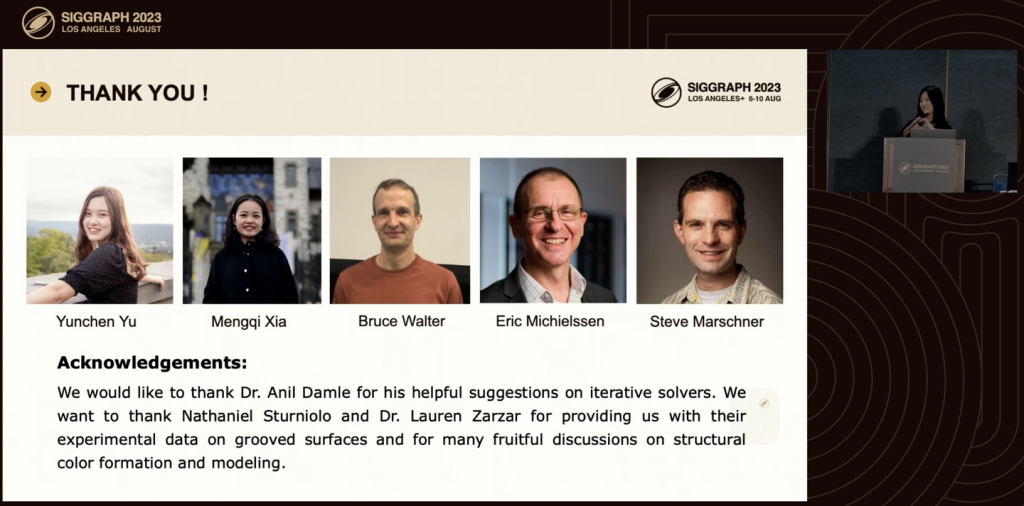
    • URP code specification reference: https://www.cyanilux.com/tutorials/urp-shader-code/
    • BIRP->URP quick reference table: https://cuihongzhi1991.github.io/blog/2020/05/27/builtinttourp/

    You can followThis article by DanielYou can also follow me to modify the code. It should be noted that the space transformation code in the original repo has problems.Pull requestsThe solution was found in

    Now put the above BIRP tessellation shader together.

    • Tags changed to URP
    • The header file is introduced and replaced with the URP version
    • Variables are surrounded by CBuffer
    • Shadow casting, receiving code

    2.2 Start to change

    Declare the URP pipeline.

    LOD 100
    Cull Off
    Pass{
        Tags{
            "RenderType" = "Opaque"
            "Queue" = "Geometry"
            "RenderPipeline" = "UniversalPipeline"
        }

    Import the URP library.

    #include "Packages/com.unity.render-pipelines.universal/ShaderLibrary/Core.hlsl"
    #include "Packages/com.unity.render-pipelines.universal/ShaderLibrary/Lighting.hlsl"
    #include "Packages/com.unity.render-pipelines.universal/ShaderLibrary/ShaderVariablesFunctions.hlsl"
    
    o._ShadowCoord = ComputeScreenPos(o.POS);

    Change the function.

    // o.normal = UnityObjectToWorldNormal(normal);
    o.normal = TransformObjectToWorldNormal(normal);

    URP receives the shadow. It is best to calculate this in the vertex shader, but for convenience, it is all calculated in the geometry shader.

    Then generate the shadows. ShadowCaster Pass.

    Pass{
        Name "ShadowCaster"
        Tags{ "LightMode" = "ShadowCaster" }
    
        ZWrite On
        ZTest LEqual
    
        HLSLPROGRAM
    
            half4 frag(geometryOutput input) : SV_TARGET{
                return 1;
            }
    
        ENDHLSL
    }

    2.3 Full code‼️(URP)

    https://pastebin.com/6KveEKMZ

    3. Optimize tessellation logic (BIRP/URP)

    3.1 Organize the code

    Above we just use a fixed number of subdivision levels, which I cannot accept. If you don't understand the principle of surface subdivision, you can seeMy Tessellation Articles, which details several solutions for optimizing segmentation.

    I use the BIRP version of the code that I completed in Section 1 as an example. The current version only has the Uniform subdivision.

    _TessellationUniform("Tessellation Uniform", Range(1, 64)) = 1

    The output structures of each stage are quite confusing, so let's reorganize them.

    3.1 Partitioning Mode

    [KeywordEnum(INTEGER, FRAC_EVEN, FRAC_ODD, POW2)] _PARTITIONING("Partition algorithm", Float) = 0
    
    #Pragmas shader_feature_local _PARTITIONING_INTEGER _PARTITIONING_FRAC_EVEN _PARTITIONING_FRAC_ODD _PARTITIONING_POW2
    
    #if defined(_PARTITIONING_INTEGER)
        [partitioning("integer")]
    #elif defined(_PARTITIONING_FRAC_EVEN)
        [partitioning("fractional_even")]
    #elif defined(_PARTITIONING_FRAC_ODD)
        [partitioning("fractional_odd")]
    #elif defined(_PARTITIONING_POW2)
        [partitioning("pow2")]
    #else 
        [partitioning("integer")]
    #endif

    3.2 Subdivided Frustum Culling

    In BIRP, use _ProjectionParams.z to represent the far plane, and in URP use UNITY_RAW_FAR_CLIP_VALUE.

    bool IsOutOfBounds(float3 p, float3 lower, float3 higher) { //Given rectangle judgment
        return p.x < lower.x || p.x > higher.x || p.y < lower.y || p.y > higher.y || p.z < lower.z || p.z > higher.z;
    }
    bool IsPointOutOfFrustum(float4 positionCS) { //View cone judgment
        float3 culling = positionCS.xyz;
        float w = positionCS.w;
        float3 lowerBounds = float3(-w, -w, -w * _ProjectionParams.z);
        float3 higherBounds = float3(w, w, w);
        return IsOutOfBounds(culling, lowerBounds, higherBounds);
    }
    bool ShouldClipPatch(float4 p0PositionCS, float4 p1PositionCS, float4 p2PositionCS) {
        bool allOutside = IsPointOutOfFrustum(p0PositionCS) &&
            IsPointOutOfFrustum(p1PositionCS) &&
            IsPointOutOfFrustum(p2PositionCS);
        return allOutside;
    }
    
    TessellationControlPoint vert(Attributes v)
    {
        ...
        o.positionCS = UnityObjectToClipPos(v.vertex);
        ...
    }
    
    TessellationFactors patchConstantFunction (InputPatch<TessellationControlPoint, 3> patch)
    {
        TessellationFactors f;
        if(ShouldClipPatch(patch[0].positionCS, patch[1].positionCS, patch[2].positionCS)){
            f.edge[0] = f.edge[1] = f.edge[2] = f.inside = 0;
        }else{
            f.edge[0] = _TessellationFactor;
            f.edge[1] = _TessellationFactor;
            f.edge[2] = _TessellationFactor;
            f.inside = _TessellationFactor;
        }
        return f;
    }

    However, it should be noted that the judgment input here is the CS coordinates of the grass. If the triangular grass completely leaves the screen, but the grass grows high and may still be on the screen, it will cause a screen bug where the grass suddenly disappears. This depends on the needs of the project. If it is a project with an upward viewing angle and the grass is relatively short, this operation can be used.

    The viewing angle is not a big problem.

    If viewed from Voldemort's perspective, the grass is incomplete and over-culled.

    3.3 Fine-grained control of screen distance

    The grass is dense near and sparse far, but based on the screen distance (CS space). This method is affected by the resolution.

    float EdgeTessellationFactor(float scale, float4 p0PositionCS, float4 p1PositionCS) {
        float factor = distance(p0PositionCS.xyz / p0PositionCS.w, p1PositionCS.xyz / p1PositionCS.w) / scale;
        return max(1, factor);
    }
    
    TessellationFactors patchConstantFunction (InputPatch<TessellationControlPoint, 3> patch)
    {
        TessellationFactors f;
    
        f.edge[0] = EdgeTessellationFactor(_TessellationFactor, 
            patch[1].positionCS, patch[2].positionCS);
        f.edge[1] = EdgeTessellationFactor(_TessellationFactor, 
            patch[2].positionCS, patch[0].positionCS);
        f.edge[2] = EdgeTessellationFactor(_TessellationFactor, 
            patch[0].positionCS, patch[1].positionCS);
        f.inside = (f.edge[0] + f.edge[1] + f.edge[2]) / 3.0;
    
    
        #if defined(_CUTTESS_TRUE)
            if(ShouldClipPatch(patch[0].positionCS, patch[1].positionCS, patch[2].positionCS))
                f.edge[0] = f.edge[1] = f.edge[2] = f.inside = 0;
        #endif
    
        return f;
    }

    Tessellation Factor = 0.08

    It is not recommended to select Frac as the segmentation mode, otherwise there will be strong shaking, which is very eye-catching. I don't like this method very much.

    3.4 Camera distance classification

    Calculate the ratio of "the distance between two points" to "the distance between the midpoint of the two vertices and the camera position". The larger the ratio, the larger the space occupied on the screen, and the more subdivision is required.

    float EdgeTessellationFactor_WorldBase(float scale, float3 p0PositionWS, float3 p1PositionWS) {
        float length = distance(p0PositionWS, p1PositionWS);
        float distanceToCamera = distance(_WorldSpaceCameraPos, (p0PositionWS + p1PositionWS) * 0.5);
        float factor = length / (scale * distanceToCamera * distanceToCamera);
        return max(1, factor);
    }
    ...
    f.edge[0] = EdgeTessellationFactor_WorldBase(_TessellationFactor_WORLD_BASE, 
        patch[1].vertex, patch[2].vertex);
    f.edge[1] = EdgeTessellationFactor_WorldBase(_TessellationFactor_WORLD_BASE, 
        patch[2].vertex, patch[0].vertex);
    f.edge[2] = EdgeTessellationFactor_WorldBase(_TessellationFactor_WORLD_BASE, 
        patch[0].vertex, patch[1].vertex);
    f.inside = (f.edge[0] + f.edge[1] + f.edge[2]) / 3.0;

    There is still room for improvement. Adjust the density of the grass so that the grass at close distance is not too dense, and the grass curve at medium distance is smoother, and introduce a nonlinear factor to control the relationship between distance and tessellation factor.

    float EdgeTessellationFactor_WorldBase(float scale, float3 p0PositionWS, float3 p1PositionWS) {
        float length = distance(p0PositionWS, p1PositionWS);
        float distanceToCamera = distance(_WorldSpaceCameraPos, (p0PositionWS + p1PositionWS) * 0.5);
        // Use the square root function to adjust the effect of distance to make the tessellation factor change more smoothly at medium distances
        float adjustedDistance = sqrt(distanceToCamera);
        // Adjust the impact of scale. You may need to further fine-tune the coefficient here based on the actual effect.
        float factor = length / (scale * adjustedDistance);
        return max(1, factor);
    }

    This is more appropriate.

    3.5 Visibility Map Controls Grass Subdivision

    The vertex shader reads the texture and passes it to the tessellation shader, which calculates the tessellation logic in PCF.

    Take FIXED mode as an example:

    _VisibilityMap("Visibility Map", 2D) = "white" {}
    TEXTURE2D (_VisibilityMap);SAMPLER(sampler_VisibilityMap);
    struct Attributes
    {
        ...
        float2 uv : TEXCOORD0;
    };
    struct TessellationControlPoint
    {
        ...
        float visibility : TEXCOORD1;
    };
    TessellationControlPoint vert(Attributes v){
        ...
        float visibility = SAMPLE_TEXTURE2D_LOD(_VisibilityMap, sampler_VisibilityMap, v.uv, 0).r; 
        o.visibility    = visibility;
        ...
    }
    TessellationFactors patchConstantFunction (InputPatch<TessellationControlPoint, 3> patch){
        ...
        float averageVisibility = (patch[0].visibility + patch[1].visibility + patch[2].visibility) / 3; // Calculate the average grayscale value of the three vertices
        float baseTessellationFactor = _TessellationFactor_FIXED; 
        float tessellationMultiplier = lerp(0.1, 1.0, averageVisibility); // Adjust the factor based on the average gray value
        #if defined(_DYNAMIC_FIXED)
            f.edge[0] = _TessellationFactor_FIXED * tessellationMultiplier;
            f.edge[1] = _TessellationFactor_FIXED * tessellationMultiplier;
            f.edge[2] = _TessellationFactor_FIXED * tessellationMultiplier;
            f.inside  = _TessellationFactor_FIXED * tessellationMultiplier;
        ...

    3.6 Complete code‼️ (BIRP)

    Grass Shader:

    https://pastebin.com/TD0AupGz

    3.7 Full code ‼ ️ (URP)

    There are some differences in URP. For example, to calculate ShadowBias, you need to do the following. I won’t expand on it. Just look at the code yourself.
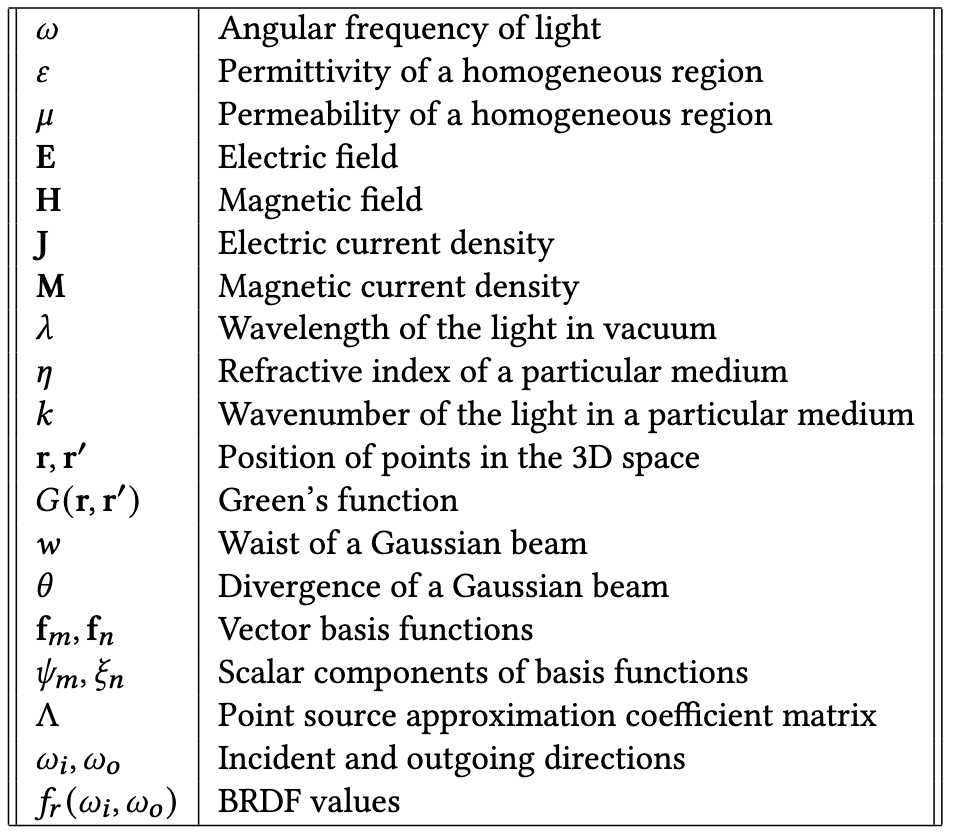
    #if UNITY_PASS_SHADOWCASTER
        // o.pos = UnityApplyLinearShadowBias(o.pos);
        o.shadowCoord = TransformWorldToShadowCoord(ApplyShadowBias(posWS, norWS, 0));
    #endif

    Grass Shader:

    https://pastebin.com/2ZX2aVm9

    4. Interactive Grassland

    URP and BIRP are exactly the same.

    4.1 Implementation steps

    The principle is very simple. The script transmits the character's world coordinates, and then bends the grass according to the set radius and interaction strength.

    uniform float3 _PositionMoving; // Object position float _Radius; // Object interaction radius float _Strength; // Interaction strength

    In the grass generation loop, calculate the distance between each grass fragment and the object and adjust the grass position according to this distance.

    float dis = distance(_PositionMoving, posWS); // Calculate distance
    float radiusEffect = 1 - saturate(dis / _Radius); // Calculate effect attenuation based on distance
    float3 sphereDisp = POS - _PositionMoving; // Calculate the position difference
    sphereDisp *= radiusEffect * _Strength; // Apply falloff and intensity
    sphereDisp = clamp(sphereDisp, -0.8, 0.8); // Limit the maximum displacement

    The new positions are then calculated within each blade of grass.

    // Apply interactive effects
    float3 newPos = i == 0 ? POS : POS + (sphereDisp * t);
    triStream.Append(GenerateGrassVertex(newPos, segmentWidth, segmentHeight, segmentForward, float2(0, t), transformMatrix));
    triStream.Append(GenerateGrassVertex(newPos, -segmentWidth, segmentHeight, segmentForward, float2(1, t), transformMatrix));

    Don't forget the outside of the for loop, which is the top vertex.

    // Final grass fragment
    float3 newPosTop = POS + sphereDisp;
    triStream.Append(GenerateGrassVertex(newPosTop, 0, height, forward, float2(0.5, 1), transformationMatrix));
    triStream.RestartStrip();

    In URP, using uniform float3 _PositionMoving may cause SRP Batcher to fail.

    4.2 Script Code

    Bind the object that needs interaction.

    using UnityEngine;
    
    public class ShaderInteractor : MonoBehaviour
    {
        // Update is called once per frame
        void Update()
        {
            Shader.SetGlobalVector("_PositionMoving", transform.position);
        }
    }

    4.3 Full code ‼ ️ (URP)

    Grass shader:

    https://pastebin.com/Zs77EQgy

    5. Compute Shader Rendering Grass v1.0

    Why v1.0? Because I think it is quite difficult to render the sea of grass with this compute shader. Many of the things that are not available now can be improved slowly in the future. I also wrote some notes about Compute Shader.

    1. Compute Shader Study Notes (I)
    2. Compute Shader Learning Notes (II) Post-processing Effects
    3. Compute Shader Learning Notes (II) Particle Effects and Cluster Behavior Simulation
    4. Compute Shader Learning Notes (Part 3) Grass Rendering

    5.1 Review/Organization

    The Compute Shader notes above fully describe how to write a stylized grass sea from scratch in CS. If you forgot, review it here.

    There are still many things that the CPU needs to do in the initialization stage. First, define the grass Mesh and Buffer transfer (the width and height of the grass, the position of each grass generation, the random orientation of the grass, and the random color depth of the grass). It also needs to specifically pass the maximum curvature value and grass interaction radius to the Compute Shader.

    For each frame, the CPU also passes the time variable, wind direction, wind force/speed, and wind field scaling factor to the Compute Shader.

    Compute Shader uses the information passed by the CPU to calculate how the grass should turn, using quaternions as output.

    Finally, the shader instantiates the ID and all calculation results, first calculating the vertex offset, then applying the quaternion rotation, and finally modifying the normal information.

    This demo can actually be further optimized, such as putting more calculations in the Compute Shader, such as the process of generating Mesh, the width and height of the grass, random tilting, etc. More real-time parameter adjustment variables can also be optimized. Various optimization culling can also be performed, such as culling the incoming camera position by distance, or culling with the view frustum, etc. This culling process requires the use of some atomic operations. There is also multi-object interaction. The logic of interactive grass deformation can also be optimized, such as the degree of interaction is proportional to the power of the distance of the interactive object, etc. The engine function can also be increased, and the function of brushing grass can be developed, which may require a quadtree storage system, etc.

    And in Compute Shader, use vectors instead of scalars when possible.

    First, organize the code. Put all variables that do not need to be sent to the Compute Shader every frame into a function for unified initialization. Organize the Inspector panel. (There are many code changes)

    First, basically all calculations are run on the GPU, except that the world coordinates of each grass are calculated in the CPU and passed to the GPU through a Buffer.

    The size of the buffer transmission depends entirely on the size of the ground mesh and the set density. In other words, if it is a super large open world, the buffer will become super large. For a 5*5 grass field, with the Density set to 0.5, approximately 312576 grass data will be sent, and the actual data will reach 4*312576*4=5001216 bytes. Based on the CPU->GPU transmission speed of 8 GB/s, it takes about 10 milliseconds to transmit.
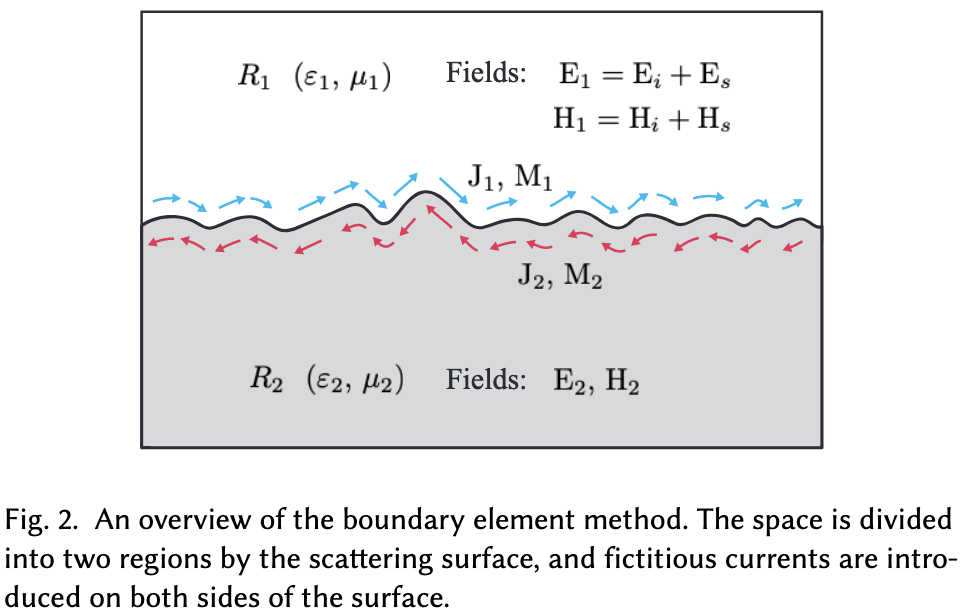
    Fortunately, this buffer does not need to be transmitted every frame, but it is enough to attract our attention. If the current grass size increases to 100*100, the time required will increase several times, which is scary. Moreover, we may not use many of the vertices, which causes a great waste of performance.

    I added a function to generate perlin noise in the Compute Shader, as well as the xorshift128 random number generation algorithm.

    // Perlin random number algorithm
    float hash(float x, float y) {
        return frac(abs(sin(sin(123.321 + x) * (y + 321.123)) * 456.654));
    }
    float perlin(float x, float y){
        float col = 0.0;
        for (int i = 0; i < 8; i++) {
            float fx = floor(x); float fy = floor(y);
            float xx = ceil(x); float cy = ceil(y);
            float a = hash(fx, fy); float b = hash(fx, cy);
            float c = hash(xx, fy); float d = hash(xx, cy);
            col += lerp(lerp(a, b, frac(y)), lerp(c, d, frac(y)), frac(x));
            col /= 2.0; x /= 2.0; y /= 2.0;
        }
        return col;
    }
    // XorShift128 random number algorithm -- Edited Directly output normalized data
    uint state[4];
    void xorshift_init(uint s) {
        state[0] = s; state[1] = s | 0xffff0000u;
        state[2] = s < 16; state[3] = s >> 16;
    }
    float xorshift128() {
        uint t = state[3]; uint s = state[0];
        state[3] = state[2]; state[2] = state[1]; state[1] = s;
        t ^= t < 11u; t ^= t >> 8u;
        state[0] = t ^ s ^ (s >> 19u);
        return (float)state[0] / float(0xffffffffu);
    }
    
    [numthreads(THREADGROUPSIZE,1,1)]
    void BendGrass (uint3 id : SV_DispatchThreadID)
    {
        xorshift_init(id.x * 73856093u ^ id.y * 19349663u ^ id.z * 83492791u);
        ...
    }

    To review, at present, the CPU uses an AABB average grass paving logic to generate all possible grass vertices, which are then passed to the GPU to perform some culling, LoD and other operations in the Compute Shader.

    So far I have three Buffers.

    m_InputBuffer is the structure on the left of the above picture that sends all the grass to the GPU without any culling.

    m_OutputBuffer is a variable length buffer that increases slowly in the Compute Shader. If the grass of the current thread ID is suitable, it will be added to this buffer for instanced rendering later. The structure on the right of the above picture.

    m_argsBuffer is a parameterized Buffer, which is different from other Buffers. It is used to pass parameters to Draw, and its specific content is to specify the number of vertices to be rendered in batches, the number of rendering instances, etc. Let's take a look at it in detail:

    First parameter, my grass mesh has seven triangles, so there are 21 vertices to render.

    The second parameter is temporarily set to 0, indicating that nothing needs to be rendered. This number will be dynamically set according to the length of m_OutputBuffer after the Compute Shader calculation is completed. In other words, the number here will be the same as the number of grasses appended in the Compute Shader.

    The third and fourth parameters represent respectively: the index of the first rendered vertex and the index of the first instantiation.

    I haven't used the fifth parameter, so I don't know what it is used for.

    The last step looks like this, passing in the Mesh, material, AABB and parameter Buffer.

    5.2 Customizing Unity Tools

    Create a new C# script and save it in the Editor directory of the project (if it doesn't exist, create one). The script inherits from Editor, and then write [CustomEditor(typeof(XXX))] . It means you work for XXX. I work for GrassControl, and then you can attach what you wrote now to XXX. Of course, you can also have a separate window, which should inherit from EditorWindow.

    Write tools in the OnInspectorGUI() function, for example, write a Label.

    GUILayout.Label("== Remo Grass Generator ==");

    To center the Inspector, add a parameter.

    GUILayout.Label("== Remo Grass Generator ==", new GUIStyle(EditorStyles.boldLabel) { alignment = TextAnchor.MiddleCenter });

    Too crowded? Just add a line of space.

    EditorGUILayout.Space();

    If you want to attach tools above XXX, then all the logic should be written above OnInspectorGUI.

    ... // Write here
    // The default Inspector interface of GrassControl
    base.OnInspectorGUI();

    Create a button and press the code:

    if (GUILayout.Button("xxx"))
    {
        ...//Code after pressing

    Anyway, these are the ones I use now.

    5.3 Editor selects the object to generate grass

    It is also very simple to get the Object of the script of the current service and display it in the Inspector.

    [SerializeField] private GameObject grassObject;
    ...
    grassObject = (GameObject)EditorGUILayout.ObjectField("Write any name", grassObject, typeof(GameObject), true);
    if (grassObject == null)
    {
        grassObject = FindObjectOfType<GrassControl>()?.gameObject;
    }

    After obtaining it, you can access the contents of the current script through GameObject.
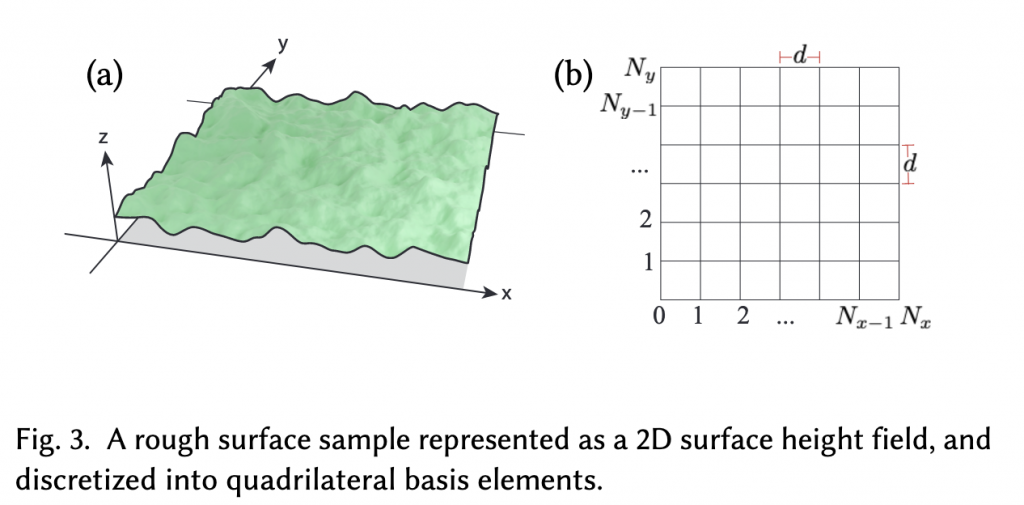
    How to get the object selected in the Editor window? It can be done with one line of code.
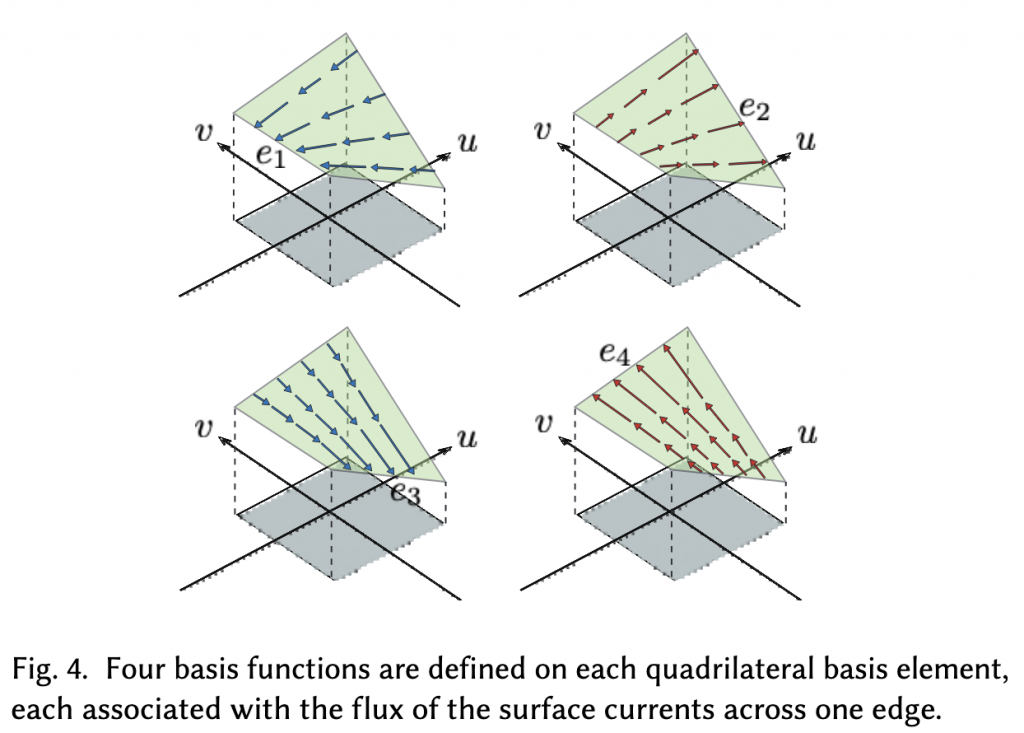
    foreach (GameObject obj in Selection.gameObjects)

    Display the selected objects in the Inspector panel. Note that you need to handle the case of multiple selections, otherwise a Warning will be issued.

    // Display the current Editor selected object in real time and control the availability of the button
    EditorGUILayout.LabelField("Selection Info:", EditorStyles.boldLabel);
    bool hasSelection = Selection.activeGameObject != null;
    GUI.enabled = hasSelection;
    if (hasSelection)
        foreach (GameObject obj in Selection.gameObjects)
            EditorGUILayout.LabelField(obj.name);
    else
        EditorGUILayout.LabelField("No active object selected.");

    Next, get the MeshFilter and Renderer of the selected object. Since Raycast detection is required, get a Collider. If it does not exist, create one.

    Then I will not talk about the code of sketching grass here.

    5.4 Processing AABBs

    After generating a bunch of grass, add each grass to the AABB and finally pass it to Instancing.

    I assume that each grass is the size of a unit cube, so it is Vector3.one. If the grass is particularly tall, this should need to be modified.

    Stuff each blade of grass into the big AABB and pass the new AABB back to the script's m_LocalBounds for Instancing.

    Graphics.DrawMeshInstancedIndirect(blade, 0, m_Material, m_LocalBounds, m_argsBuffer);

    5.5 Surface Shader – Pitfalls

    There is a small problem here. Since the current Material is a Surface Shader, the Vertex of the Surface Shader has calculated the center of the AABB by default to do the vertex offset, so the world coordinates passed in before cannot be used directly. You also need to pass the center of the AABB in and subtract it. It's so strange. I wonder if there is any elegant way.

    5.6 Simple Camera Distance Culling + Fade

    Currently, all generated grass is passed to the Compute Shader on the CPU, and then all grass is added to the AppendBuffer, which means there is no culling logic.

    The simplest culling solution is to cull grass based on the distance between the camera and the grass. In the Inspector panel, open a value to represent the culling distance. Calculate the distance between the camera and the current grass instance. If it is greater than the set value, it will not be added to the AppendBuffer.

    First, pass the world coordinates of the camera into C#. Here is the semi-pseudo code:

    // Get the camera
    private Camera m_MainCamera;
    
    m_MainCamera = Camera.main;
    
    if (m_MainCamera != null)
        m_ComputeShader.SetVector(ID_camreaPos, m_MainCamera.transform.position);

    In CS, calculate the distance between the grass and the camera:

    float distanceFromCamera = distance(input.position, _CameraPositionWS);

    The distance function code is as follows:

    float distanceFade = 1 - saturate((distanceFromCamera - _MinFadeDist) / (_MaxFadeDist - _MinFadeDist));

    If the value is less than 0, return directly.

    // skip if out of fading range too
    if (distanceFade < 0.001f)
    {
        return;
    }

    In the part between culling and not culling, set the grass width + Fade value to achieve a fading effect.

    Result.height = (bladeHeight + bladeHeightOffset * (xorshift128()*2-1)) * distanceFade;
    Result.width = (bladeWeight + bladeWeightOffset * (xorshift128()*2-1)) * distanceFade;
    ...
    Result.fade = xorshift128() * distanceFade;

    In the figure below, both are set to be relatively small for the convenience of demonstration.

    I think the actual effect is quite good and smooth. If the width and height of the grass are not modified, the effect will be greatly reduced.

    Of course, you can also modify the logic: do not completely remove the grass that exceeds the maximum drawing range, but reduce the number of drawings; or selectively draw the grass in the transition area.

    Both logics are acceptable, and if it were me I would choose the latter.

    5.7 Maintaining a set of visible ID buffers

    The so-called frustum culling is to reduce the redundant calculations of GPU through various methods at the CPU stage.

    So how do I let the Compute Shader know which grass needs to be rendered and which needs to be culled? My approach is to maintain a set of ID Lists. The length is the number of all grasses. If the current grass needs to be culled, otherwise the index value of the grass that needs to be rendered is recorded.

    List<uint> grassVisibleIDList = new List<uint>();
    
    // buffer that contains the ids of all visible instances
    private ComputeBuffer m_VisibleIDBuffer;
    
    private const int VISIBLE_ID_STRIDE        =  1 * sizeof(uint);
    
    m_VisibleIDBuffer = new ComputeBuffer(grassData.Count, VISIBLE_ID_STRIDE,
        ComputeBufferType.Structured); //uint only, per visible grass
    m_ComputeShader.SetBuffer(m_ID_GrassKernel, "_VisibleIDBuffer", m_VisibleIDBuffer);
    
    m_VisibleIDBuffer?.Release();

    Since some grass has been removed before being passed to the Compute Shader, the number of Dispatches is no longer the number of all grasses, but the number of the current List.

    // m_ComputeShader.Dispatch(m_ID_GrassKernel, m_DispatchSize, 1, 1);
    
    m_DispatchSize = Mathf.CeilToInt(grassVisibleIDList.Count / threadGroupSize);

    Generates a fully visible ID sequence.

    void GrassFastList(int count)
    {
        grassVisibleIDList = Enumerable.Range(0, count).ToArray().ToList();
    }

    And each frame should be uploaded to GPU. The preparation is complete, and then use Quad tree to operate this array.

    5.8 Quad/Octtree Storing Grass Index

    You can consider dividing an AABB into multiple sub-AABBs and then use a quadtree to store and manage them.

    Currently, all grass is in one AABB. Next, we build an octree and put all the grass in this AABB into branches. This makes it easy to do frustum culling in the early stages of the CPU.

    How to store it? If the current grass has a small vertical drop, then a quadtree is enough. If it is an open world with undulating mountains, then use an octree. However, considering that the grass has a relatively high horizontal density, I use a quadtree + octree structure here. The parity of the depth determines whether the current depth is divided into four nodes or eight nodes. If there is no need for strong height division, it is OK to use an octree, but I feel that the efficiency may be a little lower. Here, it is directly evenly distributed. Later optimization can consider the AABB division method based on variable length dynamic changes.

    if (depth % 2 == 0)
    {
        ...
        m_children.Add(new CullingTreeNode(topLeftSingle, depth - 1));
        m_children.Add(new CullingTreeNode(bottomRightSingle, depth - 1));
        m_children.Add(new CullingTreeNode(topRightSingle, depth - 1));
        m_children.Add(new CullingTreeNode(bottomLeftSingle, depth - 1));
    }
    else
    {
        ...
        m_children.Add(new CullingTreeNode(topLeft, depth - 1));
        m_children.Add(new CullingTreeNode(bottomRight, depth - 1));
        m_children.Add(new CullingTreeNode(topRight, depth - 1));
        m_children.Add(new CullingTreeNode(bottomLeft, depth - 1));
    
        m_children.Add(new CullingTreeNode(topLeft2, depth - 1));
        m_children.Add(new CullingTreeNode(bottomRight2, depth - 1));
        m_children.Add(new CullingTreeNode(topRight2, depth - 1));
        m_children.Add(new CullingTreeNode(bottomLeft2, depth - 1));
    }

    The detection of the view frustum and AABB can be done with GeometryUtility.TestPlanesAABB.

    public void RetrieveLeaves(Plane[] frustum, List<Bounds> list, List<int> visibleIDList)
    {
        if (GeometryUtility.TestPlanesAABB(frustum, m_bounds))
        {
            if (m_children.Count == 0)
            {
                if (grassIDHeld.Count > 0)
                {
                    list.Add(m_bounds);
                    visibleIDList.AddRange(grassIDHeld);
                }
            }
            else
            {
                foreach (CullingTreeNode child in m_children)
                {
                    child.RetrieveLeaves(frustum, list, visibleIDList);
                }
            }
        }
    }

    This code is the key part, passing in:

    • The six planes of the camera frustum Plane[]
    • A list of Bounds objects storing all nodes within the frustum
    • Stores a list of all grass indices contained in the node within the frustum

    By calling the method of this quad/octree, you can get the list of all bounding boxes and grass within the frustum.

    Then all the grass indexes can be made into a Buffer and passed to the Compute Shader.

    m_VisibleIDBuffer.SetData(grassVisibleIDList);

    To get a visual AABB, use the OnDrawGizmos() method.

    Pass all the AABBs obtained by culling the view frustum into this function. This way you can see the AABBs intuitively.

    Also write everything inside the view frustum to the visible grass.

    5.9 Flickering grass problem – Pitfalls

    Here I hit a small pit. I completed the octree and successfully divided many sub-AABBs as shown above. But when I moved the camera, the grass flickered wildly. I was a little lazy and didn't want to make GIF videos. Observe the two pictures below. I just moved the view slightly and changed the current Visibility List. The position of the grass jumped a lot, and it looked like the grass flickered continuously.

    I can't figure it out, there is no problem with Compute Shader culling.

    The number of dispatches is also calculated based on the length of the visibility list, so there must be enough threads to compute the shader.

    And there is no problem with DrawMeshInstancedIndirect.

    What's the problem?

    After a long debugging, I found that the problem lies in the process of taking random numbers by Xorshift of Compute Shader.

    Before using _VisibleIDBuffer, one grass corresponds to one thread ID, which is determined from the moment the grass is born. Now that this group of indexes has been added, and the ID of the incoming random value is not changed to a Visible ID, the random numbers will appear very discrete.

    That is to say, all previous IDs are replaced with index values taken from _VisibleIDBuffer!

    5.10 Multi-object Interaction

    Currently there is only one trampler passed in. If it is not passed in, an error will be reported, which is unbearable.

    There are three parameters about interaction:

    • pos – Vector3
    • trampleStrength – Float
    • trampleRadius – Float

    Now put trampleRadius into pos (Vector4) (or another one, depending on your needs), and pass the position array into it using SetVectorArray. This way each interactive object can have a dedicated interactive radius. For fat interactive objects, make the radius larger, and for skinny ones, make it smaller. That is, remove the following line:

    // In SetGrassDataBase, no need to upload every frame
    // m_ComputeShader.SetFloat("trampleRadius", trampleRadius);

    become:

    // In SetGrassDataUpdate, each frame must be uploaded
    // Set up multiple interactive objects
    if (trampler.Length > 0)
    {
        Vector4[] positions = new Vector4[trampler.Length];
        for (int i = 0; i < trampler.Length; i++)
        {
            positions[i] = new Vector4(trampler[i].transform.position.x, trampler[i].transform.position.y, trampler[i].transform.position.z,
                trampleRadius);
        }
        m_ComputeShader.SetVectorArray(ID_tramplePos, positions);
    }

    Then you have to pass the number of interactive objects so that the Compute Shader knows how many interactive objects need to be processed. This also needs to be updated every frame. I am used to storing an ID index for objects that are updated every frame, which is more efficient.

    // Initializing
    ID_trampleLength = Shader.PropertyToID("_trampleLength");
    // In each frame
    m_ComputeShader.SetFloat(ID_trampleLength, trampler.Length);

    I repackaged it:

    By modifying the corresponding code, you can adjust the radius of each interactive object on the panel. If you want to enrich this adjustment function, you can consider passing a separate Buffer into it.
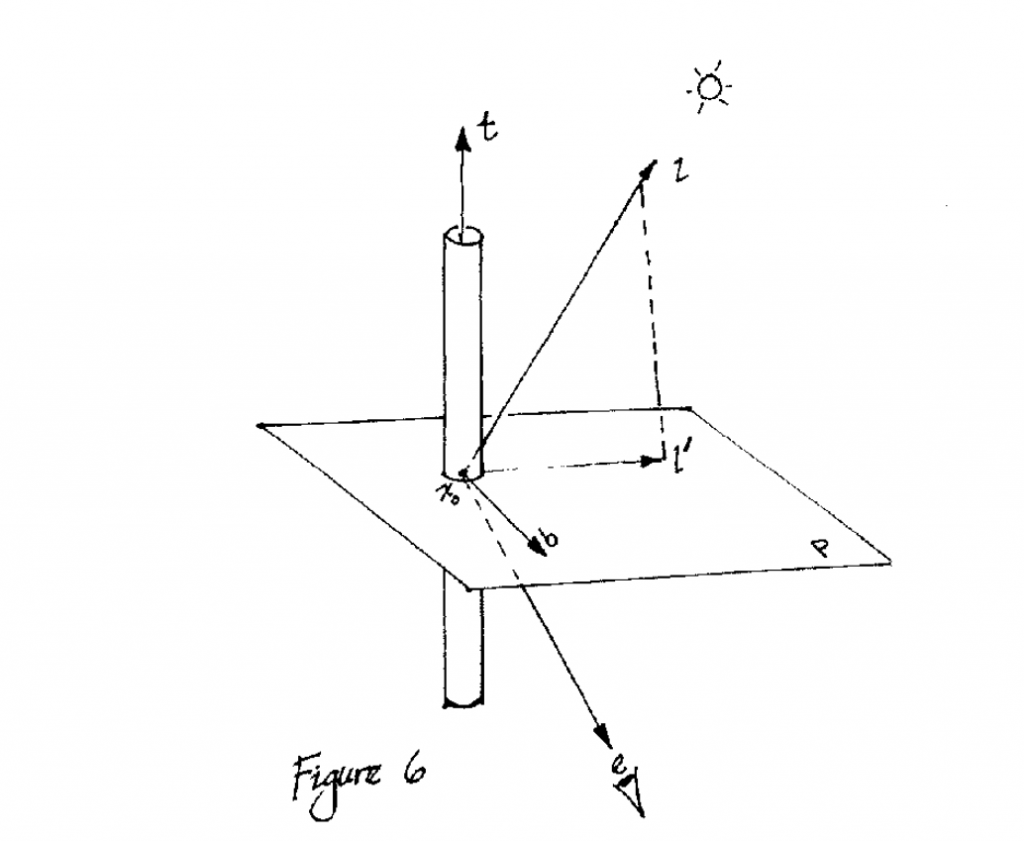
    In the Compute Shader, it is relatively simple to combine multiple rotations.

    // Trampler
    float4 qt = float4(0, 0, 0, 1); // 1 in quaternion is like this, the imaginary part is 0
    for (int trampleIndex = 0; trampleIndex < trampleLength; trampleIndex++)
    {
        float trampleRadius = tramplePos[trampleIndex].a;
        float3 relativePosition = input.position - tramplePos[trampleIndex].xyz;
        float dist = length(relativePosition);
        if (dist < trampleRadius) {
            // Use the power to enhance the effect at close range
            float eff = pow((trampleRadius - dist) / trampleRadius, 2) * trampleStrength;
            float3 direction = normalize(relativePosition);
            float3 newTargetDirection = float3(direction.x * eff, 1, direction.z * eff);
            qt = quatMultiply(MapVector(float3(0, 1, 0), newTargetDirection), qt);
        }
    }

    5.11 Editor real-time preview

    The camera currently passed to the Compute Shader is the main camera, which is the one in the game window. Now you want to temporarily get the main camera's lens in the editor (Scene window) and restore it after starting the game. You can use the Scene View GUI to draw events.

    Here is an example of remodeling my current code:

    #if UNITY_EDITOR
        SceneView view;
    
        void OnDestroy()
        {
            // When the window is destroyed, remove the delegate
            // so that it will no longer do any drawing.
            SceneView.duringSceneGui -= this.OnScene;
        }
    
        void OnScene(SceneView scene)
        {
            view = scene;
            if (!Application.isPlaying)
            {
                if (view.camera != null)
                {
                    m_MainCamera = view.camera;
                }
            }
            else
            {
                m_MainCamera = Camera.main;
            }
        }
        private void OnValidate()
        {
            // Set up components
            if (!Application.isPlaying)
            {
                if (view != null)
                {
                    m_MainCamera = view.camera;
                }
            }
            else
            {
                m_MainCamera = Camera.main;
            }
        }
    #endif

    When initializing the shader, subscribe to the event at the beginning, and then determine whether the current state is game, and then pass a camera. If it is in edit mode, then m_MainCamera is still NULL.

    void InitShader()
    {
    #if UNITY_EDITOR
        SceneView.duringSceneGui += this.OnScene;
        if (!Application.isPlaying)
        {
            if (view != null && view.camera != null)
            {
                m_MainCamera = view.camera;
            }
        }
    #endif
        if (Application.isPlaying)
        {
            m_MainCamera = Camera.main;
        }
        ...

    In the frame-by-frame Update function, if it is detected that m_MainCamera is NULL, it is determined that the current mode is edit mode:

    // Pass in the camera coordinates
            if (m_MainCamera != null)
                m_ComputeShader.SetVector(ID_camreaPos, m_MainCamera.transform.position);
    #if UNITY_EDITOR
            else if (view != null && view.camera != null)
            {
                m_ComputeShader.SetVector(ID_camreaPos, view.camera.transform.position);
            }
    
    #endif

    6. Cutting Grass

    Maintain a set of Cut Buffers

    // added for cutting
    private ComputeBuffer m_CutBuffer;
    float[] cutIDs;

    Initializing Buffer

    private const int CUT_ID_STRIDE            =  1 * sizeof(float);
    // added for cutting
    m_CutBuffer = new ComputeBuffer(grassData.Count, CUT_ID_STRIDE, ComputeBufferType.Structured);
    // added for cutting
    m_ComputeShader.SetBuffer(m_ID_GrassKernel, "_CutBuffer", m_CutBuffer);
    m_CutBuffer.SetData(cutIDs);

    Don't forget to release it when you disable it.
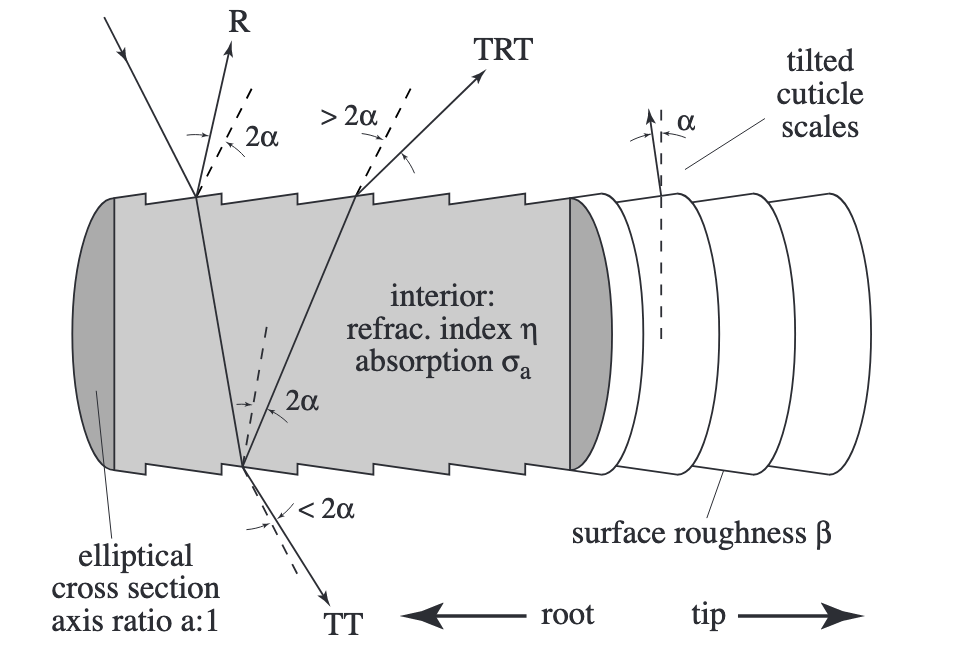
    // added for cutting
    m_CutBuffer?.Release();

    Define a method to pass in the current position and radius to calculate the position of the grass. Set the corresponding cutID to -1.

    // newly added for cutting
    public void UpdateCutBuffer(Vector3 hitPoint, float radius)
    {
        // can't cut grass if there is no grass in the scene
        if (grassData.Count > 0)
        {
            List<int> grasslist = new List<int>();
            // Get the list of IDS that are near the hitpoint within the radius
            cullingTree.ReturnLeafList(hitPoint, grasslist, radius);
            Vector3 brushPosition = this.transform.position;
            // Compute the squared radius to avoid square root calculations
            float squaredRadius = radius * radius;
    
            for (int i = 0; i < grasslist.Count; i++)
            {
                int currentIndex = grasslist[i];
                Vector3 grassPosition = grassData[currentIndex].position + brushPosition;
    
                // Calculate the squared distance
                float squaredDistance = (hitPoint - grassPosition).sqrMagnitude;
    
                // Check if the squared distance is within the squared radius
                // Check if there is grass to cut, or of the grass is uncut(-1)
                if (squaredDistance <= squaredRadius && (cutIDs[currentIndex] > hitPoint.y || cutIDs[currentIndex] == -1))
                {
                    // store cutting point
                    cutIDs[currentIndex] = hitPoint.y;
                }
    
            }
        }
        m_CutBuffer.SetData(cutIDs);
    }

    Then bind a script to the object that needs to be cut:

    using System.Collections;
    using System.Collections.Generic;
    using UnityEngine;
    
    
    public class Cutgrass : MonoBehaviour
    {
        [SerializeField]
        GrassControl grassComputeScript;
    
        [SerializeField]
        float radius = 1f;
    
        public bool updateCuts;
    
        Vector3 cachedPos;
        // Start is called before the first frame update
    
    
        // Update is called once per frame
        void Update()
        {
            if (updateCuts && transform.position != cachedPos)
            {
                Debug.Log("Cutting");
                grassComputeScript.UpdateCutBuffer(transform.position, radius);
                cachedPos = transform.position;
    
            }
        }
    
        private void OnDrawGizmos()
        {
            Gizmos.color = new Color(1, 0, 0, 0.3f);
            Gizmos.DrawWireSphere(transform.position, radius);
        }
    }

    In the Compute Shader, just modify the grass height. (Very straightforward...) You can change the effect to whatever you want.
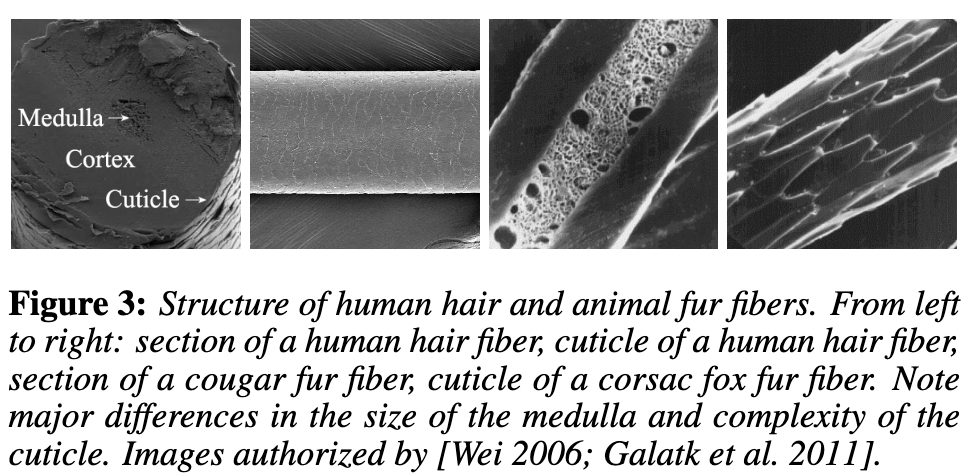
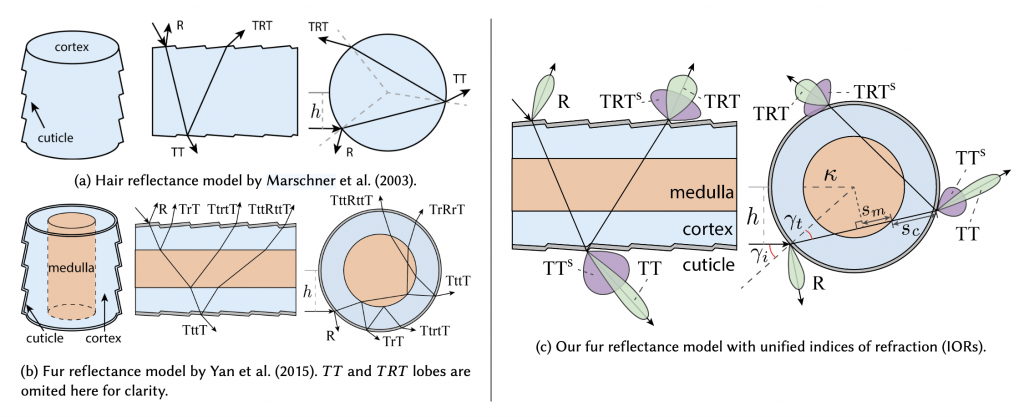
    StructuredBuffer<float> _CutBuffer;// added for cutting
    
        float cut = _CutBuffer[usableID];
        Result.height = (bladeHeight + bladeHeightOffset * (xorshift128()*2-1)) * distanceFade;
        if(cut != -1){
            Result.height *= 0.1f;
        }

    Done!

    References

    1. https://learn.microsoft.com/zh-cn/windows/uwp/graphics-concepts/geometry-shader-stage–gs-
    2. https://roystan.net/articles/grass-shader/
    3. https://danielilett.com/2021-08-24-tut5-17-stylised-grass/
    4. https://catlikecoding.com/unity/tutorials/basics/compute-shaders/
    5. Notes - A preliminary exploration of compute-shader
    6. https://www.patreon.com/posts/53587750
    7. https://www.youtube.com/watch?v=xKJHL8nQiuM
    8. https://www.patreon.com/posts/40090373
    9. https://www.patreon.com/posts/47447321
    10. https://www.patreon.com/posts/wip-patron-only-83683483
    11. https://www.youtube.com/watch?v=DeATXF4Szqo
    12. https://catlikecoding.com/unity/tutorials/basics/compute-shaders/
    13. https://docs.unity3d.com/Manual/class-ComputeShader.html
    14. https://docs.unity3d.com/ScriptReference/ComputeShader.html
    15. https://learn.microsoft.com/en-us/windows/win32/api/D3D11/nf-d3d11-id3d11devicecontext-dispatch
    16. https://zhuanlan.zhihu.com/p/102104374
    17. Unity-compute-shader-Basic knowledge
    18. https://kylehalladay.com/blog/tutorial/2014/06/27/Compute-Shaders-Are-Nifty.html
    19. https://cuihongzhi1991.github.io/blog/2020/05/27/builtinttourp/
    20. https://jadkhoury.github.io/files/MasterThesisFinal.pdf

  • Compute Shader学习笔记(四)之 草地渲染

    Compute Shader Learning Notes (IV) Grass Rendering

    Project address:

    https://github.com/Remyuu/Unity-Compute-Shader-Learngithub.com/Remyuu/Unity-Compute-Shader-Learn

    img

    视频封面

    L5 Grass Rendering

    The current effect is very ugly, and there are still many details that are not perfect, it is just "implemented". Since I am also a rookie, I hope you can correct me if I write/do it poorly.

    img

    Summary of knowledge points:

    • Grass Rendering Solution
    • UNITY_PROCEDURAL_INSTANCING_ENABLED
    • bounds.extents
    • X-ray detection
    • Rodrigo Spin
    • Quaternion rotation

    Preface 1

    Preface Reference Articles:

    img

    There are many ways to render grass.

    The simplest way is to directly paste a grass texture on it.

    img

    In addition, eachMesh GrassIt is also common to drag it into the scene. This method has a large operating space and every blade of grass is under control. Although you can use Batching and other methods to optimize and reduce the transmission time from CPU to GPU, this will consume the life of the Ctrl, C, V and D keys on your keyboard. However, you can use L(a, b) in the Transform component to evenly distribute the selected objects between a and b. If you want randomness, you can use R(a, b). For more related operations, seeOfficial Documentation.

    img

    Can also be combinedGeometry shaders and tessellation shadersThis method looks good, but one shader can only correspond to one type of geometry (grass). If you want to generate flowers or rocks on this mesh, you need to modify the code in the geometry shader. This problem is not the most critical. The more serious problem is that many mobile devices and Metal do not support geometry shaders at all. Even if they do, they are only software-simulated, with poor performance. And the grass mesh will be recalculated every frame, wasting performance.

    img

    BillboardTechnical rendering of grass is also a widely used and long-lasting method. This method works very well when we don't need high-fidelity images. This method is to simply render a Quad+map (Alpha clipping). Use DrawProcedural. However, this method can only be viewed from a distance and not up close, otherwise it will be exposed.

    img

    Using UnityTerrain SystemYou can also draw very nice grass. And Unity uses instancing technology to ensure performance. The best part is its brush tool, but if your workflow does not include the terrain system, you can also use third-party plugins to do it.

    img

    When searching for information, I also found aImpostors. It's quite interesting to combine the vertex saving advantage of billboards with the ability to realistically reproduce objects from multiple angles. This technology "takes" a Mesh photo of real grass from multiple angles in advance and stores it through Texture. At runtime, the appropriate texture is selected for rendering according to the viewing direction of the current camera. It is equivalent to an upgraded version of the billboard technology. I think the Impostors technology is very suitable for objects that are large but players may need to view from multiple angles, such as trees or complex buildings. However, this method may have problems when the camera is very close or changes between two angles. A more reasonable solution is: use a mesh-based method at very close distances, use Impostors at medium distances, and use billboards at long distances.

    img

    The method to be implemented in this article is based on GPU Instancing, which should be called "per-blade mesh grass". This solution is used in games such as "Ghost of Tsushima", "Genshin Impact" and "The Legend of Zelda: Breath of the Wild". Each grass has its own entity, and the light and shadow effects are quite realistic.

    img

    Rendering process:

    img

    Preface 2

    Unity's Instancing technology is quite complex, and I have only seen a glimpse of it. Please correct me if I find any mistakes. The current code is written according to the documentation. GPU instancing currently supports the following platforms:

    • Windows: DX11 and DX12 with SM 4.0 and above / OpenGL 4.1 and above
    • OS X and Linux: OpenGL 4.1 and above
    • Mobile: OpenGL ES 3.0 and above / Metal
    • PlayStation 4
    • Xbox One

    In addition, Graphics.DrawMeshInstancedIndirect has been eliminated. You should use Graphics.RenderMeshIndirect. This function will automatically calculate the Bounding Box. This is a later story. For details, please see the official documentation:RenderMeshIndirect . This article was also helpful:

    https://zhuanlan.zhihu.com/p/403885438.

    The principle of GPU Instancing is to send a Draw Call to multiple objects with the same Mesh. The CPU first collects all the information, then puts it into an array and sends it to the GPU at once. The limitation is that the Material and Mesh of these objects must be the same. This is the principle of being able to draw so much grass at a time while maintaining high performance. To achieve GPU Instancing to draw millions of Meshes, you need to follow some rules:

    • All meshes need to use the same Material
    • Check GPU Instancing
    • Shader needs to support instancing
    • Skin Mesh Renderer is not supported

    Since Skin Mesh Renderer is not supported,In the previous articleWe bypassed SMR and directly took out the Mesh of different key frames and passed it to the GPU. This is also the reason why the question was raised at the end of the previous article.

    There are two main types of Instancing in Unity: GPU Instancing and Procedural Instancing (involving Compute Shaders and Indirect Drawing technology), and the other is the stereo rendering path (UNITY_STEREO_INSTANCING_ENABLED), which I won't go into here. In Shader, the former uses #pragma multi_compile_instancing and the latter uses #pragma instancing_options procedural:setup. For details, please see the official documentationCreating shaders that support GPU instancing .

    Then currently the SRP pipeline does not support custom GPU Instancing Shaders, only BIRP can.

    Then there is UNITY_PROCEDURAL_INSTANCING_ENABLED . This macro is used to indicate whether Procedural Instancing is enabled. When using Compute Shader or Indirect Drawing API, the attributes of the instance (such as position, color, etc.) can be calculated in real time on the GPU and used directly for rendering without CPU intervention.In the source code, the core code of this macro is:

    #ifdef UNITY_PROCEDURAL_INSTANCING_ENABLED #ifndef UNITY_INSTANCING_PROCEDURAL_FUNC #error "UNITY_INSTANCING_PROCEDURAL_FUNC must be defined." #else void UNITY_INSTANCING_PROCEDURAL_FUNC(); // Forward declaration of programmatic function #define DEFAULT_UNITY_SETUP_INSTANCE_ID(input) { UnitySetupInstanceID(UNITY_GET_INSTANCE_ID(input)); UNITY_INSTANCING_PROCEDURAL_FUNC();} #endif #else #define DEFAULT_UNITY_SETUP_INSTANCE_ID(input) { UnitySetupInstanceID(UNITY_GET_INSTANCE_ID(input));} #endif

    The Shader is required to define a UNITY_INSTANCING_PROCEDURAL_FUNC function, which is actually the setup() function. If there is no setup() function, an error will be reported.

    Generally speaking, what the setup() function needs to do is to extract the corresponding (unity_InstanceID) data from the Buffer, and then calculate the current instance's position, transformation matrix, color, metalness, or custom data and other attributes.

    GPU Instancing is just one of Unity's many optimization methods, and you still need to continue learning.

    1. Swaying 3-Quad Grass

    All the CS knowledge points used in this chapter have been covered in the previous article, but the background is changed. Draw a simple diagram.

    img

    The implementation is to use GPU Instancing, that is, rendering a large mesh at one time. The core code is just one sentence:

    Graphics.DrawMeshInstancedIndirect(mesh, 0, material, bounds, argsBuffer);

    The Mesh is composed of three Quads and a total of six triangles.

    img

    Then add a texture + Alpha Test.

    img

    The data structure of grass:

    • Location
    • Tilt Angle
    • Random noise value (used to calculate random tilt angles)
    public Vector3 position; // World coordinates, need to be calculated public float lean; public float noise; public GrassClump( Vector3 pos){ position.x = pos.x; position.y = pos.y; position.z = pos.z; lean = 0; noise = Random.Range(0.5f, 1); if (Random.value < 0.5f) noise = -noise; }

    Pass the buffer of the grass to be rendered (the world coordinates need to be calculated) to the GPU. First determine where the grass is generated and how much is generated. Get the AABB of the current object's Mesh (assuming it is a Plane Mesh for now).

    Bounds bounds = mf.sharedMesh.bounds; Vector3 clumps = bounds.extents;
    img

    Determine the extent of the grass, then randomly generate grass on the xOz plane.

    img

    Add a caption for the image, no more than 140 characters (optional)

    It should be noted that we are still in object space, so we need to convert Object Space to World Space.

    pos = transform.TransformPoint(pos);

    Combined with the density parameter and the object scaling factor, calculate how many grasses to render in total.

    Vector3 vec = transform.localScale / 0.1f * density; clumps.x *= vec.x; clumps.z *= vec.z; int total = (int)clumps.x * (int)clumps.z;

    Since the logic of Compute Shader is that each thread calculates a blade of grass, it is very likely that the number of blades of grass that need to be rendered is not a multiple of threads. Therefore, the number of blades of grass that need to be rendered is rounded up to a multiple of threads. In other words, when the density factor = 1, the number of blades of grass rendered is equal to the number of threads in a thread group.

    groupSize = Mathf.CeilToInt((float)total / (float)threadGroupSize); int count = groupSize * (int)threadGroupSize;

    Let the Compute Shader calculate the tilt angle of each grass.

    GrassClump clump = clumpsBuffer[id.x]; clump.lean = sin(time) * maxLean * clump.noise; clumpsBuffer[id.x] = clump;

    Passing the grass position and rotation angle to the GPU Buffer is not the end. The Material must decide the final appearance of the rendered instance before Graphics.DrawMeshInstancedIndirect can be executed.

    In the rendering process, before the instantiation phase (that is, in the procedural:setup function), use unity_InstanceID to determine which grass is currently being rendered. Get the current grass's world space and the grass's dump value.

    GrassClump clump = clumpsBuffer[unity_InstanceID]; _Position = clump.position; _Matrix = create_matrix(clump.position, clump.lean);

    Specific rotation + displacement matrix:

    float4x4 create_matrix(float3 pos, float theta){ float c = cos(theta); // Calculate the cosine of the rotation angle float s = sin(theta); // Calculate the sine of the rotation angle // Return a 4x4 transformation matrix return float4x4( c, -s, 0, pos.x, // First row: X-axis rotation and translation s, c, 0, pos.y, // Second row: Y-axis rotation (enough for 2D, but may not be used for grass) 0, 0, 1, pos.z, // Third row: Z axis unchanged 0, 0, 0, 1 // Fourth row: uniform coordinates (remain unchanged) ); }

    How is this formula derived? Substitute (0,0,1) into the Rodriguez formula to get a rotation matrix, and then expand it to the barycentric coordinates. Substitute it into the code formula.

    img

    Multiply this matrix by the vertices of Object Space to get the vertex coordinates of the dumped + displaced vertex.

    v.vertex.xyz *= _Scale; float4 rotatedVertex = mul(_Matrix, v.vertex); v.vertex = rotatedVertex;

    Now comes the problem. Currently the grass is not a plane, but a three-dimensional figure composed of three groups of Quads.

    img

    If you simply rotate all vertices along the z-axis, the grass roots will be greatly offset.

    img

    Therefore, we use v.texcoord.y to lerp the vertex positions before and after the rotation. In this way, the higher the Y value of the texture coordinate (that is, the closer the vertex is to the top of the model), the greater the rotation effect on the vertex. Since the Y value of the grass root is 0, the grass root will not shake after lerp.

    v.vertex.xyz *= _Scale; float4 rotatedVertex = mul(_Matrix, v.vertex); // v.vertex = rotatedVertex; v.vertex.xyz += _Position; v.vertex = lerp(v.vertex, rotatedVertex, v.texcoord.y);

    The effect is very poor, the grass is too fake. This kind of Quad grass can only be used from a distance.

    • Swinging stiffness
    • Stiff leaves
    • Poor lighting effects
    img

    Current version code:

    2. Stylized Grass

    In the previous section, I used several Quads and grass with alpha maps, and used sin waves for disturbance, but the effect was very average. Now I will use stylized grass and Perlin noise to improve it.

    Define the grass' vertices, normals and UVs in C# and pass them to the GPU as a Mesh.

    Vector3[] vertices = { new Vector3(-halfWidth, 0, 0), new Vector3( halfWidth, 0, 0), new Vector3(-halfWidth, rowHeight, 0), new Vector3( halfWidth, rowHeight, 0), new Vector3 (-halfWidth*0.9f, rowHeight*2, 0), new Vector3( halfWidth*0.9f, rowHeight*2, 0), new Vector3(-halfWidth*0.8f, rowHeight*3, 0), new Vector3( halfWidth*0.8f, rowHeight*3, 0), new Vector3( 0, rowHeight*4, 0) } ; Vector3 normal = new Vector3(0, 0, -1); Vector3[] normals = { normal, normal, normal, normal, normal, normal, normal, normal, normal }; Vector2[] uvs = { new Vector2(0,0), new Vector2(1,0), new Vector2(0,0.25f), new Vector2(1,0.25f), new Vector2(0,0.5f), new Vector2(1,0.5f) , new Vector2(0,0.75f), new Vector2(1,0.75f), new Vector2(0.5f,1) };

    Unity's Mesh also has a vertex order that needs to be set. The default isCounterclockwiseIf you write clockwise and enable backface culling, you won't see anything.

    img
    int[] indices = { 0,1,2,1,3,2,//row 1 2,3,4,3,5,4,//row 2 4,5,6,5,7,6, //row 3 6,7,8//row 4 }; mesh.SetIndices(indices, MeshTopology.Triangles, 0);

    The wind direction, size and noise ratio are set in the code, packed into a float4, and passed to the Compute Shader to calculate the swinging direction of a blade of grass.

    Vector4 wind = new Vector4(Mathf.Cos(theta), Mathf.Sin(theta), windSpeed, windScale);

    A blade of grass data structure

    struct GrassBlade { public Vector3 position; public float bend; // Random grass blade dumping public float noise; // CS calculates noise value public float fade; // Random grass blade brightness public float face; // Blade facing public GrassBlade( Vector3 pos) { position.x = pos.x; position.y = pos.y; position.z = pos.z; bend = 0; noise = Random.Range(0.5f, 1) * 2 - 1; fade = Random.Range(0.5f, 1); face = Random.Range(0, Mathf.PI); } }

    Currently, the grass blades are all oriented in the same direction. In the Setup function, first change the blade orientation.

    // Create a rotation matrix around the Y axis (facing) float4x4 rotationMatrixY = AngleAxis4x4(blade.position, blade.face, float3(0,1,0));
    img

    The logic of tipping the grass blades (since AngleAxis4x4 includes displacement, the following figure only demonstrates the tipping of the blades without random orientation. If you want to get the effect shown in the figure below, remember to add displacement to the code):

    // Create a rotation matrix around the X axis (dump) float4x4 rotationMatrixX = AngleAxis4x4(float3(0,0,0), blade.bend, float3(1,0,0));
    img

    Then combine the two rotation matrices.

    _Matrix = mul(rotationMatrixY, rotationMatrixX);
    img

    The lighting is now very strange because the normals are not modified.

    // Calculate the inverse transpose matrix for normal transformation float3x3 normalMatrix = (float3x3)transpose(((float3x3)_Matrix)); // Transform normal v.normal = mul(normalMatrix, v.normal);

    Here is the code for the inverse matrix:

    float3x3 transpose(float3x3 m) { return float3x3( float3(m[0][0], m[1][0], m[2][0]), // Column 1 float3(m[0][1] , m[1][1], m[2][1]), // Column 2 float3(m[0][2], m[1][2], m[2][2]) // Column 3 ); }

    For code readability, add the homogeneous coordinate transformation matrix, which is upgraded to the famous rotation formula:

    float4x4 AngleAxis4x4(float3 pos, float angle, float3 axis){ float c, s; sincos(angle*2*3.14, s, c); float t = 1 - c; float x = axis.x; float y = axis. y; float z = axis.z; return float4x4( t * x * x + c , t * x * y - s * z, t * x * z + s * y, pos.x, t * x * y + s * z, t * y * y + c , t * y * z - s * x, pos.y, t * x * z - s * y, t * y * z + s * x, t * z * z + c , pos.z, 0,0,0,1 ); }
    img
    img
    img

    What if you want to spawn on uneven ground?

    img

    You only need to modify the logic of generating the initial height of the grass, and use MeshCollider and ray detection.

    bladesArray = new GrassBlade[count]; gameObject.AddComponent (); RaycastHit hit; Vector3 v = new Vector3(); Debug.Log(bounds.center.y + bounds.extents.y); vy = (bounds.center.y + bounds.extents.y); v = transform .TransformPoint(v); float heightWS = vy + 0.01f; // Floating point error v.Set(0, 0, 0); vy = (bounds.center.y - bounds.extents.y); v = transform.TransformPoint(v); float neHeightWS = vy; float range = heightWS - neHeightWS; // heightWS += 10; // Increase the error slightly and adjust it yourself int index = 0; int loopCount = 0; while (index < count && loopCount < (count * 10)) { loopCount++; Vector3 pos = new Vector3( Random.value * bounds.extents.x * 2 - bounds.extents.x + bounds.center.x, 0, Random.value * bounds.extents.z * 2 - bounds.extents.z + bounds.center.z); pos = transform.TransformPoint(pos); pos.y = heightWS; if ( Physics.Raycast(pos, Vector3.down, out hit)) { pos.y = hit.point.y; GrassBlade blade = new GrassBlade(pos); bladesArray[index++] = blade; } }

    Here, rays are used to detect the position of each grass and calculate its correct height.

    img

    You can also adjust it so that the higher the altitude, the sparser the grass.

    img

    As shown above, calculate the ratio of the two green arrows. The higher the altitude, the lower the probability of generation.

    float deltaHeight = (pos.y - neHeightWS) / range; if (Random.value > deltaHeight) { // Grass }
    img
    img

    Current code link:

    Now there is no problem with lighting or shadow.

    3. Interactive Grass

    In the previous section, we first rotated the direction of the grass and then changed the tilt of the grass. Now we need to add another rotation. When an object approaches the grass, the grass will fall in the opposite direction of the object. This means another rotation. This rotation is not easy to set, so it is changed to quaternion. The calculation of quaternion is performed in Compute Shader. The quaternion is also passed to the material and stored in the structure of the grass piece. Finally, in the vertex shader, the quaternion is converted back to an affine matrix to apply the rotation.

    Here we add random width and height of grass. Because each grass mesh is the same, we can't modify the height of grass by modifying the mesh. So we can only do vertex offset in Vert.

    // C# [Range(0,0.5f)] public float width = 0.2f; [Range(0,1f)] public float rd_width = 0.1f; [Range(0,2)] public float height = 1f; [Range (0,1f)] public float rd_height = 0.2f; GrassBlade blade = new GrassBlade(pos); blade.height = Random.Range(-rd_height, rd_height); blade.width = Random.Range(-rd_width, rd_width); bladesArray[index++] = blade; // Setup starts with GrassBlade blade = bladesBuffer[unity_InstanceID]; _HeightOffset = blade.height_offset; _WidthOffset = blade.width_offset; // Vert starts with float tempHeight = v.vertex.y * _HeightOffset; float tempWidth = v.vertex.x * _WidthOffset; v.vertex.y += tempHeight; v.vertex.x += tempWidth;

    To sort it out, the current grass Buffer stores:

    struct GrassBlade{ public Vector3 position; // World position - need to be initialized public float height; // Grass height offset - need to be initialized public float width; // Grass width offset - need to be initialized public float dir; // Blade orientation - need to be initialized public float fade; // Random grass blade shading - need to be initialized public Quaternion quaternion; // Rotation parameters - CS calculation->Vert public float padding; public GrassBlade( Vector3 pos){ position.x = pos.x; position.y = pos.y; position.z = pos.z; height = width = 0; dir = Random.Range(0, 180); fade = Random.Range(0.99f, 1); quaternion = Quaternion.identity; padding = 0; } } int SIZE_GRASS_BLADE = 12 * sizeof(float);

    The quaternion q used to represent the rotation from vector v1 to vector v2 is:

    float4 MapVector(float3 v1, float3 v2){ v1 = normalize(v1); v2 = normalize(v2); float3 v = v1+v2; v = normalize(v); float4 q = 0; qw = dot(v, v2 ); q.xyz = cross(v, v2); return q; }

    To combine two rotational quaternions, you need to use multiplication (note the order).

    Suppose there are two quaternions and . The formula for calculating their product is:

    where are the real and imaginary components of , and are the real and imaginary components of .

    float4 quatMultiply(float4 q1, float4 q2) { // q1 = a + bi + cj + dk // q2 = x + yi + zj + wk // Result = q1 * q2 return float4( q1.w * q2.x + q1.x * q2.w + q1.y * q2.z - q1.z * q2.y, // z + q1.x * q2.y - q1.y * q2.x + q1.z * q2.w, // Z component q1.w * q2.w - q1.x * q2.x - q1.y * q2.y - q1.z * q2.z // W (real) component ); }

    To determine where the grass should fall, you need to get the Pos of the interactive object trampler, that is, its Transform component. And each frame is passed to the GPU Buffer through SetVector for use by the Compute Shader, so the GPU memory address is stored as an ID and does not need to be accessed with a string every time. It is also necessary to determine the range of the grass to fall and how to transition between falling and not falling, and pass a trampleRadius to the GPU. Since this is a constant, it does not need to be modified every frame, so it can be directly set with a string.

    // CSharp public Transform trampler; [Range(0.1f,5f)] public float trampleRadius = 3f; ... Init(){ shader.SetFloat("trampleRadius", trampleRadius); tramplePosID = Shader.PropertyToID("tramplePos") ; } Update(){ shader.SetVector(tramplePosID, pos); }

    In this section, all rotation operations are thrown into the Compute Shader and calculated at once, and a quaternion is directly returned to the material. First, q1 calculates the quaternion of the random orientation, q2 calculates the random dump, and qt calculates the interactive dump. Here you can open an interactive coefficient in the Inspector.

    [numthreads(THREADGROUPSIZE,1,1)] void BendGrass (uint3 id : SV_DispatchThreadID) { GrassBlade blade = bladesBuffer[id.x]; float3 relativePosition = blade.position - tramplePos.xyz; float dist = length(relativePosition); float4 qt ; if (dist

    Then the method of converting quaternion to rotation matrix is:

    float4x4 quaternion_to_matrix(float4 quat) { float4x4 m = float4x4(float4(0, 0, 0, 0), float4(0, 0, 0, 0), float4(0, 0, 0, 0), float4(0, 0 , 0, 0)); float x = quat.x, y = quat.y, z = quat.z, w = quat.w; float x2 = x + x, y2 = y + y, z2 = z + z; float xx = x * x2, xy = x * y2, xz = x * z2; float yy = y * y2, yz = y * z2, zz = z * z2; float wx = w * x2, wy = w * y2, wz = w * z2; m[0][0] = 1.0 - (yy + zz); m[0][1] = xy - wz; m[0][2] = xz + wy; m[1][0] = xy + wz; m[1][1] = 1.0 - (xx + zz); m[1][2] = yz - wx; m[2][0] = xz - wy; m[2][1] = yz + wx; m[2][2] = 1.0 - (xx + yy); m[0][3] = _Position.x; m[1][3] = _Position.y; m[2][3] = _Position. z; m[3][3] = 1.0; return m; }

    Then apply it.

    void vert(inout appdata_full v, out Input data) { UNITY_INITIALIZE_OUTPUT(Input, data); #ifdef UNITY_PROCEDURAL_INSTANCING_ENABLED float tempHeight = v.vertex.y * _HeightOffset; float tempWidth = v.vertex.x * _WidthOffset; v.vertex.y += tempHeight; v.vertex.x += tempWidth; // Apply model vertex transformation v.vertex = mul(_Matrix, v.vertex); v.vertex.xyz += _Position; // Calculate the inverse transpose matrix for normal transformation v.normal = mul((float3x3)transpose(_Matrix), v.normal); #endif } void setup() { #ifdef UNITY_PROCEDURAL_INSTANCING_ENABLED // Get Compute Shader calculation results GrassBlade blade = bladesBuffer[unity_InstanceID]; _HeightOffset = blade.height_offset; _WidthOffset = blade.width_offset; _Fade = blade.fade; // Set shading _Matrix = quaternion_to_matrix(blade.quaternion); // Set the final rotation matrix _Position = blade.position; // Set position #endif }
    img
    img

    Current code link:

    4. Summary/Quiz

    How do you programmatically get the thread group sizes of a kernel?

    img

    When defining a Mesh in code, the number of normals must be the same as the number of vertex positions. True or false.

    img
  • Compute Shader学习笔记(三)之 粒子效果与群集行为模拟

    Compute Shader Learning Notes (Part 3) Particle Effects and Cluster Behavior Simulation

    img

    Following the previous article

    remoooo: Compute Shader Learning Notes (II) Post-processing Effects

    L4 particle effects and crowd behavior simulation

    This chapter uses Compute Shader to generate particles. Learn how to use DrawProcedural and DrawMeshInstancedIndirect, also known as GPU Instancing.

    Summary of knowledge points:

    • Compute Shader, Material, C# script and Shader work together
    • Graphics.DrawProcedural
    • material.SetBuffer()
    • xorshift random algorithm
    • Swarm Behavior Simulation
    • Graphics.DrawMeshInstancedIndirect
    • Rotation, translation, and scaling matrices, homogeneous coordinates
    • Surface Shader
    • ComputeBufferType.Default
    • #pragma instancing_options procedural:setup
    • unity_InstanceID
    • Skinned Mesh Renderer
    • Data alignment

    1. Introduction and preparation

    In addition to being able to process large amounts of data at the same time, Compute Shader also has a key advantage, which is that the Buffer is stored in the GPU. Therefore, the data processed by the Compute Shader can be directly passed to the Shader associated with the Material, that is, the Vertex/Fragment Shader. The key here is that the material can also SetBuffer() like the Compute Shader, accessing data directly from the GPU's Buffer!

    img

    Using Compute Shader to create a particle system can fully demonstrate the powerful parallel capabilities of Compute Shader.

    During the rendering process, the Vertex Shader reads the position and other attributes of each particle from the Compute Buffer and converts them into vertices on the screen. The Fragment Shader is responsible for generating pixels based on the information of these vertices (such as position and color). Through the Graphics.DrawProcedural method, Unity canDirect RenderingThese vertices processed by the Shader do not require a pre-defined mesh structure and do not rely on the Mesh Renderer, which is particularly effective for rendering a large number of particles.

    2. Hello Particle

    The steps are also very simple. Define the particle information (position, speed and life cycle) in C#, initialize and pass the data to Buffer, bind Buffer to Compute Shader and Material. In the rendering stage, call Graphics.DrawProceduralNow in OnRenderObject() to achieve efficient particle rendering.

    img

    Create a new scene and create an effect: millions of particles follow the mouse and bloom into life, as follows:

    img

    Writing this makes me think a lot. The life cycle of a particle is very short, ignited in an instant like a spark, and disappearing like a meteor. Despite thousands of hardships, I am just a speck of dust among billions of dust, ordinary and insignificant. These particles may float randomly in space (Use the "Xorshift" algorithm to calculate the position of particle spawning), may have unique colors, but they can't escape the fate of being programmed. Isn't this a portrayal of my life? I play my role step by step, unable to escape the invisible constraints.

    “God is dead! And how can we who have killed him not feel the greatest pain?” – Friedrich Nietzsche

    Nietzsche not only announced the disappearance of religious beliefs, but also pointed out the sense of nothingness faced by modern people, that is, without the traditional moral and religious pillars, people feel unprecedented loneliness and lack of direction. Particles are defined and created in the C# script, move and die according to specific rules, which is quite similar to the state of modern people in the universe described by Nietzsche. Although everyone tries to find their own meaning, they are ultimately restricted by broader social and cosmic rules.

    Life is full of various inevitable pains, reflecting the inherent emptiness and loneliness of human existence.Particle death logic to be writtenAll of these confirm what Nietzsche said: nothing in life is permanent. The particles in the same buffer will inevitably disappear at some point in the future, which reflects the loneliness of modern people described by Nietzsche. Individuals may feel unprecedented isolation and helplessness, so everyone is a lonely warrior who must learn to face the inner tornado and the indifference of the outside world alone.

    But it doesn’t matter, “Summer will come again and again, and those who are meant to meet will meet again.” The particles in this article will also be regenerated after the end, embracing their own Buffer in the best state.

    Summer will come around again. People who meet will meet again.

    img

    The current version of the code can be copied and run by yourself (all with comments):

    • Compute Shader: https://github.com/Remyuu/Unity-Compute-Shader-Learn/blob/L4_First_Particle/Assets/Shaders/ParticleFun.compute
    • CPU: https://github.com/Remyuu/Unity-Compute-Shader-Learn/blob/L4_First_Particle/Assets/Scripts/ParticleFun.cs
    • Shader: https://github.com/Remyuu/Unity-Compute-Shader-Learn/blob/L4_First_Particle/Assets/Shaders/Particle.shader

    Enough of the nonsense, let’s first take a look at how the C# script is written.

    img

    As usual, first define the particle buffer (structure), initialize it, and then pass it to the GPU.The key lies in the last three lines that bind the Buffer to the shader operation.There is nothing much to say about the code in the ellipsis below. They are all routine operations, so they are just mentioned with comments.

    struct Particle{ public Vector3 position; // Particle positionpublic Vector3 velocity; // Particle velocitypublic float life; // Particle life cycle } ComputeBuffer particleBuffer; // GPU Buffer ... // Init() // Initialize particle array Particle[] particleArray = new Particle[particleCount]; for (int i = 0; i < particleCount; i++){ // Generate random positions and normalize... // Set the initial position and velocity of the particle... // Set the life cycle of the particle particleArray[i].life = Random.value * 5.0f + 1.0f; } // Create and set up the Compute Buffer ... // Find the kernel ID in the Compute Shader ... // Bind the Compute Buffer to the shader shader.SetBuffer(kernelID, "particleBuffer", particleBuffer); material.SetBuffer("particleBuffer", particleBuffer); material.SetInt("_PointSize", pointSize);

    The key rendering stage is OnRenderObject(). material.SetPass is used to set the rendering material channel. The DrawProceduralNow method draws geometry without using traditional meshes. MeshTopology.Points specifies the topology type of the rendering as points. The GPU will treat each vertex as a point and will not form lines or faces between vertices. The second parameter 1 means starting drawing from the first vertex. particleCount specifies the number of vertices to render, which is the number of particles, that is, telling the GPU how many points need to be rendered in total.

    void OnRenderObject() { material.SetPass(0); Graphics.DrawProceduralNow(MeshTopology.Points, 1, particleCount); }

    Get the current mouse position method. OnGUI() This method may be called multiple times per frame. The z value is set to the camera's near clipping plane plus an offset. Here, 14 is added to get a world coordinate that is more suitable for visual depth (you can also adjust it yourself).

    void OnGUI() { Vector3 p = new Vector3(); Camera c = Camera.main; Event e = Event.current; Vector2 mousePos = new Vector2(); // Get the mouse position from Event. // Note that the y position from Event is inverted. mousePos.x = e.mousePosition.x; mousePos.y = c.pixelHeight - e.mousePosition.y; p = c.ScreenToWorldPoint(new Vector3(mousePos.x, mousePos.y, c.nearClipPlane + 14)); cursorPos.x = px; cursorPos.y = py; }

    ComputeBuffer particleBuffer has been passed to Compute Shader and Shader above.

    Let's first look at the data structure of the Compute Shader. Nothing special.

    // Define particle data structure struct Particle { float3 position; // particle position float3 velocity; // particle velocity float life; // particle remaining life time }; // Structured buffer used to store and update particle data, which can be read and written from GPU RWStructuredBuffer particleBuffer; // Variables set from the CPU float deltaTime; // Time difference from the previous frame to the current frame float2 mousePosition; // Current mouse position
    img

    Here I will briefly talk about a particularly useful random number sequence generation method, the xorshift algorithm. It will be used to randomly control the movement direction of particles as shown above. The particles will move randomly in three-dimensional directions.

    • For more information, please refer to: https://en.wikipedia.org/wiki/Xorshift
    • Original paper link: https://www.jstatsoft.org/article/view/v008i14

    This algorithm was proposed by George Marsaglia in 2003. Its advantages are that it is extremely fast and very space-efficient. Even the simplest Xorshift implementation has a very long pseudo-random number cycle.

    The basic operations are shift and XOR. Hence the name of the algorithm. Its core is to maintain a non-zero state variable and generate random numbers by performing a series of shift and XOR operations on this state variable.

    // State variable for random number generation uint rng_state; uint rand_xorshift() { // Xorshift algorithm from George Marsaglia's paper rng_state ^= (rng_state << 13); // Shift the state variable left by 13 bits, then XOR it with the original state rng_state ^= (rng_state >> 17); // Shift the updated state variable right by 17 bits, and XOR it again rng_state ^= (rng_state << 5); // Finally, shift the state variable left by 5 bits, and XOR it one last time return rng_state; // Return the updated state variable as the generated random number }

    Basic Xorshift The core of the algorithm has been explained above, but different shift combinations can create multiple variants. The original paper also mentions the Xorshift128 variant. Using a 128-bit state variable, the state is updated by four different shifts and XOR operations. The code is as follows:

    img
    // c language Ver uint32_t xorshift128(void) { static uint32_t x = 123456789; static uint32_t y = 362436069; static uint32_t z = 521288629; static uint32_t w = 88675123; uint32_t t = x ^ (x << 11); x = y; y = z; z = w; w = w ^ (w >> 19) ^ (t ^ (t >> 8)); return w; }

    This can produce longer periods and better statistical performance. The period of this variant is close, which is very impressive.

    In general, this algorithm is completely sufficient for game development, but it is not suitable for use in fields such as cryptography.

    When using this algorithm in Compute Shader, you need to pay attention to the range of random numbers generated by the Xorshift algorithm when it is the range of uint32, and you need to do another mapping ([0, 2^32-1] is mapped to [0, 1]):

    float tmp = (1.0 / 4294967296.0); // conversion factor rand_xorshift()) * tmp

    The direction of particle movement is signed, so we just need to subtract 0.5 from it. Random movement in three directions:

    float f0 = float(rand_xorshift()) * tmp - 0.5; float f1 = float(rand_xorshift()) * tmp - 0.5; float f2 = float(rand_xorshift()) * tmp - 0.5; float3 normalF3 = normalize(float3(f0, f1, f2)) * 0.8f; // Scaled the direction of movement

    Each Kernel needs to complete the following:

    • First get the particle information of the previous frame in the Buffer
    • Maintain particle buffer (calculate particle velocity, update position and health value), write back to buffer
    • If the health value is less than 0, regenerate a particle

    Generate particles. Use the random number obtained by Xorshift just now to define the particle's health value and reset its speed.

    // Set the new position and life of the particle particleBuffer[id].position = float3(normalF3.x + mousePosition.x, normalF3.y + mousePosition.y, normalF3.z + 3.0); particleBuffer[id].life = 4; // Reset life particleBuffer[id].velocity = float3(0,0,0); // Reset velocity

    Finally, the basic data structure of Shader:

    struct Particle{ float3 position; float3 velocity; float life; }; struct v2f{ float4 position : SV_POSITION; float4 color : COLOR; float life : LIFE; float size: PSIZE; }; // particles' data StructuredBuffer particleBuffer;

    Then the vertex shader calculates the vertex color of the particle, the Clip position of the vertex, and transmits the information of a vertex size.

    v2f vert(uint vertex_id : SV_VertexID, uint instance_id : SV_InstanceID){ v2f o = (v2f)0; // Color float life = particleBuffer[instance_id].life; float lerpVal = life * 0.25f; o.color = fixed4(1.0 f - lerpVal+0.1, lerpVal+0.1, 1.0f, lerpVal); // Position o.position = UnityObjectToClipPos(float4(particleBuffer[instance_id].position, 1.0f)); o.size = _PointSize; return o; }

    The fragment shader calculates the interpolated color.

    float4 frag(v2f i) : COLOR{ return i.color; }

    At this point, you can get the above effect.

    img

    3. Quad particles

    In the previous section, each particle only had one point, which was not interesting. Now let's turn a point into a Quad. In Unity, there is no Quad, only a fake Quad composed of two triangles.

    Let's start working on it, based on the code above. Define the vertices in C#, the size of a Quad.

    // struct struct Vertex { public Vector3 position; public Vector2 uv; public float life; } const int SIZE_VERTEX = 6 * sizeof(float); public float quadSize = 0.1f; // Quad size
    img

    On a per-particle basis, set the UV coordinates of the six vertices for use in the vertex shader, and draw them in the order specified by Unity.

    index = i*6; //Triangle 1 - bottom-left, top-left, top-right vertexArray[index].uv.Set(0,0); vertexArray[index+1].uv.Set(0,1 ); vertexArray[index+2].uv.Set(1,1); //Triangle 2 - bottom-left, top-right, bottom-right vertexArray[index+3].uv.Set(0,0); vertexArray[index+4].uv.Set(1,1); vertexArray[index+5].uv.Set(1,0);

    Finally, it is passed to Buffer. The halfSize here is used to pass to Compute Shader to calculate the positions of each vertex of Quad.

    vertexBuffer = new ComputeBuffer(numVertices, SIZE_VERTEX); vertexBuffer.SetData(vertexArray); shader.SetBuffer(kernelID, "vertexBuffer", vertexBuffer); shader.SetFloat("halfSize", quadSize*0.5f); material.SetBuffer("vertexBuffer ", vertexBuffer);

    During the rendering phase, the points are changed into triangles with six points.

    void OnRenderObject() { material.SetPass(0); Graphics.DrawProceduralNow(MeshTopology.Triangles, 6, numParticles); }

    Change the settings in the Shader to receive vertex data and a texture for display. Alpha culling is required.

    _MainTex("Texture", 2D) = "white" {} ... Tags{ "Queue"="Transparent" "RenderType"="Transparent" "IgnoreProjector"="True" } LOD 200 Blend SrcAlpha OneMinusSrcAlpha ZWrite Off .. . struct Vertex{ float3 position; float2 uv; float life; }; StructuredBuffer vertexBuffer; sampler2D _MainTex; v2f vert(uint vertex_id : SV_VertexID, uint instance_id : SV_InstanceID) { v2f o = (v2f)0; int index = instance_id*6 + vertex_id; float lerpVal = vertexBuffer[index].life * 0.25f; o .color = fixed4(1.0f - lerpVal+0.1, lerpVal+0.1, 1.0f, lerpVal); o.position = UnityWorldToClipPos(float4(vertexBuffer[index].position, 1.0f)); o.uv = vertexBuffer[index].uv; return o; } float4 frag(v2f i) : COLOR { fixed4 color = tex2D( _MainTex, i.uv ) * i.color; return color; }

    In the Compute Shader, add receiving vertex data and halfSize.

    struct Vertex { float3 position; float2 uv; float life; }; RWStructuredBuffer vertexBuffer; float halfSize;

    Calculate the positions of the six vertices of each Quad.

    img
    //Set the vertex buffer // int index = id.x * 6; //Triangle 1 - bottom-left, top-left, top-right vertexBuffer[index].position.x = p.position.x-halfSize; vertexBuffer[index].position.y = p.position.y-halfSize; vertexBuffer[index].position.z = p.position.z; vertexBuffer[index].life = p.life; vertexBuffer[index+1].position.x = p.position.x-halfSize; vertexBuffer[index+1].position.y = p.position.y+halfSize; vertexBuffer[index+1].position.z = p .position.z; vertexBuffer[index+1].life = p.life; vertexBuffer[index+2].position.x = p.position.x+halfSize; vertexBuffer[index+2].position.y = p.position.y+halfSize; vertexBuffer[index+2].position.z = p.position.z; vertexBuffer[index+2].life = p.life; //Triangle 2 - bottom-left, top-right, bottom-right // // vertexBuffer[index+3].position.x = p.position.x-halfSize; vertexBuffer[index+3].position.y = p.position.y-halfSize; vertexBuffer[index+3].position.z = p.position.z; vertexBuffer[index+3].life = p.life; vertexBuffer[index+4].position.x = p.position.x+halfSize; vertexBuffer[index+4].position.y = p.position.y+halfSize ; vertexBuffer[index+4].position.z = p.position.z; vertexBuffer[index+4].life = p.life; vertexBuffer[index+5].position.x = p.position.x+halfSize; vertexBuffer[index+5].position.y = p.position.y-halfSize; vertexBuffer[index+5].position.z = p.position.z; vertexBuffer[index+5].life = p.life;

    Mission accomplished.

    img

    Current version code:

    • Compute Shader: https://github.com/Remyuu/Unity-Compute-Shader-Learn/blob/L4_Quad/Assets/Shaders/QuadParticles.compute
    • CPU: https://github.com/Remyuu/Unity-Compute-Shader-Learn/blob/L4_Quad/Assets/Scripts/QuadParticles.cs
    • Shader: https://github.com/Remyuu/Unity-Compute-Shader-Learn/blob/L4_Quad/Assets/Shaders/QuadParticle.shader

    In the next section, we will upgrade the Mesh to a prefab and try to simulate the flocking behavior of birds in flight.

    4. Flocking simulation

    img

    Flocking is an algorithm that simulates the collective movement of animals such as flocks of birds and schools of fish in nature. The core is based on three basic behavioral rules, proposed by Craig Reynolds in Sig 87, and is often referred to as the "Boids" algorithm:

    • Separation Particles cannot be too close to each other, and there must be a sense of boundary. Specifically, the particles with a certain radius around them are calculated and then a direction is calculated to avoid collision.
    • Alignment The speed of an individual tends to the average speed of the group, and there should be a sense of belonging. Specifically, the average speed of particles within the visual range is calculated (the speed size direction). This visual range is determined by the actual biological characteristics of the bird, which will be mentioned in the next section.
    • Cohesion The position of the individual particles tends to the average position (the center of the group) to feel safe. Specifically, each particle finds the geometric center of its neighbors and calculates a moving vector (the final result is the averageLocation).
    img
    img

    Think about it, which of the above three rules is the most difficult to implement?

    Answer: Separation. As we all know, calculating collisions between objects is very difficult to achieve. Because each individual needs to compare distances with all other individuals, this will cause the time complexity of the algorithm to be close to O(n^2), where n is the number of particles. For example, if there are 1,000 particles, then nearly 500,000 distance calculations may be required in each iteration. In the original paper, the author took 95 seconds to render one frame (80 birds) in the original unoptimized algorithm (time complexity O(N^2)), and it took nearly 9 hours to render a 300-frame animation.

    Generally speaking, using a quadtree or spatial hashing method can optimize the calculation. You can also maintain a neighbor list to store the individuals around each individual at a certain distance. Of course, you can also use Compute Shader to perform hard calculations.

    img

    Without further ado, let’s get started.

    First download the prepared project files (if not prepared in advance):

    • Bird's Prefab: https://github.com/Remyuu/Unity-Compute-Shader-Learn/blob/main/Assets/Prefabs/Boid.prefab
    • Script: https://github.com/Remyuu/Unity-Compute-Shader-Learn/blob/main/Assets/Scripts/SimpleFlocking.cs
    • Compute Shader: https://github.com/Remyuu/Unity-Compute-Shader-Learn/blob/main/Assets/Shaders/SimpleFlocking.compute

    Then add it to an empty GO.

    img

    Start the project and you'll see a bunch of birds.

    img

    Below are some parameters for group behavior simulation.

    // Define the parameters for the crowd behavior simulation. public float rotationSpeed = 1f; // Rotation speed. public float boidSpeed = 1f; // Boid speed. public float neighbourDistance = 1f; // Neighboring distance. public float boidSpeedVariation = 1f; // Speed variation. public GameObject boidPrefab; // Prefab of Boid object. public int boidsCount; // Number of Boids. public float spawnRadius; // Radius of Boid spawn. public Transform target; // The moving target of the crowd.

    Except for the Boid prefab boidPrefab and the spawn radius spawnRadius, everything else needs to be passed to the GPU.

    For the sake of convenience, let’s make a foolish mistake in this section. We will only calculate the bird’s position and direction on the GPU, and then pass it back to the CPU for the following processing:

    ... boidsBuffer.GetData(boidsArray); // Update the position and direction of each bird for (int i = 0; i < boidsArray.Length; i++){ boids[i].transform.localPosition = boidsArray[i].position; if (!boidsArray[i].direction.Equals(Vector3.zero)){ boids[i].transform.rotation = Quaternion.LookRotation(boidsArray[i].direction); } }

    The Quaternion.LookRotation() method is used to create a rotation so that an object faces a specified direction.

    Calculate the position of each bird in the Compute Shader.

    #pragma kernel CSMain #define GROUP_SIZE 256 struct Boid{ float3 position; float3 direction; }; RWStructuredBuffer boidsBuffer; float time; float deltaTime; float rotationSpeed; float boidSpeed; float boidSpeedVariation; float3 flockPosition; float neighborDistance; int boidsCount;
    

    [numthreads(GROUP_SIZE,1,1)]

    void CSMain (uint3 id : SV_DispatchThreadID) { … // Continue below }

    First write the logic of alignment and aggregation, and finally output the actual position and direction to the Buffer.

    Boid boid = boidsBuffer[id.x]; float3 separation = 0; // Separation float3 alignment = 0; // Alignment - direction float3 cohesion = flockPosition; // Aggregation - position uint nearbyCount = 1; // Count itself as a surrounding individual. for (int i=0; i

    This is the result of having no sense of boundaries (separation terms), all individuals appear to have a fairly close relationship and overlap.

    img

    Add the following code.

    if(distance(boid.position, temp.position)< neighborDistance) { float3 offset = boid.position - temp.position; float dist = length(offset); if(dist < neighborDistance) { dist = max(dist, 0.000001) ; separation += offset * (1.0/dist - 1.0/neighbourDistance); } ...

    1.0/dist When the Boids are closer together, this value is larger, indicating that the separation force should be greater. 1.0/neighbourDistance is a constant based on the defined neighbor distance. The difference between the two represents how much the actual separation force responds to the distance. If the distance between the two Boids is exactly neighborDistance, this value is zero (no separation force). If the distance between the two Boids is less than neighborDistance, this value is positive, and the smaller the distance, the larger the value.

    img

    Current code: https://github.com/Remyuu/Unity-Compute-Shader-Learn/blob/L4_Flocking/Assets/Shaders/SimpleFlocking.compute

    The next section will use Instanced Mesh to improve performance.

    5. GPU Instancing Optimization

    First, let's review the content of this chapter. In both the "Hello Particle" and "Quad Particle" examples, we used the Instanced technology (Graphics.DrawProceduralNow()) to pass the particle position calculated by the Compute Shader directly to the VertexFrag shader.

    img

    DrawMeshInstancedIndirect used in this section is used to draw a large number of geometric instances. The instances are similar, but the positions, rotations or other parameters are slightly different. Compared with DrawProceduralNow, which regenerates the geometry and renders it every frame, DrawMeshInstancedIndirect only needs to set the instance information once, and then the GPU can render all instances at once based on this information. Use this function to render grass and groups of animals.

    img

    This function has many parameters, only some of which are used.

    img
    Graphics.DrawMeshInstancedIndirect(boidMesh, 0, boidMaterial, bounds, argsBuffer);
    1. boidMesh: Throw the bird Mesh in.
    2. subMeshIndex: The submesh index to draw. Usually 0 if the mesh has only one submesh.
    3. boidMaterial: The material applied to the instanced object.
    4. Bounds: The bounding box specifies the drawing range. The instantiated object will only be rendered in the area within this bounding box. Used to optimize performance.
    5. argsBuffer: ComputeBuffer of parameters, including the number of indices of each instance's geometry and the number of instances.

    What is this argsBuffer? This parameter is used to tell Unity which mesh we want to render and how many meshes we want to render! We can use a special Buffer as a parameter.

    When initializing the shader, a special Buffer is created, which is labeled ComputeBufferType.IndirectArguments. This type of buffer is specifically used to pass to the GPU so that indirect drawing commands can be executed on the GPU. The first parameter of new ComputeBuffer here is 1, which represents an args array (an array has 5 uints). Don't get it wrong.

    ComputeBuffer argsBuffer; ... argsBuffer = new ComputeBuffer(1, 5 * sizeof(uint), ComputeBufferType.IndirectArguments); if (boidMesh != null) { args[0] = (uint)boidMesh.GetIndexCount(0); args[ 1] = (uint)numOfBoids; } argsBuffer.SetData(args); ... Graphics.DrawMeshInstancedIndirect(boidMesh, 0, boidMaterial, bounds, argsBuffer);

    Based on the previous chapter, an offset is added to the individual data structure, which is used for the direction offset in the Compute Shader. In addition, the direction of the initial state is interpolated using Slerp, 70% keeps the original direction, and 30% is random. The result of Slerp interpolation is a quaternion, which needs to be converted to Euler angles using the quaternion method and then passed into the constructor.

    public float noise_offset; ... Quaternion rot = Quaternion.Slerp(transform.rotation, Random.rotation, 0.3f); boidsArray[i] = new Boid(pos, rot.eulerAngles, offset);

    After passing this new attribute noise_offset to the Compute Shader, a noise value in the range [-1, 1] is calculated and applied to the bird's speed.

    float noise = clamp(noise1(time / 100.0 + boid.noise_offset), -1, 1) * 2.0 - 1.0; float velocity = boidSpeed * (1.0 + noise * boidSpeedVariation);

    Then we optimized the algorithm a bit. Compute Shader is basically the same.

    if (distance(boid_pos, boidsBuffer[i].position) < neighborDistance) { float3 tempBoid_position = boidsBuffer[i].position; float3 offset = boid.position - tempBoid_position; float dist = length(offset); if (dist

    The biggest difference is in the shader. This section uses a surface shader instead of a fragment. This is actually a packaged vertex and fragment shader. Unity has already done a lot of tedious work such as lighting and shadows. You can still specify a vertice.

    When writing shaders to make materials, you need to do special processing for instanced objects. Because the positions, rotations and other properties of ordinary rendering objects are static in Unity. For the instantiated objects to be built, their positions, rotations and other parameters are constantly changing. Therefore, a special mechanism is needed in the rendering pipeline to dynamically set the position and parameters of each instantiated object. The current method is based on the instantiation technology of the program, which can render all instantiated objects at once without drawing them one by one. That is, one-time batch rendering.

    The shader uses the instanced technique. The instantiation phase is executed before vert. This way each instantiated object has its own rotation, translation, and scaling matrices.

    Now we need to create a rotation matrix for each instantiated object. From the Buffer, we get the basic information of the bird calculated by the Compute Shader (in the previous section, the data was sent back to the CPU, and here it is directly sent to the Shader for instantiation):

    img

    In Shader, the data structure and related operations passed by Buffer are wrapped with the following macros.

    // .shader #ifdef UNITY_PROCEDURAL_INSTANCING_ENABLED struct Boid { float3 position; float3 direction; float noise_offset; }; StructuredBuffer boidsBuffer; #endif

    Since I only specified the number of birds to be instantiated (the number of birds, which is also the size of the Buffer) in args[1] of DrawMeshInstancedIndirect of C#, I can directly access the Buffer using the unity_InstanceID index.

    #pragma instancing_options procedural:setup void setup() { #ifdef UNITY_PROCEDURAL_INSTANCING_ENABLED _BoidPosition = boidsBuffer[unity_InstanceID].position; _Matrix = create_matrix(boidsBuffer[unity_InstanceID].position, boidsBuffer[unity_InstanceID].direction, float3(0.0, 1.0, 0.0)); #endif }

    The calculation of the space transformation matrix here involvesHomogeneous Coordinates, you can review the GAMES101 course. The point is (x,y,z,1) and the coordinates are (x,y,z,0).

    If you use affine transformations, the code is as follows:

    void setup() { #ifdef UNITY_PROCEDURAL_INSTANCING_ENABLED _BoidPosition = boidsBuffer[unity_InstanceID].position; _LookAtMatrix = look_at_matrix(boidsBuffer[unity_InstanceID].direction, float3(0.0, 1.0, 0.0)); #endif } void vert(inout appdata_full v, out Input data) { UNITY_INITIALIZE_OUTPUT(Input, data); #ifdef UNITY_PROCEDURAL_INSTANCING_ENABLED v.vertex = mul(_LookAtMatrix, v.vertex); v.vertex.xyz += _BoidPosition; #endif }

    Not elegant enough, we can just use homogeneous coordinates. One matrix handles rotation, translation and scaling!

    void setup() { #ifdef UNITY_PROCEDURAL_INSTANCING_ENABLED _BoidPosition = boidsBuffer[unity_InstanceID].position; _Matrix = create_matrix(boidsBuffer[unity_InstanceID].position, boidsBuffer[unity_InstanceID].direction, float3(0.0, 1.0, 0.0)); #endif } void vert(inout appdata_full v, out Input data) { UNITY_INITIALIZE_OUTPUT(Input, data); #ifdef UNITY_PROCEDURAL_INSTANCING_ENABLED v.vertex = mul(_Matrix, v.vertex); #endif }

    Now, we are done! The current frame rate is nearly doubled compared to the previous section.

    img
    img

    Current version code:

    • Compute Shader: https://github.com/Remyuu/Unity-Compute-Shader-Learn/blob/L4_Instanced/Assets/Shaders/InstancedFlocking.compute
    • CPU: https://github.com/Remyuu/Unity-Compute-Shader-Learn/blob/L4_Instanced/Assets/Scripts/InstancedFlocking.cs
    • Shader: https://github.com/Remyuu/Unity-Compute-Shader-Learn/blob/L4_Instanced/Assets/Shaders/InstancedFlocking.shader

    6. Apply skin animation

    img

    What we need to do in this section is to use the Animator component to grab the Mesh of each keyframe into the Buffer before instantiating the object. By selecting different indexes, we can get Mesh of different poses. The specific skeletal animation production is beyond the scope of this article.

    You just need to modify the code based on the previous chapter and add the Animator logic. I have written comments below, you can take a look.

    And the individual data structure is updated:

    struct Boid{ float3 position; float3 direction; float noise_offset; float speed; // not useful for now float frame; // indicates the current frame index in the animation float3 padding; // ensure data alignment };

    Let's talk about alignment in detail. In a data structure, the size of the data should preferably be an integer multiple of 16 bytes.

    • float3 position; (12 bytes)
    • float3 direction; (12 bytes)
    • float noise_offset; (4 bytes)
    • float speed; (4 bytes)
    • float frame; (4 bytes)
    • float3 padding; (12 bytes)

    Without padding, the size is 36 bytes, which is not a common alignment size. With padding, the alignment is 48 bytes, perfect!

    private SkinnedMeshRenderer boidSMR; // Used to reference the SkinnedMeshRenderer component that contains the skinned mesh. private Animator animator; public AnimationClip animationClip; // Specific animation clips, usually used to calculate animation-related parameters. private int numOfFrames; // The number of frames in the animation, used to determine how many frames of data to store in the GPU buffer. public float boidFrameSpeed = 10f; // Controls the speed at which the animation plays. MaterialPropertyBlock props; // Pass parameters to the shader without creating a new material instance. This means that the material properties of the instance (such as color, lighting coefficient, etc.) can be changed without affecting other objects using the same material. Mesh boidMesh; // Stores the mesh data baked from the SkinnedMeshRenderer. ... void Start(){ // First initialize the Boid data here, then call GenerateSkinnedAnimationForGPUBuffer to prepare the animation data, and finally call InitShader to set the Shader parameters required for rendering. ... // This property block is used only for avoiding an instancing bug. props = new MaterialPropertyBlock(); props.SetFloat("_UniqueID", Random.value); ... InitBoids(); GenerateSkinnedAnimationForGPUBuffer(); InitShader(); } void InitShader(){ // This method configures the Shader and material properties to ensure that the animation playback can be displayed correctly according to the different stages of the instance. Enabling or disabling frameInterpolation determines whether to interpolate between animation frames for smoother animation effects. ... if (boidMesh)//Set by the GenerateSkinnedAnimationForGPUBuffer ... shader.SetFloat("boidFrameSpeed", boidFrameSpeed); shader.SetInt("numOfFrames", numOfFrames); boidMaterial.SetInt("numOfFrames", numOfFrames); if (frameInterpolation && !boidMaterial.IsKeywordEnabled("FRAME_INTERPOLATION")) boidMaterial.EnableKeyword("FRAME_INTERPOLATION"); if (!frameInterpolation && boidMaterial.IsKeywordEnabled("FRAME_INTERPOLATION")) boidMaterial.DisableKeyword("FRAME_INTERPOLATION"); } void Update(){ ... // The last two parameters: // 1. 0: Offset into the parameter buffer, used to specify where to start reading parameters. // 2. props: The MaterialPropertyBlock created earlier, containing properties shared by all instances. Graphics.DrawMeshInstancedIndirect( boidMesh, 0, boidMaterial, bounds, argsBuffer, 0, props); } void OnDestroy(){ ... if (vertexAnimationBuffer != null) vertexAnimationBuffer.Release(); } private void GenerateSkinnedAnimationForGPUBuffer() { ... // Continued }

    In order to provide the Shader with Mesh with different postures at different times, the mesh vertex data of each frame is extracted from the Animator and SkinnedMeshRenderer in the GenerateSkinnedAnimationForGPUBuffer() function, and then the data is stored in the GPU's ComputeBuffer for use in instanced rendering.

    GetCurrentAnimatorStateInfo to obtain the state information of the current animation layer for subsequent precise control of animation playback.

    numOfFrames is determined using the power of two that is closest to the product of the animation length and the frame rate, which can optimize GPU memory access.

    Then create a ComputeBuffer to store all vertex data for all frames. vertexAnimationBuffer

    In the for loop, bake all animation frames. Specifically, play and update immediately at each sampleTime point, then bake the mesh of the current animation frame into bakedMesh. And extract the newly baked Mesh vertices, update them into the array vertexAnimationData, and finally upload them to the GPU to end.

    // ...continued from above boidSMR = boidObject.GetComponentInChildren (); boidMesh = boidSMR.sharedMesh; animator = boidObject.GetComponentInChildren (); int iLayer = 0; AnimatorStateInfo aniStateInfo = animator.GetCurrentAnimatorStateInfo(iLayer); Mesh bakedMesh = new Mesh(); float sampleTime = 0; float perFrameTime = 0; numOfFrames = Mathf.ClosestPowerOfTwo((int)(animationClip.frameRate * animationClip.length)); perFrameTime = animationClip.length / numOfFrames; var vertexCount = boidSMR.sharedMesh.vertexCount; vertexAnimationBuffer = new ComputeBuffer(vertexCount * numOfFrames, 16); Vector4[] vertexAnimationData = new Vector4[vertexCount * numOfFrames]; for (int i = 0; i < numOfFrames; i++) { animator.Play(aniStateInfo.shortNameHash, iLayer, sampleTime); animator.Update(0f); boidSMR.BakeMesh(bakedMesh); for(int j = 0; j < vertexCount; j++) { Vector4 vertex = bakedMesh.vertices[j]; vertex.w = 1; vertexAnimationData[(j * numOfFrames) + i] = vertex; } sampleTime += perFrameTime; } vertexAnimationBuffer.SetData(vertexAnimationData); boidMaterial.SetBuffer("vertexAnimation", vertexAnimationBuffer); boidObject.SetActive(false);

    In the Compute Shader, maintain each frame variable stored in an individual data structure.

    boid.frame = boid.frame + velocity * deltaTime * boidFrameSpeed; if (boid.frame >= numOfFrames) boid.frame -= numOfFrames;

    Lerp different frames of animation in Shader. The left side is without frame interpolation, and the right side is after interpolation. The effect is very significant.

    视频封面

    A good title can get more recommendations and followers

    void vert(inout appdata_custom v) { #ifdef UNITY_PROCEDURAL_INSTANCING_ENABLED #ifdef FRAME_INTERPOLATION v.vertex = lerp(vertexAnimation[v.id * numOfFrames + _CurrentFrame], vertexAnimation[v.id * numOfFrames + _NextFrame], _FrameInterpolation); #else v.vertex = vertexAnimation[v.id * numOfFrames + _CurrentFrame]; #endif v.vertex = mul(_Matrix, v.vertex); #endif } void setup() { #ifdef UNITY_PROCEDURAL_INSTANCING_ENABLED _Matrix = create_matrix(boidsBuffer[unity_InstanceID].position, boidsBuffer[unity_InstanceID].direction, float3(0.0, 1.0, 0.0)); _CurrentFrame = boidsBuffer[unity_InstanceID].frame; #ifdef FRAME_INTERPOLATION _NextFrame = _CurrentFrame + 1; if (_NextFrame >= numOfFrames) _NextFrame = 0; _FrameInterpolation = frac(boidsBuffer[unity_InstanceID].frame); #endif #endif }

    It was not easy, but it is finally complete.

    img

    Complete project link: https://github.com/Remyuu/Unity-Compute-Shader-Learn/tree/L4_Skinned/Assets/Scripts

    8. Summary/Quiz

    When rendering points which gives the best answer?

    img

    What are the three key steps in flocking?

    img

    When creating an arguments buffer for DrawMeshInstancedIndirect, how many uints are required?

    img

    We created the wing flapping by using a skinned mesh shader. True or False.

    img

    In a shader used by DrawMeshInstancedIndirect, which variable name gives the correct index for the instance?

    img

    References

    1. https://en.wikipedia.org/wiki/Boids
    2. Flocks, Herds, and Schools: A Distributed Behavioral Model